
On this page
Start here
Quick answer
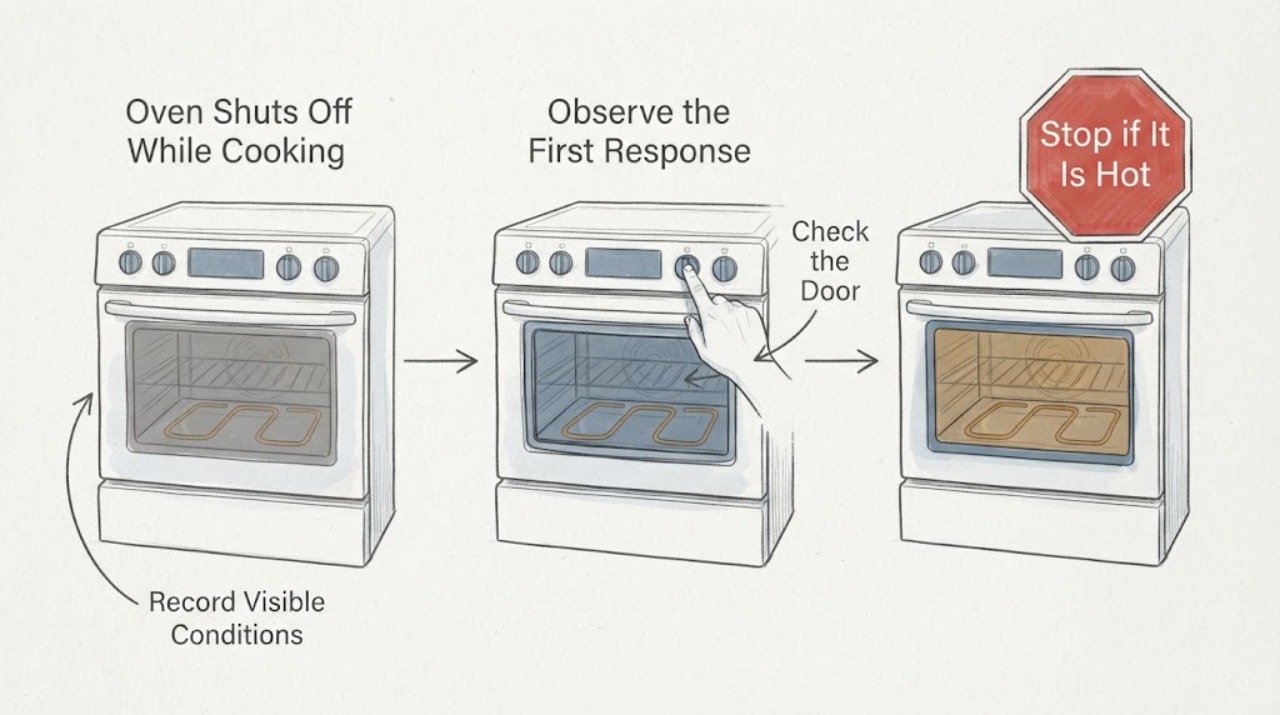
A GE C2S985SET6SS oven that seems to shut off while cooking should first be classified, not diagnosed as a failed heater. There is a meaningful difference between the oven burner or element cycling while the display remains active, a Cook Time or other automatic feature ending the heat, and the clock/display actually losing power. Record whether the display, interior light, and surface burners remain on, whether the oven is still warm, whether a timer or complete code is shown, and the exact point in the recipe when it stops. GE identifies the C2S985SET6SS as a Café dual-fuel range, so working surface burners do not prove that the oven heating or control path is healthy. If there is gas odor, smoke, sparking, a burning smell, abnormal heat, visible damage, or a repeated breaker trip, turn the appliance off, leave it unused, and use qualified gas-appliance or electrical service. Do not repeatedly run a high-temperature test, open the control panel, or measure live wiring.
Work through in order
Diagnostic checks
Use only checks that match the exact appliance or system and its official guide.
-
Check 1
At the next safe occurrence, classify the stop without opening the range: record whether the clock/display stays lit, whether the interior light responds, whether the surface burners still work, whether the oven remains warm, and whether any complete message, fault code, or indicator is present. Note the Bake/Broil mode, set temperature, elapsed time, and whether the controls respond normally.
Expected result: The display remains live and the cavity is warm, the display is live but the cavity cools, the display resets or goes dark, or only the oven heat ends while the surface burners remain available.
Next step: Keep the record and use the matching branch. Do not call the part a relay, element, igniter, or control from this observation alone.
Stop if: Stop immediately for gas odor, smoke, sparking, burning smell, visible damage, unusual heat, or a breaker that trips again.
Why this matters
Why: A live display with heat cycling is different from a true control/power loss. Surface-burner operation only shows that part of this dual-fuel range remains available; it does not identify the oven cause.
-
Check 2
Check the control display for Cook Time, Delay Time, an Automatic Oven indicator, or a countdown that was set intentionally or accidentally. Do not change a special feature by a generic button sequence; compare the visible control state with the C2S985SET6SS owner manual and record the remaining time when the oven stops.
Expected result: A Cook Time or other automatic indicator is active and reaches its end, no automatic feature is visible, or the display clears before the expected cooking time.
Next step: If the documented timer explains the stop, correct only the model-supported setting for the next supervised use. If it does not, stop repeated cooking and preserve the exact display and timing for service.
Stop if: Do not use an unverified override, enter service mode, or keep the oven heating while its controls do not match the selected operation.
Why this matters
Why: GE states that Cook Time turns the oven off when the programmed cooking time is complete. A display clear, early stop, or stop without an active timer is not explained by that normal feature and needs a different branch.
-
Check 3
With the oven cool and no safety symptom present, confirm the normal Bake command and set temperature from the exact owner manual, including any required Start action. Check only that the door is fully closed and no self-clean cycle or model-specific special mode is active; make one supervised normal-use observation rather than a high-temperature stress test.
Expected result: The oven was in a different mode, lacked the required Start command, was in a special cycle, heats and cycles normally, or stops again after a correct command.
Next step: Correct only the documented setting and monitor one normal use. If the same stop returns, stop testing and arrange qualified service rather than escalating the temperature or changing hidden settings.
Stop if: Do not force the door or latch, bypass a lock, repeat a high-temperature test, or continue with gas odor, smoke, sparking, burning smell, or abnormal heat.
Why this matters
Why: A control-state mistake can look like no heat. Heat that cycles normally is expected oven behavior, while a repeat stop after a correct command is not explained by the setting alone.
-
Check 4
If the display or clock actually went dark or reset, inspect the house breaker or fuse status only from a safe position and only as the installation permits. Do not open a panel, remove the range, probe the outlet, or alter the dual-fuel wiring or gas connection.
Expected result: The breaker is normal, one breaker is tripped, the display repeatedly resets, or the breaker trips again after a single safe reset.
Next step: If the breaker trips again, the supply is uncertain, or the display remains dead, leave the range off and arrange qualified appliance or electrical service. Give the technician the exact model and whether the cooktop remained usable.
Stop if: Do not repeatedly reset a breaker, conduct live measurements, remove covers, or move the range to reach wiring or the gas connector.
Why this matters
Why: A true display loss shifts attention toward supply, wiring, or control conditions rather than ordinary temperature cycling. A repeat trip or repeated reset is an electrical stop condition, even if the surface burners still work.
-
Check 5
Before any further cooking, check the exterior and the oven opening from a safe distance for gas odor, smoke, sparking, a burning-plastic smell, a damaged cord or plug, a visibly damaged element or panel, abnormal flame behavior, or heat that does not stop when the controls are cancelled. Do not reach into the oven or remove a panel to inspect the cause.
Expected result: No safety symptom is present and the oven only shows normal cycling, or a gas, fire, burn, electrical, or uncontrolled-heating warning is present.
Next step: For a safety warning, turn the appliance off if safe, leave it unused, and arrange qualified gas-appliance service or electrical service as appropriate. For a repeat non-hazardous stop, provide the observation record to service rather than guessing a part.
Stop if: If gas is smelled, do not light anything, operate electrical switches, or attempt a relight; leave the area and contact the gas supplier or emergency service from a safe location.
Why this matters
Why: Normal cycling can be compatible with maintaining temperature. Any gas, smoke, arcing, damaged wiring, uncontrolled heat, or unusual burning symptom crosses the user-check boundary and cannot be safely distinguished by more cooking.
Use your observations
Decision map
Find the observation that best matches what you see, then follow the next safe action.
-
PATH 01Next step
What you see
The display remains on, the cavity stays warm, and the oven heat comes and goes while the selected temperature is maintained without a timer ending.
Do this next
Do not replace a heater based on the visible off periods. If food remains consistently undercooked or the cavity becomes cold, record the mode and temperature behavior and arrange model-specific service.
Why this path and its safety boundary
Why it matters: This pattern is more consistent with normal heating cycles than with the entire oven shutting off. GE notes that both gas and electric ovens cycle to maintain an average set temperature.
-
PATH 02Next step
What you see
The oven turns off when a Cook Time or other automatic indicator reaches its programmed end, with the display otherwise behaving normally.
Do this next
Use the C2S985SET6SS owner manual to confirm or correct the timer setting for the next supervised use. If it ends early or without the indicator, stop repeated cooking and call service.
Why this path and its safety boundary
Why it matters: A programmed automatic stop is more likely than a sudden heating-component failure. GE documents that Cook Time counts down and turns the oven off when complete, while exact controls remain model-specific.
-
PATH 03Next step
What you see
The display or clock resets or goes dark while the surface burners or another range function still works, or the breaker trips again.
Do this next
Leave the range off and arrange qualified appliance or electrical service. Do not repeatedly reset power or move the range to inspect connections.
Why this path and its safety boundary
Why it matters: This is less consistent with ordinary heat cycling and leaves supply, wiring, or control causes open. The dual-fuel configuration means another function can remain available while the oven path is unsafe or unavailable.
-
PATH 04Next step
What you see
The display remains active, no automatic feature explains the stop, the normal Bake command was correct, and the oven repeatedly becomes cold or stops at the same cooking stage.
Do this next
Stop further high-temperature tests and arrange qualified GE appliance service with the model, mode, timing, display state, surface-burner state, and temperature observation.
Why this path and its safety boundary
Why it matters: A repeat oven-specific heating or control fault is more likely than a setting issue, but the observation does not establish a bake element, relay, sensor, igniter, or control-board diagnosis.
-
PATH 05Next step
What you see
Gas odor, smoke, sparking, burning smell, unusual uncontrolled heat, visible wiring or panel damage, or a suspected flame failure appears.
Do this next
Turn the appliance off only if safe, avoid flames and electrical switches, leave the area for suspected gas, and contact the gas supplier, emergency service, or qualified appliance technician from a safe location.
Why this path and its safety boundary
Why it matters: This is a stop-use or gas-emergency condition, not a reason to repeat the cooking test or identify a part from the symptom.
Helpful context
Understand the symptom
The word ‘shuts off’ can describe several different observations. GE explains that gas and electric ovens normally cycle heating on and off to maintain an average temperature, while a Cook Time feature can intentionally turn the oven off when its programmed time ends. A dark or reset display is a different branch from a warm cavity with cycling heat. Preserve the display state, timer indicators, temperature impression, and program timing before trying to correct anything.
The exact model page confirms C2S985SET6SS as a dual-fuel GE Café range, but the model page and general support articles do not prove which internal component caused an individual stop. A working gas surface burner, clock, or interior light therefore narrows the observation without clearing the oven heating circuit. Use the exact owner manual linked through GE support for any control-specific option, and stop when the symptom becomes a gas, fire, burn, or electrical hazard.
When checks do not resolve it
Need a professional?
Arrange GE or qualified appliance service when the oven repeatedly becomes cold after a correct command, stops without an explained timer, the display resets or remains dead, a breaker trips again, an exact code returns, or any gas odor, smoke, sparking, burning smell, uncontrolled heat, or visible damage appears.
Have this ready
- Provide the complete C2S985SET6SS model and serial information, the selected Bake/Broil mode and temperature, whether Cook Time or Delay Time was active, the time and stage of the stop, display and interior-light state, surface-burner state, temperature impression, full code or indicator sequence, and any gas, smoke, odor, heat, or breaker event.
Common questions
FAQ
Is it normal for a GE C2S985SET6SS oven to turn its heat off and on while cooking?
The heating system can cycle on and off to maintain an average set temperature, so the visible heat source being off briefly is not the same as the oven losing all operation. If the display remains active and the cavity stays warm, it may be normal cycling; if the cavity becomes cold or the display resets, record that separate pattern and arrange service if it repeats.
Can Cook Time make the GE oven shut off by itself?
Yes, GE says the Cook Time feature counts down and turns the oven off when the programmed cooking time is complete. Confirm the visible timer or Automatic Oven indicator against the C2S985SET6SS owner manual; an early stop without that explanation needs service rather than a guessed part.
Why can the surface burners work when the oven stops heating?
C2S985SET6SS is identified by GE as a dual-fuel range, so one operating function does not certify every other heating or control path. Use the display state, oven temperature behavior, timer indicators, and exact stop timing to distinguish a normal cycle from an oven-specific or power/control fault.
Read the exact guide
Official sources
- Model Search | C2S985SET6SSGE Appliances · The opened GE Appliances parts/support page explicitly names C2S985SET6SS and describes it as a GE Café slide-in front-control dual-fuel range with baking drawer; it does not diagnose why an individual oven stops.
- Range & Wall Oven - Oven Temperature Fluctuation / Cycling On and OffGE Appliances · GE states that gas and electric ovens cycle on and off to maintain an average set temperature and that fluctuation varies by model; this explains normal cycling but not a repeated cold cavity or control reset on C2S985SET6SS.
- GE Appliance - Model and Serial Number LocationGE Appliances · GE states that the rating plate provides model and serial information and that the exact owner's manual may show where to find it; this supports recording the complete model before service.
- User Manual & Care for C2S985SETSS | GE AppliancesGE Appliances · The GE support page represents the C2S985SET6SS family under C2S985SETSS, identifies the Café front-control dual-fuel range, links its owner's manual, and routes range troubleshooting and service; use the complete model manual for control-specific features.
- If You Smell Gas in Your HomeGE Appliances · GE directs occupants who smell gas to avoid switches, flames, and appliance operation, leave the area, and contact the gas supplier or emergency services from a safe location.
- Range - Automatic Oven FeaturesGE Appliances · GE explains that some ranges use Cook Time or Delay Time and that Cook Time counts down and turns the oven off when the cooking time is complete; exact control operation remains model-specific.
Community feedback
Share a repair observation
Share a plain-text repair observation. Accepted observations are published automatically; this page may take a moment to update.