
On this page
Start here
Quick answer
When a GE washing machine shakes, walks, or vibrates excessively, stop the cycle and first determine whether the movement follows one load, started after installation or moving, or occurs with an empty drum. Redistribute an unbalanced load, then confirm the washer is level, all feet are firmly on a solid floor, and the leg lock nuts are secured as the model instructions require. A recently installed or moved machine may still have shipping material or bolts that must be removed according to its exact installation guide. For a front-load model, a no-load rinse-and-spin test can separate a load problem from a machine problem; a clogged drain pump can also contribute to shaking on some models. Persistent vibration with an empty drum, a rocking cabinet, damaged flooring, scraping or banging, leaking, or a suspension, tub, motor, or bearing concern needs service. Do not run the machine with shipping hardware installed, prop it with improvised material, tip it alone, or open panels while powered.
Work through in order
Diagnostic checks
Use only checks that match the exact appliance or system and its official guide.
-
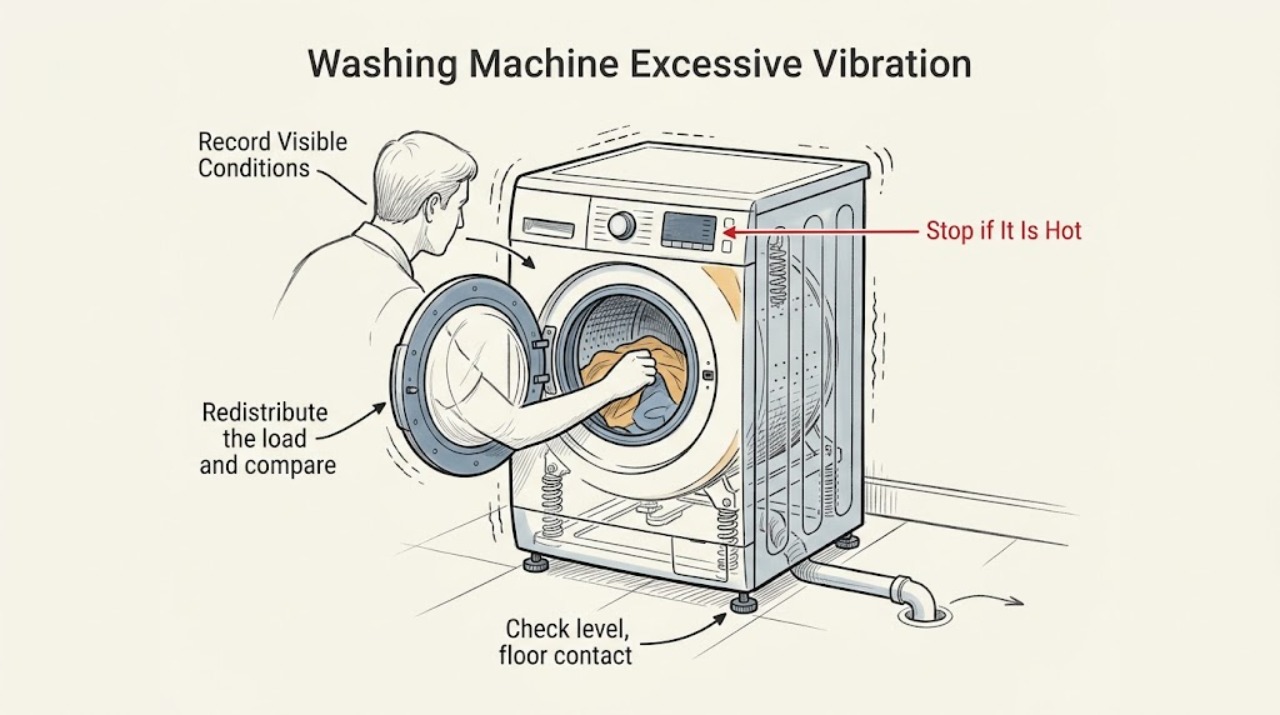
Stop the cycle and record the vibration pattern
Pause or stop the washer using its normal control and wait until the drum is stationary before opening it. Record whether the vibration occurred during wash or spin, whether the machine moved, which corner or side lifted, whether it was a full or small load, and whether scraping, banging, leaking, or a new odor accompanied the movement.
Expected result: The symptom occurred with one heavy or small load; it began after installation or moving; the empty cabinet rocks; the drum area makes a repeated scraping or banging sound; or water is leaking.
Next step: For a load-specific event, redistribute the load. For a recent install or move, check model-specific shipping hardware and leveling. For empty-cabinet movement, leaks, or mechanical sounds, skip repeated cycles and prepare for service.
Stop if: Stop immediately for smoke, burning odor, exposed wiring, a damaged power cord, uncontrolled water, a drum that contacts the cabinet, or movement that could overturn the machine.
Why this matters
Why: A load-specific spin event points first to distribution, while a symptom after moving points to shipping hardware or leveling. Rocking when empty, a persistent mechanical sound, or a leak is evidence that the issue may be installation, support, or an internal component rather than the garments alone.
-
Redistribute the load and compare the result
With the machine stopped and the door or lid safely released, spread the clothing evenly around the basket or drum. Avoid testing with a single heavy item or a load too small to balance, and follow the model's capacity guidance. Restart only the documented cycle or a low-risk spin check while observing from a safe position.
Expected result: The washer becomes stable after redistribution; the load repeatedly gathers on one side; the washer vibrates with both the original and redistributed loads; or it vibrates while empty.
Next step: Use balanced loads and the model's normal cycle if the test is stable. If the vibration persists, stop and check leveling, floor contact, and shipping hardware rather than adding weight or continuing full-speed cycles.
Stop if: Do not reach into a moving drum, hold the door or lid open during operation, overload the machine to suppress movement, or continue if it leaks or bangs.
Why this matters
Why: GE identifies unbalanced loads as a cause of increased vibration. If redistribution resolves the symptom, the load pattern was the immediate trigger. If the washer still vibrates with a balanced or empty drum, load arrangement is not sufficient to explain the problem.
-
Check level, floor contact, and leg stability
With the washer empty and off, check whether the cabinet rocks by hand without forcing it. Confirm that it sits on a solid, suitable floor, is level side-to-side and front-to-back as the model instructions specify, and that every rubber foot firmly contacts the floor. Adjust only the accessible leveling legs and lock hardware described by the exact installation guide; keep leg extension as short as the floor allows.
Expected result: The washer rocks when idle; one foot does not contact the floor; the cabinet is visibly out of level; a lock nut is loose; the floor flexes or is damaged; or all feet and the floor are stable.
Next step: Correct the model-approved leg and lock setting once, then run a supervised empty or light test only if the machine is stable. If the floor cannot support the unit, the cabinet still rocks, or the symptom persists, arrange service or a qualified installation assessment.
Stop if: Do not tip or lift the washer alone, place loose blocks under the feet, adjust legs while the machine is running, or continue if the floor or support platform is cracked or unstable.
Why this matters
Why: GE says an uneven or unstable washer can shake, and that extended legs can make vibration worse. A solid, correctly leveled cabinet with all feet in contact rules out a basic setup error and makes a suspension, tub, motor, or bearing diagnosis more likely if vibration continues.
-
Check model-specific shipping hardware after installation or moving
If the vibration began when the washer was new or after it was moved, retrieve the exact installation instructions and identify the shipping rod, Styrofoam, cardboard, bolts, or braces used by that model. Inspect only the clearly identified external hardware with the washer off and stable; remove or reinstall it only as the model guide directs, and store it for a future move when the instructions call for that.
Expected result: Required shipping material remains installed; the model uses a different shipping system than expected; all required shipping hardware was removed; or the machine was moved without the correct preparation.
Next step: Follow the exact installation guide and do not run the washer until identified shipping hardware is correctly handled. If hardware is damaged, missing, inaccessible, or the symptom remains, stop and arrange qualified service.
Stop if: Do not guess which rod, brace, bolt, foam, or cardboard piece to remove, dismantle the cabinet, or move the washer without proper assistance and model instructions.
Why this matters
Why: GE states that shipping hardware varies by model and that leaving the required material or bolts in place can make the washer noisy or vibrate. If the hardware is already correctly handled but the unit still vibrates, the cause shifts back to leveling, load, drain, or mechanical support.
-
Run the model-appropriate empty test and check the drain path
For a front-load model, after the external checks run the GE-recommended rinse-and-spin test with no load. If the model provides an accessible pump filter or clean-out door, inspect it only according to the owner's manual and with power disconnected. Do not open the cabinet or reach into a pump. Top-load and unitized models should use their exact manual's test or maintenance procedure instead.
Expected result: The empty cycle is stable; the empty cycle still shakes; an accessible pump path is blocked; the washer cannot drain; or the machine vibrates with an empty drum and a clear permitted drain path.
Next step: If the empty test is stable, return to balanced loads. If it is unstable, the drain issue persists, or the symptom includes banging, scraping, leaking, or abnormal drum movement, keep the washer out of use and arrange service.
Stop if: Unplug before any permitted clean-out; do not remove panels, probe wiring, reach into a pump, spin a loose drum, or run a cycle if the cabinet is unstable or leaking.
Why this matters
Why: GE uses an empty rinse-and-spin result to separate load imbalance from machine vibration and notes that a clogged drain pump can contribute to shaking on some front-load models. Persistent empty-drum vibration after correct setup indicates a service-level issue rather than a load correction.
Use your observations
Decision map
Find the observation that best matches what you see, then follow the next safe action.
-
PATH 01Safety boundary
What you see
The vibration occurs only with one heavy, small, or visibly one-sided load.
Do this next
Stop, redistribute the items evenly, and run the model-approved cycle once. If the washer is stable afterward, use balanced loads and monitor it.
Why this path and its safety boundary
Safety stop: Continue with the setup and empty-drum checks.
-
PATH 02Safety boundary
What you see
The washer rocks while idle or a foot does not firmly contact the solid floor.
Do this next
Level the unit and secure the feet or lock hardware only as the exact installation guide directs; do not use loose shims or extend the legs unnecessarily.
Why this path and its safety boundary
Safety stop: Continue with shipping hardware and empty-cycle diagnosis.
-
PATH 03Safety boundary
What you see
The vibration started after installation or moving and shipping hardware may remain.
Do this next
Identify the model-specific shipping rod, foam, cardboard, bolts, or braces and handle them only through the installation instructions before operating the washer again.
Why this path and its safety boundary
Safety stop: Do not remove random hardware; continue with level, load, drain, and empty-cycle checks.
-
PATH 04Safety boundary
What you see
A front-load washer vibrates with no load, or an accessible drain path is blocked and the model manual permits user clean-out.
Do this next
Disconnect power, perform only the documented clean-out, then run the model-approved empty test once. Persistent vibration or draining trouble requires service.
Why this path and its safety boundary
Safety stop: A stable empty test supports a load-related cause; return to balanced loading and observe normally.
-
PATH 05Safety boundary
What you see
The machine still walks or bangs when empty and correctly leveled, or there is leaking, scraping, abnormal drum movement, or an unstable floor.
Do this next
Stop using the washer and arrange qualified service or installation assessment for the suspension, tub, motor, bearing, drain, floor, or other support fault.
Why this path and its safety boundary
Safety stop: True
Helpful context
Understand the symptom
Classify the vibration before changing parts
A washer that moves only during a dense towel load has a different decision path from a cabinet that rocks when empty. Note whether the vibration is strongest during spin, whether the unit moved after installation or a recent move, whether one corner lifts, and whether there is scraping, leaking, or a new mechanical sound. Start with load and installation checks that change those observations; do not assume that a dramatic spin symptom proves a failed suspension or bearing.
Use GE's model-specific installation instructions
GE has different guidance for top-load, front-load, and unitized or space-saving machines. Leg design, shipping hardware, drain-pump access, and the safe leveling procedure vary by model. The GE support pages repeatedly direct owners to the washer's installation or owner's instructions for the exact procedure. Identify the model before removing shipping material or adjusting hardware, and keep the machine stable while inspecting it.
Know when vibration has crossed into service territory
After a correctly balanced load and model-approved leveling check, an empty-drum cycle is useful evidence. If the cabinet still walks, bangs, scrapes, leaks, or vibrates severely, stop using it and arrange service. Unplug the washer before any maintenance or cleaning, never reach into a moving drum, and do not remove covers to inspect suspension, tub, motor, or electrical components.
Safety boundary
Stop conditions
- Stop for smoke, burning odor, exposed wiring, a damaged cord, uncontrolled water, or movement that could overturn the washer.
- Do not reach into a moving drum, hold a door or lid open during operation, or adjust leveling legs while the machine runs.
- Do not tip or lift the washer alone, use loose blocks or improvised supports, or run it on a cracked or unstable floor.
- Do not remove unidentified shipping material, cabinet panels, suspension parts, pump covers, or electrical components as a guess.
- Unplug before any model-permitted maintenance or clean-out and stop when the symptom persists with an empty, correctly leveled machine.
Only after diagnosis
Potential parts
- rubber leveling foot or leg hardware
Consider this class only if a damaged foot, leg, or lock component prevents firm floor contact after the exact model leveling check and the hardware is confirmed by the model parts information.
Confirm the complete GE model and installation instructions; do not use loose blocks or substitute hardware as a stability fix. - shipping rod, bolt, brace, or installation hardware
Consider this class only when the exact model's installation documentation identifies missing, damaged, or incorrectly handled transport hardware after a move or installation.
Transport hardware is model- and design-specific; do not remove or install a rod, bolt, foam, or brace based on appearance alone. - drain pump or pump filter component
Consider this class only when the model permits an accessible pump check and a persistent drain or vibration symptom remains after the permitted path is clear and qualified diagnosis confirms the component.
Verify the exact GE model and isolate power before service; do not reach into a powered pump or select a component from vibration alone. - suspension, tub support, motor, or bearing component
Consider this class only for persistent empty-drum vibration, abnormal drum movement, scraping, or banging after correct load, leveling, shipping, and permitted drain checks and a technician's diagnosis.
These components vary by GE model and require safe disassembly; do not open the cabinet or replace a part from a symptom alone.
When checks do not resolve it
Need a professional?
Arrange GE or qualified washer service when vibration persists with an empty drum after the model-specific load, leveling, shipping-hardware, and permitted drain checks; when the cabinet remains unstable; when the drum scrapes, bangs, or moves abnormally; or when there is leaking, floor damage, a damaged cord, or suspected suspension, tub, motor, bearing, pump, or control trouble. Stop immediately for smoke, burning odor, exposed wiring, uncontrolled water, or movement that could overturn the machine. Provide the model, installation or move history, load pattern, leg and floor result, shipping-hardware result, empty-test result, and any sound or leak observations.
Common questions
FAQ
Why is my GE washing machine vibrating so much during spin?
Start with load distribution, then check whether the washer rocks, is level, and has all feet firmly on a solid floor. If the symptom began after installation or moving, check model-specific shipping hardware; persistent empty-drum vibration needs service.
How do I tell whether an unbalanced load is causing the vibration?
Stop and redistribute the load evenly, then compare the result. GE's front-load guidance also recommends an empty rinse-and-spin test: normal vibration with no load supports a load-related cause, while severe empty-drum vibration points to the machine or installation.
Can shipping bolts or a shipping rod make a GE washer vibrate?
Yes. GE says transport hardware varies by model and that a shipping rod or shipping bolts left in place can cause noise and vibration. Identify the exact hardware and removal procedure from the model installation instructions before operating the washer.
Should I adjust the legs on a vibrating GE washer?
Check that the washer is level, all feet touch a solid floor, and the leg lock hardware is secure. Adjust only as the exact installation guide directs, keep leg extension as short as the floor allows, and do not tip the machine alone or use loose blocks.
When should I call service for a GE washer that shakes or walks?
Arrange service when vibration continues with an empty, correctly leveled drum, or when the machine bangs, scrapes, leaks, has abnormal drum movement, or has a suspected suspension, tub, motor, bearing, pump, or floor problem. Stop immediately for smoke, burning odor, exposed wiring, uncontrolled water, or overturning risk.
Read the exact guide
Official sources
- Washer - Leveling the LegsGE Appliances · GE explains level and floor-contact requirements, leg adjustment differences by model generation, and the need to use exact instructions for unitized or space-saving models.
- Top Load Washer - Walking or VibratingGE Appliances · GE identifies shipping material, leveling, solid floor, and unbalanced load checks for a top-load washer that walks, vibrates, shakes, or moves.
- Front Load Washer - Walking, Vibrating, Shaking, or MovingGE Appliances · GE guidance for front-load vibration covers load redistribution and empty rinse-and-spin testing, possible drain-pump blockage, shipping bolts, level legs, solid floor, and service escalation.
- Top Load Washer - Shipping RodGE Appliances · GE explains model-dependent shipping rods, Styrofoam, and cardboard transport material and warns that an unremoved shipping rod can cause noise and vibration.
Community feedback
Share a repair observation
Share a plain-text repair observation. Accepted observations are published automatically; this page may take a moment to update.