
On this page
Start here
Quick answer
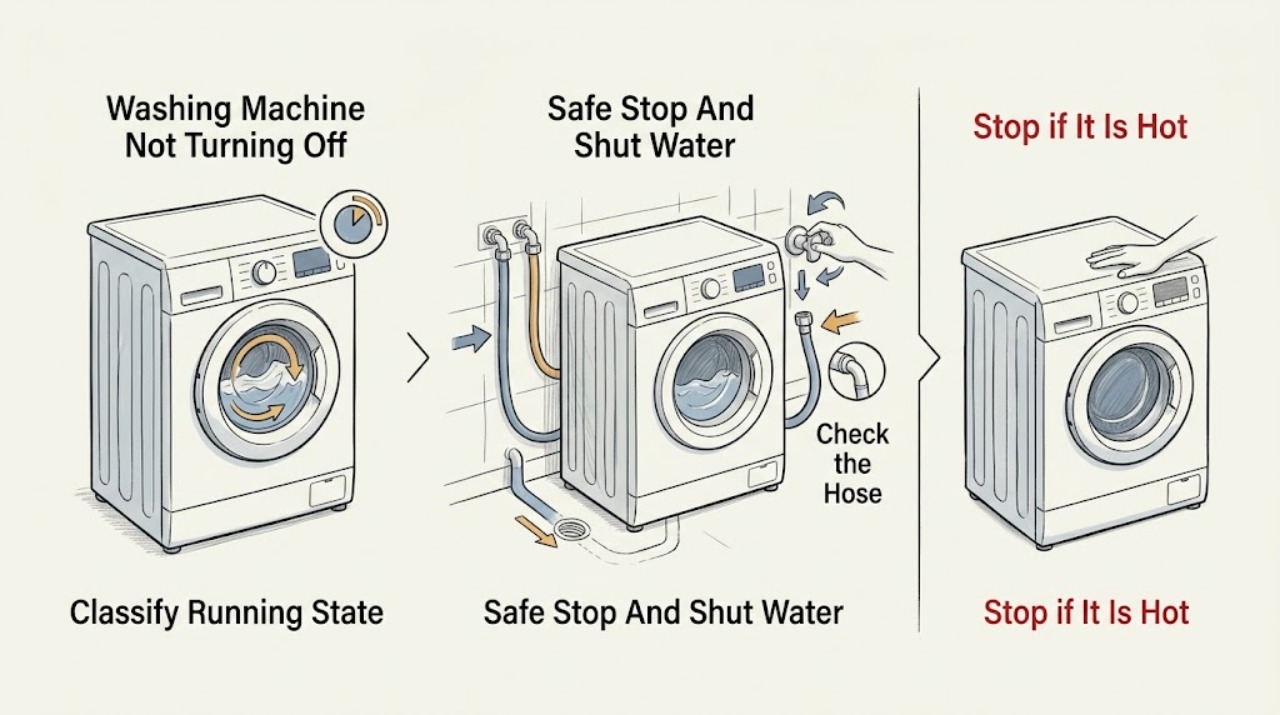
If a GE washing machine will not stop, press Stop or Start/Pause once, keep clear of moving parts, and close both hot and cold supply faucets if the washer is still filling. If water is on the floor, a hose is spraying, the cabinet is overheating, you smell burning, or a breaker trips, stop using it and use only a safe, dry disconnect or the home's water shutoff; arrange qualified service. Otherwise, observe whether it is continuously filling, continuously tumbling, or only ignoring controls. A raised drain hose can cause siphoning, Control Lock or a control interruption can make selections appear unresponsive, and a two-minute power reset may clear a control lockup. Use the exact GE manual for the model before any further check.
Work through in order
Diagnostic checks
Use only checks that match the exact appliance or system and its official guide.
-
Check 1
Press Stop or Start/Pause once, keep clear of the basket and other moving parts, and observe from a dry position. If water is still entering, turn both hot and cold washer supply faucets clockwise; if a leak is active and the local valves are not safely reachable, use the home's main water shutoff.
Expected result: Record whether the basket or pump stops, whether water continues entering, and whether there is water on the floor, a spraying hose, a burning smell, smoke, visible arcing, cabinet heat, or a tripped breaker.
Next step: Leave the water off and arrange qualified appliance service for an uncontrolled fill, leak, overheating, electrical symptom, or any unsafe disconnect. Continue only with the low-risk observations below when the area is dry and the machine is stable.
Stop if: Do not reach through standing water, touch a wet cord or receptacle, handle exposed wiring, or keep operating the washer after smoke, burning odor, arcing, repeated breaker trips, uncontrolled water, or abnormal heat.
Why this matters
Why: Continued filling creates a flood risk even if the control appears Off. Water, heat, smoke, arcing, or a breaker trip is a stop condition, not a reason to continue diagnosis; a washer that stops motion but ignores the control needs a separate control or interlock check.
-
Check 2
With water controlled and the area safe, observe one attempted cycle without reaching into the washer: determine whether it continuously fills, continuously tumbles or agitates, repeatedly drains, or stops moving but leaves the controls unresponsive.
Expected result: Note the water level, whether the drain pump runs, whether the basket or agitator moves, whether the lid or door is closed, and any display message or flashing control indicator.
Next step: Follow the matching branch rather than repeating the same Start/Pause press; write down the exact message and the model number for the model-specific manual.
Stop if: Stop if the washer shakes violently, the cabinet becomes unusually hot, water escapes, or the sound changes to grinding, arcing, or another unsafe symptom.
Why this matters
Why: Continuous filling favors a water-inlet, water-level, or siphoning investigation. Stable water with ongoing motion or a pump that never ends favors cycle-state, lid/door-interlock, drain, or control diagnosis. An unresponsive panel makes Control Lock or an electronic control interruption a useful early check.
-
Check 3
If the washer fills and does not progress, inspect the visible drain hose routing from outside the appliance; compare it with the installation instructions and confirm that it is not pushed too far down the standpipe or lying in a way that permits immediate draining.
Expected result: Observe whether water enters and disappears at the same time, whether the hose is visibly low or deeply inserted, and whether the washer can retain water long enough to begin the cycle; do not pull on a pressurized hose or dismantle the cabinet.
Next step: Correct only an obvious, accessible hose-routing issue in accordance with the exact GE installation instructions; if the routing is uncertain, the hose or standpipe is damaged, or the washer still fills continuously, leave the water off and request service.
Stop if: Do not move a heavy washer alone, open the cabinet, loosen plumbing under pressure, or work near wet electrical connections.
Why this matters
Why: Filling and draining at once is consistent with siphoning, so the machine may appear to run without ever reaching the next step. A correctly routed hose with continuing fill points back toward the inlet valve, water-level sensing, or controls rather than authorizing an internal repair.
-
Check 4
If the washer is not filling uncontrollably and the panel ignores selections, look for a Control Lock indicator or a model-specific lock message, then check the exact owner's manual for the button combination that toggles Control Lock; do not force the buttons or open the console.
Expected result: Record whether the lock indicator clears and the controls respond, whether a lid/door message remains, or whether the display stays frozen or repeats an error after the specified control sequence.
Next step: If controls respond, cancel the cycle according to the manual and observe whether the washer drains and stops. If the panel remains frozen or the washer keeps running, use the safe reset step once, then arrange service if it returns.
Stop if: Do not bypass a lid or door interlock, defeat a lock, remove the console, or probe wiring while powered.
Why this matters
Why: A cleared lock indicator explains an apparently unresponsive panel without proving a failed part. A persistent lid/door or error message can prevent the cycle from ending normally, while a frozen panel after the correct model-specific procedure supports a control or service diagnosis.
-
Check 5
After water is controlled and the appliance is in a safe, dry condition, perform GE's electronic-control reset by unplugging the washer or switching off its breaker for two minutes, then restore power and follow the exact model manual to cancel or restart the cycle.
Expected result: After power returns, observe whether the controls respond, whether the prior cycle clears, whether the washer immediately starts filling or moving again, and whether the same message or symptom returns.
Next step: Leave the washer unused with its water supply off and arrange service when the symptom returns, especially if the washer cannot be safely stopped from the controls.
Stop if: Do not pull a plug through water, remove a cover, test live voltage, or keep cycling power when there is smoke, burning odor, heat, arcing, or a tripped breaker.
Why this matters
Why: A normal response after the reset supports a temporary control interruption. Immediate refilling, continued motion, a frozen panel, a repeated error, or a return of the no-stop symptom means the reset did not resolve the underlying fault and should not be repeated as a repair.
-
Check 6
Record the model number from the appliance label, washer type, exact display message, cycle and load state, water-level behavior, hose-routing observation, Control Lock result, and what happened after the two-minute reset; provide that record to GE or a qualified appliance technician.
Expected result: Confirm whether the washer is now fully stopped with water off, or whether it still fills, moves, drains, ignores controls, leaks, overheats, or trips protection.
Next step: Use GE's model-specific literature and service channel for the next safe decision; keep the washer isolated from water and power as appropriate until the service provider gives model-specific instructions.
Stop if: Stop all user checks when diagnosis would require cabinet removal, live electrical testing, bypassing an interlock, moving the appliance through water, or handling a gas or other household hazard.
Why this matters
Why: A complete symptom timeline helps distinguish a water-inlet or siphoning problem from a control, interlock, drain, or sensor problem. A persistent or unsafe symptom is evidence to escalate, not permission to order a part based only on a generic description.
Use your observations
Decision map
Find the observation that best matches what you see, then follow the next safe action.
-
PATH 01Safety boundary
What you see
The washer keeps taking in water, or water enters even after the control is set to stop.
Do this next
Close both washer faucets, use the main water shutoff if needed for safety, and arrange qualified service; inspect only the accessible drain-hose routing when the area is dry and stable.
Why this path and its safety boundary
Why it matters: Treat this as an immediate flood-risk branch. A water inlet or water-level control fault is possible, and a drain-hose siphon can also prevent normal cycle progress.
Safety stop: Do not leave the washer unattended with water available, open the console, or test a valve or wiring while energized.
-
PATH 02Safety boundary
What you see
Water enters and drains away at the same time, and the washer never reaches the next cycle stage.
Do this next
Compare the visible hose routing with the exact GE installation instructions and correct only an obvious accessible routing issue; request service if the installation is uncertain or the symptom continues.
Why this path and its safety boundary
Why it matters: The drain hose may be routed in a way that allows siphoning, so the control can continue trying to fill.
Safety stop: Do not pull the appliance out alone or alter a standpipe or plumbing connection under pressure.
-
PATH 03Safety boundary
What you see
The water level is stable, but the display or buttons do not respond, or Control Lock is shown.
Do this next
Use the model-specific Control Lock procedure, then perform the documented two-minute reset once if the area is dry and electrically safe. Arrange service if controls remain frozen or the washer starts running again.
Why this path and its safety boundary
Why it matters: Control Lock or a temporary electronic-control interruption can prevent normal cancellation; a persistent lock or error can indicate a service issue.
Safety stop: Do not bypass the lid/door interlock or open the console to restore button operation.
-
PATH 04Safety boundary
What you see
A lid, door, fill, drain, or other message remains after the normal cancel attempt.
Do this next
Record the exact message and model number, consult the matching GE manual, and escalate if the message returns or the washer cannot be safely stopped.
Why this path and its safety boundary
Why it matters: The message identifies a model-specific state that may intentionally prevent the cycle from completing; its meaning and reset sequence vary by model.
Safety stop: Do not defeat a safety interlock or continue operation with a leak, unusual heat, burning odor, smoke, arcing, or repeated breaker trip.
-
PATH 05Safety boundary
What you see
There is standing or spraying water, an unreachable shutoff, burning odor, smoke, arcing, cabinet overheating, or a breaker trip.
Do this next
Stay clear of wet electrical equipment, close the main water supply if it is safe to do so, and contact qualified appliance or electrical service; use emergency services for an immediate fire or life-safety emergency.
Why this path and its safety boundary
Why it matters: The immediate priority is people and property safety, not identifying a replaceable part.
Safety stop: Do not touch wet plugs or receptacles, enter standing water to reach a control, restore a tripped breaker repeatedly, or operate the washer again.
-
PATH 06Safety boundary
What you see
The washer remains safe and dry, but it still will not stop after the matching low-risk check and one documented reset.
Do this next
Keep the water supply closed and leave the appliance disconnected only when that can be done safely; provide the symptom record and model number to a qualified GE appliance technician.
Why this path and its safety boundary
Why it matters: A persistent fault may involve the inlet valve, water-level sensing, drain system, interlock, timer, or electronic control; a generic part swap cannot establish compatibility or safety.
Safety stop: Do not dismantle the cabinet, perform live tests, bypass an interlock, or continue cycling the washer to see whether it eventually stops.
Helpful context
Understand the symptom
Stop the washer and control incoming water first
Do not assume that turning a cycle knob to Off isolates the appliance. Press the normal Stop or Start/Pause control and keep hands away from the tub, basket, belt area, and door or lid. If the washer is continuing to fill, close the hot and cold faucets behind it by turning them clockwise. If a supply hose or internal leak is flooding the area and the local valves cannot be reached safely, shut off the home's main water supply. Only disconnect power from a dry, safe position; do not reach through standing water or touch a wet cord, receptacle, or breaker. Burning odor, smoke, arcing, repeated breaker trips, overheating, or uncontrolled water requires immediate shutdown and professional service.
Separate continuous filling from a control or cycle problem
A washer that never stops adding water points first to the water-inlet path, water-level sensing, or drain-hose siphoning. A washer whose water level is stable but whose basket keeps moving may have a control, timer, lid or door interlock, or cycle-state problem. If the display or buttons do not respond, Control Lock or an electronic control interruption is plausible. These are different observations: closing the faucets prevents flooding, but it does not repair a valve or control fault.
Use the exact model documentation for the final decision
GE's literature lookup uses the appliance model number to provide the matching owner's manual and installation instructions. Record the model tag, the displayed message, the point in the cycle when the washer failed to stop, and what happened after the safe checks. Do not open the cabinet or test live wiring as an ordinary-user step; a technician can use the model-specific wiring and service procedure.
Only after diagnosis
Potential parts
- water inlet valve
Consider this only if the washer continues to fill with the controls stopped and the accessible hose routing is not siphoning; a technician should confirm the diagnosis.
Confirm the exact washer model and the manufacturer's fit information before ordering any part. - water-level sensing component
Consider this only when water-level behavior remains abnormal after safe fill and drain-hose checks and model-specific diagnosis supports a sensing fault.
Do not assume compatibility across GE washer families; verify the model-specific service information. - electronic control or timer
Consider this only if Control Lock is cleared, the documented reset fails, and the panel or cycle remains unresponsive without a water or mechanical hazard.
A qualified technician should confirm the fault and exact model fit before any control replacement.
When checks do not resolve it
Need a professional?
Call qualified appliance service when the washer continuously fills, cannot be stopped safely, leaks, shows a persistent lid or door fault, remains unresponsive after the model-specific lock and reset steps, or requires cabinet removal or electrical testing. Stop immediately for standing water near electrical equipment, smoke, burning odor, visible arcing, abnormal heat, repeated breaker trips, or a hose or fitting that cannot be shut off safely.
Common questions
FAQ
Should I turn off the water if my GE washer will not stop filling?
Yes. From a safe, dry position, close both hot and cold washer faucets. If a leak makes them unsafe to reach, use the home's main water shutoff if safe and arrange service.
Can I reset a GE washer that will not turn off?
When the area is dry and there is no electrical hazard, GE describes a two-minute electronic-control reset by unplugging the washer or switching off its breaker. If the symptom returns, the reset did not repair the fault.
What if my GE washer panel is not responding?
Check for a Control Lock indicator and use the exact model manual for the unlock sequence. Do not bypass the lid or door interlock; arrange service if the panel remains frozen or the washer starts running again.
When should I stop troubleshooting immediately?
Stop for standing water near electrical equipment, smoke, burning odor, visible arcing, abnormal heat, repeated breaker trips, violent movement, or a leak that cannot be shut off safely. Keep clear and use qualified service or emergency help as appropriate.
Read the exact guide
Official sources
- Washer - Resetting the Electronic ControlsGE Appliances · GE washer electronic-control reset
- Top Load Washer - No FillGE Appliances · GE top-load washer fill-message and fill troubleshooting
- Washer - Locating the Water Shut-Off ValvesGE Appliances · GE washer water supply shutoff location and direction
- Owner's Manual & Installation InstructionsGE Appliances · GE appliance model-specific manuals and installation instructions
- Washer - Control Lock FeatureGE Appliances · GE washer Control Lock behavior
- Washer - Won't Stop FillingGE Appliances · GE washer that will not stop filling
- GE AppliancesWashersProfileGE Appliances · GE washer operating and safety instructions
Community feedback
Share a repair observation
Share a plain-text repair observation. Accepted observations are published automatically; this page may take a moment to update.