
On this page
Start here
Quick answer
A Hotpoint washing machine may appear not to turn off while it is finishing a drain, waiting for a door-lock release, or retrying a fill or balance step. First look for water, a leak, smoke, burning smell, exposed wiring, or violent movement; stop and isolate the appliance if any danger is present. If it is safe, note whether the timer or lights change, use the exact model's documented Cancel or Off control once, and check the external water and drain path. A washer that keeps filling, pumping, spinning, or ignores its documented stop command needs qualified service rather than repeated resets or a forced door release.
Before you begin
Safety first
- Keep checks external and low risk. Hotpoint advises removing mains power before repairs or replacements; only isolate power when the area is dry and the plug or isolator is safely reachable. Standing water, an active leak, smoke, heat, or damaged electrics requires stopping and qualified help.
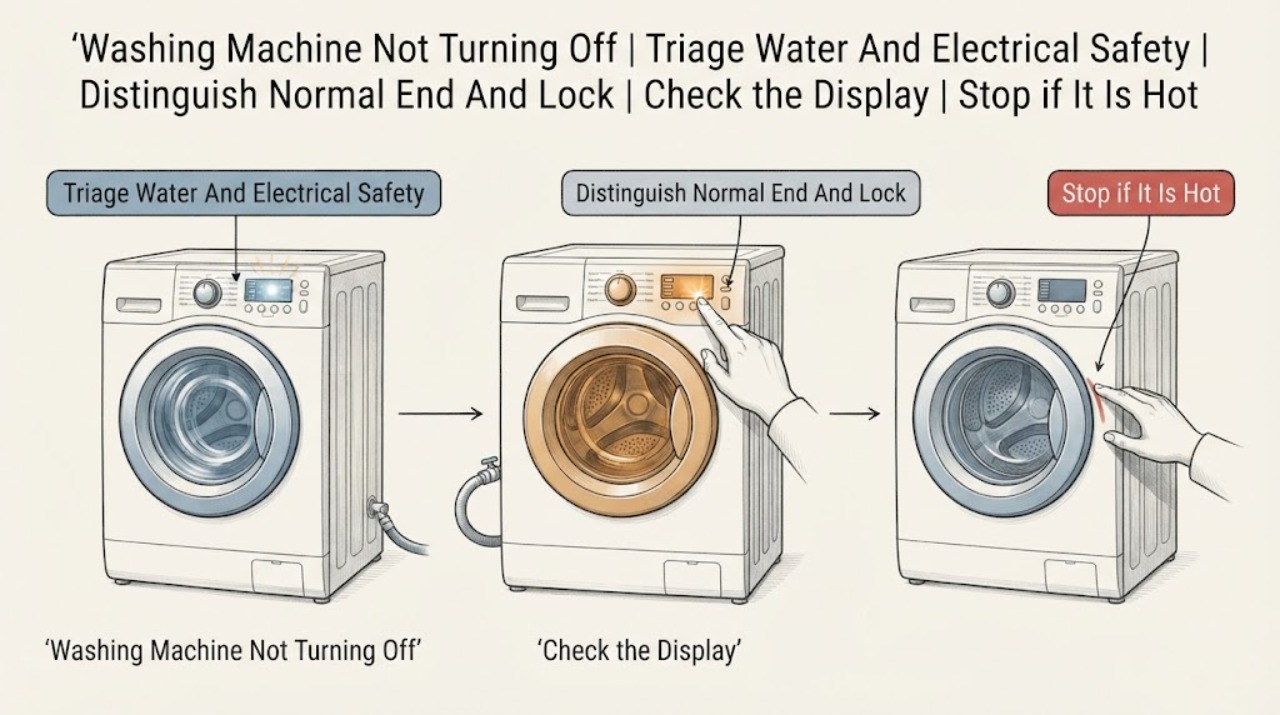
Work through in order
Diagnostic checks
Use only checks that match the exact appliance or system and its official guide.
-
Check 1
Look from a dry, safe position for water on the floor or cabinet, a washer that is moving or banging, smoke, a burning smell, a hot or damaged plug or socket, exposed wiring, or a control that is sparking. Do not touch the washer or plug through water.
Expected result: A leak is reaching electrics, the appliance is smoking or hot, wiring is damaged, the breaker trips, or the machine is violently unstable; alternatively the area is dry with none of these signs.
Next step: If any hazard is present and it is safe to do so without touching wet electrics, stop the cycle at the isolator or breaker and close the water taps; otherwise leave the area and obtain qualified help. If no hazard is present, observe the active stage and display without opening the cabinet.
Stop if: Stop immediately for water near electrical parts, smoke, burning odor, arcing, damaged wiring, repeated breaker trips, or violent movement.
Why this matters
Why: These signs can turn a stuck-cycle complaint into an electrical, flood, fire, or mechanical hazard. The washer must not be repeatedly restarted while a hazard is present.
-
Check 2
Without opening the door or reaching into the drum, record whether the display counts down or shows End, whether an end or spin light is flashing, whether the pump is running, whether the drum is turning, and whether water remains visible. Wait only through the short period described by the model manual for a normal drain or door-lock release.
Expected result: The timer progresses or End appears; the pump is briefly draining; the door remains locked with water or heat present; or the same stage continues with no progress.
Next step: If the cycle reaches End and the manual describes a release delay, allow that model-specific delay and do not force the door. If the stage does not progress, continue to the cancel/control check; if water remains, use the manual's safe drain guidance before any door or filter work.
Stop if: Stop if the door is locked with rising water, the drum is still hot, or opening it would require force or bypassing the lock.
Why this matters
Why: A brief drain, cooldown, or safety-lock interval can be normal, while an unchanged stage, persistent pump, or water that never clears points toward a drain, fill, lock, or control problem.
-
Check 3
Using the exact Hotpoint model manual, perform the documented Cancel, Off, or program-reset operation once; check whether a Control Lock or a moved program dial is indicated, and do not press random combinations or bypass the door lock.
Expected result: The documented command stops the cycle; a lock or indicator state clears; the buttons remain unresponsive; or the washer immediately resumes the same stage.
Next step: If the model-specific operation restores Off or End, leave the washer idle and monitor for recurrence. If it is ignored or the unwanted action returns, continue with external water and drain observations and plan service; do not remove the console.
Stop if: Stop if the control behaves erratically, the display shows a service-directed fault, or stopping the machine would require opening the console or defeating a lock.
Why this matters
Why: A control-lock or program-state issue can mimic a washer that will not turn off. If the command is ignored or the cycle restarts, the control path or an underlying water, drain, motor, or safety input may be faulty.
-
Check 4
From outside the appliance, determine whether water is still entering or leaving: listen for the inlet flow or pump, check the visible fill and drain hoses for kinks or obvious leaks, and note whether the drain hose is installed at the model-specified height. Close the water taps if the washer keeps filling and it is safe to reach them.
Expected result: Water continues entering after the program should stop, the pump runs with no progress, a hose is kinked or leaking, the drain path is blocked, or no continuous water movement is present.
Next step: If filling continues, close the taps and leave the washer off for service. If draining is blocked, do only the model-manual's safe external hose or drain procedure with power isolated and water controlled; otherwise continue to the single reset decision.
Stop if: Stop for a spreading leak, water near the plug or socket, a full drum that cannot be drained safely, or any need to remove a filter or hose under pressure without model instructions.
Why this matters
Why: Continuous filling can indicate an inlet-control fault or a supply issue; continuous pumping or a water-filled drum can be a drain-path or pump problem. Hotpoint specifically links mid-cycle behavior to water supply and drain-hose conditions, but model access and filter procedures differ.
-
Check 5
If the washer is not filling or pumping continuously, observe whether it is repeatedly redistributing a load, trying to spin, or stopping after imbalance; do not reach into a moving drum. If the drum is stationary and the door is unlocked, note whether a grossly uneven or overloaded load is visible without handling wet laundry in a hazardous area.
Expected result: The machine repeatedly attempts to balance or spin, the spin indicator flashes, the load is visibly uneven, or the washer remains in the same stage despite a reasonable load.
Next step: If safe and the door is already unlocked, redistribute a small, accessible load according to the manual and select the documented spin or drain program once. If the door is locked, water remains, or the drum moves violently, leave it off and arrange service.
Stop if: Stop for violent vibration, metal-on-metal noise, a locked door, standing water, or any need to reach into a moving drum or open the cabinet.
Why this matters
Why: Hotpoint explains that an unbalanced load can cause redistribution and an aborted spin, which may be perceived as a cycle that will not finish. Repeated attempts with no progress can instead indicate a mechanical, motor, drain, or control fault.
-
Check 6
Only if the area is dry, there is no active leak or electrical warning, and the model manual permits a reset, isolate the washer from mains power once for the manual's stated interval, then reconnect and observe without starting a full load immediately.
Expected result: The washer returns to Off or End and remains idle; it immediately resumes filling, pumping, or turning; the controls remain dead; or the fault returns with a code or flashing lights.
Next step: If the washer remains normal, follow the model manual for a cautious empty test. If it resumes the unwanted behavior, remains unresponsive, or reports a fault, leave it isolated and contact Hotpoint support or a qualified appliance technician with the recorded observations.
Stop if: Do not repeat the reset, run another cycle, bypass the lock, test live wiring, or replace a part when the fault returns or any water, heat, odor, smoke, or electrical symptom is present.
Why this matters
Why: A one-time recovery can clear a transient control state, but recurrence identifies an unresolved fault rather than a successful repair. Hotpoint's error guidance directs persistent electronic, pump, door-lock, and related faults to service.
Use your observations
Decision map
Find the observation that best matches what you see, then follow the next safe action.
-
PATH 01Next step
What you see
There is water near electrics, smoke, a burning smell, arcing, damaged wiring, repeated breaker trips, or violent movement.
Do this next
Stop testing. Isolate power and close the water taps only if safe to reach without touching wet electrics; leave the appliance off and obtain qualified help.
-
PATH 02Next step
What you see
The timer progresses, End appears, the pump is briefly draining, or the door remains locked while water or heat is present.
Do this next
Follow the exact model manual and allow its documented completion or lock-release behavior. Never force the door or use an emergency release while water or heat remains unless the manual gives a safe procedure.
-
PATH 03Next step
What you see
Water keeps entering, the pump runs continuously, or the drum stays full.
Do this next
Close the water taps for unwanted filling, keep power isolated when needed, and use only model-approved external drain checks. Persistent behavior needs service.
-
PATH 04Next step
What you see
The documented Cancel or Off command is ignored, the buttons are erratic, or the machine resumes the same stage after one safe reset.
Do this next
Leave the washer off and arrange qualified diagnosis of the control, lock, motor, pump, or water-control path. Do not open panels or bypass a safety switch.
-
PATH 05Next step
What you see
The washer repeatedly redistributes or attempts spin and indicates an imbalance without reaching End.
Do this next
If the door is already unlocked and there is no water or hazard, follow the manual's load and spin guidance once. Repeated imbalance, violent movement, or mechanical noise requires service.
Helpful context
Understand the symptom
First identify what ‘not turning off’ means
A washer can still make a normal pump or drum sound briefly after the main wash, and a locked door can remain locked while water or heat is present. The more useful distinction is whether the machine is progressing toward End, repeating one stage, continuously adding water, continuously pumping, rotating aggressively, or ignoring every control. Write down the display, indicator lights, remaining-time behavior, water level, and sound before changing anything. Hotpoint notes that indicator meanings and procedures vary by model, so the exact manual is the reference for a Cancel, Reset, or door-release sequence.
When to stop immediately
Do not keep testing if water is reaching an electrical connection, the floor is wet around the plug, the cabinet is smoking or unusually hot, there is a burning smell, a cable or socket is damaged, or the washer is moving or banging violently. If the machine is actively filling when it should not, close the household water taps if they are safe to reach without touching wet electrics. If it is pumping out continuously, keep clear of moving parts and do not dismantle a filter with water trapped in the drum unless the model manual provides a safe drain method.
Why water and balance can look like a control fault
Hotpoint's washing-machine guidance links mid-cycle behavior to a missing water supply, a wrongly positioned drain hose, or a blocked waste path. Its guidance also explains that an unbalanced load can make the appliance redistribute clothes or abandon a spin. Those states can leave a pump, indicator, or locked door active even though the washer is following a protection routine. Observe the stage and water path before assuming the control board has failed.
Use one controlled recovery attempt
After the safe observations, perform only the model-documented stop or cancel step. If the manual authorizes a power reset for the displayed fault, isolate power once, wait for the stated interval, and reconnect only when the area is dry and the appliance is safe. A machine that resumes the same unwanted behavior should be left off. Repeated resets can conceal a water, drain, door-lock, motor, or control fault and can create a flood or electrical risk.
What to tell the technician
Give the complete model number, the program and options selected, the exact point at which it stopped, whether the timer changed, whether the drum or pump continued, the water level, any error code or flashing lights, and whether closing the water taps changed the behavior. Also report leaks, unusual noise, movement, odor, or a breaker trip. Do not bypass the door lock or move the machine to inspect hoses while it is powered.
Safety boundary
Stop conditions
- Stop for water near electrical parts, smoke, burning odor, arcing, damaged wiring, repeated breaker trips, or violent movement.
- Close the water taps and leave the washer off if it keeps filling; do not touch wet electrical parts.
- Never force the door, reach into a moving drum, bypass a lock, open a panel, or repeat resets to keep a stuck cycle running.
Only after diagnosis
Potential parts
- water inlet control component
Consider only if qualified diagnosis confirms that the washer keeps filling after the program should stop and the external taps and hoses are sound.
Verify the complete model number and manufacturer fit information; do not order from continuous filling alone. - drain pump or drain control component
Consider only after a qualified diagnosis separates a blocked external drain path from a failed pump or pump-control circuit.
Drain access and component fit vary by model; use the model manual and professional verification before replacement.
When checks do not resolve it
Need a professional?
Call Hotpoint support or a qualified appliance technician when the documented stop command and one permitted reset do not end the cycle, when filling or pumping continues, when the door remains locked with unresolved water, when a fault code returns, or when diagnosis would require opening the cabinet, testing live wiring, bypassing a lock, or replacing a component.
Common questions
FAQ
Is it normal for a Hotpoint washing machine to keep running briefly after the cycle ends?
A short drain or door-lock wait may be normal, but the timer, lights, and water state should progress according to the exact model manual. Continuous pumping, filling, or turning is not a reason to keep waiting indefinitely.
What should I do if my Hotpoint washer keeps filling when it should be off?
Close the household water taps if they are safely reachable and leave the washer off. Do not touch wet electrical parts or open the cabinet; continuous filling needs qualified diagnosis.
Can I force open the door when the washing machine will not turn off?
No. Do not force or bypass the door lock. Water, heat, or a running drum may still be present; follow the exact model manual's safe release instructions or arrange service.
Should I keep pressing Cancel or unplugging the washer?
Use the model-documented Cancel or Off operation once. If the manual permits a power reset, perform it once only with dry, safe access. If the unwanted behavior returns, leave the washer off and call for service.
Could an unbalanced load make the washer seem stuck on?
Yes. Hotpoint says some machines redistribute an unbalanced load or abort spin, which can extend a cycle. If the door is already unlocked and there is no water or hazard, follow the manual's load guidance once; repeated attempts or violent movement need service.
Read the exact guide
Official sources
- Washing Machine Troubleshooting - Quick fixes & Tips - HotpointHotpoint · Hotpoint washing-machine power, door, water, drain, spin, safety, and professional-help guidance
- Hotpoint Service Washing Machine RepairHotpoint · Hotpoint washing-machine repair guidance, mid-cycle, water, drain, leak, and indicator troubleshooting
- Washing Machine Error Codes Troubleshooting Guide - HotpointHotpoint · Hotpoint washing-machine error-code meanings, one-time reset advice, and service boundaries
- Appliance Support - HotpointHotpoint · Hotpoint appliance registration, support, and repair routing in the Americas and Europe
Community feedback
Share a repair observation
Share a plain-text repair observation. Accepted observations are published automatically; this page may take a moment to update.