
On this page
Start here
Quick answer
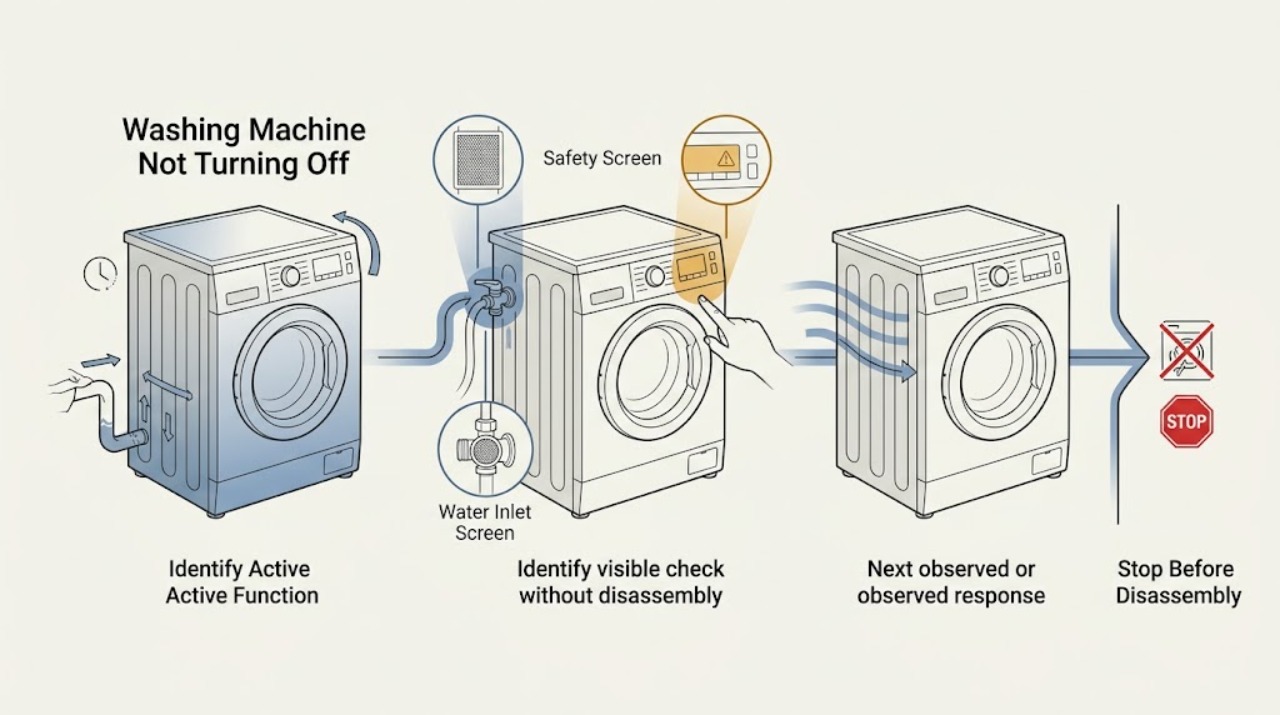
A washing machine may continue briefly after Cancel or End while it drains, cools, spins down, or releases a door or lid lock. Do not force it off until you have noted whether the drum is moving, water is entering, water remains, the pump is running, or the display shows a code. If it is continuously filling, flooding, spinning violently, leaking, or making smoke, burning odor, arcing, or unusual electrical noise, close the water supply if safely reachable and isolate power only from a dry safe position; do not touch wet equipment or repeatedly reset it. When the machine is stable and safe, use the model's visible Pause, Stop, or Cancel command once, check the drain and hose routing from outside, and record the exact display and stage. A control, inlet valve, drain pump, door or lid switch, wiring, or household drain fault needs qualified service rather than a generic reset or forced unplugging.
Work through in order
Diagnostic checks
Use only checks that match the exact appliance or system and its official guide.
-
Check 1
Observe the washer from a dry, stable position and do not touch wet electrical equipment, the drum, the lid lock, or the cabinet.
Expected result: Record uncontrolled water, a leak, water near the cord or outlet, hot water, severe movement, smoke, burning odor, sparks, unusual heat, damaged hose or cord, or a repeated electrical trip.
Next step: Keep people clear, close the water supply only if safely reachable, isolate power only from a dry safe position, and arrange appliance, plumbing, or electrical service as applicable.
Stop if: Do not restart, repeatedly reset, touch wet parts, move the washer, or force the door or lid after a safety symptom.
Why this matters
Why: These symptoms make continued operation or forced shutdown a flooding, burn, shock, fire, or mechanical hazard.
-
Check 2
From outside, identify whether the machine is still filling, tumbling, spinning, draining, pumping, displaying a lock state, or simply showing lights after the cycle.
Expected result: A moving drum, incoming water, or running pump is different from a display that remains lit; a repeated start or a control that ignores commands points to another branch.
Next step: Write down the programme, stage, sound, water level, and exact display before using a command once.
Stop if: Do not open the door or lid while the drum may move or water may be high enough to spill.
Why this matters
Why: The active function determines whether the behavior may be a normal transition or a stuck water, motor, drain, or control state.
-
Check 3
Look and listen for water entering while the washer should be paused or finished, without disconnecting a hose or reaching behind the machine.
Expected result: Water that continues entering with no intended fill supports an inlet-valve or control problem; water that stops but the machine continues points toward drain, motor, lock, or control state.
Next step: Close the correct supply valves if safely accessible, keep the washer off, and arrange appliance service; use plumbing help if a valve or hose cannot isolate the water.
Stop if: Do not leave the washer unattended, remove inlet hoses, or test a suspected valve while water is uncontrolled.
Why this matters
Why: Continuous filling can overflow even when the control panel appears stopped.
-
Check 4
Look through the door or lid from outside to determine whether water remains and whether the lock indicator is active; do not pull the handle or lift a locked lid.
Expected result: Visible water or an active lock can explain why the machine has not released; an empty tub with a persistent lock or running state shifts attention to controls, interlock, or a completed-cycle fault.
Next step: Keep the door or lid closed, follow only the exact model's drain and release instructions, and arrange service if safe conditions are met but the lock persists.
Stop if: Do not pry, bypass, insert tools, tilt the washer, or open the cabinet.
Why this matters
Why: The lock may be protecting against opening onto water or a moving drum rather than being the original failure.
-
Check 5
If the machine is stable, dry, and free of warning signs, wait only through the normal drain or spin-down period described by the exact manual while observing from outside.
Expected result: A pump that stops and a door or lid that releases after the documented transition supports normal completion; a pump, motor, or display that remains active beyond the documented state needs diagnosis.
Next step: If it does not enter a normal stopped state, continue with the water, drain, display, and service branches without repeating high-stress tests.
Stop if: Do not treat an undocumented or lengthening delay as normal, and do not open the machine during a transition.
Why this matters
Why: Some models continue draining or stopping the drum after Pause, Stop, Cancel, or a programme end.
-
Check 6
When the washer is stable, cool, dry, and has no active hazard, press the model's visible Pause, Stop, or Cancel command once and observe the response.
Expected result: A documented pause or cancel may stop motion and begin draining; no response, immediate restart, continued filling, or a new error indicates that the control or another interlock condition remains unresolved.
Next step: Record the result and follow the exact manual's next step once; arrange service when the machine ignores the command or remains active.
Stop if: Do not press the controls repeatedly, force a door or lid, or continue a cycle after a warning symptom.
Why this matters
Why: A command can change the programme state without proving that the control, lock, drain, or water-level system is healthy.
-
Check 7
With the washer stopped, inspect only the visible drain hose routing, standpipe or laundry-tub position, and nearby floor for kinks, flooding, or an obvious discharge restriction.
Expected result: A kink, blocked-looking outlet, hose routed too low or too far into the standpipe, or water returning to the tub supports a drain installation or household-drain path; clear external evidence leaves pump or control service possible.
Next step: Use the exact installation manual for external hose routing and arrange service if water remains, the hose is inaccessible, or the condition returns.
Stop if: Do not pull the washer out, disconnect a wet hose, open a filter into standing water, or run another cycle with flooding risk.
Why this matters
Why: Siphoning and restricted drainage can make a washer fill, drain, or run longer than expected.
-
Check 8
Record the exact error code, icon, flashing pattern, programme, and stage shown on the display, then compare it only with the exact model manual.
Expected result: A paused or canceled-cycle message, excess-suds indication, drain-time warning, door or lid-lock indication, or other code changes the next check; a code that returns after the manual's action needs service.
Next step: Follow the manual's single documented action or reset when the machine is safe, then stop and arrange service if the state returns.
Stop if: Do not enter hidden diagnostics, guess a code meaning, or repeatedly reset a fault.
Why this matters
Why: Washer codes and release times are model-specific and should not be generalized from another machine.
-
Check 9
Only when the machine is dry, stable, cool, and free of water or electrical hazards, follow the exact model's single power-reset instruction.
Expected result: A normal return to standby supports a temporary control state; an active pump, incoming water, repeated code, immediate restart, or protection trip means the fault remains.
Next step: Stop after one authorized reset and arrange qualified appliance service if the washer will not stop or the symptom returns.
Stop if: Do not restore power to wet equipment, reset after smoke or arcing, or cycle power repeatedly.
Why this matters
Why: A reset can clear a temporary electronic state but cannot prove that an inlet valve, pump, motor control, lock, sensor, or wiring is good.
-
Check 10
Prepare a service record with the complete model number, front- or top-load type, programme, stage, water level, active function, display, lock state, hose routing, sound, timing, and all safety symptoms.
Expected result: The sequence distinguishes normal drain or spin-down, continuous filling, siphoning, failed drain, excess suds, lock state, motor operation, or a control fault.
Next step: Keep the washer out of service when the cause is unresolved, water remains, it repeats the fault, or a safety symptom occurred; arrange qualified appliance, plumbing, or electrical service.
Stop if: Do not order or replace a pump, valve, lock, sensor, control, motor, or timer from the phrase not turning off alone.
Why this matters
Why: A technician can target the inlet system, drain path, pump, pressure sensing, motor, interlock, control, wiring, or household plumbing without unsafe disassembly.
Use your observations
Decision map
Find the observation that best matches what you see, then follow the next safe action.
-
PATH 01Safety boundary
What you see
There is uncontrolled filling, a leak, water near electricity, hot water, violent movement, smoke, burning odor, arcing, damaged wiring, unusual heat, or a repeated electrical trip.
Do this next
Keep clear, close water only if safely reachable, isolate power only from a dry safe position, and arrange qualified appliance, plumbing, or electrical help.
Why this path and its safety boundary
Why it matters: The washer presents a flooding, burn, shock, fire, or mechanical hazard.
Safety stop: Do not restart, touch wet equipment, move the washer, or force the door or lid.
-
PATH 02Safety boundary
What you see
The cycle has ended or was canceled, the drum is stopped, no water is entering, and the pump or lock completes the exact model's documented transition.
Do this next
Wait through the model's stated transition and record whether the machine enters standby and releases safely.
Why this path and its safety boundary
Why it matters: A short drain, spin-down, cooldown, or unlock delay may be normal.
Safety stop: Stop if the delay lengthens, water enters, the motor or pump remains active, or any warning symptom appears.
-
PATH 03Safety boundary
What you see
Water keeps entering when the programme is paused, canceled, or complete.
Do this next
Close the supply valves if safely reachable, keep the washer off, and arrange appliance service; use plumbing help if isolation fails.
Why this path and its safety boundary
Why it matters: An inlet valve, water-level control, or control fault is possible, and overflow risk is increasing.
Safety stop: Do not leave the machine unattended, remove hoses, or keep resetting the controls.
-
PATH 04Safety boundary
What you see
The washer fills and drains at the same time, the water level never settles, or water returns because the drain hose routing is wrong.
Do this next
Keep the machine off and compare the external hose routing with the exact installation instructions; arrange service if the routing or household drain cannot be safely corrected.
Why this path and its safety boundary
Why it matters: Siphoning or an installation-related drain path can make the machine appear unable to finish or turn off.
Safety stop: Do not seal the hose into the standpipe, insert it farther, or disconnect it while wet.
-
PATH 05Safety boundary
What you see
Water remains in the tub, the pump runs without moving water, a drain warning appears, or the cycle stops during drain.
Do this next
Keep the door or lid closed, use only the exact model's safe drain procedure, and arrange service if water cannot be cleared safely.
Why this path and its safety boundary
Why it matters: A kinked or restricted hose, household drain, pump filter, pump, excessive suds, or control condition may be prolonging the cycle and keeping the lock active.
Safety stop: Do not open a filter or hose into an uncontrolled wet area, touch wet electrical parts, or run a high-speed test with residual water.
-
PATH 06Safety boundary
What you see
The display or manual indicates excess suds, the machine repeatedly rinses, or foam prevents normal draining.
Do this next
Follow the exact manual's detergent and rinse guidance once, then arrange service if the condition persists or the tub remains full.
Why this path and its safety boundary
Why it matters: The washer may extend or repeat parts of the cycle while breaking down foam and trying to remove water.
Safety stop: Do not add unapproved chemicals, run repeated cycles, or open a wet service point.
-
PATH 07Safety boundary
What you see
The washer is stable and dry, but a documented Pause, Stop, or Cancel command has no effect or the machine immediately restarts.
Do this next
Stop using the machine and arrange qualified appliance service with the exact display and stage recorded.
Why this path and its safety boundary
Why it matters: A control, interlock, sensor, timer, or wiring problem may be preventing a safe stop.
Safety stop: Do not enter diagnostics, open the control panel, bypass a lock, or repeatedly cycle power.
-
PATH 08Safety boundary
What you see
The pump or motor continues beyond the documented transition, runs with no water movement, or keeps restarting after the controls are canceled.
Do this next
Keep the washer off and arrange qualified appliance diagnosis; do not access the pump or cabinet yourself.
Why this path and its safety boundary
Why it matters: A drain pump, motor control, water-level sensor, lock, or control fault remains possible.
Safety stop: Do not run the pump dry, reach into the drum, remove panels, or repeat the cycle to provoke the sound.
-
PATH 09Safety boundary
What you see
The drum is stopped and water is not visible, but a door or lid remains locked after the exact release conditions.
Do this next
Use only a model-authorized release or single reset under its stated safe conditions; otherwise arrange service.
Why this path and its safety boundary
Why it matters: The interlock, sensor, control, or a residual drain state may be preventing release.
Safety stop: Do not pry, insert tools, tilt the washer, or bypass the door or lid lock.
-
PATH 10Safety boundary
What you see
The washer is safe and returns to normal standby after one model-authorized reset without a recurring code or active water or motor state.
Do this next
Monitor normal use without deliberate stress testing and arrange service if the washer fails to stop again.
Why this path and its safety boundary
Why it matters: A temporary control state may have interrupted the cycle, but the underlying system is not proven healthy.
Safety stop: Stop immediately if filling, leaking, violent movement, smoke, odor, arcing, or a protection trip returns.
Helpful context
Understand the symptom
First decide what has not stopped
“Not turning off” can mean the drum still rotates, the pump continues humming, water keeps entering, the display remains lit, the machine repeatedly restarts, or the door or lid stays locked. A short drain or spin-down routine can be normal on some models, but continuous filling, a persistent motor or pump, or a control that ignores a documented command is not the same condition. Observe from outside and record the stage, sound, water level, and display before making another selection.
Water state changes the safe path
If water is entering, close the correct supply valve only when it is safely reachable. If water remains in the tub, keep the door or lid closed and use only the exact model's safe drain instructions. A drain hose that is too low or inserted too far can create siphoning, while a kink, restriction, pump filter, or household drain problem can prolong the cycle. Do not open a wet filter or hose into an uncontrolled area.
Use controls and codes only as the model documents
Press a visible Pause, Stop, or Cancel control once when the machine is stable, dry, and free of hazardous symptoms. Note the exact code, icon, flashing pattern, and programme stage; codes differ by model and cannot be treated as universal. A single manual-authorized power reset can clear a temporary control state, but a returning fault, continuous operation, or a breaker trip requires service.
Persistent operation is a service boundary
When a washer keeps filling, pumping, spinning, or ignoring commands after the safe external checks, the inlet valve, drain pump, pressure or water-level sensing, motor control, timer, door or lid interlock, or wiring may be involved. These parts are not identified by the symptom alone. Keep the washer out of service and give a technician the exact sequence instead of opening the cabinet or bypassing an interlock.
Safety boundary
Stop conditions
- Stop for uncontrolled filling, flooding, leaks, water near electricity, hot water, violent movement, smoke, burning odor, sparks, unusual heat, damaged wiring, or a repeated electrical trip.
- Do not force a door or lid, bypass an interlock, tilt or move the washer, reach into a rotating drum, or open the cabinet.
- Do not disconnect wet hoses, open a pump filter into an uncontrolled area, or touch electrical parts while water is present.
- Do not repeatedly press Cancel, cycle power, restart a high-speed programme, or hold a breaker on to make the washer stop.
- Do not diagnose or replace an inlet valve, pump, motor, sensor, timer, lock, control, or wiring from the symptom alone; persistent operation needs qualified service.
Only after diagnosis
Potential parts
- water inlet valve
Only relevant when service confirms that water continues entering after a safe stop or that the inlet valve is not closing on the exact model.
Confirm the complete model, valve configuration, hose connection, and electrical specification through the manufacturer or qualified technician before ordering. - drain pump or pump filter assembly
Only relevant when a qualified diagnosis finds a failed or obstructed pump after safe drain-path checks and the exact model supports the part.
Pump and filter designs vary by model and access may expose water or electricity; do not select or install one from a persistent-pump symptom alone. - door or lid interlock
Only relevant when the drum is stopped, water is safely absent, and service confirms an interlock or lock-sensing fault.
Confirm front-load or top-load design and exact model fit; never bypass or defeat the interlock.
When checks do not resolve it
Need a professional?
Arrange qualified appliance service when the washer continues filling, pumping, spinning, or restarting after its documented transition; ignores a safe Pause, Stop, or Cancel command; keeps a lock active with no water; returns an error; or needs internal access. Use plumbing help for a failed water shutoff, household drain, or flooding path and electrical help for wet equipment, damaged wiring, smoke, arcing, heat, or repeated trips.
Common questions
FAQ
Why does a washing machine keep running after I press Stop?
Some models continue a short drain, spin-down, or unlock transition after Pause, Stop, or Cancel. Record whether the drum, pump, or inlet is still active and compare the state with the exact manual. Continuous filling, a pump that never stops, immediate restart, or a returning error needs service.
What should I do if the washer will not stop filling?
Close the correct water valves if safely reachable and keep the washer off. Continuous filling can involve an inlet valve, water-level control, or siphoning caused by drain-hose routing. Do not leave it unattended or disconnect a hose under uncontrolled water pressure; arrange appliance or plumbing service if isolation fails.
Can a drain problem make a washer seem unable to turn off?
Yes. Residual water, a kinked or restricted drain path, excess suds, siphoning, or a pump problem can prolong draining or keep the lock active. Keep the door or lid closed and follow only the exact model's safe drain procedure; do not open a wet filter or hose into an uncontrolled area.
Should I unplug or reset a washing machine that will not turn off?
Only when the machine is stable, cool, dry, and free of leaks, smoke, odor, arcing, or other hazards, and only according to the exact manual's single reset instruction. A reset may clear a temporary control state but cannot repair a valve, pump, lock, sensor, motor, or control fault.
When is a washer that will not turn off an emergency?
Treat uncontrolled filling, flooding, water near electricity, hot water, violent movement, smoke, burning odor, sparks, unusual heat, damaged wiring, or repeated electrical trips as immediate stop conditions. Keep clear, isolate water and power only when safely reachable, and obtain qualified appliance, plumbing, or electrical help.
Read the exact guide
Official sources
- Washer - Won't Stop FillingGE Appliances · Washer continuous filling, siphoning, water-level control, and service boundary
- Continuously Fills / Fills and Drains - WasherWhirlpool Product Help · Whirlpool washer continuous filling, fills-and-drains, siphoning, and drain-hose routing
- Washer Not Draining or Spinning? Troubleshooting GuideWhirlpool Product Help · Whirlpool washer drain, spin, hose, standpipe, filter, and residual-water troubleshooting
- How to Reset a WasherWhirlpool Product Help · Whirlpool washer single power reset and model-specific control-lock guidance
- Error Codes in Front Load WashersWhirlpool Product Help · Whirlpool washer error states, pause or cancel behavior, drain, suds, lock, and model-specific guidance
- Top Load Washer - How to Drain and Spin a Wash Cycle on Electronic Control ModelsGE Appliances · Electronic top-load washer pause, stop, drain, spin, and automatic-drain behavior
Community feedback
Share a repair observation
Share a plain-text repair observation. Accepted observations are published automatically; this page may take a moment to update.