
On this page
Start here
Quick answer
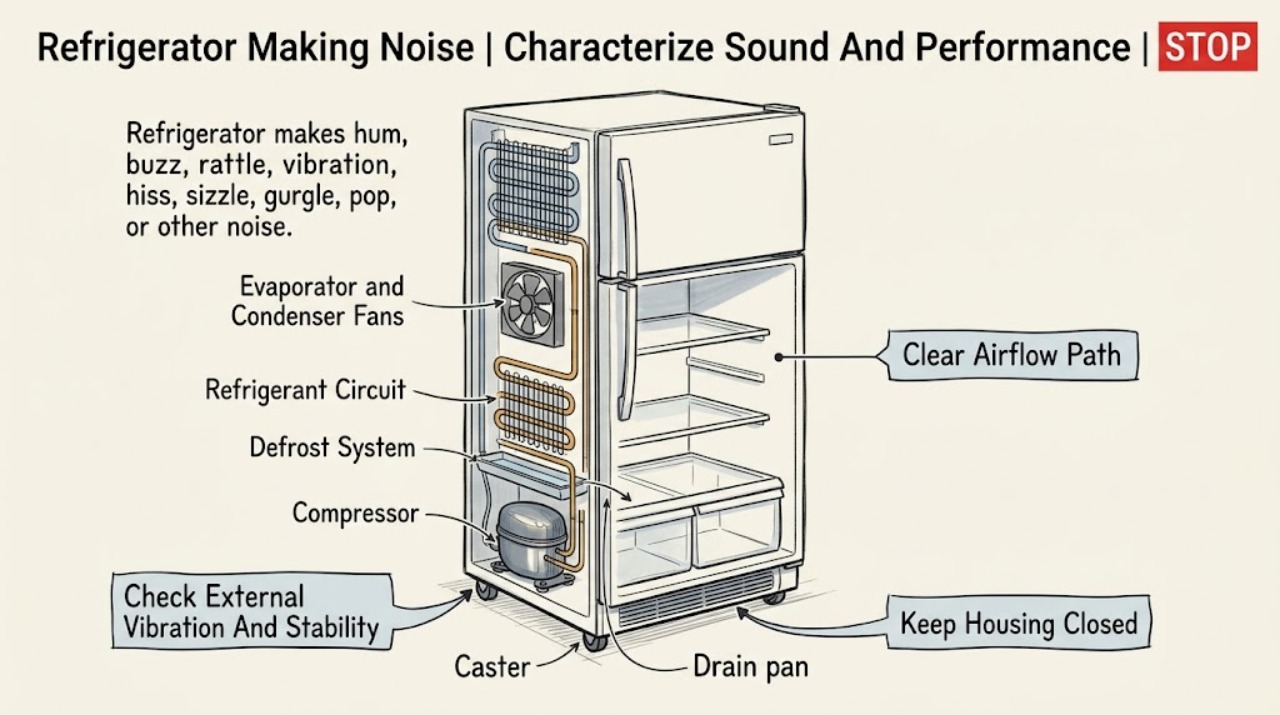
First record the sound, its location, whether it happens continuously or only during cooling, defrost, door opening, or loading, and whether the refrigerator is still cooling normally. Gladiator's official owner manual says many new sounds are normal: high-efficiency compressors and fans can hum, pulse, or sound high-pitched; evaporator and condenser fans move air; refrigerant can rattle or gurgle; defrost water can sizzle or run into the drain pan; and cabinet expansion can pop. Check from outside that the unit is stable, not touching a wall or cabinet, items are not rattling on top, and food is not blocking airflow vents. If the noise is a new grinding, scraping, or repeated loud vibration, becomes louder when a door opens, accompanies poor cooling, or persists after safe external checks, stop short of removing panels and arrange qualified service. Stop immediately for smoke, burning odor, sparking, a hot cord or plug, refrigerant or oil evidence, a leak near electricity, or repeated breaker trips.
Before you begin
Safety first
- This article covers sound classification, visible installation and stability, internal vent clearance, normal-cycle observation, and visible safety signs. Fan, compressor, control, wiring, refrigerant, evaporator, and rear-compartment work requires qualified service.
Work through in order
Diagnostic checks
Use only checks that match the exact appliance or system and its official guide.
-
Check 1
From a safe position, describe the sound as a hum, buzz, pulsation, whoosh, rattle, vibration, click, pop, hiss, sizzle, gurgle, scrape, or grind. Note whether it comes from inside the freezer or cabinet, underneath or behind the unit, or from a shelf, caster, door, or nearby object. Record whether cooling, lights, and door seals still appear normal.
Expected result: The sound is brief and cycle-linked, continuous and new, louder when a door opens, caused by an object or cabinet vibration, or accompanied by warming, frost, water, odor, smoke, or a power symptom.
Next step: Use the normal-cycle, stability, airflow, door-related, or service branch below. Do not use a phone recording or sound label as proof of a specific internal part.
Stop if: Stop using the appliance for smoke, burning odor, sparking, a hot cord or plug, refrigerant or oil evidence, water near electricity, or repeated breaker trips.
Why this matters
Why: The sound's timing and location separate documented compressor, fan, refrigerant, defrost, and cabinet noises from a possible mechanical, installation, or electrical fault. A performance or safety change makes a normal-sound explanation less likely.
-
Check 2
Without opening panels or moving a loaded unit, check that the refrigerator is stable, not rocking, not touching a wall or cabinet, and not carrying loose items on top. If the model has accessible brake feet or casters, use only the owner's installation instructions to confirm that the unit is held in its final position.
Expected result: The cabinet rocks, a caster or foot is loose, the unit touches a surface, a shelf or item rattles, or the external installation is stable but the sound continues.
Next step: Remove only an obvious loose item and correct an allowed external stability or contact issue. If the sound remains or needs rear-panel access, leave the unit in place and arrange service.
Stop if: Do not tip, lift, roll, or pull a heavy refrigerator alone, remove the base, reach behind moving fans, or loosen refrigerant or electrical components.
Why this matters
Why: The Gladiator manual says hard surfaces can amplify sounds and instructs owners to make the unit steady; rattling can also come from items stored on top. Correcting an external vibration source can remove noise without implicating a compressor or fan.
-
Check 3
From inside the cabinet, check that food packages are not blocking the marked air vents and that doors close normally. Note whether the sound becomes louder after frequent door openings, adding warm food, a warm garage, or a recent installation, and whether temperatures remain within the model's normal range.
Expected result: Vents are blocked, warm food or frequent door openings preceded the sound, the unit runs longer in a warm location, temperatures are normal, or the noise and temperature problem persist together.
Next step: Rearrange only items that visibly block vents and allow the refrigerator time to recover. If cooling remains poor or the noise does not settle, stop short of internal checks and call qualified service.
Stop if: Do not scrape frost with a sharp tool, use mechanical defrosting, remove an evaporator cover, or keep operating if food safety or a fire/electrical hazard is involved.
Why this matters
Why: Gladiator's manual says airflow must remain open and that fan speed and compressor operation can increase with cooling demand. A longer run during recovery can be expected; persistent loud noise with poor cooling points toward a fault or airflow/service condition.
-
Check 4
Observe from outside whether the sound starts or changes when a cooling cycle begins, during a defrost period, at cycle end, or after a door is opened. Do not hold a door switch down or reach through a guard; simply compare the sound with the door closed and the normal cycle described in the manual.
Expected result: There is a brief hum or fan sound, a pulsating or high-pitched compressor/fan sound, a gurgle or pop at cycle transition, sizzling or water-running during defrost, or a scraping or grinding sound that tracks door opening.
Next step: If the sound matches a documented normal event and cooling is normal, monitor it. If it is a new scrape, grind, or repeated abnormal vibration, stop troubleshooting and provide the timing and location to a technician.
Stop if: Do not remove fan guards, touch a moving fan, chip frost, or defeat a door switch to make the noise louder.
Why this matters
Why: The Gladiator manual identifies compressor and fan sounds, refrigerant movement, cabinet expansion, and defrost water as normal possibilities. A sound that changes sharply with a door or persists as a scrape may involve a fan obstruction, frost, door hardware, or another service issue, but the source cannot be confirmed without access.
-
Check 5
From a dry, safe position, inspect only the visible cord, plug, outlet area, floor, and cabinet for heat, water, smoke, burning odor, oil-like residue, or damage. Note whether a household breaker has tripped, but do not remove covers or repeatedly reset power to chase a sound.
Expected result: The cord or plug is hot or damaged, water is near the outlet, smoke or burning odor is present, a breaker trips, the area is dry and normal, or the sound is accompanied only by normal cooling behavior.
Next step: For a hazard, stop, keep clear, and have qualified electrical or appliance service assess it. For a clear external area, continue only with the normal-cycle and service boundary; do not perform a live test.
Stop if: Do not touch wet electrical areas, reset a repeatedly tripping breaker, use an extension cord or adapter, open the compressor compartment, or attempt refrigerant work.
Why this matters
Why: A sound plus an electrical, refrigerant, water, or fire sign is a safety event, not a normal-noise comparison. A dry, stable appliance with normal cooling and no hazard can proceed to observation or scheduled service based on the sound.
-
Check 6
After the external stability, airflow, cycle, door, and safety observations, document whether the sound remains new or loud, whether temperatures are changing, and whether it appears to come from a fan, compressor area, control, door, or sealed cooling system. Include the exact model number when contacting Gladiator support.
Expected result: The noise has stopped after an external correction, remains but matches a documented normal cycle, persists as scraping/grinding, returns with poor cooling, or requires a panel, fan, compressor, control, or refrigerant-system inspection.
Next step: Arrange Gladiator/authorized or qualified appliance service and provide the recording or description, location, timing, temperature symptom, installation context, and model. Keep the appliance off if a hazard is present.
Stop if: Do not remove covers, test live wiring, manually turn a fan, puncture refrigerant tubing, or continue operation with smoke, burning odor, sparking, leaks, hot wiring, or repeated breaker trips.
Why this matters
Why: Normal-sound descriptions do not identify a failing internal part. Persistent abnormal mechanical noise or noise with poor cooling can involve a fan, frost, compressor, control, mounting, or sealed system and needs model-specific diagnosis.
Use your observations
Decision map
Find the observation that best matches what you see, then follow the next safe action.
-
PATH 01Safety boundary
What you see
The sound is a brief hum, fan whoosh, pulsation, gurgle, pop, defrost sizzle, or drain-pan trickle, occurs at a repeatable cooling or defrost transition, and cooling remains normal.
Do this next
Keep vents clear and monitor the sound. Use the exact model manual if its character, duration, or cooling performance changes; no internal part should be ordered from sound alone.
Why this path and its safety boundary
Why it matters: Gladiator documents these compressor, fan, refrigerant, cabinet, defrost, and drain sounds as normal possibilities, although hard surfaces can amplify them.
Safety stop: Stop for smoke, burning odor, sparking, hot wiring, a leak near electricity, or repeated breaker trips.
-
PATH 02Safety boundary
What you see
The cabinet rocks or contacts a wall, a caster or foot is unstable, an item on top or inside rattles, or the sound changes when the external object or contact is removed.
Do this next
Remove the loose item and make only the manual-approved external stability adjustment. Arrange help before moving a heavy loaded unit; call service if the vibration remains.
Why this path and its safety boundary
Why it matters: The installation or a loose object is more likely than an internal compressor failure, and the manual says surfaces and stored items can make normal sounds seem louder.
Safety stop: Do not tip or lift the refrigerator alone or enter the rear service area.
-
PATH 03Safety boundary
What you see
The sound increases after warm food, frequent door openings, a warm garage, or blocked internal vents, while the unit is otherwise cooling and the sound eases as conditions recover.
Do this next
Clear only visible vent obstructions, close doors promptly, and allow recovery. If the refrigerator stays warm or the loud sound persists, arrange service rather than opening panels.
Why this path and its safety boundary
Why it matters: The compressor and evaporator or condenser fans may be working harder to restore temperature; Gladiator notes that fan speed and run time can rise with cooling demand.
Safety stop: Do not scrape frost, block or remove a fan guard, or use mechanical defrosting.
-
PATH 04Safety boundary
What you see
The noise becomes a scrape, grind, or repeated rattle when a door opens or closes, or persists independently of normal cooling and defrost timing.
Do this next
Check only that packages and shelves do not obstruct the door and that the unit is stable. If the noise persists, stop and schedule qualified diagnosis.
Why this path and its safety boundary
Why it matters: A door, shelf, frost, fan, mounting, or cabinet interaction may be involved. A door-related change is not enough to name a specific part without model-specific inspection.
Safety stop: Do not hold door switches, remove panels, reach near fans, or chip at frost with a tool.
-
PATH 05Safety boundary
What you see
A new loud scrape, grind, or vibration persists, cooling worsens, or smoke, burning odor, sparking, hot wiring, water near electricity, refrigerant evidence, or repeated breaker trips is present.
Do this next
Stop using the refrigerator and arrange qualified appliance service; use qualified electrical service for supply or wiring hazards. Isolate power only from a dry, safe position and provide the exact model and observations.
Why this path and its safety boundary
Why it matters: An internal fan, compressor, control, mounting, electrical, or sealed-system fault may exist; safety signs override normal-sound guidance.
Safety stop: Do not continue operation, repeatedly reset power, open the compressor or control area, test live circuits, or puncture refrigerant tubing.
Helpful context
Understand the symptom
Identify the sound before assuming a failed part
A brief hum, fan whoosh, refrigerant gurgle, defrost sizzle, drain-pan trickle, or occasional pop can be part of normal cooling and temperature changes. The Gladiator manual notes that newer high-efficiency equipment can run longer and sound different from an older refrigerator, while floors, walls, cabinets, and stored items can amplify vibration. The useful first distinction is whether the sound is expected during a cycle and cooling is normal, or whether it is new, mechanical, continuous, and paired with a performance change.
Stability and airflow can make a normal motor sound abnormal
Gladiator's instructions require clear airflow around the unit and describe checking stability and brake feet or casters. Do not let packages block internal vents, and do not store loose objects on top of the cabinet. A rattling panel, shelf, bottle, wall contact, or unstable caster can transmit a harmless motor vibration as a loud buzz. Make only an external adjustment that the model's installation instructions allow; moving a loaded refrigerator or accessing the rear service area is not an ordinary noise check.
Cooling and defrost sounds have different timing
The manual associates fan speed with cooling demand, including opening doors or adding warm food; it associates sizzling and water-running sounds with defrost, and gurgling with refrigerant movement as a cycle ends. A noise that is brief and synchronized with one of those events is less concerning than a scrape or grind that continues, changes with the door, or coincides with a warming compartment. Do not remove a fan cover to prove which motor is running.
Safety boundary
Stop conditions
- Stop the refrigerator for smoke, burning odor, sparking, a hot or damaged cord or plug, water near electricity, oil-like or refrigerant evidence, or repeated breaker trips.
- Do not remove fan guards, electrical panels, compressor covers, or evaporator panels; do not perform live electrical tests or refrigerant work.
- Do not puncture tubing, use mechanical defrosting, chip frost with sharp or metal tools, or defeat a door switch to investigate a noise.
- Do not tip, lift, or move a heavy Gladiator refrigerator alone; use qualified help for rear access or service.
- Do not order or replace a fan, compressor, control, or other part based only on a sound description; confirm the exact model and professional diagnosis.
When checks do not resolve it
Need a professional?
Arrange Gladiator or qualified appliance service when a new scrape, grind, or loud vibration persists after safe external stability and airflow checks; when noise is paired with poor cooling, frost, water, or repeated cycling; or when an internal fan, compressor, control, mounting, or sealed system would need access. Stop immediately for smoke, burning odor, sparking, hot wiring, water near electricity, refrigerant evidence, or repeated breaker trips.
Safety scope: This article covers sound classification, visible installation and stability, internal vent clearance, normal-cycle observation, and visible safety signs. Fan, compressor, control, wiring, refrigerant, evaporator, and rear-compartment work requires qualified service.
Common questions
FAQ
Are humming and gurgling sounds normal on a Gladiator refrigerator?
They can be. Gladiator's manual says high-efficiency compressors and fans may hum, pulse, or sound high-pitched, and refrigerant movement can produce gurgling. A brief cycle-linked sound with normal cooling is less concerning than a new scrape, grind, worsening vibration, or noise paired with poor cooling.
Why does my Gladiator refrigerator sound louder after I add warm food?
The manual says the evaporator fan can increase speed after warm food is added and that high-efficiency compressors and fans may run longer while restoring temperature. Keep vents clear and allow recovery. If the loud noise or warming persists, arrange service.
What causes a rattling or vibrating Gladiator refrigerator?
Possible external causes include a refrigerator that is not stable, a wall or cabinet contact, an item stored on top, or a loose shelf or container. Gladiator says hard surfaces can amplify normal sound. Remove only obvious loose items and use the model's stability instructions; do not move a heavy unit alone.
Is sizzling or water running during defrost normal?
Gladiator's manual says water dripping on the defrost heater can sizzle and water can run into the drain pan during defrost. It should not be accompanied by smoke, a burning smell, electrical damage, or a leak near an outlet. Those signs require immediate stop and qualified service.
Why does a refrigerator noise change when I open the door?
Fan operation and airflow can change with the door state, and a door-related scrape can also reveal a mechanical or frost problem. Compare only by normal observation; do not hold a door switch down or remove a fan guard. A persistent scrape or grind needs model-specific diagnosis.
When should I stop using a noisy Gladiator refrigerator?
Stop for smoke, burning odor, sparking, a hot or damaged cord or plug, water near electricity, refrigerant or oil evidence, or repeated breaker trips. Also stop and schedule service for a new scrape or grind that persists, especially if cooling worsens. Do not open panels or perform live tests.
Read the exact guide
Official sources
- 17.8 Cu. Ft. (0.50 m³) All Refrigerator Black GARF30FDGB | GladiatorGladiator GarageWorks / Whirlpool Canada · Official product page for GARF30FDGB; it confirms a Gladiator refrigerator product but does not establish that every Gladiator refrigerator uses identical components or sound behavior.
- Service and Support | GladiatorGladiator GarageWorks / Whirlpool Canada · Official Gladiator support center; service and parts resources are selected by the appliance model number.
- Owners ManualGladiator GarageWorks / Whirlpool Canada · Official Gladiator GarageWorks owner manual for the refrigerator/freezer family covered by the document; model-specific controls and service instructions still require the exact model.
Community feedback
Share a repair observation
Share a plain-text repair observation. Accepted observations are published automatically; this page may take a moment to update.