
On this page
Start here
Quick answer
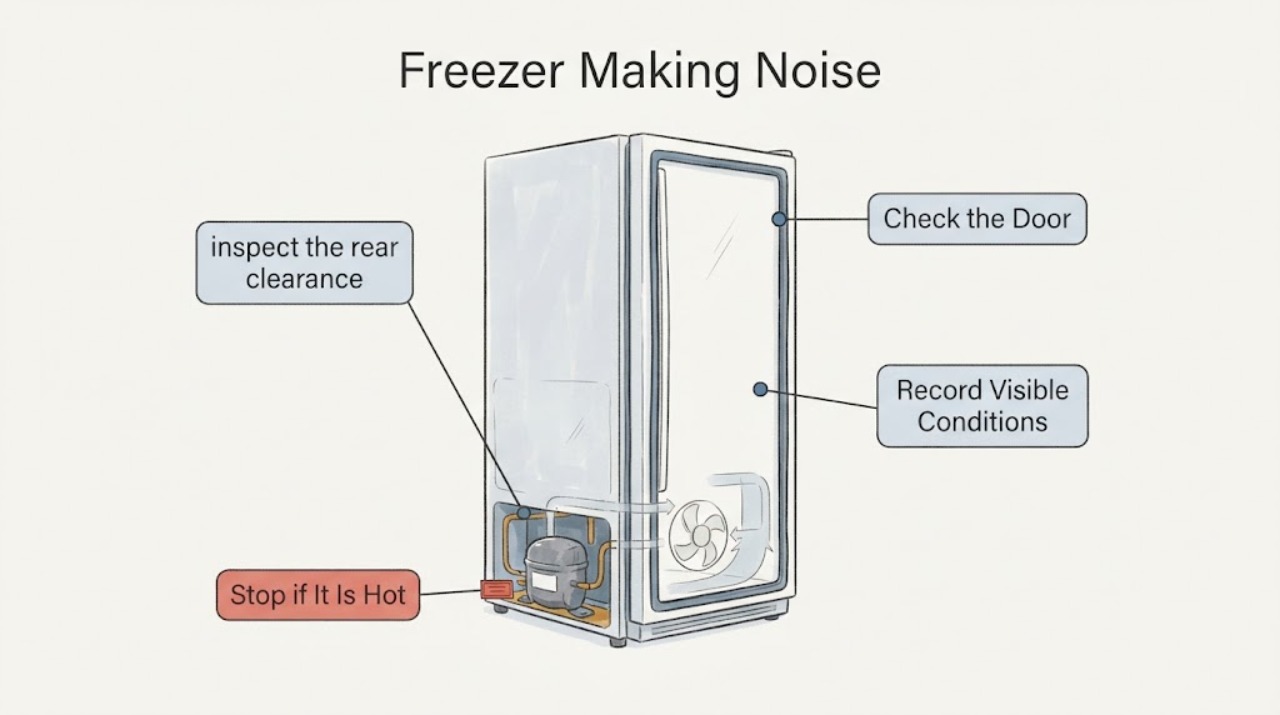
Many Hotpoint freezer sounds are normal: a compressor can buzz or hum, refrigerant can gurgle or bubble, a fan can whirr, and temperature changes can cause brief cracking. A new or frost-free freezer may sound different from an older one. First identify when the sound occurs, then check that rear pipework is not touching the wall, all feet are firmly on the floor, the cabinet is level, and ventilation is not blocked. Stop and disconnect only if safe for smoke, burning odor, sparking, a hot or damaged cord, a refrigerant leak concern, or repeated electrical trips; do not use electrical or mechanical tools to defrost the freezer. If food is warming or the noise is getting louder and does not match a normal sound, arrange qualified Hotpoint service.
Work through in order
Diagnostic checks
Use only checks that match the exact appliance or system and its official guide.
-
Check 1
Listen from the front with the door closed and note whether the noise is a low hum or buzz, gurgling or bubbling, a fan-like whirr, a brief crack, a vibration or rattle, or a scraping or repeated click. Record whether it occurs when cooling starts, during automatic defrost, or continuously.
Expected result: The sound matches a steady compressor hum, refrigerant movement, fan airflow, or brief temperature-change crack; it is a new mechanical scrape or rattle; or it is accompanied by warming, an alarm, smoke, or a burning smell.
Next step: Follow the branch for the sound pattern. Do not remove panels or run another test if a hazard sign, suspected leak, or loss of cooling is present.
Why this matters
Why: Hotpoint lists compressor, gas circulation, circulating-fan, and defrost-related sounds as normal operating sounds. A new mechanical noise or a noise with a cooling or electrical symptom needs a physical and safety check rather than reassurance alone.
-
Check 2
With the freezer operating normally and without reaching into moving parts, inspect the rear clearance from the outside. Check that pipework is not touching the wall, skirting board, or another object, and that stored items are not pressing against the cabinet.
Expected result: A tube or cabinet is touching a wall or obstacle, the rear is clear, or the sound continues with no external contact visible.
Next step: Restore the clearance described in the exact installation instructions without bending tubing. If no safe external correction changes a persistent vibration or rattle, arrange service.
Why this matters
Why: Hotpoint identifies pipework vibrating against a wall as a cause of extra noise. A contact vibration can sound like a compressor fault even when the refrigeration system is operating normally.
-
Check 3
Check the freezer's stability from the front: verify that all four feet or wheels make firm contact and that the cabinet does not rock when the door is closed. Use the model instructions for any leveling adjustment and get help moving or holding the appliance.
Expected result: The cabinet rocks or one foot is not firmly loaded, the freezer is level and stable, or leveling reduces the vibration.
Next step: Level the appliance according to the manual and allow it to settle before judging the sound again. If it remains noisy while stable, continue with the sound and cooling checks rather than repeatedly adjusting the feet.
Why this matters
Why: Hotpoint says an unstable or unlevel freezer can increase noise. A stable cabinet reduces vibration and also helps the door remain aligned and sealed.
-
Check 4
If the sound is a fan-like whirr or a crack during defrost, inspect only the visible interior for heavy frost, a door that is not closing, or food obstructing air passages. Do not chip ice or use an unapproved heater, hair dryer, electrical device, or mechanical tool.
Expected result: There is no heavy frost and the sound is intermittent, frost is building around the internal air path, or the fan-like noise is harsh, scraping, or accompanied by warming.
Next step: Keep vents and the door seal clear and follow the exact manual for a permitted defrost. If frost returns quickly, the fan scrapes, or food temperature rises, stop DIY work and arrange qualified service.
Why this matters
Why: Hotpoint notes that frost-free models use internal and external fans and that cracking can occur as frost melts during automatic defrost. Heavy frost, a blocked airflow path, or a harsh fan sound can prevent normal cooling and needs model-specific guidance.
-
Check 5
Check whether the freezer is cooling normally without leaving the door open: look for an abnormal temperature warning, softening food, or a compartment that is no longer at its normal frozen condition. If a large load was just added, note that separately.
Expected result: Food remains hard frozen and no warning is present, a large fresh load was recently added, or the freezer is warming while the unusual noise continues.
Next step: Keep the door closed and follow the exact model temperature and warning-light instructions. If the freezer is warming, an alarm persists, or food safety is in doubt, transfer food only if safe and arrange prompt service; do not rely on a noise diagnosis.
Why this matters
Why: A freezer may run longer after loading or when it must reach its operating temperature, but a persistent unusual noise combined with warming is not explained by sound alone. The Hotpoint manual gives a normal freezer target of -18 °C or colder for applicable models.
-
Check 6
Inspect the visible plug and cord for heat, scorching, cuts, or looseness, and note any breaker trip, smoke, burning odor, sparking, or suspected refrigerant leak. Do not open the electrical compartment or test live wiring.
Expected result: The electrical connection is visibly sound and the sound is unchanged, or any electrical or refrigerant hazard is present.
Next step: For any hazard, stop using the freezer, disconnect it only if safe, ventilate for a suspected leak, keep away from damaged parts, and seek qualified electrical or appliance service. Do not run another test.
Why this matters
Why: A noisy compressor does not justify working on mains wiring or the sealed refrigeration circuit. Hotpoint's safety guidance requires the appliance to be disconnected before repair or part replacement and warns against switching on a suspected leaking appliance.
Use your observations
Decision map
Find the observation that best matches what you see, then follow the next safe action.
-
PATH 01Next step
What you see
The sound is a steady compressor hum, refrigerant gurgle, fan whirr, or occasional defrost crack, and the freezer remains cold.
Do this next
Treat it as normal operating sound, keep ventilation and the door seal clear, and monitor for a change in sound or temperature.
-
PATH 02Next step
What you see
A vibration or rattle changes when the rear pipework, wall, skirting board, or cabinet contact is removed.
Do this next
Maintain the required clearance and do not bend the tubing. Arrange service if the vibration returns without an external contact point.
-
PATH 03Next step
What you see
The cabinet rocks, a foot is unloaded, or leveling changes the noise.
Do this next
Level the freezer using the exact manual and assistance for any movement. Escalate if it remains unstable or noisy when all supports are firm.
-
PATH 04Next step
What you see
A fan-like or cracking sound occurs during normal frost-free operation, with no heavy frost and no loss of cooling.
Do this next
Monitor it as a possible normal fan or defrost sound. If it becomes scraping, continuous, or coincides with warming, stop and arrange service.
-
PATH 05Next step
What you see
The noise is persistent or worsening and the freezer is warming, showing a temperature warning, or not returning to normal after a large load.
Do this next
Keep the door closed, protect food according to local food-safety guidance, and arrange prompt qualified Hotpoint service. Do not open the sealed system or guess a replacement part.
-
PATH 06Next step
What you see
Smoke, burning odor, sparks, a hot or damaged cord, repeated breaker trips, or a suspected refrigerant leak occurs.
Do this next
Stop immediately, disconnect power only if safe, ventilate a suspected leak without switching the appliance on, keep clear of damaged parts, and obtain qualified electrical or appliance service.
Helpful context
Understand the symptom
Classify the sound before opening anything
A freezer does not become faulty merely because it is audible. Compare the timing and character: a steady hum when cooling, a short gurgle after the compressor runs, a fan-like whirr, or an occasional crack during defrost can all be expected. A new, louder, scraping, or rhythmic sound that coincides with warming food deserves an external check and possibly service.
Protect the cabinet, refrigerant circuit, and food
Keep food and the door closed while you investigate so the freezer retains cold air. Do not pull hard on the cabinet, bend rear tubing, remove sealed-system covers, or chip ice with a knife. If a pipe or refrigerant leak is suspected, do not switch the appliance on; ventilate the room and obtain qualified service.
When checks do not resolve it
Need a professional?
Book service for a continuing abnormal sound, warming food, a repeated temperature warning, recurring frost or fan interference, or any repair beyond the exact Hotpoint manual.
Common questions
FAQ
What sounds are normal for a Hotpoint freezer?
A compressor may buzz or hum, refrigerant can gurgle or bubble, a circulating fan can whirr, and temperature changes during defrost can cause brief cracking. The sound should be judged together with cooling performance and any change from normal.
Why is my Hotpoint freezer vibrating or rattling?
Check from the outside that rear pipework is not touching a wall or obstacle and that all feet or wheels firmly contact the floor. Leveling and clearance can reduce vibration; a persistent rattle with no external cause needs service.
Is a crack or fan noise a sign that my Hotpoint freezer is broken?
Not necessarily. Hotpoint describes cracking during defrost and fan noise in frost-free models as normal possibilities. A scraping fan, heavy frost, warming food, or a worsening sound changes the decision and warrants service.
When should I stop using a noisy Hotpoint freezer?
Stop for smoke, burning odor, sparks, a hot or damaged cord, repeated breaker trips, suspected refrigerant leakage, or loss of cooling with a worsening noise. Disconnect only if safe, ventilate a suspected leak without switching the appliance on, and obtain qualified service.
Read the exact guide
Official sources
- Hotpoint Fridge Freezer Error CodesHotpoint · Use only for safety and escalation context when a freezer noise is accompanied by a warning or control fault; exact model codes vary.
- Hotpoint Freezer Troubleshooting & RepairHotpoint · General Hotpoint freezer troubleshooting; exact sound behavior and controls vary by model.
- FREEZER - MODELHotpoint · Use as a representative Hotpoint freezer manual; confirm the exact model manual before applying model-specific controls or maintenance.
- Hotpoint Service Freezer RepairHotpoint · Use for the same general Hotpoint freezer noise guidance and escalation to qualified repair.
Community feedback
Share a repair observation
Share a plain-text repair observation. Accepted observations are published automatically; this page may take a moment to update.