
On this page
Start here
Quick answer
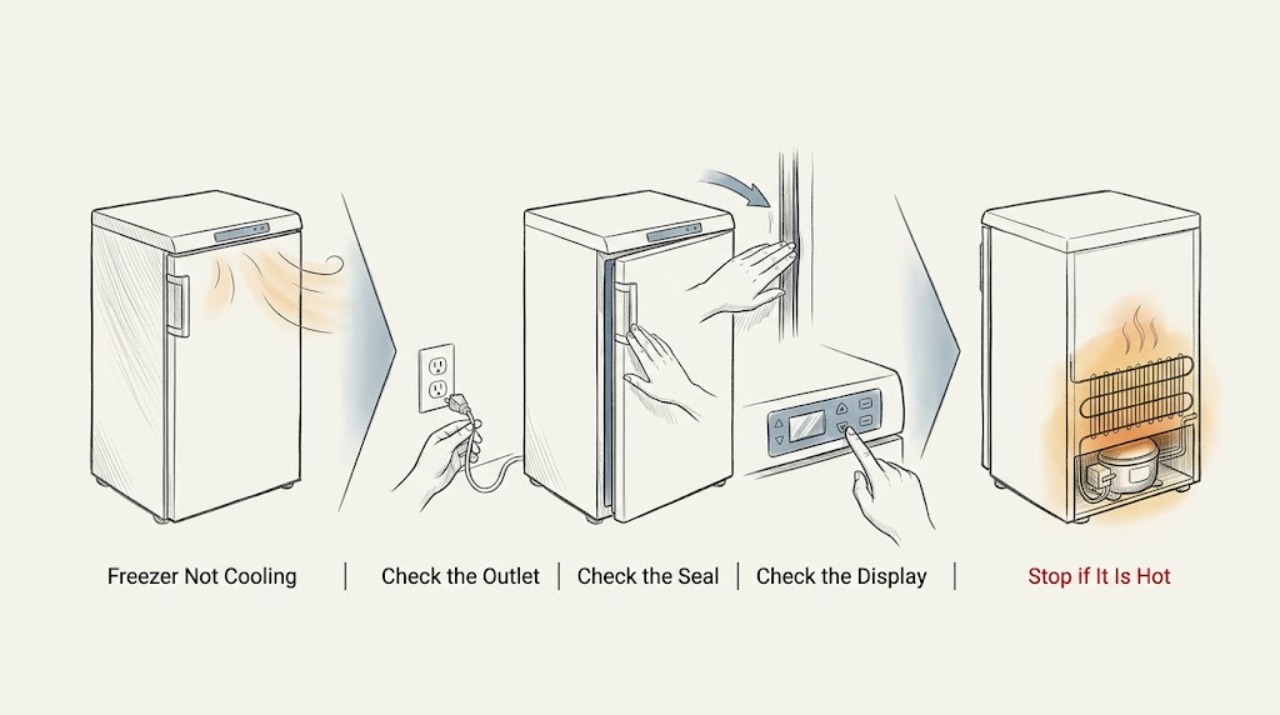
If a Hotpoint freezer is not cooling, keep the door closed and first check the visible power connection, door seal, temperature setting, ventilation, and whether a large fresh load or recent power interruption explains the delay. Hotpoint's general guidance uses -18 °C or colder as the safe freezer temperature for applicable models; use a suitable appliance thermometer and the exact manual rather than guessing from cabinet feel. A heavy frost layer may require the model-approved defrost procedure, while frost-free models should not be defrosted with improvised heaters or sharp tools. Stop and disconnect only if safe for smoke, burning odor, sparks, a hot or damaged cord, or a suspected refrigerant leak; arrange qualified service for persistent warming, a returning warning, a failed fan or compressor, or any sealed-system or electrical repair.
Work through in order
Diagnostic checks
Use only checks that match the exact appliance or system and its official guide.
-
Check 1
Check the visible plug, cord, outlet, and mains or power indicator without opening the appliance. Note whether the freezer is completely silent, whether a warning light is on, and whether another appliance confirms power at the outlet.
Expected result: The plug is loose or power is absent, the freezer has power but is not cooling, or a breaker trips again when power is restored.
Next step: Correct only an obvious external connection and retry once if safe. If power remains absent, the cord is hot or damaged, or the breaker trips again, stop and involve a qualified electrician or appliance technician.
Why this matters
Why: A freezer cannot cool without a stable supply. A repeat breaker trip or damaged cord is an electrical stop condition, not a reason to keep resetting or testing the appliance.
-
Check 2
Inspect the door from the outside: make sure it closes fully, no package prevents closure, and the gasket contacts the cabinet around its entire visible edge. Clean the gasket with the model-approved method and do not use sharp objects or damage the seal.
Expected result: The door was ajar, a package was obstructing it, the gasket has a visible gap or damage, or the seal and closure appear normal.
Next step: Remove only the external obstruction and close the door. If the gasket is damaged, the door will not align, or the freezer remains warm with a good seal, arrange service rather than gluing or reshaping the gasket.
Why this matters
Why: Hotpoint lists an improperly closed door as a reason for a warm freezer, and a damaged or dirty seal lets cold air escape. A normal seal shifts attention to airflow, setting, frost, or a component fault.
-
Check 3
Read the internal temperature with a suitable appliance thermometer while keeping the door closed as much as possible. Check the thermostat or control position against the exact manual; do not assume a dial number has the same meaning on every Hotpoint model.
Expected result: The temperature is at or below the model's normal target, it is above the target, the control is set too warm, or a warning light remains after the freezer has had time to cool.
Next step: Adjust only as the manual permits and allow the freezer time to respond. If the reading stays warm or the warning returns, protect the food and arrange qualified service; do not guess at a sensor or control replacement.
Why this matters
Why: Hotpoint states that the freezer should achieve about -18 °C or colder for safe operation on the referenced models and that a higher control setting makes it colder. A measured warm compartment with a normal setting needs more than a dial adjustment.
-
Check 4
Check from outside that the freezer is away from a cooker, radiator, or direct sun and that its ventilation openings and surrounding clearance are not blocked. Do not move a loaded appliance or damage rear pipework; get help if repositioning is necessary.
Expected result: The cabinet is next to a heat source, clearance or ventilation is restricted, the cabinet is already correctly positioned, or cooling improves after the external obstruction is removed.
Next step: Restore the manual's required clearance and ventilation, then monitor the temperature. If the freezer remains warm in a suitable location, continue to frost and component-service checks.
Why this matters
Why: Hotpoint says heat sources and insufficient air circulation can make the freezer run longer and affect its ability to reach operating conditions. Restricted clearance can also increase vibration and reduce heat removal.
-
Check 5
Look only at accessible interior surfaces for heavy ice, blocked air passages, or a door that has been left open. Determine whether the appliance is frost-free before considering defrosting, and follow the exact model instructions; never scrape ice or use an electrical or mechanical defrosting tool.
Expected result: There is little or no frost, a heavy ice layer is obstructing the compartment, the model is frost-free, or frost quickly returns after a permitted defrost.
Next step: Use only the model-approved defrost method and keep food safely cold during it. If frost returns rapidly, the fan is not moving air, or the freezer is still warm, stop DIY work and arrange service.
Why this matters
Why: Hotpoint gives model-dependent defrost guidance: some freezers need defrosting when ice reaches a specified thickness, while frost-free appliances are designed not to need routine defrosting. Recurring frost can indicate a door-seal, defrost, airflow, or control problem.
-
Check 6
Check for a recent power failure, installation, large fresh-food load, unusual compressor noise, or a displayed warning. Keep the door shut while the freezer recovers and record the exact model and warning pattern instead of repeatedly cycling the power.
Expected result: The freezer was just installed or heavily loaded, power was interrupted, it is running but remains warm, or a high-temperature or sensor warning persists.
Next step: Allow only the normal recovery period stated in the manual, keep food protected, and arrange qualified service for persistent warming or a returning warning. Do not open the sealed system or replace a part without model-specific diagnosis.
Why this matters
Why: Hotpoint notes that a warning can remain briefly after installation or a large load, but a continuing high-temperature or sensor indication points to an unresolved condition. A freezer that runs without reaching temperature may have a ventilation, airflow, compressor, sensor, or sealed-system problem.
Use your observations
Decision map
Find the observation that best matches what you see, then follow the next safe action.
-
PATH 01Next step
What you see
The freezer has no power, the plug or cord is damaged, or a breaker trips again.
Do this next
Stop using it. Disconnect only if safe and obtain qualified electrical or appliance service; do not keep resetting the breaker.
-
PATH 02Next step
What you see
The door was ajar, a package blocked it, or the gasket has a visible gap, and the freezer has not yet warmed severely.
Do this next
Correct the external obstruction, close the door, and monitor temperature with minimal door opening. Arrange service if the gasket or alignment is damaged or cooling does not recover.
-
PATH 03Next step
What you see
The temperature control is set warmer than the model instruction, or the freezer was just installed or loaded with a large quantity of food.
Do this next
Set the control only as the manual directs, keep the door closed, and allow recovery. If the measured temperature remains warm, escalate to service.
-
PATH 04Next step
What you see
Heat source, poor ventilation, or restricted clearance surrounds the freezer.
Do this next
Restore the model's required position and clearance with help for any move, then monitor. Persistent warming in a suitable location needs service.
-
PATH 05Next step
What you see
Heavy frost blocks the interior, frost-free airflow is obstructed, or frost returns quickly after a permitted defrost.
Do this next
Follow only the exact manual's defrost and airflow instructions. Stop if ice will not clear safely or the problem recurs, and arrange qualified service.
-
PATH 06Next step
What you see
The freezer remains above its safe target, food is softening, a high-temperature or sensor warning persists, or there is smoke, burning odor, sparks, a suspected refrigerant leak, or abnormal heat.
Do this next
Keep the door closed, protect or transfer food only when safe, stop using the freezer, and arrange prompt qualified appliance service. For smoke, electrical damage, or suspected refrigerant leakage, disconnect and ventilate only as the safety instructions permit; do not run another test.
Helpful context
Understand the symptom
Protect the food while you diagnose
Open the freezer only when necessary and note whether food is still hard frozen, softening, or thawing. A warning light shortly after installation or after loading a large amount of food can take time to clear, but persistent warming is a cooling problem even if the motor can be heard. Record the model before using an error-code or defrost instruction.
Do not improvise a defrost or sealed-system repair
Never chip ice with a knife, put an electrical device inside the cabinet, open the sealed refrigeration circuit, or work on live wiring. Hotpoint's manual warns that the cooling gas can be flammable and says not to switch on a suspected leaking appliance; ventilate and obtain qualified help instead.
When checks do not resolve it
Need a professional?
Book service for persistent warming, a returning high-temperature or sensor warning, recurring frost, a failed fan or compressor, a damaged seal or door alignment that cannot be corrected externally, or any repair beyond the exact Hotpoint manual.
Common questions
FAQ
Why is my Hotpoint freezer running but not getting cold?
Check the door seal, temperature setting, ventilation, heat source, frost or blocked airflow, and whether a large load or recent power interruption explains a temporary delay. A measured warm temperature after those checks needs service.
What temperature should a Hotpoint freezer reach?
Hotpoint's referenced guidance uses about -18 °C or colder for safe freezer operation. Confirm the exact model instructions and measure with a suitable appliance thermometer rather than judging by the cabinet or air alone.
Can frost make a Hotpoint freezer stop cooling?
Heavy frost can obstruct cooling airflow on models that require defrosting, while frost-free models use a different system and should follow their own manual. Never chip ice or use an electrical or mechanical defrosting tool.
When should I stop using a Hotpoint freezer that is not cooling?
Stop for smoke, burning odor, sparks, abnormal heat, a damaged cord, repeated breaker trips, a suspected refrigerant leak, or persistent warming that threatens food. Keep the door closed, disconnect only if safe, and arrange qualified service.
Read the exact guide
Official sources
- Hotpoint Freezer Troubleshooting & RepairHotpoint · General Hotpoint freezer troubleshooting; exact controls, defrost method, and warning behavior vary by model.
- FREEZER - MODELHotpoint · Representative Hotpoint freezer manual; confirm the exact model manual before applying model-specific controls or maintenance.
- Hotpoint Fridge Freezer Troubleshooting & FAQHotpoint · Use for Hotpoint refrigeration cooling checks that also apply to freezer compartments; confirm the exact model instructions.
- Hotpoint Fridge Freezer Error CodesHotpoint · Use when a not-cooling freezer shows a warning or error; exact code meanings vary by model and appliance family.
Community feedback
Share a repair observation
Share a plain-text repair observation. Accepted observations are published automatically; this page may take a moment to update.