
On this page
Start here
Quick answer
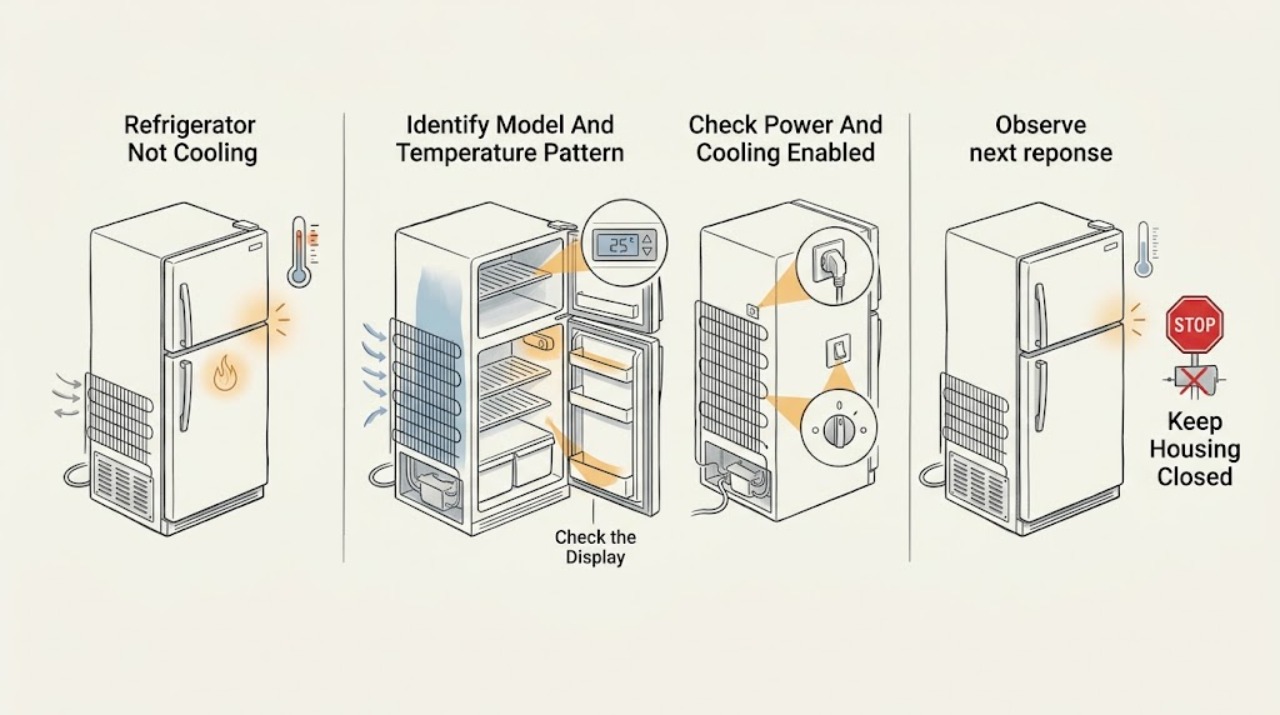
Start by separating a refrigerator that is completely off from one that has lights but is warm. Confirm the accessible power connection and that cooling is enabled; some Whirlpool-family controls use a Cooling Off or Showroom/Demo state, but the exit sequence varies by model. Then check the temperature setting, room or garage conditions, door closure and gasket contact, blocked interior vents, and whether a large load was recently added. Clean only a model-approved accessible grille or condenser area with power disconnected; some models do not permit owner coil cleaning. If the freezer is cold but the fresh-food section is warm, blocked air passages or a defrost or fan problem becomes more likely; if both compartments stay warm, the compressor, condenser airflow, sealed system, control, or power path may be involved. Do not remove panels, pierce tubing, handle refrigerant, or make energized electrical checks. Persistent warm temperatures, repeated clicking, a hot or silent compressor, heavy frost, a damaged cord, or any sealed-system or internal electrical fault needs qualified Inglis/Whirlpool service.
Before you begin
Safety first
- The user may identify the model, check an accessible plug and outlet from a dry position, verify documented cooling settings, rearrange food around visible vents, inspect door contact, and clean an accessible condenser only when the exact manual permits it with power disconnected. Qualified service must handle panels, fans, defrost components, controls, wiring, compressor, and sealed-system tubing or refrigerant.
Work through in order
Diagnostic checks
Use only checks that match the exact appliance or system and its official guide.
-
Check 1
Record the complete Inglis model and serial information, whether the refrigerator is top-freezer, bottom-freezer, side-by-side, or another design, which compartment is warm, and the approximate temperature trend. Note any display message, recent move, installation, power event, or large food load.
Expected result: Only the fresh-food section is warm; both sections are warm; the freezer is also warming; the refrigerator is newly installed; or the exact model cannot be identified.
Next step: Use the matching symptom branch and exact owner manual. If the model or temperature pattern is unknown, gather that information before choosing a reset or cleaning procedure.
Stop if: Do not remove panels or move a built-in or heavy refrigerator to find a concealed label or component.
Why this matters
Why: A one-compartment temperature problem points toward airflow, fan, door, or defrost behavior, while both compartments warm points toward shared power, controls, condenser, compressor, or sealed-system causes. Model identity determines which controls and access points are user-serviceable.
-
Check 2
From a dry, safe position, observe the interior light and display, confirm the accessible plug is seated and the outlet switch is on, and check the exact panel for Cooling Off, Showroom, Demo, or an equivalent cooling-disabled indication. Do not open electrical parts.
Expected result: There is no light or display; the outlet is switched off; cooling-off or demo is shown; lights work but both compartments are warm; or the controls appear normal.
Next step: Restore only an accidentally switched-off outlet or use the exact manual's documented cooling-enable procedure. If protection operates again or cooling stays off, leave the appliance disconnected when safe and arrange qualified service.
Stop if: Do not repeatedly reset a breaker, touch a wet or damaged cord or outlet, or use an extension cord as a repair.
Why this matters
Why: No light or display sends the diagnosis toward power. Lights with Cooling Off or Demo can be a deliberate control state rather than a failed compressor. Normal controls with warmth move the diagnosis to settings, airflow, environment, or cooling hardware.
-
Check 3
Check that the refrigerator and freezer controls are set for normal cooling, the unit is not next to a heat source or in an unsuitable garage environment, doors are not being held open, and no large recent load is blocking the cabinet. Make only small model-documented setting changes and allow the manual's stabilization period.
Expected result: A control was set warm or cooling was off; the appliance is in a very hot or cold location; doors are frequently open; a large load was recently added; or conditions are normal.
Next step: Correct the accessible condition and recheck after the model's stated stabilization interval. If food-safety temperature is uncertain, move perishable food to a safe cold appliance while arranging diagnosis.
Stop if: Do not compensate for a blocked vent or poor installation by selecting extreme settings, and do not place the refrigerator against a heat source or behind an obstructing cabinet door.
Why this matters
Why: Incorrect settings, environment, door use, and a recent load can make temperatures appear abnormal without a component failure. Normal conditions after adequate stabilization make airflow or refrigeration hardware more likely.
-
Check 4
Inspect the closed doors and visible gaskets for packages, shelves, or dirt preventing contact. Inside the cabinet, move food away from the visible supply and return vents without removing fixed covers; note whether the freezer has an unusual frost sheet or the refrigerator has one-sided cold spots.
Expected result: A package holds a door open; a gasket is dirty, loose, or damaged; a vent is blocked; frost covers a rear panel; or doors, vents, and visible seals appear normal.
Next step: Rearrange accessible packages and clean only the visible gasket with the manual-approved method. If frost returns, a fan is silent or abnormal, or access requires removing a panel, keep the unit within safe use limits and call service.
Stop if: Do not chip frost with a sharp object, use a heat gun or open flame, remove evaporator covers, or unplug and reassemble hidden components without the exact manual.
Why this matters
Why: Poor door sealing admits warm, moist air, while blocked vents interrupt cold-air circulation. A broad frost layer can restrict airflow and suggests a defrost or airflow fault; a normal visible cabinet does not rule out an internal fan or control problem.
-
Check 5
If the exact manual and design permit owner cleaning, disconnect power, inspect the accessible base grille or condenser area for dust and blocked ventilation, and use only a soft brush or vacuum as directed. If the model says the condenser is technician-only or the grille will not safely come off, leave it closed.
Expected result: The grille or accessible condenser area is dusty; ventilation is blocked; the manual does not permit owner access; or the area is clean and unobstructed.
Next step: Replace the grille and restore power only after cleaning is complete and the manual permits it; allow the refrigerator to stabilize. Arrange service if the condenser is inaccessible, the compressor or fan is abnormal, or cooling remains poor.
Stop if: Do not remove a sealed-system cover, touch a fan or compressor while powered, spray liquid into the base, or clean a model whose manual reserves the task for a technician.
Why this matters
Why: Restricted condenser airflow can make the motor work harder and reduce cooling, but not every Inglis/Whirlpool-family model has owner-cleanable coils. A clean accessible area shifts attention to controls, fans, defrost, compressor, or the sealed system.
-
Check 6
If the refrigerator remains warm after the safe setting, door, airflow, environment, and model-approved cleaning checks, record the compartment temperatures or trend, compressor and fan sounds as heard externally, frost pattern if visible without removing covers, and any clicking, odor, leak, or code.
Expected result: Both compartments remain warm; only the refrigerator section is warm; frost returns quickly; the compressor repeatedly clicks or stays silent; or the cord, plug, cabinet, or tubing shows damage.
Next step: Keep food safe and arrange qualified Inglis/Whirlpool service with the model information and observations. Do not restore use after an electrical smell, damaged cord, refrigerant leak sign, or repeated protection operation until assessed.
Stop if: Do not remove rear covers, pierce tubing, add refrigerant, replace a compressor or control, or perform energized electrical or sealed-system diagnosis.
Why this matters
Why: Persistent whole-cabinet warmth can involve power, control, condenser airflow, compressor, or the sealed refrigeration system. One-section warmth or recurring frost can involve a fan, damper, defrost, gasket, or airflow path. These observations do not identify a safe replacement part.
Use your observations
Decision map
Find the observation that best matches what you see, then follow the next safe action.
-
PATH 01Safety boundary
What you see
The interior light and display are both absent, and there is no response from the refrigerator.
Do this next
Check only the accessible plug and outlet switch. If the outlet is dead, a fuse or breaker operates again, or the refrigerator stays dead at a known-good supply, leave it disconnected and use qualified electrical or appliance service.
Why this path and its safety boundary
Why it matters: A supply, plug, outlet, cord, or internal power-input condition is more likely than a temperature-setting or airflow issue.
Safety stop: Do not open the outlet, plug, control enclosure, or rear cabinet, and do not repeatedly reset protection.
-
PATH 02Safety boundary
What you see
Lights and controls work, but the display shows Cooling Off, Showroom, Demo, or the compressor appears not to run after a power event.
Do this next
Use the exact owner's manual to re-enable cooling once. If the indicator will not clear or the refrigerator stays warm, arrange service rather than guessing another key combination.
Why this path and its safety boundary
Why it matters: A deliberate cooling-disabled state or model-specific restart condition is more likely than an immediate sealed-system failure. Whirlpool says exit steps vary by refrigerator type.
Safety stop: Do not hold random control combinations, defeat door switches, or remove the control panel.
-
PATH 03Safety boundary
What you see
The freezer remains cold enough to freeze food, but the fresh-food compartment is warm or has uneven cold spots.
Do this next
Rearrange food away from visible vents, check door contact and gasket condition, and note any frost without removing covers. Use service for recurring frost, an abnormal fan, or internal access.
Why this path and its safety boundary
Why it matters: Blocked supply or return vents, a door gasket, evaporator fan, damper, frost buildup, or defrost-related airflow restriction is more likely than total loss of refrigeration.
Safety stop: Do not chip frost, remove evaporator covers, or force a fan or damper.
-
PATH 04Safety boundary
What you see
Both the freezer and refrigerator compartments remain warm after controls are enabled and the appliance has had time to stabilize.
Do this next
Check only the external setting, environment, door closure, and model-approved condenser access. If warmth persists, keep food safe and call qualified service.
Why this path and its safety boundary
Why it matters: A shared cooling, power, condenser-airflow, compressor, control, or sealed-system condition is more likely than a refrigerator-only vent blockage.
Safety stop: Do not open the rear cabinet, handle refrigerant tubing, or make internal electrical checks.
-
PATH 05Safety boundary
What you see
Frost quickly returns, the compressor clicks repeatedly or stays silent, a fan sounds abnormal, or there is an odor, damaged cord, leak sign, or repeated protection operation.
Do this next
Stop and arrange qualified Inglis/Whirlpool service. Keep the refrigerator off when electrical or refrigerant safety is uncertain and protect perishable food elsewhere.
Why this path and its safety boundary
Why it matters: The user-check boundary has been reached. Defrost, fan, compressor, control, sealed-system, or electrical faults can look similar from outside and require trained diagnosis.
Safety stop: Do not reproduce clicking or overheating, remove panels, add refrigerant, pierce tubing, or continue after an electrical smell or damaged cord.
Helpful context
Understand the symptom
Confirm the Inglis/Whirlpool model and cooling state
Inglis refrigerators can differ in control layout, freezer arrangement, airflow, condenser access, and service documentation. Record the model and serial information before changing a control. Whirlpool's official support also notes that some refrigerators can be turned off after a power event and that Showroom or Demo mode can leave lights on while disabling cooling. Use the exact owner's manual for the applicable control sequence.
The warm compartment changes the diagnosis
If the freezer remains properly cold but the refrigerator compartment is warm, blocked supply or return vents, door sealing, an evaporator fan, or an ice or defrost condition is more plausible than a total loss of cooling. If both compartments are warm, begin with power and cooling settings, then consider airflow around the condenser and the internal refrigeration system. A recently installed appliance or large load can take time to stabilize; do not turn a temporary recovery period into a parts diagnosis.
Keep sealed-system and electrical work professional
External observation and model-approved cleaning are the user boundary. Do not remove the rear cover, access the compressor or control wiring, pierce a refrigerant tube, add refrigerant, or make measurements on energized components. If the cord, plug, outlet, compressor, fan, frost pattern, or control requires internal access, stop using the refrigerator as appropriate and arrange qualified service.
Safety boundary
Stop conditions
- Stop using the refrigerator and obtain qualified help for a damaged cord or plug, electrical odor, sparks, repeated breaker operation, water near electrical parts, or suspected refrigerant leak.
- Do not remove rear or evaporator panels, handle compressor or control wiring, pierce sealed tubing, add refrigerant, or make energized electrical measurements.
- Do not chip frost with a sharp object or use flame, a heat gun, or improvised heat to force defrosting.
- Clean condenser areas only when the exact manual permits it, with power disconnected; some Inglis/Whirlpool-family models reserve condenser access for technicians.
- Do not infer a compressor, fan, defrost, valve, control, or sealed-system part from warmth alone. Use the exact model manual and service route.
- Move perishable food to a safe cold appliance if temperatures are unsafe, and arrange service for persistent warmth after the external checks.
When checks do not resolve it
Need a professional?
Safety scope: The user may identify the model, check an accessible plug and outlet from a dry position, verify documented cooling settings, rearrange food around visible vents, inspect door contact, and clean an accessible condenser only when the exact manual permits it with power disconnected. Qualified service must handle panels, fans, defrost components, controls, wiring, compressor, and sealed-system tubing or refrigerant.
Common questions
FAQ
Why is my Inglis refrigerator warm but the lights still work?
Check the exact control panel for Cooling Off, Showroom, or Demo, then verify the temperature settings, doors, vents, environment, and recent load. Lights with cooling disabled do not prove that the compressor or sealed system has failed.
Why is the refrigerator section warm while the freezer is cold?
Blocked supply or return vents, door sealing, frost, a fan, damper, or defrost-related airflow problem is more likely than a total cooling loss. Move food away from visible vents and arrange service for recurring frost or any internal access.
Can a dirty condenser make an Inglis refrigerator stop cooling?
Restricted condenser airflow can reduce performance, but access varies by model. Clean an accessible grille or condenser only if the exact manual permits it, with power disconnected; some models require a technician.
How long should I wait after changing an Inglis refrigerator setting?
Use the exact manual's stabilization period. Whirlpool's control guidance recommends waiting at least 24 hours after a small setting change before rechecking many full-size models, while a recent installation or large load can also take time to recover.
When does an Inglis refrigerator need professional service?
Arrange service for persistent warmth after external checks, repeated clicking, abnormal fan behavior, recurring frost, a damaged cord, electrical odor, repeated protection operation, or any compressor, control, sealed-system, refrigerant, or internal-wiring diagnosis. Do not remove panels or add refrigerant.
Read the exact guide
Official sources
- Not CoolingWhirlpool Product Help · Opened the official Whirlpool Product Help page; its family-level checks are used as conditional guidance for Inglis/Whirlpool-family refrigerators, while exact model manuals control access and settings.
- Owner's ManualWhirlpool Corporation / Inglis Limited · Opened the official Whirlpool-hosted owner's manual; the PDF identifies Inglis Limited service information and contains family/model-specific refrigerator guidance. It is used conditionally rather than as a universal Inglis procedure.
- Tips for Properly Setting the ControlsWhirlpool Product Help · Opened the official Whirlpool control guidance; it explicitly says control panels vary and directs owners to the exact Use & Care Guide.
- Cooling Off Indicator Light - RefrigeratorWhirlpool Product Help · Opened the official Whirlpool page; its button example is for compatible refrigerator families and is not applied as a universal Inglis sequence.
Community feedback
Share a repair observation
Share a plain-text repair observation. Accepted observations are published automatically; this page may take a moment to update.