
On this page
Start here
Quick answer
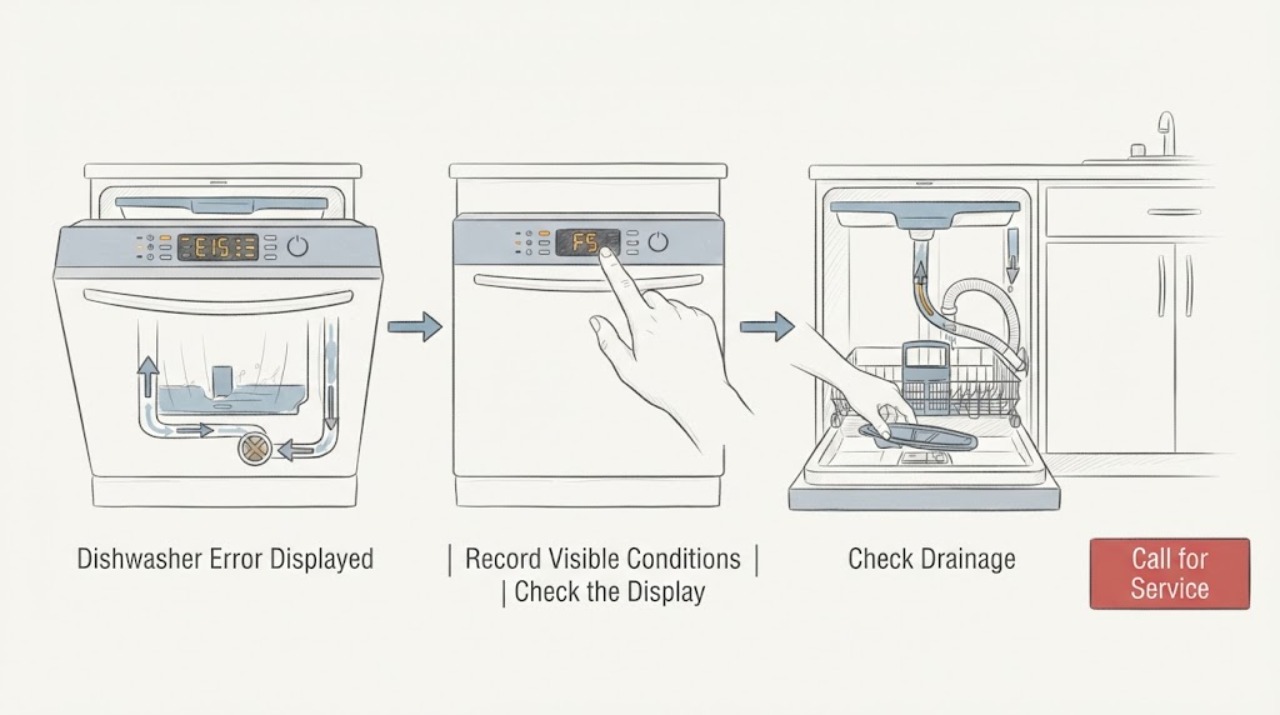
Do not decode a JennAir dishwasher error from a universal chart. First record the exact model, the full digital code or the two groups of LED flashes, and whether the dishwasher is filling, draining, paused, or showing water or a leak. JennAir’s opened Product Help guide says digital models commonly show an F#E# code, while flashing-light models communicate two numbers separated by a pause; it also states that exact codes vary by model. Match the record to the exact model manual or JennAir Product Help page. The official examples route H2O or F8E1 toward a water-supply check, F9E1 toward the accessible drain path, and F6E1 or F7E2 toward a power cycle followed by service if the code returns, but these examples are not a license to generalize across models. With power isolated, the user may check a visible supply or drain issue and follow one model-documented power cycle. Stop for a leak, water under the machine, smoke, burning odor, abnormal heat, damaged wiring, or repeated breaker trips; close the water supply and disconnect power when safe, and use qualified service for internal pumps, valves, floats, controls, wiring, or any recurring code.
Before you begin
Safety first
- The user may record the model and code, inspect visible hoses, supply, drain connection, and accessible filter with power isolated, and perform one exact-manual power cycle when safe. Qualified personnel must handle base access, pumps, valves, floats, motors, controls, wiring, door interlocks, live tests, leaks near electrical parts, and any hard-wired disconnect beyond the home's ordinary breaker operation.
Work through in order
Diagnostic checks
Use only checks that match the exact appliance or system and its official guide.
-
Check 1
Before pressing Cancel or cycling power, record the exact JennAir model and region, the full code if shown, or the number of flashes in each group. Note whether the panel is digital, a Clean or Control light is flashing, several lights are flashing, or a front status light is involved. Also note whether the door is closed and whether water is present under or inside the dishwasher.
Expected result: A complete F#E# code is visible; a two-group flash pattern repeats; several lights flash without a readable code; or the panel is dark while another symptom is present.
Next step: Use the exact model documentation and the matching branch below. Do not substitute an error meaning from another JennAir control generation.
Stop if: Stop and isolate power when safe for a leak, water near electrics, smoke, sparks, burning odor, abnormal heat, damaged wiring, or a repeated breaker trip.
Why this matters
Why: Display form and model identity determine which JennAir manual or Product Help entry applies. A partial code or a flash count taken without its pause pattern is not enough to identify a fault.
-
Check 2
For a digital panel, wake the screen if needed and copy every character of the F#E# code. For flashing LEDs, count the first group, the short pause, the second group, and the longer repeat pause; write the pattern down or make a record without placing hands inside the machine.
Expected result: The display yields a complete code; the flash pattern yields two repeatable groups; the count changes between repetitions; or the indicator stays continuously lit rather than flashing.
Next step: Search the exact model’s JennAir manual or Product Help page using the recorded code or pattern. If it cannot be read consistently, report the display behavior to service instead of guessing.
Stop if: Do not remove a control panel, probe the display wiring, or continue operating if the panel is accompanied by smoke, heat, water, or electrical noise.
Why this matters
Why: JennAir documents separate digital and flashing-light methods, with the pause separating the function and error numbers. A changing or incomplete pattern may be a display or control issue rather than a reliable fault code.
-
Check 3
If the exact model entry points to water detection, water supply, or draining, switch the dishwasher off and isolate power before touching water connections or accessible filters. Check only the visible water valve and inlet hose, accessible filter, drain hose, disposer connection, or air gap named by that entry. Do not reach through standing water or remove the base.
Expected result: The water supply is off or the hose is visibly kinked; the accessible drain path or disposer connection is blocked; water is under the machine; or all allowed external paths appear clear.
Next step: Correct only the visible condition permitted by the exact model guide and observe one safe attempt if there is no leak or hazard. If water remains, the code returns, or the external paths are clear, close the water supply when appropriate and arrange service.
Stop if: Stop for a leak, water near electrical parts, a hot or inaccessible pump area, a need to tilt the dishwasher, or any need to remove the base or test a valve or pump live.
Why this matters
Why: The first findings support a visible supply or drain restriction, while water under the unit can indicate leak or overfill protection. A clear external path with a returning code makes an internal valve, pump, float, sensor, or control issue more likely, but does not identify a part.
-
Check 4
If the code or light appears after a start attempt or interrupted cycle, check from the front that no rack or dish obstructs the door and close it normally. Follow the exact manual’s Start/Cancel timing and cycle-interruption instructions; the opened owner guide says its covered model must be firmly closed within four seconds after Start/Cancel.
Expected result: The cycle resumes after the documented door-close action; the Start/Cancel light keeps flashing; the door will not latch; or the same code returns immediately.
Next step: Remove only a visible loading obstruction and use the documented start sequence once. If the latch or code problem repeats, stop at the exterior and arrange qualified service; do not bypass the interlock.
Stop if: Do not force the door, tape a safety switch, remove the latch, or perform live tests. Stop immediately for water, burning odor, smoke, heat, or electrical symptoms.
Why this matters
Why: A door not closed in the model’s start window or an interruption can explain a start-related indication. A latch that will not engage or a recurring code points toward door sensing, control, water, or another model-specific fault.
-
Check 5
Only after recording the code and confirming there is no hazard, perform the exact JennAir Product Help power-cycle procedure once: disconnect the control from its power source for the documented period, then restore power without opening panels. Observe whether the code clears, the dishwasher completes a safe start, or the same display returns.
Expected result: The code clears and the dishwasher operates normally; it clears but returns during the next attempt; the same code remains; or the panel becomes unresponsive.
Next step: Monitor at most one supervised cycle with no hazard. For a returning or persistent code, an unresponsive panel, or any internal-function symptom, provide the model, display record, water state, and checks to JennAir or a qualified technician.
Stop if: Do not repeatedly cycle power, restart after smoke or burning odor, or continue when a leak, abnormal heat, damaged wiring, or breaker trip is present.
Why this matters
Why: One-time recovery can indicate a temporary control state, but it does not prove that a user interface, main control, motor, valve, sensor, or leak-protection issue is repaired. A returning code is the stronger service signal.
Use your observations
Decision map
Find the observation that best matches what you see, then follow the next safe action.
-
PATH 01Safety boundary
What you see
The code is incomplete, the flash count changes, several lights flash without a stable pattern, or the owner cannot determine whether the panel is digital or LED-based.
Do this next
Photograph or record the repeating panel behavior, identify the model and region, and use its manual or Product Help entry. Arrange service if the pattern remains unstable or the panel is otherwise unresponsive.
Why this path and its safety boundary
Why it matters: The display record is insufficient for a safe code interpretation. A generic JennAir code chart could misidentify the fault because the official guide says exact codes vary by model.
Safety stop: Do not remove the control panel, probe wiring, or keep operating with smoke, heat, water, or electrical symptoms.
-
PATH 02Safety boundary
What you see
The exact model entry identifies H2O or F8E1-type water detection and the visible supply valve is off or the inlet hose is kinked, with no leak or electrical hazard.
Do this next
Restore the visible supply or correct a visible hose issue only as the exact manual allows, then press Start or resume as documented. If the indication returns, arrange service for the internal inlet or sensing path.
Why this path and its safety boundary
Why it matters: A visible water-supply restriction is more likely than a wash-motor or interface fault. JennAir’s opened guide lists water-supply checks for its water-detection examples, but the exact model entry controls.
Safety stop: Close the water supply and stop for a leak, water near electrics, hidden hose damage, or any need to disconnect plumbing.
-
PATH 03Safety boundary
What you see
The exact model entry identifies F9E1 or another drain-related indication and water remains in the tub, the drain hose is kinked, the disposer connection is blocked, or an air gap is obstructed.
Do this next
With power isolated, clear only the accessible condition named by the manual and run one safe confirmation attempt. If drainage remains poor or the code returns, arrange service for the pump or internal drain path.
Why this path and its safety boundary
Why it matters: An accessible drain-path restriction is more likely. JennAir’s guide names the filter, drain hose, disposer connection, and air gap for its long-drain example, but that example is not a universal code mapping.
Safety stop: Do not remove the base, reach through hot or standing water, tilt the appliance, or test the drain pump live.
-
PATH 04Safety boundary
What you see
A complete model-matched code such as F6E1 or F7E2 returns after the documented power cycle, or the dishwasher remains unable to start with no visible water-path or door obstruction.
Do this next
Stop user troubleshooting and schedule qualified JennAir service with the exact code, display form, model, cycle state, and power-cycle result. Do not select a board or motor from the code alone.
Why this path and its safety boundary
Why it matters: JennAir’s opened guide associates these examples with a user-interface/main-control error or a wash-motor error. A returning code makes an internal control, motor, wiring, or related fault more likely than a temporary display state.
Safety stop: Do not open the control or motor area, perform live tests, bypass the door or float safety, or restart after an electrical or thermal warning.
-
PATH 05Safety boundary
What you see
Water is present under the dishwasher, the exact entry indicates a leak or overfill condition, or there is smoke, burning odor, abnormal heat, damaged wiring, or repeated breaker tripping.
Do this next
Stop the cycle, close the water supply if a leak is present, and disconnect power only from a safe dry position. Leave the dishwasher off and arrange qualified service with the model and code record.
Why this path and its safety boundary
Why it matters: Leak protection or an electrical, thermal, or fire hazard overrides code interpretation. The user cannot safely distinguish a float, valve, hose, control, pump, or wiring failure from the display alone.
Safety stop: Do not restart to test, reach into water, remove the drip tray or base, touch wet wiring, or perform live electrical checks.
Helpful context
Understand the symptom
Capture the display before trying to clear it
An error shown on a JennAir dishwasher may be a digital code, a flashing Clean or status light, several flashing buttons, or a front status-light pattern. Record the exact model and serial information, the code including its letter or number, or the two flash groups and their pauses. JennAir’s Product Help index separates these display forms and links the model manual, so a code copied from a different control generation can send the diagnosis in the wrong direction.
Read a digital code or flashing sequence differently
On a digital-display model, wake an idle panel as the guide describes and copy the complete F#E# value. On a flashing-LED model, count the first rapid group, wait for the short pause, count the second group, and wait for the longer pause before the pattern repeats. The opened JennAir guide uses a seven-flashes, pause, one-flash example to illustrate F7E1, but it also says exact codes vary by model. Use the exact model manual or the matching Product Help entry rather than building a new code table from this example.
Let the symptom choose the safe external check
A code associated with not detecting water is a different path from a long-drain indication, a wash-motor or user-interface error, or water detected under the dishwasher. With power isolated, inspect only the visible supply valve, inlet hose, accessible filter, drain hose, disposer connection, or air gap that the exact JennAir instructions allow. Do not remove the base, reach through standing water, or assume that the same code means the same thing on every generation.
Power-cycle once, then treat a returning code as evidence
JennAir’s opened Product Help guide describes disconnecting the control from power for 30 seconds, using the plug where fitted or the dishwasher breaker when hard-wired. Only do this when there is no leak, smell, heat, smoke, or other hazard and only after recording the error. A cleared code is not proof of a repair; if the same code or light sequence returns, use the model-matched service route. Never bypass a door or float safety, open a control compartment, or perform live electrical tests.
Safety boundary
Stop conditions
- Stop and disconnect power when safe for smoke, sparks, flame, burning odor, abnormal heat, damaged wiring, water near electrical parts, or repeated breaker trips.
- Close the dishwasher water supply for a leak and do not restart until the water and electrical safety have been assessed.
- Do not apply a generic code table across JennAir models; confirm the exact model, region, display form, and complete code or flash pattern.
- Do not remove the base or control panel, reach through standing water, bypass a door or float safety, or perform live tests.
- Do not repeatedly cycle power or replace a pump, valve, motor, sensor, fuse, or control based only on the displayed code.
Only after diagnosis
Potential parts
- model-matched inlet valve, drain pump, hose, filter, or leak-protection float component
Consider only after the exact model code and qualified diagnosis identify a water-supply, drain, overfill, or leak-protection fault that remains after safe visible checks.
JennAir water and drain assemblies vary by model, control generation, installation, and region. Confirm exact model fitment before ordering; internal water and electrical access requires qualified service. - model-matched user interface, main control, wash motor, sensor, or door-interlock component
Consider only when the model-matched code returns after the documented power cycle and qualified diagnosis confirms a control, motor, sensor, or interlock failure; an error display alone does not identify the part.
JennAir controls and wash systems differ across model families and display types. Confirm the exact model and manufacturer fit information before ordering or replacing any internal part.
When checks do not resolve it
Need a professional?
Arrange JennAir or qualified dishwasher service when the exact code or light pattern returns after one documented power cycle, the display cannot be read reliably, the door will not latch, the panel remains unresponsive, the visible water or drain path is clear but the indication remains, or the model-matched code points to a motor, interface, control, valve, sensor, float, or leak path. Stop immediately for water under the unit, a leak near electrical parts, smoke, sparks, burning odor, abnormal heat, damaged wiring, or repeated breaker trips; close the water supply and disconnect power when safe. The user may record the model and display, inspect visible water and drain conditions with power isolated, and follow one model-specific start or power-cycle procedure. Internal pumps, valves, floats, heaters, motors, controls, wiring, door interlocks, base access, and live tests belong to qualified personnel.
Safety scope: The user may record the model and code, inspect visible hoses, supply, drain connection, and accessible filter with power isolated, and perform one exact-manual power cycle when safe. Qualified personnel must handle base access, pumps, valves, floats, motors, controls, wiring, door interlocks, live tests, leaks near electrical parts, and any hard-wired disconnect beyond the home's ordinary breaker operation.
Common questions
FAQ
How do I read a JennAir dishwasher error code?
Record the exact model first. For a digital display, copy the complete F#E# code. For flashing lights, count the first group, the pause, the second group, and the repeat pause. JennAir says exact codes vary by model, so match the record to the model manual or Product Help entry.
What does a flashing Clean light mean on a JennAir dishwasher?
JennAir says a flashing Clean light usually communicates an error through a two-part flash sequence. Count both groups around the pause and use the exact model documentation; do not assign a code from another model.
Can I reset a JennAir dishwasher error code?
After recording the code and confirming there is no leak or hazard, JennAir’s Product Help guide describes disconnecting power from the control for 30 seconds, using the plug or the dishwasher breaker as applicable. If the code returns, arrange service instead of repeatedly resetting it.
What should I check for an H2O or water-related JennAir code?
Use the exact model entry first. Where it directs a water-supply check, inspect the visible supply valve and inlet hose for an off valve or kink with power isolated. If the code returns, there is a leak, or the visible path is clear, stop and arrange service.
When should I stop using a JennAir dishwasher with an error displayed?
Stop for water under the dishwasher, a leak near electrical parts, smoke, burning odor, abnormal heat, damaged wiring, or repeated breaker trips. Close the water supply and disconnect power when safe, then use qualified service; do not remove panels or bypass a safety device.
Read the exact guide
Official sources
- Dishwasher Error Codes - ReadingJennAir Product Help · Official JennAir Product Help guide; it explicitly says exact codes vary by model and presents common examples, so it is a routing aid rather than a universal code chart.
- Error Code or Flashing LightsJennAir Product Help · Official JennAir dishwasher support index; it organizes multiple display forms and links model-dependent entries rather than establishing one universal mapping.
- Owner's ManualJennAir Brand Home Appliances · Official JennAir owner guide for a specific dishwasher model family; button timing and indicators must be confirmed against the user's exact model.
Community feedback
Share a repair observation
Share a plain-text repair observation. Accepted observations are published automatically; this page may take a moment to update.