
On this page
Start here
Quick answer
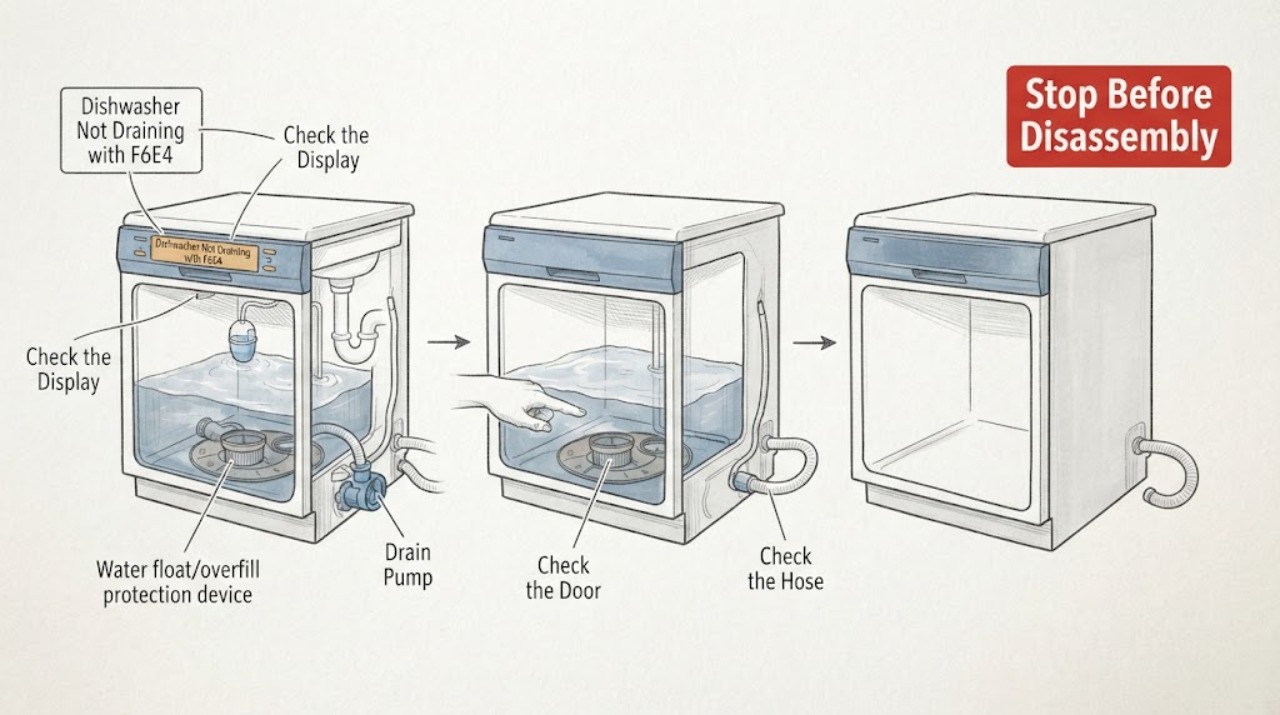
On a JennAir dishwasher, F6E4 should not be treated as proof that the drain pump is dead. The opened Whirlpool Product Help entry for the dishwasher version of F6E4 identifies a water float switch and says to check whether the dishwasher is level, then cycle power; it does not identify a pump failure from a sound. If the selected drain option leaves water in the tub, first stop the cycle and check for an active leak, excessive water or suds, and a visibly unlevel appliance. Disconnect power only from a dry, safe position. When the tub is safe to access, check only the model-approved filter, drain hose, disposer connection, or air gap for an accessible blockage. A clear path with persistent standing water, a returning F6E4, or any leak requires qualified JennAir service. Do not run repeated drain cycles, reach into standing water, or replace the pump based only on the code or noise.
Work through in order
Diagnostic checks
Use only checks that match the exact appliance or system and its official guide.
-
Check 1
Stop the selected Drain option and note the complete F6E4 display, whether water remains in the tub, whether the dishwasher is level, and whether the floor, toe-kick, or nearby electrical connection is wet. Disconnect power only if the area and connection are dry and safe.
Expected result: Water is under or inside the dishwasher, suds are present, the unit leans, the supply has tripped, or there is no visible water and the unit is level.
Next step: If water or suds are present, stop the cycle, close the water supply when appropriate, keep clear of wet electrics, and arrange qualified service. If there is no hazard, continue with the visible level and path checks.
Stop if: Do not touch wet wiring, reach into standing water, or restart the dishwasher to make the pump sound repeat.
Why this matters
Why: F6E4 is associated with a water float switch in the opened dishwasher reference, while water, suds, or incorrect leveling can keep the float condition active. A wet or electrical hazard overrides diagnosis.
-
Check 2
With the dishwasher empty, power isolated, and the exact manual available, verify whether it is visibly level and whether a toe-kick or cabinet position is pressing against the door or base. Do not remove the base or adjust hidden feet without the model instructions.
Expected result: The dishwasher leans or is pressed against the cabinet, the installation looks level, or leveling cannot be checked safely without moving the appliance.
Next step: Correct only an accessible, model-approved installation issue. If the appliance must be pulled out or the level condition remains uncertain, leave it off and arrange service.
Stop if: Do not pull on water or electrical connections, tilt the dishwasher, or work below it while water is present.
Why this matters
Why: The opened F6E4 reference says incorrect leveling can actuate the overfill or float switch. A level installation makes that visible explanation less likely but does not prove a pump fault.
-
Check 3
After confirming a dry, safe work area, inspect only the user-accessible filter, sump opening, drain hose, disposer connection, or air gap named by the exact JennAir manual. Remove loose visible debris only as that manual allows; do not disassemble the pump.
Expected result: A filter or visible drain path is blocked, the path is clear, the hose is kinked, or the accessible area is full of water or damaged.
Next step: Clear only the accessible obstruction, restore the filter and covers correctly, and stop if F6E4 or standing water remains. Do not choose a replacement pump from this check.
Stop if: Do not reach through hot or dirty water, remove the base or sump, probe wiring, or run the pump with a cover or filter removed.
Why this matters
Why: A visible restriction can explain poor drainage, but a clear path does not distinguish a pump, float, sensor, wiring, or control fault. Damage or water exposure requires service.
-
Check 4
If there is no leak, no standing water hazard, and the exact model instructions permit it, perform at most one documented power reset for the dishwasher. Use the exact JennAir procedure; the opened F6E4 family reference describes disconnecting power for 30 seconds before restoring it.
Expected result: F6E4 clears and the dishwasher drains normally, F6E4 returns, the tub remains full, or the electrical supply trips again.
Next step: If the code returns, water remains, or the supply trips, keep the dishwasher off and contact qualified JennAir service with the reset result. Do not repeat the reset or drain programme.
Stop if: Do not reset through a wet connection, hold a float down, bypass the door or leak protection, or keep cycling power.
Why this matters
Why: A one-time recovery can clear a temporary control state, but a returning code or unchanged drain result means the underlying float, drain path, pump, or control issue remains unresolved. A trip is an electrical stop.
-
Check 5
Record whether the pump was heard, whether it moved any water, the water level before and after the Drain option, the F6E4 timing, level condition, visible filter or hose result, and any leak or suds. Give the record and the complete model number to service.
Expected result: The pump is silent, hums, runs briefly, drains weakly, or appears to run normally while water remains; F6E4 is stable or intermittent.
Next step: Leave the dishwasher unused and arrange qualified JennAir service for persistent F6E4, poor drainage, a float or leak condition, or any internal access requirement.
Stop if: Do not order a pump, apply voltage to it, remove the lower assembly, or test energized wiring from the sound alone.
Why this matters
Why: These observations help a technician choose a safe diagnostic path, but sound and drain result alone cannot prove that the pump is clogged or dead.
Use your observations
Decision map
Find the observation that best matches what you see, then follow the next safe action.
-
PATH 01Next step
What you see
Water is under the dishwasher, the tub is overfilled, suds are pushing water out, or water is near an electrical connection.
Do this next
Stop the cycle, close the water supply when appropriate, disconnect power only from a dry safe position, and arrange qualified service. Do not reach into the water or restart.
Why this path and its safety boundary
Why it matters: The float or leak-protection condition and the electrical hazard take priority over deciding whether the drain pump is clogged or dead.
-
PATH 02Next step
What you see
F6E4 is displayed, the dishwasher is visibly out of level, and no leak or electrical hazard is present.
Do this next
Correct only the accessible model-approved leveling issue, then follow the exact manual for one safe confirmation. Escalate if the code returns.
Why this path and its safety boundary
Why it matters: The opened F6E4 dishwasher reference says incorrect leveling can actuate the overfill or float switch, so installation is a plausible first branch rather than a pump diagnosis.
-
PATH 03Next step
What you see
The dishwasher is level, the visible filter and drain path are clear, and F6E4 or standing water remains after one permitted power reset.
Do this next
Keep the dishwasher off and arrange qualified JennAir service. Provide the complete code, water level, reset result, and whether any pump sound was heard.
Why this path and its safety boundary
Why it matters: The visible restriction and temporary control-state explanations are less likely, but the result still does not distinguish a float, pump, sensor, wiring, or control fault.
-
PATH 04Next step
What you see
A filter or accessible drain connection is visibly blocked, and clearing it restores normal drainage without a leak or returning F6E4.
Do this next
Refit all covers and filters as the exact manual shows, watch the first supervised use for water, and stop if the code, standing water, or leak returns.
Why this path and its safety boundary
Why it matters: A visible drain-path restriction is supported as the immediate cause; the code still does not establish that a pump part should be replaced.
When checks do not resolve it
Need a professional?
Arrange qualified JennAir service when F6E4 returns, water remains after a visible path check and one permitted reset, the dishwasher leaks or the float condition persists, the unit is not level and cannot be safely corrected, or diagnosis requires pump, base, wiring, or control access. Do not select a drain pump from the code or sound alone.
Common questions
FAQ
Does JennAir dishwasher code F6E4 mean the drain pump is dead?
No. The opened dishwasher Product Help entry identifies F6E4 with a water float switch and recommends checking level and cycling power. A pump sound or lack of sound cannot prove that the pump is dead; standing water can also involve the filter, hose, float, sensor, wiring, or control.
Why does my JennAir dishwasher show F6E4 when I select Drain?
The selected Drain option exposes the result that water is not leaving, but F6E4 is documented as a water-float-switch condition in the opened dishwasher reference. Check for water, suds, incorrect leveling, and an accessible drain restriction using the exact model manual before considering an internal pump diagnosis.
Can I keep running Drain to clear a clog?
No. Repeated Drain cycles can worsen a leak or electrical problem and will not safely distinguish a clogged path from a float or pump fault. Stop, isolate power only from a dry safe position, inspect only the model-approved accessible path, and arrange service if water or F6E4 remains.
What should I tell the JennAir technician?
Provide the complete model number, F6E4 display, whether Drain was selected, water level, leak or suds status, level condition, visible filter or hose result, whether the pump was heard, and the result of any single model-approved power reset. Do not report the pump as dead unless service has diagnosed it.
Read the exact guide
Official sources
- Dishwasher Error Code or Flashing Lights - Product HelpWhirlpool Product Help · Opened the official dishwasher error-code index, which lists F6E4 as a dishwasher entry and directs users to model-number manuals and service. It does not identify the assigned JennAir model's exact drain-pump failure.
- F6E4 Dishwasher - Product HelpWhirlpool Product Help · Opened the official dishwasher F6E4 entry in the Whirlpool brand-family Product Help system for the assigned JennAir dishwasher context. It identifies a water float switch, recommends checking level and cycling power, and does not establish a dead drain pump or an exact model-specific part.
- F8E4 Dishwasher - Product HelpJennAir Product Help · Opened the official JennAir dishwasher water-condition guidance as a related safety source. Its water, float, suds, and service boundaries are used conservatively and do not substitute for the exact assigned model's F6E4 manual.
Community feedback
Share a repair observation
Share a plain-text repair observation. Accepted observations are published automatically; this page may take a moment to update.