
On this page
Start here
Quick answer
Treat a non-functioning JennAir JDB9800CWX2 as an identification and safety problem before searching for a discontinued part. Record the complete model and serial numbers, the exact symptom, and any display or light pattern. JennAir directs owners to model-based manuals and troubleshooting, its service intake uses the model and serial numbers to identify the product and bring the correct parts and tools, and its FAQ says replacement or service parts are searched by model or part number. If a part is unavailable, ask JennAir or qualified service to confirm a factory-specified replacement or supersession; do not substitute a visually similar control or run the dishwasher with smoke, burning odor, water near electrical parts, or repeated breaker trips.
Work through in order
Diagnostic checks
Use only checks that match the exact appliance or system and its official guide.
-
Check 1
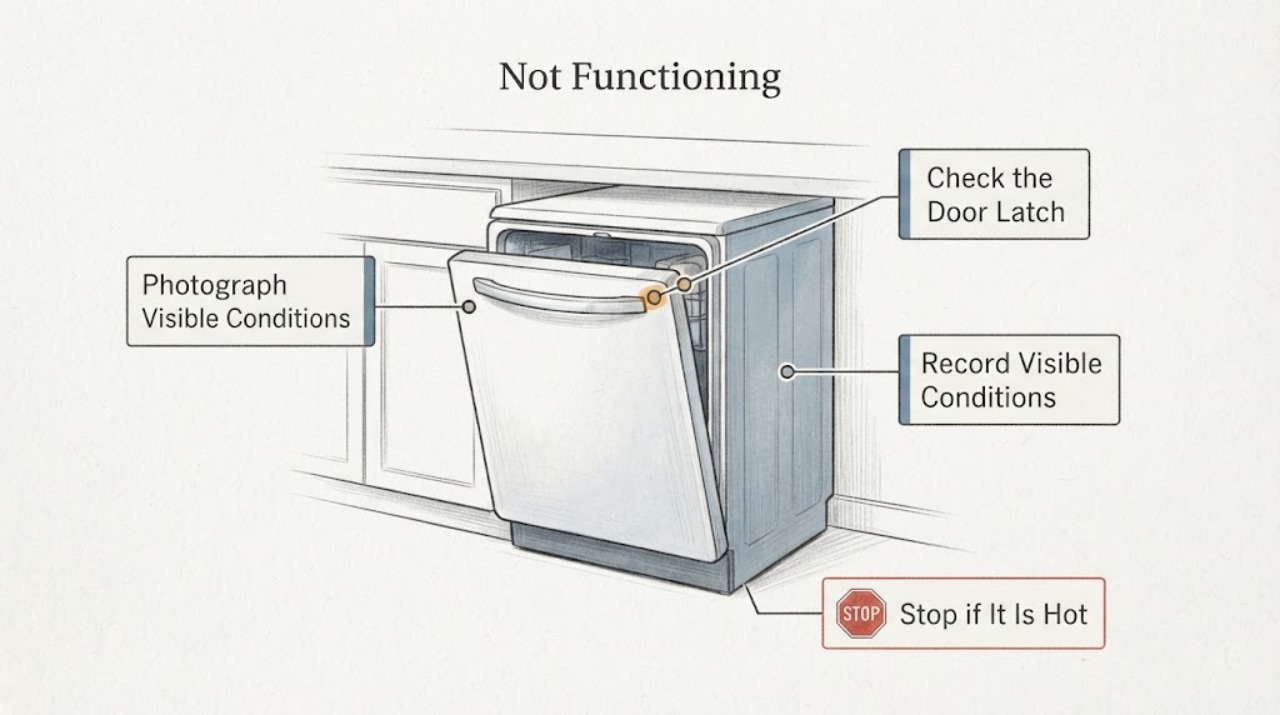
From a dry, safe position, photograph the control display and record every light, beep, flashing pattern, and the point in the cycle where the dishwasher stopped. Do not reach into the tub or move the built-in appliance to obtain a better view.
Expected result: The dishwasher is completely dark, has lights but does not respond, starts and stops, shows a code or flashing pattern, or has an incomplete or uncertain display.
Next step: Keep the photo and sequence with the model and serial information. Use the exact JennAir documentation or service route for the confirmed identity rather than a generic dishwasher code list.
Stop if: If there is smoke, a burning odor, heat, water near electrical parts, a damaged cord, or repeated breaker tripping, leave the dishwasher off and arrange qualified service without trying to reproduce the symptom.
Why this matters
Why: These are different service descriptions; the symptom alone does not identify a control panel, board, latch, pump, or supply fault.
-
Check 2
Read and record the complete model and serial numbers from the rating label or owner documents without removing a panel or pulling out the dishwasher. Confirm that the label matches JDB9800CWX2 and note the country or market if it is shown.
Expected result: The full identity matches JDB9800CWX2, the model suffix is different, or the model or serial cannot be confirmed safely.
Next step: Use only documentation that matches the complete identity. If identity is uncertain, stop the parts search and give the label information and symptom record to JennAir or qualified service.
Stop if: Do not move an integrated dishwasher alone, remove the toe panel, expose wiring, or open the control console to find an identification label.
Why this matters
Why: JennAir uses model-specific manuals and service intake; a suffix or market difference can change the applicable documentation and parts path.
-
Check 3
With the area dry and no visible hazard, check only external conditions: whether the household supply is available, whether the dishwasher door closes and latches normally, whether the controls respond, and whether water is standing inside or beneath the unit. Do not remove covers or test wiring.
Expected result: The home supply appears unavailable, the door does not latch, the controls are unresponsive despite normal external supply, the unit stopped with water inside, or no external abnormality is visible.
Next step: Record the result and the cycle stage. If the issue is not an obvious external condition that can be corrected without moving or opening the appliance, use the model-specific service route.
Stop if: Do not bypass a door latch, repeatedly reset a tripped breaker, run a cycle to test a leak, or continue if water is near an electrical connection.
Why this matters
Why: An external supply, door-state, water, or control-response observation changes the service description, but none of these observations proves a replaceable part.
-
Check 4
For the discontinued-part question, search JennAir’s official replacement or service-parts route with the exact model or an already-confirmed part number. If the result says unavailable, ask JennAir or qualified service whether a factory-specified successor or repair path exists.
Expected result: The official route returns a part for the exact model, identifies a superseded replacement, returns no result, or gives a result for a different model or only a visual match.
Next step: Keep the exact part number and fitment confirmation with the service request. If no factory-supported result can be confirmed, have a qualified technician assess repairability before buying a substitute.
Stop if: Do not install a part because a retailer or used-parts listing calls it compatible, and do not open the console to compare boards or connectors.
Why this matters
Why: A model or part-number match is evidence for the next service step; a visual match, a different-model result, or no result does not establish compatibility or prove that the appliance should be replaced.
-
Check 5
Prepare the service handoff with the complete model and serial numbers, symptom and cycle stage, display or light photo, external checks, water status, and any part number or availability result. Keep the dishwasher out of use while the cause remains unresolved.
Expected result: The appliance is fully dead, remains unresponsive, stops with water inside, has a recurring display pattern, or needs access behind a panel to proceed.
Next step: Schedule JennAir or qualified appliance service and provide the recorded identity and observations so the technician can bring the correct parts and tools.
Stop if: Stop immediately for smoke, burning smell, hot or damaged wiring, water near electrical parts, or repeated breaker trips; isolate power only from a safe, dry position when possible.
Why this matters
Why: The remaining diagnosis requires model-specific service information or internal access; a user-visible symptom cannot safely select a replacement part.
Use your observations
Decision map
Find the observation that best matches what you see, then follow the next safe action.
-
PATH 01Next step
What you see
The model and serial are confirmed, the dishwasher is dry and externally safe, and JennAir returns a replacement or successor for the exact model or confirmed part number.
Do this next
Keep the confirmation and have the part installed or assessed by a qualified technician according to the exact service information.
Why this path and its safety boundary
Why it matters: The official model or part-number match supports that service path, but it does not make an untrained console repair safe.
-
PATH 02Next step
What you see
The model and serial are confirmed but the part is listed as discontinued, unavailable, or not found through JennAir’s model or part-number route.
Do this next
Ask JennAir or qualified service to check for a factory-specified successor and to assess whether repair remains supported. Do not buy a visually similar panel or board as a substitute.
Why this path and its safety boundary
Why it matters: JennAir’s public lookup does not by itself establish a safe substitute; availability and supersession must be confirmed for this identity.
-
PATH 03Next step
What you see
The dishwasher is dark or unresponsive, the door will not latch, it stops with water inside, or an external supply check does not resolve the symptom.
Do this next
Keep the unit out of use and arrange model-specific JennAir or qualified appliance service with the symptom, cycle stage, and identity record.
Why this path and its safety boundary
Why it matters: The observation narrows the service description but does not identify a control, latch, pump, supply, or other replaceable part from outside the appliance.
-
PATH 04Next step
What you see
There is smoke, burning odor, heat, damaged wiring, water near an electrical connection, or repeated breaker tripping.
Do this next
Keep people away, isolate power and water only from a safe dry position when possible, and use qualified appliance or electrical service. Use emergency help for an active fire or immediate danger.
Why this path and its safety boundary
Why it matters: This is an immediate electrical, fire, or water-safety boundary, not a parts-selection problem.
Helpful context
Understand the symptom
A control panel that appears dead, a dishwasher that will not start, or a unit that stops partway through a cycle can share the phrase “not functioning” without sharing a failed part. The first useful split is whether the exact model and serial identity are known and whether the appliance is safe to leave connected. JennAir’s support pages are model-driven, so a part listing for a similar JennAir or Whirlpool-family dishwasher is not proof of fitment.
“Discontinued” also needs confirmation. An unavailable listing may have a factory replacement, a superseded number, or no supported replacement. The safe question for JennAir or an authorized technician is whether a part is factory-specified for JDB9800CWX2, not whether another panel or board looks the same.
When checks do not resolve it
Need a professional?
Arrange JennAir or qualified appliance service when the JDB9800CWX2 remains dead or unresponsive, the door will not latch, it stops with water inside, the symptom returns after an external check, the official part route gives no confirmed result, or internal access would be required. Stop use immediately for smoke, burning odor, heat, damaged wiring, water near electrical parts, or repeated breaker trips. Do not open the control console, bypass the latch, test live wiring, or replace a part from the symptom alone.
Common questions
FAQ
Where can I find a discontinued JennAir dishwasher part?
Start with JennAir’s replacement or service-parts route using the exact model or a confirmed part number. If it is unavailable, ask JennAir or qualified service to confirm a factory-specified successor or repair path. Do not treat a visually similar listing as proof of fit.
Can I use a panel or board from another JennAir or Whirlpool-family dishwasher?
Not without model-specific fitment confirmation. JennAir’s parts guidance is based on model or part number, and its service intake uses the model and serial to identify the correct parts and tools. A similar appearance or connector does not establish compatibility.
What should I do if the JDB9800CWX2 is not functioning?
Record the exact symptom, cycle stage, display or light pattern, model, and serial number, then perform only dry external checks. If it remains dead or unresponsive, stops with water inside, needs panel access, or shows an electrical or water hazard, keep it out of use and arrange qualified service.
Read the exact guide
Official sources
- Home - Product Help | JennAirJennAir · Official JennAir Product Help home. It covers dishwashers and directs owners to use the model number for manuals and troubleshooting, with a separate service route.
- Where is my Model and Serial Number Located? - Product Help | JennAirJennAir · Official JennAir identification guide. For the supplied JDB9800CWX2 task, use it only to locate and verify the complete model and serial label; it does not establish model-specific parts, failure causes, or compatibility.
- FAQ - Product Help | JennAirJennAir · Official JennAir FAQ. It says replacement or service parts are ordered by searching by model or part number, points owners to manuals, warns that tech sheets are for experienced repair trade users, and explains where model and serial numbers are located.
- W Service | Repair Step 1 - Model and SerialJennAir Service · Official JennAir service intake. It asks for model and serial numbers and explains that these identify the product so the service team brings the correct parts and tools.
Community feedback
Share a repair observation
Share a plain-text repair observation. Accepted observations are published automatically; this page may take a moment to update.