
On this page
Start here
Quick answer
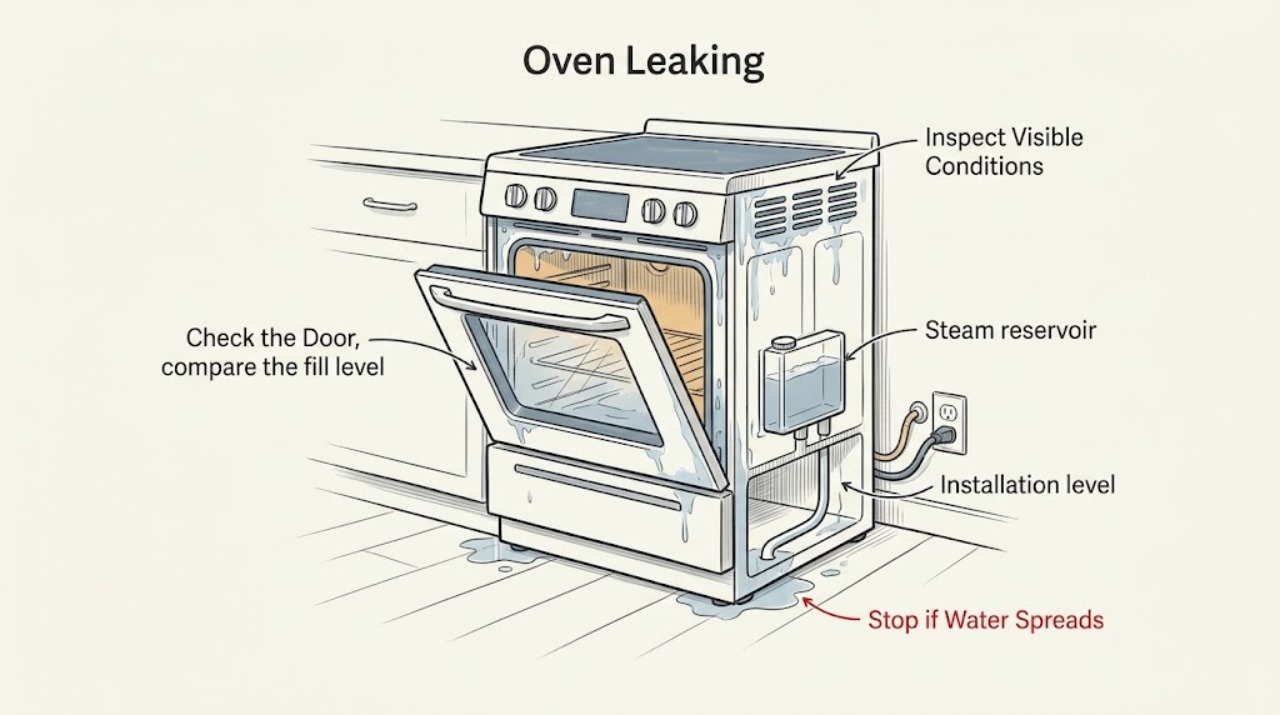
First decide whether you are seeing normal condensation or active liquid escaping. Stop using the JennAir oven immediately for gas odor, smoke, sparks, burning smell, abnormal heat, water near electrical parts, or a breaker that trips again; leave a fire or gas danger and use appropriate emergency help. For a cool, safe oven, note whether the moisture followed a high-water food, came from a vent, followed Steam Bake or a steam-water-container cycle, or appeared after a cleaning cycle. Use only the exact model's normal drain or cancel function, keep vents clear, do not overfill a water container, and wipe residual water only after the cavity has cooled. Check visible door sealing and whether a range or oven is level using the installation instructions. A continuing puddle, water from behind the oven, damaged seal, or any leak near wiring needs qualified service rather than repeated cooking or a cover-off inspection.
Work through in order
Diagnostic checks
Use only checks that match the exact appliance or system and its official guide.
-
Check 1
Stop the cooking or cleaning function and assess the oven from a safe, dry position. Look for gas odor, smoke, sparks, burning smell, abnormal heat, water near an outlet or wiring, a hot or damaged cord, or a breaker that trips again. Do not touch wet electrical areas or keep testing an oven with any of these symptoms.
Expected result: There is a gas, fire, heat, water-and-electricity, or repeated-trip hazard; or the oven is cool enough to inspect externally and there is only ordinary moisture.
Next step: For gas odor, avoid flames and electrical switches, leave by a safe route, and contact the appropriate gas emergency service from outside. For smoke or fire, leave and use emergency help. Otherwise isolate the oven only from a safe dry position and continue after it has cooled.
Why this matters
Why: A safety hazard is not a condensation problem and may worsen if the oven is reheated. With no hazard, the location and timing of the moisture can distinguish steam from active leakage.
-
Check 2
After the oven has cooled, wipe only accessible moisture from the outside of the door, the floor or cabinet, and the visible cavity surfaces. Note whether the water appeared under a vent, on the glass, after cooking a high-moisture food, or as a growing puddle independent of the cooking mode. Confirm that the oven vents and bottom vent are not covered by foil, cookware, or stored items.
Expected result: A small amount of moisture tracks to steam or a vent and stops after cooling, or water continues to accumulate from an unconfirmed location.
Next step: If it matches a cooled condensation pattern, keep vents clear and monitor one normal use. If it grows, returns without a high-moisture cooking cause, or comes from behind or below the oven, stop use and arrange service.
Why this matters
Why: JennAir says steam can escape from vents and condense on a floor or cabinet, and moisture on gas-oven glass can be normal. Blocked vents can impair air circulation and cooling. Ongoing or unexplained accumulation is not established as normal condensation.
-
Check 3
If the appliance has Steam Bake or a steam oven water container, compare the fill level with the exact model's MAX mark and review how the container is seated and removed. Use the model's normal Maintenance or Drain function when provided; do not open a hot cavity, tip a hot container, or add water to chase a partial result.
Expected result: The container was overfilled, was not seated or removed as instructed, residual water remains after the cycle, or the container and controls match the manual but water still escapes.
Next step: For a model-supported container issue, correct only the external fill or seating condition after cooling and follow the model drain procedure. If water leaks from the compartment, valve area, door edge, or beneath the unit, stop using the steam function and call qualified service.
Why this matters
Why: JennAir documents overflow from a container above its MAX line, drips from the valve seat after incorrect removal, and residual water after steam use as separate possibilities. A correctly handled container followed by repeated escaping water suggests a reservoir, valve, drain, or seal problem.
-
Check 4
If the water followed Steam Clean or an AquaLift cleaning cycle, leave the door closed until the cycle has ended and the cavity has cooled. Then check whether the remaining water is on the cavity bottom as the cleaning instructions describe, and remove only the residual water with a sponge or cloth. Do not add more water or use cleaners or additives unless the exact model instructions explicitly allow them.
Expected result: The moisture is limited to expected residual water after cleaning and can be removed when cool, or water spilled over the door, floor, controls, or adjacent cabinetry.
Next step: If the cool residual water matches the model instructions, wipe it up and monitor the next correctly prepared cycle. If water escapes the cavity, reaches the controls, or recurs, stop cleaning and arrange service.
Why this matters
Why: JennAir states that cleaning functions can leave water in the cavity and that this water is hot during the cycle. A spill outside the intended cavity or a leak that persists after cooling is a containment or appliance fault, not a normal cleaning residue.
-
Check 5
With the oven cool and power isolated only if the position is safe, inspect the visible door gasket, glass, frame, hinge area, and vent openings for food debris, a torn or displaced seal, a door that does not close evenly, or a blocked vent. Do not remove the door, adjust gas parts, or open the appliance cabinet. For a range or freestanding unit, check level only as described in the installation instructions.
Expected result: The door closes evenly and the visible seal and vents are intact, a loose visible obstruction is found, or the seal, glass, frame, hinge, installation, or vent is damaged or misaligned.
Next step: Remove only a loose visible obstruction, close the door gently, and monitor without forcing it. If damage or misalignment is present, keep the oven unused and arrange qualified repair.
Why this matters
Why: A door or installation condition can change where steam and liquid travel, but an external inspection cannot prove the condition of internal insulation, tubing, valves, or wiring. A damaged or misaligned part needs model-specific service.
-
Check 6
Record the cooking or maintenance mode, where the first drop appeared, whether the oven was a wall oven or range, the model number, and whether the leak returns when the oven is cool. If the display shows an error or Call Service message, use Cancel or the exact model's documented reset once only when no hazard is present; do not repeatedly cycle power or run a heat test on a leaking oven.
Expected result: The message clears and no water returns, or the message returns, the leak persists, or the oven shows a gas, electrical, smoke, or overheating symptom.
Next step: Stop using the appliance and arrange qualified JennAir service for a returning message or persistent leak. Give the technician the mode, leak location, water-container status, door and vent observations, and any safety symptoms.
Why this matters
Why: A one-time control reset can clear a transient message, but it cannot validate a water path or safety component. A returning message or persistent leak needs diagnosis with the model and symptom history.
Use your observations
Decision map
Find the observation that best matches what you see, then follow the next safe action.
-
PATH 01Next step
What you see
Moisture appears on the glass or below a vent after high-moisture food and dissipates after cooling.
Do this next
Keep the vents clear, allow the oven to cool, wipe accessible moisture, and monitor the next normal cycle. Escalate if it becomes a growing puddle or occurs without the same cooking cause.
-
PATH 02Next step
What you see
A steam or water-container model is involved.
Do this next
Check the exact model's MAX fill, seating, removal, and drain instructions after cooling. Repeated water from the reservoir, valve seat, door edge, or beneath the oven requires service.
-
PATH 03Next step
What you see
Water remains after Steam Clean or AquaLift cleaning.
Do this next
Keep the door closed while hot, then remove residual water only after cooling and only as the model instructions describe. Do not add extra water to compensate for uneven coverage.
-
PATH 04Next step
What you see
The door, visible gasket, vent, or range installation is damaged or misaligned.
Do this next
Do not force the door or run another heated cycle. Keep the oven out of service and arrange qualified repair.
-
PATH 05Next step
What you see
Water comes from behind or below the oven, continues when cool, reaches controls or wiring, or returns during ordinary baking.
Do this next
Stop use and arrange qualified service. Do not remove panels or attempt to find an internal leak.
-
PATH 06Next step
What you see
There is gas odor, smoke, sparks, burning smell, abnormal heat, damaged wiring, water near electrical parts, or a repeat breaker trip.
Do this next
Stop immediately, avoid flames and unsafe electrical switches, leave fire or gas danger, and use appropriate emergency help. Do not re-light, reheat, or reset the appliance for testing.
Helpful context
Understand the symptom
A JennAir oven can look like it is leaking when steam is condensing
Moisture on the glass or a small damp area below a vent can be steam from high-moisture food, especially while the cavity and door are still cool. JennAir also documents residual water after steam and cleaning functions. That explanation fits only when the amount is limited, the source matches the cooking mode, and it stops after the oven cools and the residual water is removed as the model instructions describe.
A growing puddle, water from a side or rear panel, moisture that reaches wiring, or a leak that returns during ordinary baking is a different branch. Keep the oven out of service and have the installation, door, reservoir, drain path, and appliance-specific seals checked by a qualified technician.
When checks do not resolve it
Need a professional?
Call a qualified appliance technician if water persists after the oven is cool, comes from behind or below the cavity, escapes during ordinary cooking, or returns after the documented steam or cleaning procedure., Arrange service for a torn or displaced door seal, damaged glass or frame, misaligned door, blocked or damaged vent, reservoir or valve-seat leak, or a returning error message., Stop immediately for gas odor, smoke, sparks, burning smell, abnormal heat, water near electrical parts, damaged wiring, or a breaker that trips again; use appropriate emergency help for fire or immediate gas danger.
Common questions
FAQ
Is water under a JennAir oven always a leak?
No. Steam from high-moisture food can leave condensation on the glass, floor, or cabinet, and steam or cleaning functions can leave residual water. It should stop after cooling and match the model's documented function; a growing puddle or unexplained water needs service.
Why is water coming from the vent or door?
Steam can condense on cool glass and escape through vents, especially with moist food or a steam function. Keep vents clear and let the oven cool. If liquid runs rather than condenses, or returns during ordinary baking, stop use and arrange service.
What should I check on a JennAir steam oven water container?
Check the exact model's MAX mark, container seating, removal method, and normal drain function after the oven has cooled. Overfilling or incorrect removal can leave water at the valve seat. Repeated water from the compartment or beneath the oven requires service.
Is water left after JennAir Steam Clean or AquaLift normal?
Some residual water can remain in the cavity after a cleaning function. Keep the door closed while the water is hot, wait for the cavity to cool, then remove the residue as the model instructions describe. Do not add extra water to compensate for uneven coverage.
Can an uneven JennAir range contribute to water spreading?
JennAir directs owners to check product level and follow the installation instructions for leveling legs on applicable ranges. Do not move a connected appliance or adjust it beyond the installation procedure; use qualified help if installation or door alignment is uncertain.
When is a JennAir oven leak an emergency?
Stop immediately for gas odor, smoke, sparks, burning smell, abnormal heat, water near electrical parts, damaged wiring, or a breaker that trips again. Avoid unsafe switches and flames, leave immediate fire or gas danger, and use appropriate emergency help.
Read the exact guide
Official sources
- Moisture On Door - RangeJennAir Product Help · JennAir ranges with the documented gas or Steam Bake features; verify the exact model
- FAQs About the AquaLift Oven Cleaning CycleJennAir Product Help · JennAir ranges with AquaLift technology; follow the exact model installation and cleaning instructions
- Steam Cleaning the OvenJennAir Product Help · JennAir ranges and ovens with the documented Steam Clean feature; exact controls vary
- Water Dripping or Condensation - Wall OvenJennAir Product Help · JennAir wall ovens with the documented steam or water-container functions; exact model controls vary
- How to Level Your Appliance with Your PhoneJennAir Product Help · JennAir ranges and appliances; use the exact installation instructions for adjustment
- Call ServiceJennAir Product Help · JennAir ranges with the documented Call Service message; exact model controls vary
- Oven Not Working - GasJennAir Product Help · JennAir gas ranges and ovens; exact installation and model instructions apply
- Condensation on Floor or Cabinet - Wall OvenJennAir Product Help · JennAir wall ovens; vent locations and model installation vary
Community feedback
Share a repair observation
Share a plain-text repair observation. Accepted observations are published automatically; this page may take a moment to update.