
On this page
Start here
Quick answer
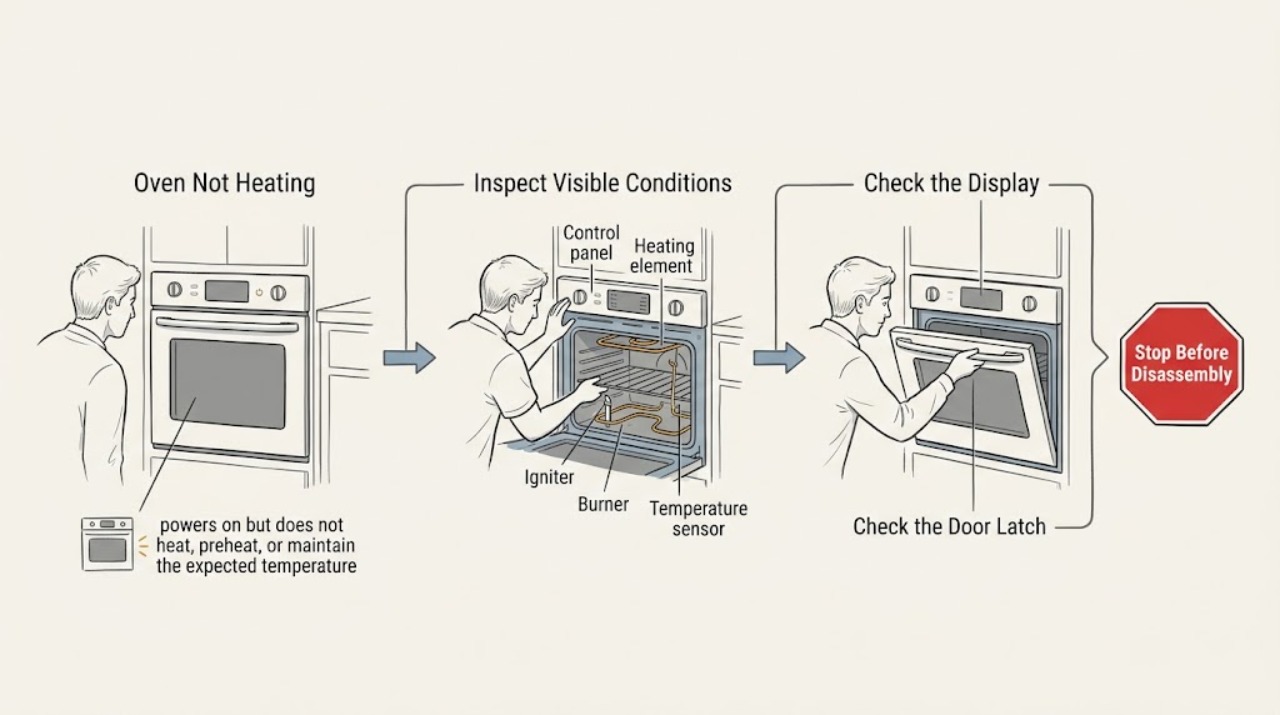
First identify whether the JennAir oven is electric or gas, whether the display responds, and whether it is truly not heating or simply preheating slowly. Confirm the correct Bake or other cooking mode, temperature, clock, door closure, Control Lock, Demo Mode, and Delayed Start settings. For an electric model, a tripped breaker, incorrect installation, or inadequate supply can prevent the heating element from operating; for a gas model, the grounded outlet, main gas valve, and model-specific gas controls matter. JennAir says elements or burners can cycle on and off normally, so do not diagnose from one brief visual check. If temperature is consistently low after a proper bake test, use only the model-specific calibration instructions. Stop for gas odor, delayed ignition, smoke, sparks, overheating, damaged wiring, or a repeated breaker trip, and arrange qualified service.
Work through in order
Diagnostic checks
Use only checks that match the exact appliance or system and its official guide.
-
Check 1
Stop and look for immediate danger before selecting another cycle. Note any gas odor, delayed ignition or loud ignition event, smoke, flame outside the burner area, sparking, melted material, damaged cord or wiring, severe heat, or a breaker that has tripped again.
Expected result: A gas, fire, electrical, or overheating warning is present, or the oven is stable with no warning sign.
Next step: For gas odor or fire danger, leave the area and seek help from a safe location. For electrical signs, isolate power only if the path is dry and safe; do not reset repeatedly or re-energize the oven for a test. Arrange qualified service.
Why this matters
Why: A hazardous symptom is more important than restoring heat. Continuing to energize a faulty oven can increase fire, shock, or gas risk.
-
Check 2
Read the display and confirm the cooking setup: select the model-supported Bake mode, enter a temperature, confirm the clock and start state, and cancel any Delayed Start. Check for Control Lock or Demo Mode, then use only the exact model manual's unlock or demo instructions with dry hands.
Expected result: The controls were locked, in demo mode, delayed, set to a non-heating function, or the display accepts a normal immediate bake command.
Next step: After correcting a setting, make one supervised normal bake attempt. If the display ignores commands, shows a recurring code, or still produces no heat, stop and record the exact display for service.
Why this matters
Why: A mode or control state can make an oven appear not to heat even though the heating system has not been requested. A normal command with no heat moves the investigation to power, gas, door, or heating components.
-
Check 3
Confirm the door closes fully and the latch area is not blocked by a rack, oversized dish, food, soil, or packing material. Do not force the door or remove it. For a gas range, also confirm that the oven bottom is not covered with foil or a liner that could obstruct burner airflow.
Expected result: The door is open or obstructed, the oven was recently installed or the door was removed, or the door closes normally.
Next step: Remove only a loose visible obstruction after the oven is cool. If the hinge, latch, glass, or door alignment is damaged, leave the oven off and arrange service rather than forcing closure.
Why this matters
Why: JennAir models may keep elements or burners off when the door is open. A displaced rack, obstruction, or incorrectly reset hinge can prevent the door from reaching its operating position.
-
Check 4
For an electric JennAir oven, check the household breaker or fuse indication without opening the appliance. If a recent outage or installation preceded the failure, verify the model rating information and installation documentation with a qualified electrician; do not inspect live terminals or guess at circuit ratings.
Expected result: A breaker or fuse is open, the oven is newly installed or recently rewired, the display is blank, or the household supply appears normal.
Next step: Reset a protective device only once when there is no hazard and the panel is dry. If it trips again, the oven remains blank, or installation is uncertain, leave power off and use a licensed electrician or qualified appliance service.
Why this matters
Why: JennAir notes that improper wiring, incorrect supply, or a tripped protective device can prevent the heating element from turning on. A normal display does not prove the heating supply is correct.
-
Check 5
For a gas JennAir range, confirm only the user-accessible supply state described in the model instructions: the grounded outlet is operational and the main gas valve is on. If the range was recently installed or reconnected, stop rather than opening fittings or repeatedly attempting ignition; have the installation checked by qualified personnel.
Expected result: The cooktop works but the oven does not, the outlet or main valve is uncertain, the range was recently connected, or the user-accessible supply states are normal.
Next step: If the accessible supply state is uncertain, arrange qualified electrical or gas service. If it is normal but the oven does not ignite or heat, stop repeated attempts and provide the model and ignition behavior to service.
Why this matters
Why: JennAir separates oven ignition from surface operation: the oven needs both the correct gas path and a reliable electrical ground for ignition on applicable models. A cooktop that works does not prove the oven burner path is healthy.
-
Check 6
If the oven warms but food is consistently underdone, first use the correct rack, pan spacing, preheat cycle, and door-closed practice from the model guidance. Do not use a household thermometer as the sole proof of failure. If a documented bake-performance check shows a consistent temperature offset, use the exact model calibration method; do not calibrate a completely cold oven to conceal a failed element, igniter, or sensor.
Expected result: The oven eventually reaches a useful temperature, cooking varies with placement or preheat, a documented test shows a consistent offset, or the oven stays cold.
Next step: Apply only the model-specific calibration instructions for a confirmed temperature offset. If heat is absent, the offset returns, a sensor or error code is involved, or only one mode fails, stop and arrange service for component diagnosis.
Why this matters
Why: JennAir treats some preheat and browning differences as normal and provides model-specific calibration for a measured, consistent offset. A completely cold oven is a heating-system problem, not a calibration preference.
Use your observations
Decision map
Find the observation that best matches what you see, then follow the next safe action.
-
PATH 01Next step
What you see
The display is active but the selected function is delayed, locked, in Demo Mode, or not a heating function.
Do this next
Cancel the delay, use the exact model procedure for Control Lock or Demo Mode, select Bake, and make one supervised check. Arrange service if controls remain unresponsive.
Why this path and its safety boundary
Why it matters: The controls may be preventing a heat request.
-
PATH 02Next step
What you see
The door is open, misaligned, or blocked by a rack, bakeware, food, soil, or packing material.
Do this next
With the oven cool and off, remove only a loose visible obstruction and close the door normally. Use service for hinge, latch, glass, or alignment damage.
Why this path and its safety boundary
Why it matters: The oven may intentionally keep elements or burners off, or the door may not be reaching its operating position.
-
PATH 03Next step
What you see
An electric oven is blank, has a tripped breaker, was newly installed, or does not have the expected supply.
Do this next
Reset protection only once when safe; if the problem persists or the breaker trips again, leave the oven off and use a licensed electrician or qualified appliance service.
Why this path and its safety boundary
Why it matters: Household supply, wiring, installation, or the appliance power path is in scope.
-
PATH 04Next step
What you see
A gas oven's cooktop works but the oven does not ignite, or the main gas and grounded outlet states are uncertain.
Do this next
Do not open fittings or repeat ignition attempts. Confirm only the accessible states in the model guidance, then arrange qualified gas or appliance service.
Why this path and its safety boundary
Why it matters: The oven gas path, igniter, ground, or model-specific control may be involved.
-
PATH 05Next step
What you see
The oven heats slowly or cooks unevenly but eventually produces heat.
Do this next
Use the model's bake-performance guidance and calibrate only for a confirmed consistent offset. Do not use calibration to mask a cold oven or recurring error.
Why this path and its safety boundary
Why it matters: Preheat conditions, rack or pan placement, normal element or burner cycling, or a calibration offset may explain the result.
-
PATH 06Next step
What you see
The oven remains cold, only one mode fails, an exact error code returns, or heat stops unexpectedly.
Do this next
Leave the oven off and provide the exact model, mode, code, and symptom timing to qualified service. Do not remove covers or test live components.
Why this path and its safety boundary
Why it matters: An element, igniter, burner, sensor, control, wiring, or mode-specific circuit may need diagnosis.
-
PATH 07Next step
What you see
There is gas odor, delayed ignition, smoke, fire, sparking, severe heat, damaged wiring, or a breaker trips again.
Do this next
Leave the area for gas or fire danger and seek help from a safe location. Do not operate controls, repeatedly reset power, or re-energize the oven; qualified service must assess it.
Why this path and its safety boundary
Why it matters: This is an immediate stop condition.
Helpful context
Understand the symptom
Separate no heat from slow or normal cycling
A JennAir oven may take longer to preheat because of the cavity, room temperature, rack load, or the supply configuration. Electric elements and gas burners also cycle to hold temperature, so a brief period without visible heat does not prove a failure. The useful distinction is whether the oven never produces heat, whether only one mode fails, or whether it eventually reaches temperature but cooks consistently cool.
Do not turn a heating complaint into a hazard
Keep all checks external and model-specific. Do not remove the rear cover, probe live terminals, bypass a door switch, open a gas line, or replace an element or igniter based only on a symptom. Gas odor, delayed ignition, smoke, sparks, unusual heat, damaged wiring, or a breaker that trips again is a stop condition; leave the appliance off and use qualified help.
Safety boundary
Stop conditions
- Stop immediately for gas odor, delayed ignition, smoke, flame outside the normal burner area, sparking, severe heat, melted material, damaged wiring or glass, or a breaker that trips again.
- Do not open gas fittings, remove covers, probe live terminals, bypass a door switch, defeat a safety control, or replace an element or igniter without qualified diagnosis.
- Do not repeatedly attempt ignition, repeatedly reset the breaker, or use calibration to compensate for an oven that never produces heat.
- If water, cleaning liquid, or another spill reaches electrical controls, keep the oven off and isolate power only when safe; arrange service after the area is dry and the fault is assessed.
Only after diagnosis
Potential parts
- electric bake or broil heating element
Only consider this after a qualified diagnosis confirms an electric element fault and rules out the selected mode, door, control, and household supply.
Confirm the complete model number and manufacturer fit information before ordering; no-heat symptoms alone do not identify an element. - gas oven igniter or burner assembly
Only consider this after qualified gas-appliance diagnosis confirms an ignition or burner fault; do not open the gas path or repeatedly attempt ignition.
Match the exact model and fuel configuration, and have installation and gas-safety checks performed by qualified personnel. - oven temperature sensor
Only consider this when a qualified diagnosis links a recurring temperature error or confirmed control-temperature fault to the sensor.
Use the exact model and a confirmed diagnosis; calibration or slow preheat alone does not prove a sensor failure. - oven control or user-interface assembly
Only consider this after the mode, door, supply, element or igniter, and sensor checks are completed by qualified service and a control fault is confirmed.
Confirm the complete model and manufacturer fit information before ordering; do not infer compatibility from a display symptom.
When checks do not resolve it
Need a professional?
Arrange qualified JennAir appliance service when the oven remains cold after the correct mode, door, control, and safe supply checks; only one mode fails; an error code returns; an igniter or burner does not establish heat; the temperature offset returns after model-specific calibration; or a sensor, element, wiring, or control fault is suspected. Use a licensed electrician for the household circuit or installation and qualified gas service for a gas-supply concern.
Have this ready
- The complete JennAir model number and whether the appliance is electric, gas, dual-fuel, or a wall oven
- The selected mode and temperature, whether the display responds, and whether the oven is cold or merely slow
- Whether the door closes normally, Control Lock or Demo Mode is shown, and whether Delayed Start was active
- Whether the issue followed installation, rewiring, a power outage, or gas reconnection
- The exact error code and any gas odor, delayed ignition, smoke, spark, overheating, damaged wiring, or breaker event
Common questions
FAQ
Why is my JennAir oven on but not heating?
Confirm Bake and the temperature are selected, cancel Delayed Start, check Control Lock or Demo Mode, and make sure the door closes fully. For electric models, a household supply or installation issue can prevent heat; for gas models, the grounded outlet and main gas state also matter.
Why does my JennAir oven heat slowly?
Cavity size, room temperature, rack load, supply configuration, pan placement, and a hidden heating element can affect preheat time. Use the model's preheat and bake guidance before assuming a failed part, and stop if the oven never produces heat.
Is it normal for JennAir oven elements to turn off and on?
Yes. JennAir says electric elements and gas burners can cycle to maintain temperature. A brief period without visible heat is different from an oven that remains cold, cannot ignite, or repeatedly loses heat.
Can I calibrate a JennAir oven that is not heating?
Calibration is for a confirmed, consistent temperature offset after the oven produces heat; it is not a repair for a cold oven. Use only the exact model's calibration method and arrange service if heat is absent, an error returns, or the offset persists.
When should I stop testing a JennAir oven that is not heating?
Stop for gas odor, delayed ignition, smoke, sparks, severe heat, damaged wiring or glass, or a breaker that trips again. Do not repeat ignition or breaker resets, open the appliance, or probe live parts; leave it off and arrange qualified service.
Read the exact guide
Official sources
- Oven Temperature Incorrect (Too Hot or Too Cold)JennAir Product Help · JennAir preheat expectations, rack and pan placement, cycling, thermometer caution, and temperature calibration
- Oven Not Working - Cooktop Working - Not ClickingJennAir Product Help · JennAir gas-range oven door, foil or liner, regulator shutoff, main valve, and grounded ignition checks
- Oven Elements Turning On/Off - Electric RangeJennAir Product Help · JennAir electric element cycling and door-closed operating behavior
- Nothing Is Working - No Power - Wall OvenJennAir Product Help · JennAir wall-oven Control Lock, rating-supply, breaker, and one-minute power-reset guidance
- How to Calibrate the OvenJennAir Product Help · JennAir model-specific oven-temperature calibration methods and manual referral
- Oven Not Working - GasJennAir Product Help · JennAir gas oven grounded outlet, gas reconnection, main valve, and qualified-service guidance
- Oven Not Working - Light Doesn't Turn OffJennAir Product Help · JennAir oven door closure, latch obstruction, rack, bakeware, food, soil, and hinge checks
- Oven Not Pre-Heating - Wall OvenJennAir Product Help · JennAir wall-oven installation, supply, breaker, heating-element, and stop-use guidance
- Oven Not Heating - Powering On - ElectricJennAir Product Help · JennAir electric oven no-heat checks for door, installation, Control Lock, Demo Mode, and Delayed Start
- Oven Not Working - ElectricJennAir Product Help · JennAir electric range outage, control lock, Demo Mode, Delayed Start, and breaker-reset guidance
Community feedback
Share a repair observation
Share a plain-text repair observation. Accepted observations are published automatically; this page may take a moment to update.