
On this page
Start here
Quick answer
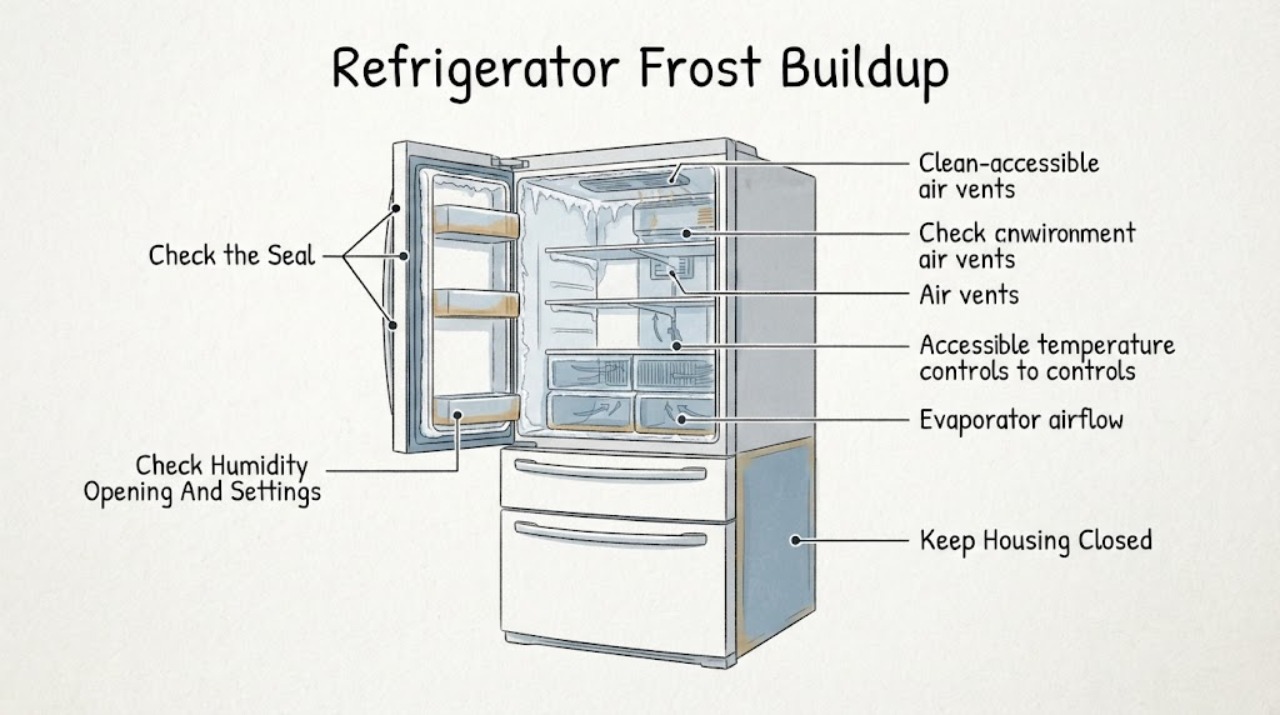
Start with where the frost is, not just how much there is. A light, short-lived film on a freezer back wall or near vents can be normal, especially after humid-air entry, warm food, or a defrost cycle. Frost concentrated along a door edge, gasket, mullion, or the top of a freezer door points first to a door that is open, obstructed, misaligned, or not sealing. Frost around vents or on food in the airflow path points to blocked circulation. If heavy frost repeatedly covers a freezer back wall, returns after the door seal and vent checks, or is accompanied by warm compartments, a fan that cannot move air, or water around the cabinet, stop treating it as a wipe-away issue and arrange model-specific service for the automatic-defrost, airflow, drain, sensor, or seal path. JennAir says controls and vent locations vary by refrigeration type; its opened owner manual explains that an auto-defrost freezer melts frost on the cooling coil and drains it to a pan. Unplug or disconnect power when safe before cleaning or moving removable parts, never chip ice with a sharp or mechanical tool, and stop for a damaged gasket, exposed wiring, water near electrical parts, burning odor, unusual heat, or repeated breaker trips.
Before you begin
Safety first
- The user may map frost, identify the model, clean an accessible gasket, clear visible vent obstructions, minimize door openings, and follow a model-approved cleaning or defrost procedure with power isolated. Qualified personnel must handle evaporator or rear-panel access, defrost heaters, fans, sensors, drains, controls, sealed refrigerant tubing, live tests, and loaded built-in movement.
Work through in order
Diagnostic checks
Use only checks that match the exact appliance or system and its official guide.
-
Check 1
Record the exact JennAir model, configuration, and location of the frost. With doors open only briefly, note whether it is a light film on the freezer back wall, a strip on a door gasket or mullion, a patch around a vent, ice on food, or a thick layer across the rear panel. Record whether either compartment is warm or a fan sounds abnormal.
Expected result: The frost is light and localized; it is concentrated at a door edge; it surrounds or blocks a vent; it covers the back wall; or frost occurs with uneven temperatures, water, or an unusual fan sound.
Next step: Use the matching branch below and the exact Owner’s Manual. Do not remove an interior panel or infer a defrost component from frost alone.
Stop if: Stop and disconnect power when safe for exposed wiring, water near electrical parts, burning odor, unusual heat, smoke, a damaged cord, or repeated breaker trips.
Why this matters
Why: Location separates normal humidity exposure and door-seal paths from airflow and possible automatic-defrost or drain paths. JennAir has different guidance for full-size, built-in, column, and other configurations, so location without model identity is not enough to choose a procedure.
-
Check 2
Inspect the outside of the refrigerator and freezer doors for a package, bin, ice buildup, or shelf position that prevents full closure. Wipe the accessible gasket and contact surface with a soft cloth, then close the door normally and observe whether the gasket contacts the cabinet around the frosted area. Do not pull the gasket out or adjust hinges without model instructions.
Expected result: A visible obstruction is present; the door springs back or does not close; the gasket is dirty, torn, folded, or separated; or the gasket closes evenly with no visible gap.
Next step: Remove only a visible obstruction, clean and dry the gasket, and monitor one normal operating period with doors closed promptly. If the gasket or alignment remains defective, arrange model-specific service rather than forcing the door.
Stop if: Stop for a torn or detached gasket, a damaged hinge or cabinet, water near electrical parts, or any need to move the built-in unit or adjust hinges under load.
Why this matters
Why: An obstruction, incomplete closure, or damaged seal allows humid room air into the cold compartment and makes door-edge frost more likely. A sound, closed gasket shifts attention toward opening habits, airflow, settings, or an internal service path.
-
Check 3
Consider whether the doors were recently left open, opened frequently, or loaded with warm or uncovered food, and whether the room is humid. Keep doors closed between uses, cover food, and follow the exact manual for temperature, Energy Saver, or Humidity controls; do not make repeated large temperature changes while the compartments recover.
Expected result: Frost followed a long opening, frequent use, a warm-food load, or humid weather; the frost is light and recedes; or frost continues despite normal door use and model-correct settings.
Next step: Allow the exact model’s normal recovery period with minimal openings and monitor the frost pattern. If the layer grows, temperatures become uneven, or the issue returns under normal use, continue to the airflow check and arrange service as needed.
Stop if: Do not leave food at risk while waiting, use a mechanical defroster, or continue operation with abnormal heat, smoke, water near electrics, or a repeated breaker trip.
Why this matters
Why: Humid-air entry can create temporary frost without a failed component. Persistent growth despite controlled door use and correct model settings makes a seal, airflow, drain, or automatic-defrost issue more likely.
-
Check 4
Locate only the visible supply and return vents shown by the exact model manual in both compartments. With power isolated when moving food or removable shelves, clear containers, bags, and packages from the vent openings and from the direct cold-air path. Do not remove the rear freezer panel or reach toward a fan or evaporator.
Expected result: A vent or return path is blocked; food is freezing directly in front of a supply; airflow appears normal and temperatures are even; or the vent path is clear but a thick back-wall frost remains or returns.
Next step: Rearrange only accessible items and monitor one normal cooling period. If airflow remains abnormal, the fan is noisy or absent, or frost returns over the rear panel, stop at external checks and arrange service.
Stop if: Do not remove interior panels, touch a moving fan, chip ice, apply a heat gun, or puncture any liner or tubing.
Why this matters
Why: A blocked vent can disturb circulation, produce excessive frost, and create warm or frozen spots. A clear path with recurring thick frost raises the need for qualified evaluation of the fan, automatic-defrost, sensor, or drain system; it does not identify a part.
-
Check 5
If the exact manual allows a user cleaning or defrost procedure and there is no hazard, turn cooling off as documented, disconnect power, remove food and only removable parts, and let frost melt naturally. Protect the floor from meltwater and never use a knife, mechanical defroster, or forced heat. After the manual’s restart procedure, record whether frost returns and whether both compartments reach normal temperatures.
Expected result: The frost clears and does not return under normal use; frost returns quickly; the refrigerator or freezer remains warm; water fails to drain; or the unit shows a fan, odor, heat, leak, or electrical symptom.
Next step: Monitor only a stable unit with no safety symptom. For rapid recurrence or an unresolved temperature or drain problem, keep the refrigerator off if necessary and arrange qualified JennAir refrigeration service with the frost location and timeline.
Stop if: Do not restart after smoke, burning odor, exposed wiring, water near electrics, abnormal heat, a damaged gasket or liner, or repeated breaker trips; do not puncture refrigerant tubing.
Why this matters
Why: A stable result after a documented, safe defrost can support a temporary humidity or airflow cause. Rapid recurrence, poor cooling, a drain problem, or a safety symptom makes an internal automatic-defrost, fan, sensor, drain, seal, or control fault possible.
Use your observations
Decision map
Find the observation that best matches what you see, then follow the next safe action.
-
PATH 01Safety boundary
What you see
The frost is a light, short-lived film or small droplets on the freezer back wall or near vents, appeared after humid weather or a warm-food load, and both compartments maintain normal temperatures.
Do this next
Minimize door openings, keep food covered, leave airflow space, and monitor the pattern through a normal operating period using the exact model guidance.
Why this path and its safety boundary
Why it matters: Normal condensation or humidity exposure is more likely than a failed component. JennAir says some moisture and light frost can be expected and should be judged by persistence and amount.
Safety stop: Do not wait through a rapidly growing ice sheet, warm food compartment, water leak, abnormal heat, smoke, odor, or electrical symptom.
-
PATH 02Safety boundary
What you see
Frost or moisture is concentrated along the freezer door gasket, vertical hinged seal, center rail, or cabinet flange, and a package, bin, dirty gasket, or incomplete door closure is visible.
Do this next
Remove the visible obstruction, clean and dry the gasket and contact area, and use the exact manual for any model-specific humidity feature. Arrange service for a torn gasket, misalignment, or recurring frost with a clean, closed seal.
Why this path and its safety boundary
Why it matters: Humid air entering at the seal is more likely. JennAir specifically links gasket obstruction, doors left open, and frequent openings to frost and moisture; certain models also use an Energy Saver or Humidity feature at the hinged seal.
Safety stop: Do not force or remove the gasket, adjust a loaded hinge, move a built-in appliance, or continue if water reaches electrical parts.
-
PATH 03Safety boundary
What you see
Frost or ice is near a visible vent, food freezes directly in the cold-air path, or one compartment is warm while another is cold, and a container or package blocks the model’s vent area.
Do this next
Clear only the visible vent path and rearrange food away from direct airflow, then monitor one normal cooling period. If the fan remains abnormal or frost returns with a clear path, arrange service.
Why this path and its safety boundary
Why it matters: A circulation restriction is more likely than a door-edge seal issue. JennAir says vent locations vary by model and blocked vents can cause excessive frost and uneven or unintended freezing.
Safety stop: Do not remove the rear panel, reach into a fan, chip ice, apply forced heat, or puncture the liner or tubing.
-
PATH 04Safety boundary
What you see
A thick layer repeatedly covers much of the freezer back wall or returns soon after a safe manual-approved defrost, while the door seal and visible vents are clear; cooling or airflow may be uneven.
Do this next
Stop at external checks and arrange qualified JennAir refrigeration service. Provide the model, frost location, recurrence time, temperatures, fan observations, and whether the manual-approved defrost changed the symptom.
Why this path and its safety boundary
Why it matters: An internal automatic-defrost, evaporator-airflow, drain, sensor, or control issue is possible. JennAir’s manual explains the auto-defrost process, but frost alone cannot identify which internal part has failed.
Safety stop: Do not remove the evaporator cover, test a heater or sensor live, use a mechanical defroster, or puncture refrigerant tubing.
-
PATH 05Safety boundary
What you see
Frost is accompanied by water that reaches electrical areas, a damaged liner or gasket, smoke, burning odor, abnormal heat, exposed wiring, a hot cord, or repeated breaker trips.
Do this next
Stop cooling and disconnect power from a safe, dry position if possible; close a connected water supply if a leak is present; protect the area and arrange qualified service.
Why this path and its safety boundary
Why it matters: A water, electrical, fire, or sealed-system hazard overrides frost diagnosis. Continued operation can damage food and the appliance or create a shock or fire risk.
Safety stop: Do not touch wet electrical parts, scrape ice around wiring, open panels, puncture tubing, or restart to test.
Helpful context
Understand the symptom
Map the frost before changing settings
Take a photo and note whether frost is a thin, even film on the freezer back wall, a strip around a door gasket or mullion, a patch around a vent, ice on food, or a thick sheet that covers much of the rear panel. A little frost after humid air enters may clear during normal operation, while a growing layer that blocks storage or airflow deserves a different route. JennAir publishes separate guidance for full-size, built-in, column, and other refrigeration families, so identify the exact model and configuration before moving a gasket, vent, or humidity control.
Door-edge frost usually means humid air entered
Frost or moisture along the freezer door gasket, center rail, or cabinet flange is often a sealing or humidity clue rather than a failed cooling component. JennAir says a door left open, frequent openings, or an obstruction at the gasket can allow humid room air in. Check from the outside that packages, bins, or ice do not hold the door open, and wipe the gasket and contact surface with a soft cloth. Built-in and French-door models may have a model-dependent Energy Saver or Humidity feature for exterior moisture on a vertical hinged seal; use the Owner’s Manual for that control instead of changing it by assumption.
Back-wall frost and vent frost need an airflow check
JennAir’s airflow guide says cold air moves through supply and return vents and that their locations differ by model. Keep containers and bags out of the visible vent path, especially where food is freezing directly in the airstream. If the back panel is heavily iced, the fan cannot move air, temperatures are uneven, or the frost returns after the external door and loading checks, do not remove an interior panel to reach an evaporator or fan. The pattern can require service evaluation of the automatic-defrost, sensor, fan, or drain system.
Defrost safely and protect the sealed system
If the exact manual permits a user defrost or cleaning procedure, turn cooling off, disconnect power, remove food and only removable parts, and let ice melt without sharp tools or forced heat. JennAir’s opened owner manual describes an auto-defrost freezer and specifically warns against mechanical defrost devices and puncturing refrigerant tubing. A temporary melt does not prove the cause is fixed; heavy frost that returns, a warm refrigerator, water that does not drain, or a fan that remains abnormal belongs with qualified service.
Safety boundary
Stop conditions
- Stop and disconnect power when safe for smoke, sparks, burning odor, abnormal heat, exposed wiring, water near electrical parts, a hot or damaged cord, or repeated breaker trips.
- Close the refrigerator water supply for a leak and do not restart until water and electrical safety have been assessed.
- Do not use knives, mechanical devices, or forced heat to remove frost; do not puncture the liner or refrigerant tubing.
- Do not remove an evaporator or rear panel, reach into a fan, test a defrost component live, or adjust a built-in door or appliance while loaded.
- Do not treat a temporary thaw as a repair when heavy frost returns or compartments remain warm; arrange qualified diagnosis.
Only after diagnosis
Potential parts
- model-matched refrigerator or freezer door gasket, hinge, mullion, or humidity-control component
Consider only after a qualified or model-specific inspection confirms a damaged seal, door alignment issue, or failed model-dependent humidity-control feature after visible obstruction and cleaning checks.
JennAir French-door, built-in, column, and other configurations use different seals and door hardware. Confirm the exact model and manufacturer fit information before ordering. - model-matched evaporator fan, defrost heater, defrost sensor, drain component, or control
Consider only after qualified diagnosis confirms recurring back-wall frost, abnormal airflow, a drain symptom, or a model-specific defrost or control fault; frost alone does not identify a part.
Automatic-defrost and airflow assemblies vary by JennAir model and configuration and require internal access. Confirm exact fitment and qualified installation.
When checks do not resolve it
Need a professional?
Arrange JennAir or qualified refrigerator service when frost repeatedly covers the freezer back wall, returns quickly after the exact manual’s safe defrost procedure, persists with a clean door seal and clear vents, or is accompanied by uneven temperatures, an abnormal fan, water that does not drain, or a failed model-specific humidity feature. Stop immediately for water near electrical parts, a damaged gasket or liner, exposed wiring, smoke, burning odor, abnormal heat, a hot or damaged cord, or repeated breaker trips; disconnect power and close the water supply when safe. The user may identify the model, map the frost, clear visible loading and vent obstructions, clean the accessible gasket, minimize humid-air entry, and follow one model-approved cleaning or defrost procedure. Internal evaporator covers, defrost heaters, sensors, fans, drains, controls, sealed tubing, refrigerant work, live tests, and loaded built-in movement belong to qualified personnel.
Safety scope: The user may map frost, identify the model, clean an accessible gasket, clear visible vent obstructions, minimize door openings, and follow a model-approved cleaning or defrost procedure with power isolated. Qualified personnel must handle evaporator or rear-panel access, defrost heaters, fans, sensors, drains, controls, sealed refrigerant tubing, live tests, and loaded built-in movement.
Common questions
FAQ
Is frost on the back wall of a JennAir freezer normal?
A light film or small droplets can be normal, especially after humid-air entry or a defrost cycle. A thick layer that blocks the back panel, returns quickly, or accompanies warm or uneven compartments needs model-specific service evaluation.
Why is frost forming around my JennAir refrigerator door gasket?
Check for a package or bin preventing closure, a dirty or damaged gasket, and doors left open or opened frequently. JennAir links these conditions to humid air entering the compartment. Clean only the accessible gasket and arrange service if it will not seal.
Can blocked vents cause frost in a JennAir refrigerator?
Yes. JennAir says blocked supply or return vents can disturb airflow, cause excessive frost or moisture, and create warm or frozen spots. Clear only visible loading obstructions and use the exact model manual for vent locations.
Can I chip the ice out of my JennAir freezer?
Do not use a knife or mechanical defrosting device. If the exact Owner’s Manual permits a user defrost procedure, disconnect power and allow ice to melt naturally without puncturing the liner or refrigerant tubing. A recurring layer still needs diagnosis.
When should I call for JennAir refrigerator frost repair?
Call when heavy frost returns after safe door, gasket, humidity, vent, and manual-approved defrost checks, or when cooling is uneven, a fan or drain is abnormal, or a gasket will not seal. Stop for water near electrics, smoke, burning odor, abnormal heat, damaged wiring, or repeated breaker trips.
Read the exact guide
Official sources
- What's Normal Condensation or FrostJennAir Product Help · Official JennAir full-size refrigerator guidance; the amount and location of normal frost depend on the exact refrigerator configuration and environment.
- Preventative Maintenance for RefrigeratorsJennAir Product Help · Official JennAir maintenance guidance; exact maintenance tasks and access depend on the model and configuration.
- Frost or Condensation in Freezer - Built-In RefrigeratorJennAir Product Help · Official JennAir built-in refrigerator guidance; built-in door hardware and humidity controls are model-dependent.
- How to Check the Air Vents for Blockage-Ensuring Proper Air FlowJennAir Product Help · Official JennAir airflow guide; vent locations and interior layouts differ by exact model.
- Owners ManualJennAir Brand Home Appliances · Official JennAir owner manual for a specific refrigerator or freezer model family; the auto-defrost description and controls must be confirmed against the user's exact model.
- How to Help Eliminate Condensation and FrostJennAir Product Help · Official JennAir full-size refrigerator guidance; controls and vent locations vary by refrigeration type and exact model.
Community feedback
Share a repair observation
Share a plain-text repair observation. Accepted observations are published automatically; this page may take a moment to update.