
On this page
Start here
Quick answer
Identify the sound by timing and location before treating it as a failure. JennAir says low humming from the compressor or fans, soft airflow, gentle refrigerant gurgling, brief high-pitched or pulsating compressor/fan sounds, relay or control clicks, water-valve buzz during ice filling, defrost hissing or dripping, and popping from wall contraction or ice ejection can be normal. A buzz from an ice-maker valve when the refrigerator is not connected to water can stop when the ice maker is turned off according to the model guide. First check only safe external causes: items vibrating on top or against the cabinet, an unlevel or unstable refrigerator, a door rubbing, blocked airflow, and a kinked water line or filter when the noise matches dispensing. If the sound is new, continuous, harsh, grinding, scraping, repeatedly loud, or accompanied by loss of cooling, water leakage, smoke, burning odor, a hot or damaged cord, or repeated protective-device trips, stop owner troubleshooting and arrange qualified JennAir service. Do not open the sealed refrigeration system, fan housing, electrical compartment, or control area, and do not reach behind a running unit.
Before you begin
Safety first
- The user may record the model and sound pattern, remove loose external objects, observe door or cabinet contact, check visible water-line conditions, and follow model-permitted leveling or ice-maker settings. Qualified service must handle fan and compressor access, sealed-system work, internal water valves, electrical controls, wiring, loaded built-in adjustments, and live testing.
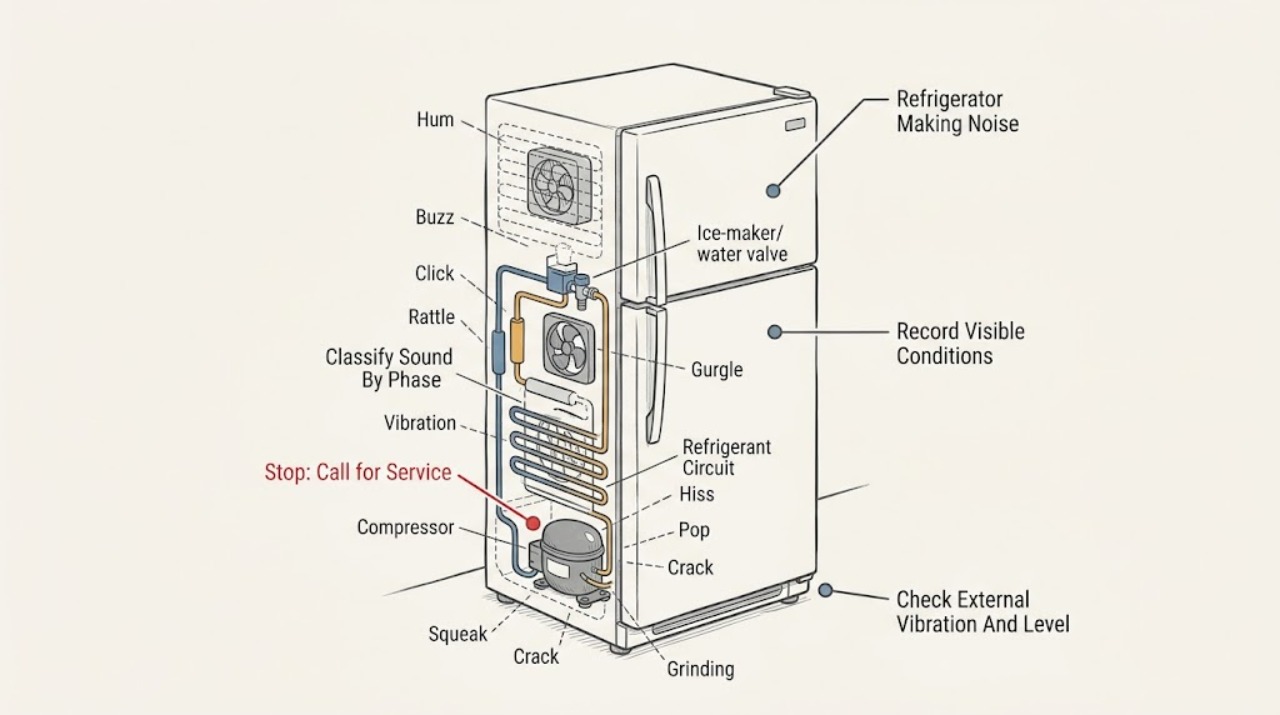
Work through in order
Diagnostic checks
Use only checks that match the exact appliance or system and its official guide.
-
Check 1
Record the complete JennAir model and configuration, then inspect the visible cord, plug, outlet area, cabinet, floor, and nearby water tubing without moving the refrigerator. Stop immediately for smoke, burning odor, a hot or damaged cord, water at electrical parts, or repeated protective-device trips.
Expected result: The model and installation type are known and the area is dry and intact, or a hazard or built-in installation prevents safe inspection.
Next step: If safe, continue from outside the appliance and use the exact model literature. If not safe, keep the refrigerator off and arrange qualified appliance or electrical service.
Stop if: Do not move a built-in or column unit, reach behind a running refrigerator, or handle a hot or damaged cord or wet electrical area.
Why this matters
Why: The manual and appliance layout determine which sound sources and external checks apply; a hazard overrides noise diagnosis.
-
Check 2
From a safe distance, note whether the sound is a brief click, low hum, airflow whoosh, gurgle, pop, hiss, buzz during water or ice use, or persistent grinding/rattling, and whether it begins with cooling, defrost, door opening, dispensing, or ice-maker filling.
Expected result: The sound is brief and phase-linked, a continuous sound, or a harsh sound with cooling or electrical symptoms.
Next step: Follow the matching normal-sound, vibration, water/ice, or service branch without deliberately repeating a risky event.
Stop if: Do not place hands, tools, or recording equipment near a fan, water valve, compressor, or moving door while energized.
Why this matters
Why: JennAir documents many brief phase-linked sounds as normal. Persistence, increasing volume, a mechanical scrape, or a change in appliance performance shifts the likelihood toward a fault.
-
Check 3
Without moving the refrigerator, remove loose objects from its top, look for contact with surrounding cabinets, and check whether the unit visibly rocks or sits unevenly. If the model instructions permit owner leveling, follow only those instructions; otherwise record the observation for service.
Expected result: An object or cabinet contact vibrates, the unit is unstable or unlevel, a door rubs, or the exterior setup is stable.
Next step: Remove only loose external objects and correct a clearly permitted visible setup issue. If the noise remains with a stable setup, stop before moving the unit or opening panels.
Stop if: Do not adjust loaded leveling hardware, pull out a built-in appliance, or place hands behind the cabinet.
Why this matters
Why: JennAir identifies items on top, an unlevel floor or cabinet, and door rubbing as ways normal operating vibration can become louder or produce squeaks.
-
Check 4
Compare the sound with normal cooling events: low hum or air movement while fans or compressor run, a brief high-pitched or pulsating tone during speed change, or a gentle gurgle after cooling. Check that cooling remains normal and that the sound is brief, soft, or cyclic rather than harsh and continuous.
Expected result: The noise follows compressor or fan cycling and cooling is normal; it is persistent or loud; or temperature, airflow, or frost behavior also changes.
Next step: Monitor a normal cyclic sound. Arrange service for a persistent sound, fan scraping, loss of cooling, unusual frost, or any noise that requires internal access.
Stop if: Do not remove fan covers, touch a compressor, puncture tubing, or perform live tests.
Why this matters
Why: The first pattern matches JennAir's listed normal compressor, fan, refrigerant, and pressure-equalization sounds. A persistent noise with cooling change may indicate fan, compressor, airflow, or sealed-system service needs.
-
Check 5
If the buzz, click, thump, or hammering occurs during ice-maker filling or water dispensing, inspect only the visible water-supply condition and filter status according to the model guide. If the ice maker has no water connection, confirm from the guide whether it should be turned off.
Expected result: The sound occurs only during a fill or dispense event, the water line is kinked or restricted, the filter is overdue or incorrectly installed, or the ice maker is enabled without a water supply.
Next step: Correct only a visible kink or model-permitted setting or filter issue. Arrange service for a leaking line, valve, persistent sound, or internal ice-maker fault.
Stop if: Do not disconnect pressurized tubing, reach into the ice maker, or work on a water valve while energized.
Why this matters
Why: JennAir links these patterns to the water valve, line, filter, or ice-maker setting rather than the compressor. A repeated valve sound without water can continue if an unconnected ice maker remains on.
-
Check 6
Note whether a pop, crack, hiss, sizzle, dripping, or thump occurs during defrost or when ice is released into the bucket. Do not open panels or touch the heater, evaporator, ice maker, or water line to confirm the source.
Expected result: The sound is brief and tied to defrost or ice ejection with normal cooling, or it is loud, continuous, accompanied by a leak, or unrelated to a cycle.
Next step: Monitor only a brief cycle-linked sound. Arrange service for continuous sizzling, loud impacts, leaks, temperature change, or a sound that cannot be safely localized.
Stop if: Do not touch hot components, remove the rear panel, or deliberately trigger a defrost or ice cycle.
Why this matters
Why: JennAir identifies defrost water on the heater, cabinet contraction, and ice ejection as normal sources when tied to those events. A persistent unrelated sound needs further diagnosis.
-
Check 7
Stop owner troubleshooting when the sound is persistent, harsh, grinding, scraping, or electrically abnormal, or when external setup and model-directed water or ice checks do not explain it. Give the technician the model, configuration, sound timing and location, cooling status, and any hazard signs.
Expected result: Noise persists or worsens, cooling or dispensing changes, water leaks, a fan appears to scrape, compressor behavior changes, or smoke, odor, heat, or tripping is present.
Next step: Keep the refrigerator off when a hazard or water exposure is present and arrange qualified JennAir appliance service; use qualified electrical service for supply-side symptoms.
Stop if: No cabinet opening, internal fan or compressor work, sealed-system access, live electrical test, or repeated operation to reproduce the noise.
Why this matters
Why: An internal fan, compressor, water valve, defrost component, control, wiring, or sealed-system issue may be involved; sound alone cannot identify a safe part.
Use your observations
Decision map
Find the observation that best matches what you see, then follow the next safe action.
-
PATH 01Safety boundary
What you see
The sound is a brief, soft hum, whoosh, gurgle, pulsation, or high-pitched tone that repeats with normal compressor or fan cycling and cooling remains stable.
Do this next
Monitor the sound and use the exact model manual for normal operating descriptions. Arrange service if it becomes louder, continuous, harsh, or affects temperature.
Why this path and its safety boundary
Why it matters: JennAir lists compressor, fan, refrigerant-flow, and speed-change sounds in this pattern as normal possibilities.
Safety stop: Do not dismiss a new sound when it is accompanied by cooling loss, leak, odor, smoke, or vibration damage.
-
PATH 02Safety boundary
What you see
Rattle, buzz, squeak, or vibration changes when loose objects are removed, cabinet contact is cleared, the door stops rubbing, or the refrigerator is stabilized according to its instructions.
Do this next
Leave the refrigerator stable with clearances maintained. Use service or the installation instructions for built-in leveling or persistent door alignment problems.
Why this path and its safety boundary
Why it matters: External resonance, leveling, or door alignment is more likely than an internal component failure.
Safety stop: Do not pull out the unit or adjust internal hardware without the model procedure.
-
PATH 03Safety boundary
What you see
Buzzing, clicking, thumping, or hammering occurs only during ice-maker fill or dispensing, especially when the water line or filter is restricted or the ice maker lacks a water connection.
Do this next
Check the visible supply and model-permitted ice-maker setting or filter condition. Arrange service for a leak, persistent valve sound, or internal water-system fault.
Why this path and its safety boundary
Why it matters: The water valve, line, filter, or ice-maker operating state is more likely than the compressor or fan.
Safety stop: Do not disconnect water tubing or reach into the ice maker while powered or pressurized.
-
PATH 04Safety boundary
What you see
A pop, crack, hiss, sizzle, drip, or thump is brief and occurs during defrost or when ice falls into the bucket, with no cooling or leak symptom.
Do this next
Monitor the cycle-linked sound. Arrange service if it becomes continuous, unusually loud, causes a leak, or occurs with temperature change.
Why this path and its safety boundary
Why it matters: Cabinet expansion, defrost water on the heater, or ice ejection is consistent with JennAir's normal-sound descriptions.
Safety stop: Do not touch the heater, evaporator, ice maker, or rear components.
-
PATH 05Safety boundary
What you see
Grinding, scraping, harsh banging, continuous loud rattling, crackling, burning odor, smoke, hot or damaged cord, water near electrical parts, cooling loss, or repeated protective-device trips occurs.
Do this next
Stop the refrigerator, disconnect only from a dry safe position when possible, and arrange qualified JennAir appliance or electrical service.
Why this path and its safety boundary
Why it matters: The noise may come from an internal fan, compressor, control, wiring, water system, or another fault that is not safe to isolate by continued operation.
Safety stop: Do not open panels, perform live tests, keep restarting the appliance, or continue operation after smoke, arcing, overheating, or water exposure.
Helpful context
Understand the symptom
Use timing and sound character to classify the noise
Record whether the sound starts when the compressor starts, after a door opening, during defrost, while water or ice is dispensed, during an ice-maker fill, or when a door moves. A brief soft sound that repeats with one of those events is more consistent with normal operation than a continuous harsh sound. The exact model manual takes precedence because built-in, column, and freestanding JennAir refrigerators use different layouts and features.
Check for external vibration before suspecting a sealed system
From outside the refrigerator, remove items resting on top, confirm the cabinet is stable on a solid level floor, and look for a door or nearby cabinet rubbing. JennAir says an unlevel unit can transfer vibration to surrounding cabinets or the floor, and that leveling can reduce hinge strain and creaks. Do not move a built-in or column refrigerator to reach the rear; use the installation instructions or service.
Separate fan and compressor sounds from water and ice sounds
A low hum, airflow whoosh, brief high-pitched compressor tone, or gentle gurgle can occur as the unit cools and circulates air. A buzz or click that occurs during ice-maker filling or dispensing points instead to the water valve, water line, or ice-maker cycle. If the ice maker is not connected to water, use the exact model guide to turn it off; do not disconnect water tubing while the unit is operating.
Recognize defrost, refrigerant, and ice-ejection sounds
JennAir identifies gentle gurgling from refrigerant flow, sizzling or hissing from water reaching the defrost heater, and popping or cracking from cabinet contraction or ice dropping into the bucket as normal possibilities. These sounds should be brief or tied to a regular cycle and should not come with a temperature rise, leak, smoke, or damage. Do not puncture tubing or remove a rear panel to locate them.
Treat harsh, persistent, or electrically unsafe noise as a service boundary
A continuous grinding, scraping, banging, loud rattling, electrical crackle, or sound that changes with a fan but persists after external checks is not identified by sound alone. If cooling fails, water leaks, the cord or plug is hot or damaged, smoke or a burning odor appears, or a protective device trips repeatedly, stop using the refrigerator and arrange qualified appliance or electrical service. Internal fan, compressor, control, wiring, and sealed-system work is not an owner repair.
Safety boundary
Stop conditions
- Stop immediately for smoke, arcing, burning odor, a hot or damaged cord or plug, water near electrical parts, repeated protective-device trips, loss of cooling, or a significant water leak.
- Disconnect power only from a dry safe position. Do not move a built-in or column refrigerator, reach behind a running unit, or use an extension cord as a diagnostic.
- Do not open fan, compressor, control, or electrical panels; puncture refrigerant tubing; perform live electrical tests; or disconnect pressurized water tubing.
- Brief soft compressor, fan, refrigerant, defrost, relay, water-valve, and ice-ejection sounds may be normal only when their timing, duration, and appliance performance match the exact model. Persistent, harsh, or unexplained noise requires qualified JennAir service.
Only after diagnosis
Potential parts
- JennAir refrigerator condenser or evaporator fan service
Consider this service category when scraping, grinding, or persistent fan noise remains after external clearance and level checks, especially with airflow or cooling changes.
Fan location and assembly vary by configuration. Do not remove fan covers or work near energized components; qualified service must verify the model-specific part. - JennAir refrigerator compressor or sealed-system service
Consider this service category when a persistent compressor-area noise accompanies temperature change or does not match a brief normal cycling sound.
Compressor and sealed-system diagnosis requires qualified service. Do not puncture tubing, recover refrigerant, or replace a compressor from sound alone. - JennAir refrigerator ice-maker water valve or water-line service
Consider this category when buzzing or clicking is tied to fill or dispense, a visible line or filter restriction is not corrected, or the valve repeatedly operates without water.
Valve, filter, tubing, and ice-maker fitment depend on the exact model and water configuration. Do not disconnect pressurized tubing or bypass a leak. - JennAir refrigerator leveling, door, or cabinet installation service
Consider this service category when vibration or squeaking persists after removing loose external items and the refrigerator remains unstable, unlevel, or in contact with cabinetry.
Built-in and column leveling and door adjustment can involve loaded hardware and installation clearances. Follow the exact installation guide or use qualified service.
When checks do not resolve it
Need a professional?
Arrange qualified JennAir appliance service when a grinding, scraping, harsh, persistent, or worsening noise remains after safe external checks; when a fan, compressor, defrost, water valve, or sealed system is suspected; or when noise accompanies cooling loss, frost change, water leakage, or control symptoms. Use qualified electrical service for smoke, arcing, a hot or damaged cord, water near electrical parts, or repeated protective-device trips.
Safety scope: The user may record the model and sound pattern, remove loose external objects, observe door or cabinet contact, check visible water-line conditions, and follow model-permitted leveling or ice-maker settings. Qualified service must handle fan and compressor access, sealed-system work, internal water valves, electrical controls, wiring, loaded built-in adjustments, and live testing.
Common questions
FAQ
What refrigerator noises are normal on a JennAir refrigerator?
JennAir lists low compressor or fan hum, soft airflow, gentle refrigerant gurgling, brief compressor speed tones, relay or control clicks, water-valve sounds during ice or water use, defrost hissing or dripping, and cabinet or ice-ejection pops as possible normal sounds. Timing and cooling performance matter: a persistent harsh or worsening noise needs service.
Why does my JennAir refrigerator buzz when the ice maker is not connected?
JennAir says an ice-maker water valve can buzz or click as it tries to fill when no water supply is connected. Use the exact model guide to turn the ice maker off if it is not connected. A restricted line, filter, leak, or repeated valve sound with a connected supply needs service.
Why is my JennAir refrigerator rattling or vibrating?
Check for loose objects on top, contact with cabinetry, an unstable or unlevel floor, a door rubbing, or a water line transmitting vibration. JennAir identifies these as possible noise amplifiers. Remove only visible external objects and follow the model installation guide; do not pull out a built-in unit or open panels.
Is a high-pitched or pulsating JennAir refrigerator noise normal?
A brief, soft tone that repeats with compressor or fan cycling can be normal on high-efficiency models, and JennAir also describes faint pressure-equalization sounds as possible. If the tone is continuous, grows louder, or comes with cooling loss, scraping, or another fault sign, arrange service instead of relying on the sound category alone.
Should I open my JennAir refrigerator to find the noise?
No. Limit checks to the model label, visible cabinet and water-line conditions, loose external objects, and model-permitted settings or leveling. Do not open fan, compressor, control, or electrical compartments, puncture tubing, disconnect pressurized water, or perform a live test. Persistent or hazardous noise requires qualified service.
Read the exact guide
Official sources
- Popping or Cracking Noise - Refrigerator - Product Help | JennAirJennAir Product Help · Official JennAir guidance tagged to French-door/bottom-freezer models; apply conditionally to matching model behavior.
- Clicking Noise - Refrigerator - Product Help | JennAirJennAir Product Help · Official JennAir guidance tagged to French-door/bottom-freezer models; do not transfer dual-evaporator behavior to a model without that architecture.
- Humming Noise - Refrigerator - Product Help | JennAirJennAir Product Help · Official JennAir guidance tagged to French-door/bottom-freezer models; exact sound and feature availability vary by model.
- Refrigerator Noise - Buzzing - Product Help | JennAirJennAir Product Help · Official JennAir buzzing guidance across tagged full-size refrigerator configurations; use the exact model manual for access and settings.
- Refrigerator Normal Sounds and Noises - Product Help | JennAirJennAir Product Help · Official JennAir guidance for full-size refrigerators; exact configuration and sound sources vary by model.
- Refrigerator Noise - High-Pitched or Pulsating - Product Help | JennAirJennAir Product Help · Official JennAir guidance for full-size refrigerators; duration, sound level, and model configuration determine whether service is needed.
Community feedback
Share a repair observation
Share a plain-text repair observation. Accepted observations are published automatically; this page may take a moment to update.