
On this page
Start here
Quick answer
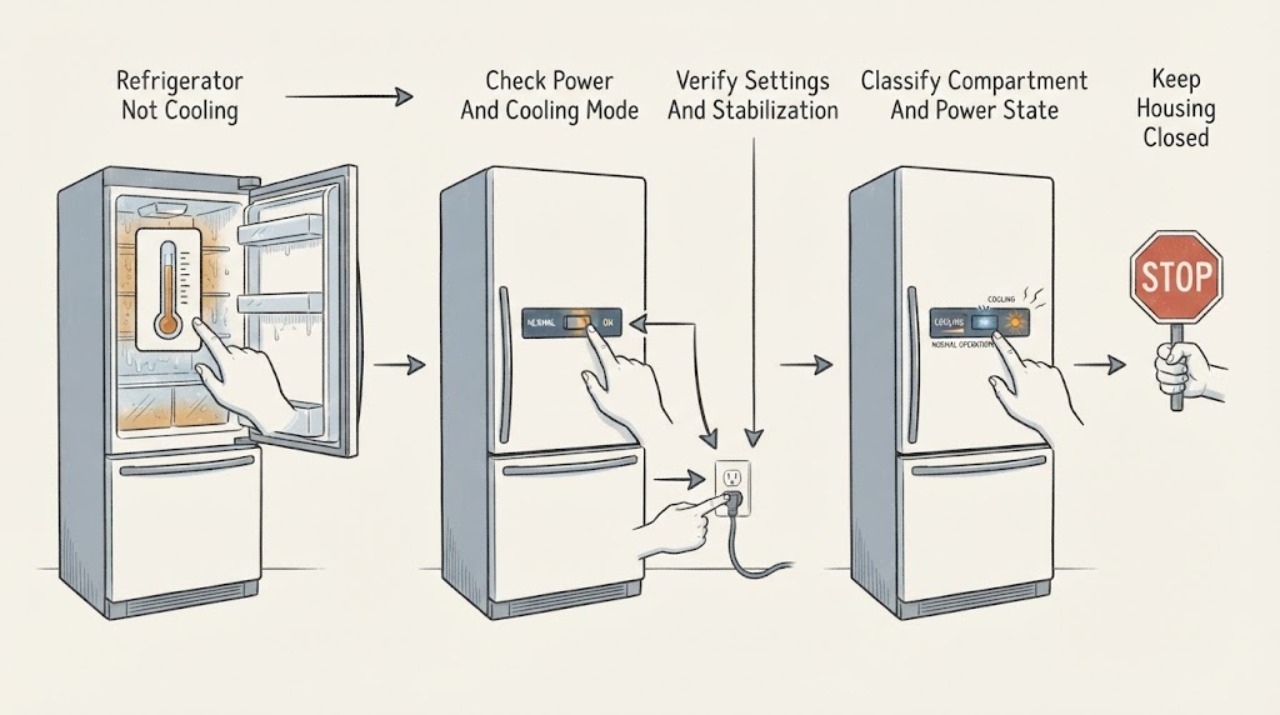
First identify the cooling pattern: an all-refrigerator column, a combined refrigerator/freezer with only the fresh-food section warm, only the freezer warm, or both compartments warm. Check the exact model's power and cooling status, Showroom or Demo mode, and temperature settings before assuming a compressor fault. JennAir's control guidance uses about 37°F for the refrigerator and 0°F for the freezer as common starting points, calls for small adjustments, and says to wait 24 hours before judging a change; the owner guide for your model controls. Check that food is not blocking supply or return vents, the doors close and gaskets seal, the unit is not beside a heat source, and a recent installation or large warm load has had time to stabilize. If the display and lights work but both compartments remain warm, the freezer alone remains warm, temperatures do not recover after the documented external checks, or an alarm persists, arrange JennAir service. Do not remove panels, reach into a fan, open a sealed cooling system, handle refrigerant, or test live electrical parts. Unplug or isolate the appliance for smoke, burning odor, a hot or damaged cord, water near electricity, sparks, or repeated breaker trips, and use a qualified electrician for the household power path.
Before you begin
Safety first
- This page covers model identification, external power and cooling-state observations, control settings, thermometer readings, accessible loading and door checks, and documented placement checks. Cabinet panels, fans, sensors, compressors, capacitors, wiring, refrigerant, sealed systems, restricted condenser access, and live testing require qualified service.
Work through in order
Diagnostic checks
Use only checks that match the exact appliance or system and its official guide.
-
Check 1
Record the exact model and architecture, then compare the fresh-food compartment and freezer separately. Note whether the display and lights respond, whether cooling is shown as off, whether one or both compartments are warm, and whether an alarm or power-outage indication is present.
Expected result: An all-refrigerator column is warm, only the refrigerator section is warm, only the freezer is warm, both compartments are warm, or the display and power are absent.
Next step: Continue with the matching branch and record the exact model. If there is an electrical or water hazard, keep the unit isolated and arrange qualified service instead of continuing checks.
Stop if: Stop for smoke, burning odor, sparks, shock, a hot or damaged cord, water near electricity, abnormal heat, or repeated breaker trips. Do not repeatedly cycle power.
Why this matters
Why: A single-compartment column has no separate freezer comparison. In a combined unit, fresh-food-only warmth can involve airflow from the freezer, while both compartments warm or no display points toward cooling-state or power checks. The pattern does not identify an internal part.
-
Check 2
From a dry, safe position check that the cord is seated in the model-required outlet, the accessible cord and receptacle are intact, and the refrigerator's cooling function is on. Look for Cooling Off, Showroom, Demo, or Power Outage indications and use only the exact manual's button sequence.
Expected result: The display says cooling is off or Showroom/Demo is active, a recent outage is indicated, the outlet or cord is abnormal, or power and cooling status appear normal.
Next step: Restore cooling only with the matching model guide and verify the household supply without opening the outlet. Call an electrician for a hot, wet, scorched, loose, or repeatedly tripping power path; call JennAir service for persistent appliance-side failure.
Stop if: Do not use an extension cord, change protection ratings, open the receptacle, repeatedly reset a breaker, or reconnect a wet, hot, scorched, or damaged appliance.
Why this matters
Why: Cooling-off or showroom behavior can leave lights and controls active while compartments stay warm. An abnormal outlet or cord is a household or appliance safety route. A normal display does not prove the internal cooling system works.
-
Check 3
Use an appliance thermometer, if available, in the center of each accessible compartment away from doors, walls, and vents. Compare the readings and current controls with the exact Use and Care Guide; if a setting is wrong, make one small adjustment and wait 24 hours before judging it.
Expected result: The refrigerator or freezer setting is warmer than intended, readings improve after stabilization, one compartment differs sharply from the other, or correct settings produce persistent warmth.
Next step: Keep the model-approved setting and allow the full stabilization period after each change. Protect temperature-sensitive food while the appliance is out of range; escalate if the reading does not recover.
Stop if: Do not make rapid repeated adjustments, place the thermometer against a vent or wall, or treat a generic target as a guarantee for every JennAir model.
Why this matters
Why: A setting or recent adjustment can explain a temporary warm reading. JennAir gives common starting points near 37°F for the refrigerator and 0°F for the freezer, but model labels and conditions vary. Persistent warmth with correct settings moves to airflow, door, environment, or service.
-
Check 4
With the appliance otherwise safe, inspect only accessible storage and door areas: confirm food is not pressed against supply or return vents, shelves are not overpacked, the door closes squarely, and the gasket contacts the cabinet continuously without an obvious gap or missed shipping material.
Expected result: A vent is blocked, containers are against the back or side walls, the door or gasket has an obstruction or visible gap, or airflow and closure appear normal.
Next step: Rearrange only obvious loading obstructions, clean an accessible gasket according to the exact manual, close the doors, and allow stabilization. Arrange service for a damaged gasket, misalignment, or persistent abnormal temperature.
Stop if: Do not remove door hinges, force a gasket, reach into a fan, remove internal panels, or modify a built-in cabinet or grille.
Why this matters
Why: JennAir explains that blocked vents can create warm spots or disrupt shared airflow, while a poor seal admits warm air. Normal visible loading and closure do not rule out a concealed fan or refrigeration fault.
-
Check 5
Record whether the refrigerator was recently installed, had a power interruption, received a large warm grocery load, is in a hot room or garage, sits beside an oven or radiator, has a blocked base grille, or has been opened frequently. Compare the location with the exact installation guide.
Expected result: The unit is newly installed, recently interrupted, overloaded with warm items, in an unsuitable environment, next to heat, or has an obstructed grille; or those conditions are absent.
Next step: Correct only a clearly documented external placement or loading issue, then allow the model's stabilization period. Do not move a built-in unit by force; arrange service if the environment is suitable but cooling does not recover.
Stop if: Do not block or alter the base grille, move a built-in cabinet without the installation procedure, remove the rear cover, or continue if food-safety temperatures cannot be maintained.
Why this matters
Why: JennAir says a recent installation or large warm load can require hours or up to 24 hours to stabilize, and heat, frequent opening, or blocked ventilation can reduce performance. If conditions are suitable and both compartments stay warm, an internal fault becomes more likely.
-
Check 6
Prepare a service report with the exact model, architecture, compartment readings, display or alarm, cooling-mode status, settings, stabilization time, door and vent observations, installation environment, and any power or hazard event. Do not attempt internal cleaning unless the exact guide explicitly assigns it to the user.
Expected result: The appliance remains warm after the model-approved external checks, only one section stays abnormal, a code or alarm persists, or an internal fan, sensor, compressor, control, or sealed-system issue is suspected.
Next step: Contact JennAir authorized service or a qualified appliance technician. Use a qualified electrician for the household outlet, breaker, circuit, or cord. Move or discard temperature-sensitive food according to safe-food guidance while cooling is unreliable.
Stop if: Do not remove panels, reach into fans, test capacitors or wiring live, handle refrigerant, pierce a sealed system, or order a compressor, fan, sensor, or control by appearance.
Why this matters
Why: The remaining possibilities are model-specific and cannot be selected safely from a generic not-cooling symptom. JennAir notes that some condenser coils can only be cleaned by a certified technician.
Use your observations
Decision map
Find the observation that best matches what you see, then follow the next safe action.
-
PATH 01Safety boundary
What you see
The display is dark, Cooling Off or Showroom/Demo is indicated, a recent outage is shown, or the outlet, cord, or breaker has an abnormal observation.
Do this next
Use the exact model guide to restore cooling only when safe. Keep the unit off and use a qualified electrician for an abnormal household power path; use JennAir service for an appliance-side no-power condition.
Why this path and its safety boundary
Why it matters: This is a power or cooling-state route, not proof of a compressor or thermostat failure.
Safety stop: Do not repeatedly reset breakers, open the outlet, change protection ratings, use an extension cord, or reconnect a wet, hot, scorched, or damaged unit.
-
PATH 02Safety boundary
What you see
The refrigerator is on, no hazard is present, the control is warmer than intended or the unit has just been adjusted, newly installed, or loaded with many warm items.
Do this next
Make one small model-approved setting change if needed, correct an obvious load or placement issue, and wait the documented stabilization period—JennAir commonly says 24 hours for control changes.
Why this path and its safety boundary
Why it matters: A control, installation, or temporary thermal-load explanation remains plausible; it does not establish a failed cooling component.
Safety stop: Do not make rapid repeated changes, block vents or grilles, or rely on the refrigerator for temperature-sensitive storage while it remains out of range.
-
PATH 03Safety boundary
What you see
In a combined refrigerator/freezer, the freezer is cold but the fresh-food compartment is warm or has warm spots, especially near blocked vents or after frequent door opening.
Do this next
Rearrange food away from documented vents, confirm door closure and gasket contact, reduce prolonged opening, and allow stabilization. Arrange service if the section remains warm with clear airflow and a sound seal.
Why this path and its safety boundary
Why it matters: JennAir describes many such units as sharing cold air generated in the freezer and moved through vents; blocked supply or return airflow and warm-air entry are plausible external explanations.
Safety stop: Do not remove evaporator covers, reach into fans, melt frost with an improvised heat source, or assume a fan or damper part without model-specific diagnosis.
-
PATH 04Safety boundary
What you see
The freezer alone is warm, both compartments are warm, or an all-refrigerator column stays warm after cooling is on, settings, airflow, door, and environment checks are suitable.
Do this next
Keep food safe, record the exact temperatures and model, and arrange JennAir service. Do not attempt internal component or refrigerant work.
Why this path and its safety boundary
Why it matters: A broader cooling, power, control, fan, sensor, compressor, or sealed-system issue is possible, but the symptom does not identify which internal part.
Safety stop: Do not remove panels, clean restricted condenser areas, test live wiring or capacitors, open the sealed system, or substitute parts.
-
PATH 05Safety boundary
What you see
There is smoke, burning odor, sparks, shock, a hot or damaged cord, water near electrical parts, repeated breaker trips, a damaged door or cabinet, a persistent code, or an unknown model or architecture.
Do this next
If safe, disconnect or isolate the appliance, preserve the model and alarm information, and contact JennAir service; use a qualified electrician for the household power path.
Why this path and its safety boundary
Why it matters: The safety or model-identity issue overrides generic cooling checks and requires qualified assessment.
Safety stop: Do not restart a hazardous unit, repeatedly reset protection, open panels, bypass a safety device, or apply another model's control or service procedure.
Helpful context
Understand the symptom
Start with the compartment pattern
A single-compartment all-refrigerator column and a combined refrigerator/freezer do not give the same diagnostic information. Record whether the fresh-food compartment, freezer, both compartments, or one of several model-specific zones is warm. Note display, interior-light, fan, alarm, and temperature readings, but do not infer that a running light or fan proves the sealed cooling system is healthy.
Settings and airflow are external checks
JennAir recommends checking that cooling is on, that Showroom or Demo mode is not active, that settings suit the surroundings, and that food does not block supply or return vents. Door opening, a large warm load, room heat, a blocked base grille, or a recent installation can temporarily change temperatures. Make one documented change at a time and allow the stated stabilization period.
Warm everywhere is a service boundary
If the exact model is on, the settings and airflow are suitable, and both compartments or an all-refrigerator column remain warm, the symptom does not identify a fan, sensor, compressor, refrigerant, or control part. Some JennAir models also restrict condenser cleaning to a certified technician. Keep the cabinet and sealed system closed and arrange qualified service.
Safety boundary
Stop conditions
- Stop immediately for smoke, burning odor, sparks, shock, abnormal heat, a hot or damaged cord or plug, water near electrical parts, cabinet damage, or repeated breaker trips.
- Do not remove refrigerator panels, reach into fans, test live wiring or capacitors, handle refrigerant, pierce the sealed cooling system, bypass safety devices, or select an internal replacement part from a generic symptom.
- Do not block or modify supply vents, return vents, base grilles, or built-in clearances. Do not move a built-in unit by force or clean a condenser area that the exact manual reserves for a certified technician.
- Use the exact JennAir Use and Care or installation guide for controls, cooling-off or Showroom mode, temperature labels, compartment layout, air paths, door handling, and condenser access. JennAir refrigerator types are not interchangeable.
- Arrange qualified service when an all-refrigerator column or both compartments remain warm after model-approved external checks, when one section stays abnormal, or when a fan, sensor, compressor, control, wiring, or sealed-system fault is suspected.
When checks do not resolve it
Need a professional?
Contact JennAir authorized service or a qualified appliance technician when the exact model is on, the settings, door seal, loading, airflow, and environment are suitable but a compartment remains warm, both compartments fail to cool, an alarm or code persists, or an internal fan, sensor, compressor, control, wiring, or sealed-system issue is suspected. Use a qualified electrician for a hot, wet, scorched, loose, or damaged receptacle, breaker, household circuit, or appliance cord. Stop use immediately for smoke, burning odor, sparks, shock, abnormal heat, water near electricity, cabinet damage, or repeated trips.
Safety scope: This page covers model identification, external power and cooling-state observations, control settings, thermometer readings, accessible loading and door checks, and documented placement checks. Cabinet panels, fans, sensors, compressors, capacitors, wiring, refrigerant, sealed systems, restricted condenser access, and live testing require qualified service.
Common questions
FAQ
What should I check first when my JennAir refrigerator is not cooling?
Separate an all-refrigerator column, fresh-food-only problem, freezer-only problem, and both-compartments problem. Then check that cooling is on, Showroom or Demo mode is off, the settings match the exact manual, and vents and doors are unobstructed.
What temperature should a JennAir refrigerator and freezer use?
JennAir's general control guidance uses about 37°F for the refrigerator and 0°F for the freezer as common starting points. Follow your model's guide, make small changes, and wait 24 hours before judging a change.
Why is my JennAir refrigerator warm while the freezer is cold?
Many combined units generate cold air in the freezer and move it through vents to the fresh-food section. Blocked supply or return vents, overpacking, frequent door opening, or a poor gasket seal can disrupt that airflow. If the path is clear and the section remains warm, arrange service.
Can Showroom or Demo mode stop a JennAir refrigerator from cooling?
Yes. JennAir says Showroom or Demo mode can leave interior lighting and control responses available while cooling is turned off. Check for the model's indication and use the exact owner manual to exit the mode.
How long should a recently installed JennAir refrigerator take to cool?
JennAir's guidance says a recently installed unit may need up to 24 hours to reach proper temperatures; a large warm load can also take several hours to stabilize. Confirm the door seal and remove missed packaging, then escalate if the model remains warm after the documented period.
Should I replace the fan or compressor if my JennAir refrigerator is not cooling?
No. A warm symptom does not identify a fan, sensor, compressor, control, or sealed-system fault, and some condenser access is technician-only. Keep the cabinet closed and arrange JennAir or qualified appliance service after the external checks.
Read the exact guide
Official sources
- Tips for Properly Setting the ControlsJennAir Product Help · JennAir refrigerator temperature-control and not-cooling guidance
- Both Compartments are Not Cooling - Built-In RefrigeratorJennAir Product Help · JennAir built-in refrigerator with both compartments not cooling
- Not Cooling - All Refrigerator - ColumnJennAir Product Help · JennAir all-refrigerator column not-cooling guidance
- Freezer Section is Not Cooling - Built-In RefrigeratorJennAir Product Help · JennAir built-in refrigerator freezer-section no-cooling guidance
- Not Cooling - Refrigerator Section - RefrigeratorJennAir Product Help · JennAir French-door bottom-freezer refrigerator fresh-food cooling guidance
Community feedback
Share a repair observation
Share a plain-text repair observation. Accepted observations are published automatically; this page may take a moment to update.