
On this page
Start here
Quick answer
Stop using the Kenmore dryer until the lint screen and its seating area are confirmed safe. A screen that is torn, holed, warped, loose, missing, or unable to seat correctly can let lint bypass the intended filter path, so do not tape, glue, or run the dryer without it. With the dryer switched off and unplugged where practical, remove the screen, photograph the damage, and identify the complete model number before ordering a replacement. Kenmore's official manuals page says its laundry manuals are found by entering the model number, so use that exact manual and fit information rather than a generic screen. USFA and CPSC dryer-fire guidance also calls for regular lint-screen and vent maintenance. If the screen housing is cracked, lint is visible inside the cabinet, the dryer overheats, or there is a burning smell, smoke, gas odor, or cord damage, keep the dryer out of service and arrange qualified appliance or electrical service.
Before you begin
Safety first
- Keep the dryer off with a damaged or missing screen. Do not patch it, run without it, open the cabinet, bypass a safety device, use a guessed replacement, or repeat a cycle after smoke, burning odor, gas odor, overheating, or electrical damage.
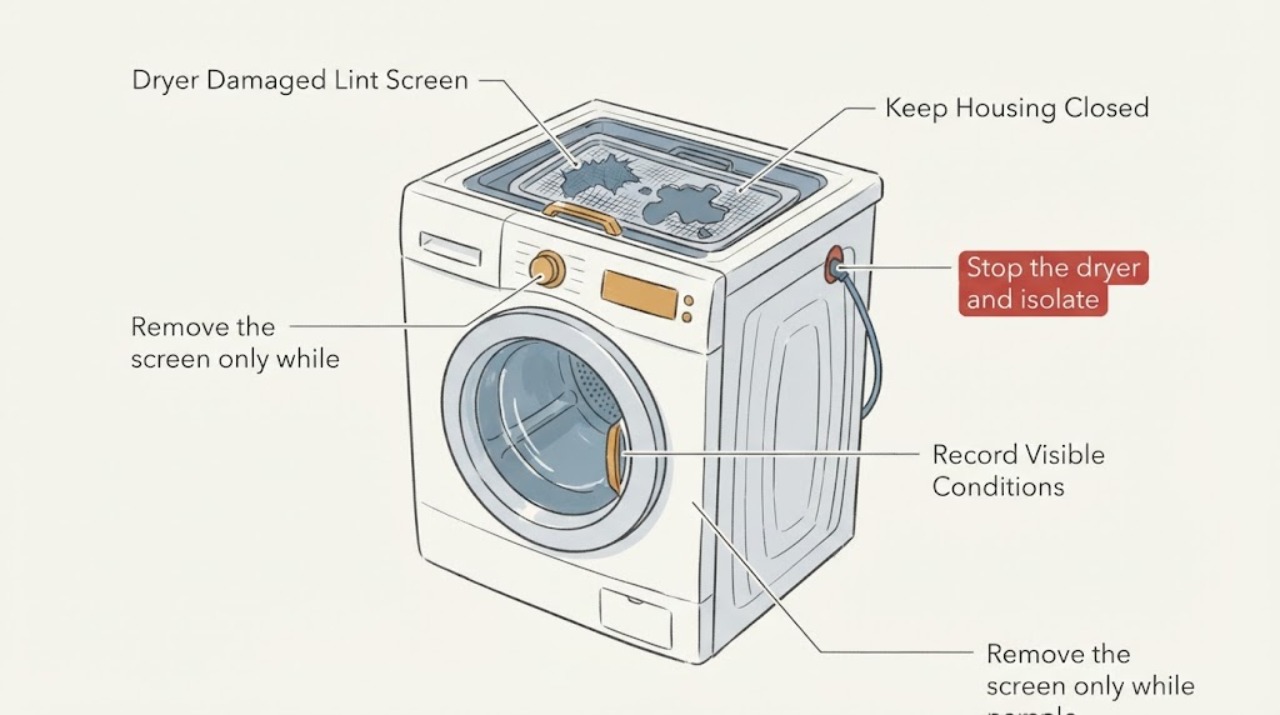
Work through in order
Diagnostic checks
Use only checks that match the exact appliance or system and its official guide.
-
Check 1
Stop the dryer and isolate its power before handling the lint screen. Do not run it with a torn, holed, warped, loose, or missing screen.
Expected result: There is smoke, a burning smell, unusual heat, a gas odor, a hot or damaged cord, sparking, water near electrical parts, or a breaker that will not stay on; or none of these warning signs is present.
Next step: Keep the dryer out of service. If there is an active fire or strong gas odor, move away and use emergency or gas-service help as appropriate. Otherwise arrange qualified appliance or electrical service before testing.
Why this matters
Why: Any warning sign raises a fire, gas, shock, or overheating concern that cannot be safely investigated by another cycle. Even without a warning sign, a damaged screen is not a safe operating configuration.
-
Check 2
Remove the screen only while the dryer is off, then inspect the mesh, frame, handle, tabs, and seating edge for tears, holes, warping, cracks, or missing pieces.
Expected result: The screen is visibly damaged or cannot sit flat and secure, or it appears intact and seats fully without force.
Next step: For damage or poor fit, keep the dryer off and use the exact model information to obtain the correct screen or service assessment. For an intact, correctly seated screen, continue with the model and accessible airflow checks.
Why this matters
Why: Visible damage or poor seating can allow lint to bypass the intended screen and may indicate a damaged housing or wrong screen. An intact screen does not prove that the vent path or dryer is otherwise safe.
-
Check 3
Record the complete Kenmore model number and compare the screen location, cleaning method, and replacement identification in the matching Kenmore manual.
Expected result: The full model number is available and the manual identifies the screen arrangement, or the label/manual match remains uncertain.
Next step: Follow only the matched manual and confirm the replacement against the complete model. If the model cannot be confirmed, stop at identification and use Kenmore support or qualified service rather than ordering by appearance.
Why this matters
Why: Kenmore manuals are model-based; a similar-looking screen or a generic listing cannot establish fit, seating, or the correct cleaning method for an unidentified dryer.
-
Check 4
With power isolated, clean only the accessible screen and inspect the accessible lint-screen opening and outside exhaust hood for visible lint or obstruction without opening the cabinet or disconnecting the exhaust system.
Expected result: Lint is packed around the opening, the housing is cracked or sharp, the outside hood has weak or no visible airflow when later cleared by a professional, or the accessible path appears clear.
Next step: Do not reach into the cabinet or dismantle the vent path. Have a qualified technician address housing or internal lint, and have the vent system cleaned or assessed if airflow is restricted. Resume use only after the exact screen is fitted and the safety checks are resolved.
Why this matters
Why: Packed lint, housing damage, or poor exhaust flow can indicate an airflow or containment problem beyond the screen itself. A clear-looking opening does not rule out an internal or duct restriction.
-
Check 5
Prepare a service handoff with the full model number, photos of the screen and housing, the damage type, whether the screen seats, any lint inside the opening, prior overheating or long-dry symptoms, and any odor or cord damage.
Expected result: The screen cannot be matched or seated, the housing or cabinet is damaged, lint is inaccessible inside, or any overheating, burning odor, smoke, gas odor, or electrical damage occurred.
Next step: Keep the dryer off and give the evidence to Kenmore support or qualified appliance service. Do not open the cabinet, bypass the screen, defeat a safety device, or order an internal part from the lint-screen symptom alone.
Why this matters
Why: The remaining issue exceeds a safe screen-only check and may involve fit, airflow, cabinet contamination, or electrical/gas safety; the screen symptom does not identify a replacement heater, thermostat, motor, or other part.
Use your observations
Decision map
Find the observation that best matches what you see, then follow the next safe action.
-
PATH 01Next step
What you see
The lint screen is torn, holed, warped, missing, or will not remain seated.
Do this next
Leave the dryer off, identify the complete Kenmore model, and use the matched manual or qualified service to confirm the exact screen and housing repair before use.
Why this path and its safety boundary
Why it matters: The dryer cannot be treated as having a reliable lint-filtering path, and the damage may extend to the screen housing.
-
PATH 02Next step
What you see
The screen appears intact but cannot seat because the opening, frame, or retaining tabs are cracked, obstructed, or distorted.
Do this next
Do not force the screen or run the dryer. Photograph the opening and arrange model-matched service, keeping the cabinet closed.
Why this path and its safety boundary
Why it matters: The problem is a fit or housing issue rather than a screen-only replacement question; a visually similar screen may not restore containment.
-
PATH 03Next step
What you see
A model-matched screen is fully seated, the accessible opening is clean, and there has been no heat, odor, smoke, gas, or cord warning.
Do this next
Follow the matched Kenmore manual for normal use and maintenance, and have a restricted or uncertain exhaust path checked before relying on the dryer for regular loads.
Why this path and its safety boundary
Why it matters: The specific screen condition may be resolved, but this observation does not clear a restricted vent or a separate dryer fault.
-
PATH 04Next step
What you see
There is burning odor, smoke, unusual overheating, gas odor, exposed wiring, water near electrical parts, or repeated breaker tripping.
Do this next
Do not operate or repeatedly reset the dryer. Move away from an active hazard and use emergency, gas, electrical, or qualified appliance help as appropriate.
Why this path and its safety boundary
Why it matters: The situation has a fire, gas, electrical, or shock hazard beyond a lint-screen replacement.
Helpful context
Understand the symptom
A damaged lint screen is a containment and fit problem first, not proof that a heater, thermostat, or motor has failed. Do not operate the dryer to see whether it still heats. Keep the screen, housing, and accessible vent path in the condition required by the exact Kenmore model manual.
What counts as damaged
Treat a torn or holed mesh, a bent frame, a broken handle or tab, a screen that falls out, or a screen that cannot sit flush as a failed screen. Do not patch it with tape or adhesive and do not substitute a screen because it looks similar. The model number and the exact screen opening and seating arrangement control fit.
Why the dryer should stay off
USFA and CPSC fire-safety material identifies lint-screen and vent maintenance as part of dryer fire prevention. That guidance does not diagnose a Kenmore component, but it is enough to treat a loose, missing, or damaged screen as a stop condition until the exact fit is restored and the accessible airflow path is checked.
Use the complete model number before ordering anything
Kenmore's official manuals page directs owners to enter the model number to retrieve laundry manuals and resources. Record the full model label from the dryer before searching for a screen. If the label is unreadable or the screen design is uncertain, give the model and photographs to Kenmore support or qualified service instead of guessing a part fit.
When checks do not resolve it
Need a professional?
Call qualified appliance service when the screen will not seat, the housing is damaged, the model or replacement fit is uncertain, lint is visible inside the cabinet, or any overheating, burning smell, smoke, gas odor, cord damage, or repeated breaker trip occurred. Use qualified electrical or gas help for hazards involving the supply connection.
Safety scope: Keep the dryer off with a damaged or missing screen. Do not patch it, run without it, open the cabinet, bypass a safety device, use a guessed replacement, or repeat a cycle after smoke, burning odor, gas odor, overheating, or electrical damage.
Have this ready
- Complete Kenmore model number, photos of the screen and opening, damage type, whether the screen seats, accessible lint or vent observations, prior long-dry or overheating symptoms, and any odor, smoke, gas, cord, or breaker event.
Common questions
FAQ
Can I tape or glue a torn Kenmore dryer lint screen?
No. Tape or glue does not establish a heat-safe, lint-tight, correctly seated screen. Keep the dryer off and use the complete model number with Kenmore's manual and support path to confirm the exact screen or service option.
Can I run the dryer briefly without the lint screen?
Do not use a dryer with a missing, loose, or damaged lint screen as a test. USFA and CPSC fire-safety guidance includes lint-screen and vent maintenance; restore the exact model-approved screen and resolve any housing or airflow concern first.
How do I find the right replacement screen without a model number?
Do not order by appearance alone. Record the complete model number from the dryer's label and use Kenmore's official manuals page or qualified service to verify the screen design and fit.
Does a damaged lint screen prove the heater or thermostat is bad?
No. It proves the filter path or its fit needs attention. Stop at the screen, housing, and accessible vent checks; if the dryer overheated, smelled burned, smoked, or has electrical or gas warnings, leave it off and arrange qualified service rather than guessing an internal part.
Read the exact guide
Official sources
- Appliance and Electrical Fire SafetyU.S. Fire Administration · General dryer and appliance fire-safety guidance used for lint and vent maintenance, direct connection, damaged-cord, and stop-use boundaries; it is not a Kenmore model diagnosis.
- Kenmore ManualsKenmore / Transform SR Brands LLC · Official Kenmore lookup source. It establishes that the model number is needed to retrieve the matching manual and that laundry and dryer resources are covered; it does not establish a replacement part number for an unidentified dryer.
- Safety Education MaterialsU.S. Consumer Product Safety Commission · Official safety material used for the general dryer maintenance boundary. It recommends cleaning the dryer vent, exhaust duct, and lint screen/filter periodically; it does not identify a Kenmore replacement screen or internal fault.
Community feedback
Share a repair observation
Share a plain-text repair observation. Accepted observations are published automatically; this page may take a moment to update.