
On this page
Start here
Quick answer
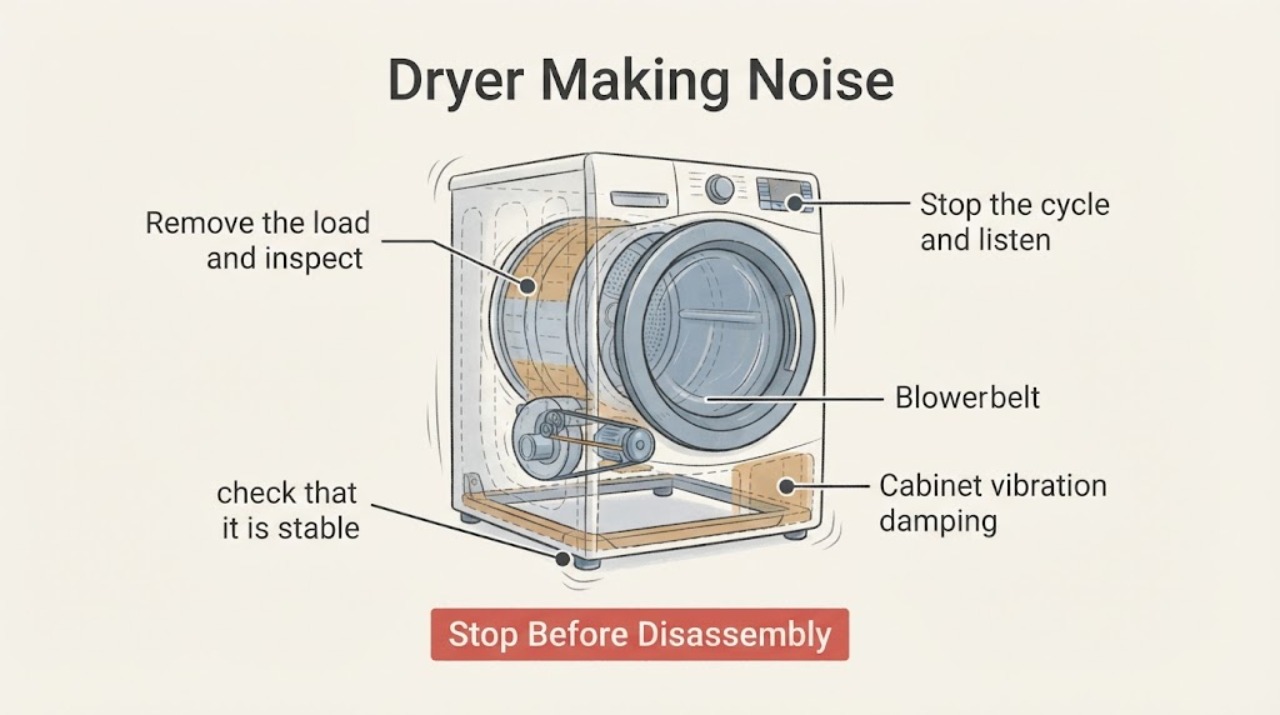
A Kenmore dryer making noise should be classified by sound and timing before any part is ordered. Stop the cycle and check the load, drum edges, lint-screen area, cabinet clearances, and level footing using only safe external or visible checks. A brief click on a gas model, a small load-related thump, or a rattle from an object touching the cabinet can have a different next step from scraping, grinding, squealing, or a motor hum with no drum movement. Use the exact Kenmore model manual for model-specific access and arrange service for a persistent internal noise, poor tumbling, overheating, gas odor, smoke, or electrical symptom.
Work through in order
Diagnostic checks
Use only checks that match the exact appliance or system and its official guide.
-
Check 1
Stop the cycle and listen from outside the dryer long enough to classify the sound as clicking, thumping, knocking/rattling, scraping, squealing, or a motor hum. Note whether it is tied to drum rotation, heat selection, or the start of the cycle.
Expected result: The sound is brief and repeatable, changes with drum rotation, occurs only as heat starts, or is harsh and continuous.
Next step: Continue only with the safe visible checks if the sound is mild and there is no safety symptom. Stop and arrange service for scraping, grinding, severe squealing, repeated impact, or worsening noise.
Why this matters
Why: Timing narrows the path: a load or gas-valve operating sound is different from a drum-contact, blower, drive, or motor fault. A harsh continuous sound is not a good candidate for repeated home testing.
-
Check 2
Remove the load and inspect the visible front and rear edges of the drum and the drum interior for coins, clips, zippers, buttons, or another small object. Remove only an object that is plainly reachable without tools and without reaching into a moving or enclosed mechanism.
Expected result: A loose item is visible at the drum edge or in the load; or the drum edge is clear and the noise remains.
Next step: Remove the visible item, check pockets, and make one short empty-drum observation only if no gas or electrical hazard exists. If the sound persists, do not remove panels; move to the installation and airflow checks or service.
Why this matters
Why: A trapped object can make clicking, tapping, scraping, or rattling as the drum turns. If nothing visible explains the noise, the cause may be in an enclosed drive or blower area.
-
Check 3
With the dryer empty and off, check that it is stable on all installed feet and that nothing rests on top, leans against a side, touches the rear, or contacts a nearby washer. Check any accessible pedestal or storage area for loose items.
Expected result: The cabinet rocks, a foot is missing, a nearby object is touching it, or a loose item is found; or the dryer is stable with clear surroundings.
Next step: Remove the external object and correct only safe, accessible stability issues without tilting or moving a gas dryer. If the noise continues, use the model manual or arrange service rather than opening the cabinet.
Why this matters
Why: Cabinet contact and an unlevel installation can amplify normal vibration into a knock or rattle. A stable, clear installation makes an internal source more likely if the noise remains.
-
Check 4
Inspect the lint screen and the visible lint-screen housing for a plainly visible foreign object, then confirm the lint screen is installed. Do not insert a hand or tool into the chute and do not remove the blower cover.
Expected result: A visible object is present near the lint-screen opening; the opening is clear; or the noise seems to strike once per drum revolution or once per blower rotation.
Next step: Remove only a loose, visible item from the accessible opening. If the sound remains or appears to come from the blower, belt, rollers, or motor area, stop and request qualified service.
Why this matters
Why: An object near the lint path can rattle or contact an enclosed blower, while a once-per-revolution sound can point to a drum or support issue. Neither observation identifies a safe DIY internal repair.
-
Check 5
After the dryer is safe to operate and no gas, smoke, or electrical symptom exists, note whether the drum tumbles normally, whether the dryer heats, and whether the noise changes with a light load versus an empty drum. Do not run a long unattended cycle.
Expected result: The drum does not turn, the motor hums without tumbling, the dryer overheats, the noise occurs only with a load, or the noise remains with an empty drum.
Next step: Stop for no tumble, overheating, or an internal-sounding noise. Give the technician the sound, load condition, heat result, and model number instead of testing further or ordering a guessed part.
Why this matters
Why: A load-only noise can point to loose hardware or an unbalanced bulky load; a no-tumble hum, overheating, or empty-drum noise suggests a drive, airflow, electrical, or internal mechanical issue.
-
Check 6
Find the full Kenmore model number and retrieve the matching manual before discussing parts or access instructions. Record when the noise began, what was in the drum, whether the dryer was moved, and any recent cleaning, repair, power, or gas-service event.
Expected result: The model number and a clear sound description are available; or the model cannot be identified and the cause remains uncertain.
Next step: Provide the model number and notes to Kenmore support or a qualified technician. If the model cannot be identified, do not order a motor, belt, roller, blower, burner, or control from a generic symptom list.
Why this matters
Why: Kenmore's documentation is selected by model number, and different dryer models can use different assemblies and service boundaries. A symptom alone is not reliable part compatibility evidence.
Use your observations
Decision map
Find the observation that best matches what you see, then follow the next safe action.
-
PATH 01Next step
What you see
The noise is a mild click or brief operating sound, and the drum tumbles without overheating or other symptom.
Do this next
Confirm the model and manual, observe whether the sound is repeatable during a cycle transition, and monitor. Escalate if it becomes harsh, continuous, or is joined by a gas, smoke, heat, or electrical symptom.
-
PATH 02Next step
What you see
The sound is a thump, knock, or rattle that changes when the load or an external contact point is removed.
Do this next
Keep pockets clear, avoid tightly balled bulky loads, and restore safe cabinet clearances and stable footing. If the sound persists with an empty, stable dryer, request service.
-
PATH 03Next step
What you see
The sound is a scrape, grind, severe squeal, or repeated impact, or it continues with the drum empty.
Do this next
Stop using the dryer. Do not open panels or reach into the drive or blower area; arrange qualified appliance service with the model number and sound recording or description.
-
PATH 04Next step
What you see
The motor hums without normal drum movement, the cabinet becomes unusually hot, or the dryer shows an electrical symptom.
Do this next
Stop using the dryer and disconnect power only if it is safe and there is no gas odor. Do not repeatedly reset a breaker or attempt a motor, belt, wiring, or thermal-device repair.
-
PATH 05Next step
What you see
A gas odor, smoke, burning smell, sparking, damaged cord, or other immediate hazard accompanies the noise.
Do this next
Leave the appliance out of service and follow the appropriate gas, fire, or electrical emergency response. Do not operate switches, relight a gas appliance, or continue diagnosis from inside the room.
Helpful context
Understand the symptom
Classify the sound first
Record the sound in plain words: click, thump, knock, rattle, scrape, squeal, hum, or a whoosh. Note whether it happens only with a particular load, only as the drum starts, throughout the cycle, or when heat starts. That distinction separates objects and installation vibration from a possible drum, blower, motor, or burner-related service problem. Do not keep running the dryer just to reproduce a harsh noise.
Safe boundary
Unplug the dryer only when there is no gas odor and it is safe to reach the plug without moving the appliance. Do not open the cabinet, reach toward the blower or belt, test live voltage, or work on a gas burner. If there is smoke, burning odor, gas odor, sparking, a damaged cord, overheating, or a breaker trip, stop using the dryer and get qualified help.
Safety boundary
Stop conditions
- Stop for smoke, burning odor, gas odor, sparking, a damaged cord or plug, overheating, water near electrical parts, or a repeated breaker trip.
- Stop for scraping, grinding, severe squealing, repeated impact, a motor hum with no drum movement, or a noise that rapidly worsens.
- Do not remove panels, reach into the blower or belt area, test live voltage, work on a gas burner, bypass a safety device, or move a gas dryer to inspect its connection.
Only after diagnosis
Potential parts
- drum support roller or glide
Consider only after a qualified diagnosis links a persistent rhythmic thump, scrape, or squeal to the drum support and not to a loose load or cabinet contact.
Confirm the complete model number and the technician's diagnosis before ordering; dryer support parts are not interchangeable by symptom alone. - drive belt or idler component
Consider only if a qualified technician confirms belt or idler wear as the source of a squeal, slapping sound, or abnormal drum drive.
Use model-specific fit information and qualified installation; do not open the cabinet based solely on a noise description. - blower wheel or motor component
Consider only after a technician isolates the sound to the blower or motor and confirms that an obstruction, mounting issue, or component failure is responsible.
Confirm model fitment and the actual failed component before ordering. Gas and electrical service boundaries still apply.
When checks do not resolve it
Need a professional?
Arrange qualified service when the noise remains after safe load, visible-object, clearance, and stability checks; comes from an enclosed mechanism; or occurs with no tumble, overheating, gas odor, smoke, sparking, a damaged cord, or repeated breaker trips.
Common questions
FAQ
Why is my Kenmore dryer making a rattling or knocking noise?
Check the load for loose hardware, then check for objects touching the cabinet, an unstable footing, a nearby washer contact point, or a loose pedestal item. If the sound remains with an empty, stable dryer, arrange service.
Should I keep running the dryer to identify a scraping sound?
No. Stop for scraping, grinding, severe squealing, or repeated impact. Look only for a plainly visible object at the drum edge; do not remove panels or reach toward the blower or drive.
Is clicking always a sign of a failed Kenmore dryer?
Not necessarily. A brief repeatable click can be an operating sound on some models, including a gas-valve sound on a gas dryer, but the exact model manual and the presence of heat, gas odor, or other symptoms determine the safe next step.
What should I tell a Kenmore technician?
Give the full model number, sound type, when it starts, whether the drum turns and heats, whether the sound changes with the load, and any recent move, installation, cleaning, repair, power, or gas event.
Read the exact guide
Official sources
- Gas DryersKenmore · Kenmore gas dryer product category and model identity
- Kenmore ManualsKenmore · Kenmore model-specific appliance manuals and troubleshooting resources
- Contact UsKenmore · Kenmore product questions and support routing
Community feedback
Share a repair observation
Share a plain-text repair observation. Accepted observations are published automatically; this page may take a moment to update.