
On this page
Start here
Quick answer
Treat a Kenmore washer-dryer alert as model-specific until the exact code and model number are recorded. Stop immediately for smoke, a burning or electrical smell, a hot or damaged cord, water near electrical parts, an active leak or overflow, or a drum that will not stop safely. Otherwise, photograph the display, record when the alert appears, and use the exact Kenmore owner's manual for that model; Kenmore's manual finder covers its laundry appliances. From ordinary safe access, check the door or lid closure, control lock, visible drain or water-supply problem, load distribution, and external power connection. Perform only a reset that the model manual documents, and only once. If the code returns, the display is blank, the unit will not drain or unlock, or the check would require cabinet access or energized electrical work, stop and arrange appliance service rather than guessing at a code or replacing a part.
Before you begin
Safety first
- This article supports documentation and ordinary-access checks only. Do not force a lock, open the cabinet, perform energized electrical measurements, or substitute a part based on a generic alert list.
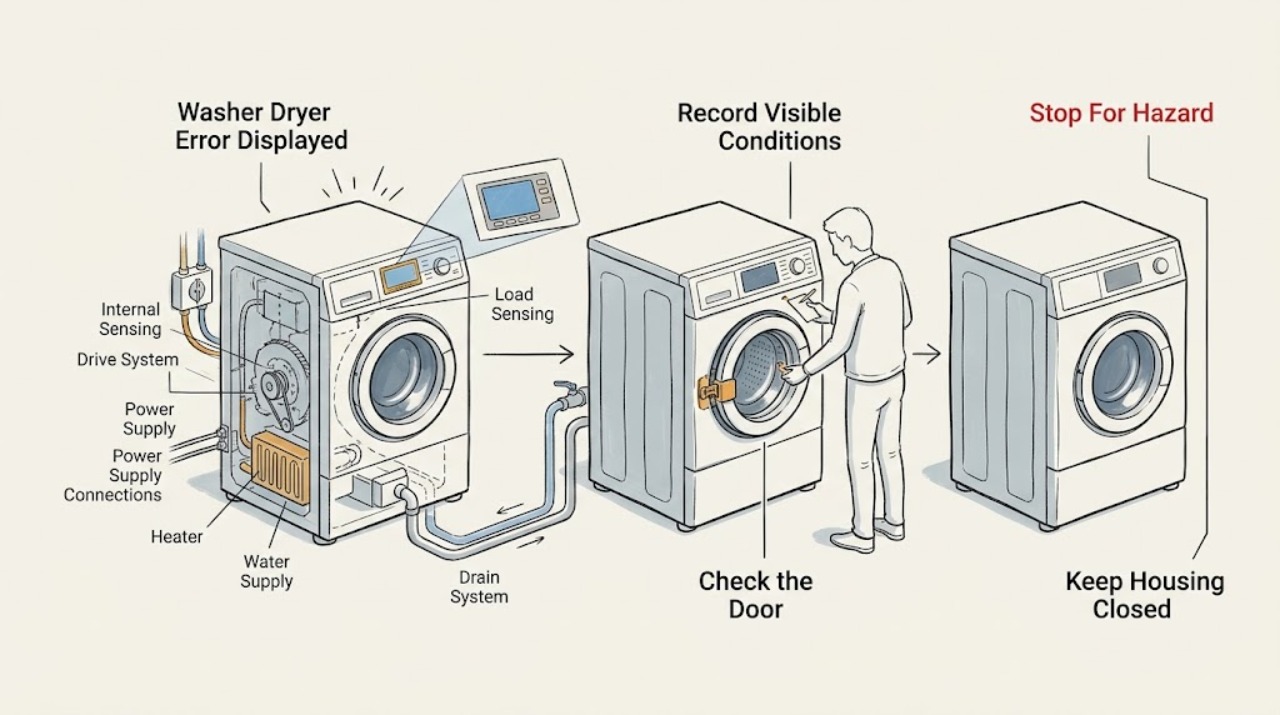
Work through in order
Diagnostic checks
Use only checks that match the exact appliance or system and its official guide.
-
Check 1
Stop the cycle and disconnect power only by the normal plug or accessible disconnect if it can be done without touching water or damaged wiring; keep clear of the appliance when there is smoke, a burning or electrical smell, a hot or damaged cord, an active leak or overflow, or a drum that keeps moving unexpectedly.
Expected result: Record whether any hazard is present, whether water is near the outlet or controls, whether the drum stops normally, and whether the appliance or cord feels abnormally hot without touching a damaged area.
Next step: If a hazard is present, leave the appliance off, keep people away from water and moving parts, and arrange qualified appliance or electrical service; otherwise continue to record the display before resetting anything.
Stop if: Do not restart after smoke, burning odor, exposed or hot wiring, water contacting electrical parts, an uncontrolled leak, or unsafe movement.
Why this matters
Why: A hazard overrides code interpretation and ordinary troubleshooting. No hazard permits the documentation and external checks below, but it does not make cabinet access or energized electrical testing appropriate.
-
Check 2
Photograph the complete display and write down the exact letters, numbers, flashing lights, beeps, cycle, stage, and behavior immediately before the alert; locate the model and serial label without removing panels.
Expected result: Classify the event as a code, control-lock indication, flashing status light, blank display, or an alert that appears only during filling, washing, draining, spinning, or drying; record whether the door or lid is locked.
Next step: Enter the model number in Kenmore's official manual finder and use that manual's alert table and user checks; keep the photo and notes for service if the alert is not listed or returns.
Stop if: Stop interpreting the alert and request model-specific support when the label, display, or code cannot be read, or when the procedure would require removing a panel.
Why this matters
Why: The alert's exact identity and timing determine which model-manual procedure applies. A partial code, a guessed meaning, or a code copied from another model is not reliable diagnosis.
-
Check 3
With the appliance stopped, inspect the visible door or lid opening and latch area for clothing, detergent residue, or debris; close the door or lid normally and check whether the control panel shows a lock or control-lock indication.
Expected result: Note whether an obstruction is visible, the door or lid closes and latches evenly, the lock indicator clears, and the alert changes without force.
Next step: Remove only a loose visible obstruction, follow the exact manual procedure for the control lock, and retry only if the manual permits it; if the alert returns or the door remains locked, keep the unit off and arrange service.
Stop if: Do not force the door, defeat the lock, insert tools into the latch, or reach into a moving or water-filled drum.
Why this matters
Why: A visible obstruction or an unchanged control-lock setting can prevent a cycle from starting or continuing. A clean, correctly closed door with a returning lock alert points to a latch, interlock, wiring, or control issue that is not confirmed by visual inspection.
-
Check 4
If the display or symptoms involve filling, draining, or an inability to unlock, inspect from ordinary access for standing water, a visibly kinked drain hose, a closed supply tap, or a blocked external hose path; use a model-manual filter procedure only if the manual identifies that filter as user-serviceable and gives the safe sequence.
Expected result: Record whether the tub is empty or holding water, whether the drain hose is kinked or displaced, whether both supply taps are open, and whether the alert changes after the manual-approved external correction.
Next step: Correct only the visible hose or tap condition described by the manual, protect the floor from water, and run only the manual-approved test; if water remains, leaks, or the alert returns, stop and request service.
Stop if: Do not open a wet cabinet, remove a pump or hose, reach into standing water near electricity, or continue a cycle during an uncontrolled leak or overflow.
Why this matters
Why: Standing water or a visible hose or tap problem can explain a user-correctable drain or fill condition. Normal hoses and supplies with a recurring alert point toward a pump, valve, sensor, control, or concealed obstruction that needs model-specific diagnosis.
-
Check 5
For an alert during washing, spinning, or drying, compare the load with the model manual's loading guidance, redistribute only items that can be moved safely while the drum is stopped, and inspect the plug and accessible receptacle for a loose connection or tripped reset without opening the appliance.
Expected result: Note whether the load was tightly packed, visibly unbalanced, or empty; record whether the appliance has stable power and whether the alert appears again with the same load or with no load as the manual permits.
Next step: Use the model manual's permitted load or power check once, then preserve the alert photo and result for service if the condition repeats or the display is blank or erratic.
Stop if: Do not operate an appliance with a hot, scorched, loose, or damaged cord or receptacle, and do not remove covers or perform energized electrical measurements.
Why this matters
Why: An obvious load or supply condition may interrupt a cycle, while a repeat alert with a reasonable load and stable external power makes a drive, balance sensor, heater, control, or wiring fault more likely. It does not identify a failed part by itself.
-
Check 6
After the immediate user-facing condition is corrected, perform only the exact power reset or button sequence documented for this model in the Kenmore manual, once, with the appliance in the manual's required state.
Expected result: Record whether the display clears, whether the appliance completes the manual-approved test, and whether the same alert returns at the same stage or immediately on power-up.
Next step: Stop repeating resets when the alert returns; give the technician the code, timing, manual procedure, and test result and use Kenmore's repair-support route.
Stop if: Do not use a reset sequence copied from another model, leave the appliance unattended during an abnormal test, or continue after smoke, leak, unsafe movement, or overheating.
Why this matters
Why: A cleared alert that does not return may have been a transient user condition, but a recurring or immediate alert is evidence of an unresolved fault. A reset cannot confirm a board, lock, pump, motor, heater, or sensor replacement.
Use your observations
Decision map
Find the observation that best matches what you see, then follow the next safe action.
-
PATH 01Safety boundary
What you see
Smoke, burning or electrical odor, a hot or damaged cord, water near electrical parts, an uncontrolled leak or overflow, or unsafe drum movement is present.
Do this next
Keep the appliance off, keep people away from the hazard, and arrange qualified appliance or electrical service.
Why this path and its safety boundary
Why it matters: The safety condition takes priority over interpreting the alert.
Safety stop: Do not restart, open the cabinet, or continue a cycle to see whether the alert clears.
-
PATH 02Safety boundary
What you see
The alert occurs with a visible door obstruction, control-lock setting, kinked external hose, closed supply tap, or clearly unsuitable load.
Do this next
Correct only the documented external condition, then run the manual-approved check once and record the result.
Why this path and its safety boundary
Why it matters: A user-facing condition may be interrupting the cycle, but the exact model manual still controls the correction.
Safety stop: If the alert returns, the door stays locked, water remains, or the unit leaks, stop and request service.
-
PATH 03Safety boundary
What you see
The door or lid, visible hoses, supplies, load, and external power appear normal but the alert persists or returns.
Do this next
Use the exact model manual and provide the alert photo, model and serial, cycle stage, symptoms, and one-time reset result to qualified service.
Why this path and its safety boundary
Why it matters: A control, lock, pump, valve, sensor, drive, heater, wiring, or other internal fault remains possible; the code alone does not establish which part failed.
Safety stop: Do not open panels, substitute parts, or perform live electrical or component tests as an ordinary-user step.
-
PATH 04Safety boundary
What you see
The display is blank, flickers, resets repeatedly, or shows incomplete characters rather than a readable alert.
Do this next
Check only the accessible plug and breaker or reset condition without opening anything, then arrange service if the display remains abnormal.
Why this path and its safety boundary
Why it matters: The event cannot be safely mapped to a code from the visible display; external power and internal control faults remain unresolved.
Safety stop: Stop for heat, scorching, odor, sparks, a damaged receptacle, or any need for energized measurements.
Helpful context
Understand the symptom
Start with the exact display and model identity
A code, a control-lock indicator, a flashing status light, and a blank display do not establish the same fault. Do not translate a Kenmore alert from a different model or assume that a washer-dryer combination uses the same meanings as a separate washer or dryer. Photograph the full display, note the cycle and stage, and record whether the unit fills, tumbles, heats, drains, unlocks, or stops. Kenmore's manual finder asks for the appliance model number and provides model-specific laundry manuals, so use that document before interpreting the alert or selecting a reset.
Make only ordinary-access checks first
With the appliance stopped, check the visible door or lid seal and latch area for clothing or debris, confirm that the door or lid closes normally, and check whether a control lock is indicated. If there is standing water, inspect only the externally accessible drain hose and any filter the model manual identifies as user-serviceable. Also check that supply taps are open and hoses are not visibly kinked, and that the load is not obviously packed or badly unbalanced. These checks can separate a blocked user condition from a recurring control, lock, pump, motor, heater, or sensor fault without opening the cabinet.
Use a reset as a test, not a repair
Some models document a power reset or a specific button sequence, while others require a different procedure. Follow only the exact Kenmore manual for the model, keep the appliance unloaded if the manual says to do so, and perform the documented reset once after the immediate user-facing condition has been corrected. If the same alert returns, record the timing and stop repeating resets: recurrence is useful service evidence and may indicate a component or wiring problem.
Know when the display requires service
An alert that returns after the manual's permitted checks, a unit that will not drain or unlock, a blank or erratic display, a continuing leak, or a fault during heating or high-speed spin is not a safe invitation to open the cabinet. Keep the code photo, model and serial information, cycle, load, water level, door behavior, and reset result for the technician. Kenmore's customer-care resources link owners to manuals, warranty information, and repair support.
Safety boundary
Stop conditions
- Stop and arrange qualified service for smoke, burning or electrical odor, a hot or damaged cord, sparks, water near electrical parts, an uncontrolled leak or overflow, or unsafe drum movement.
- Do not force a locked door or lid, defeat an interlock, insert tools into the latch, or reach into a moving or water-filled drum.
- Do not remove cabinet panels, perform energized electrical measurements, or replace a control, pump, valve, motor, heater, sensor, or lock based only on a generic code list.
- Do not repeat resets or continue test cycles when the same alert returns, the display is blank or erratic, water remains, the unit will not drain or unlock, or the cycle fails during heating or high-speed spin.
- Use the exact model manual and preserve the code photo and symptom history before requesting service.
When checks do not resolve it
Need a professional?
Arrange qualified Kenmore or appliance service when the alert is not identified by the exact model manual, returns after the manual-approved user checks or one-time reset, the display is blank or erratic, the unit will not drain or unlock, a leak persists, or diagnosis would require cabinet access or electrical testing. Use Kenmore's customer-care and repair resources and provide the model and serial information, exact display, cycle stage, door or lid behavior, water level, load, external power observations, and reset result.
Safety scope: This article supports documentation and ordinary-access checks only. Do not force a lock, open the cabinet, perform energized electrical measurements, or substitute a part based on a generic alert list.
Read the exact guide
Official sources
- Customer Care & Support | Kenmore AppliancesKenmore / Transform SR Brands LLC · Kenmore's official customer-care page provides general support routes; it does not replace the exact manual or diagnose an individual alert.
- Find Your Manual | Kenmore Appliance Manuals & GuidesKenmore / Transform SR Brands LLC · Kenmore's official manual finder says owners should enter the model number and specifically lists washers and dryers among the appliances covered; the exact manual controls alert meanings and procedures for a particular unit.
Community feedback
Share a repair observation
Share a plain-text repair observation. Accepted observations are published automatically; this page may take a moment to update.