
On this page
Start here
Quick answer
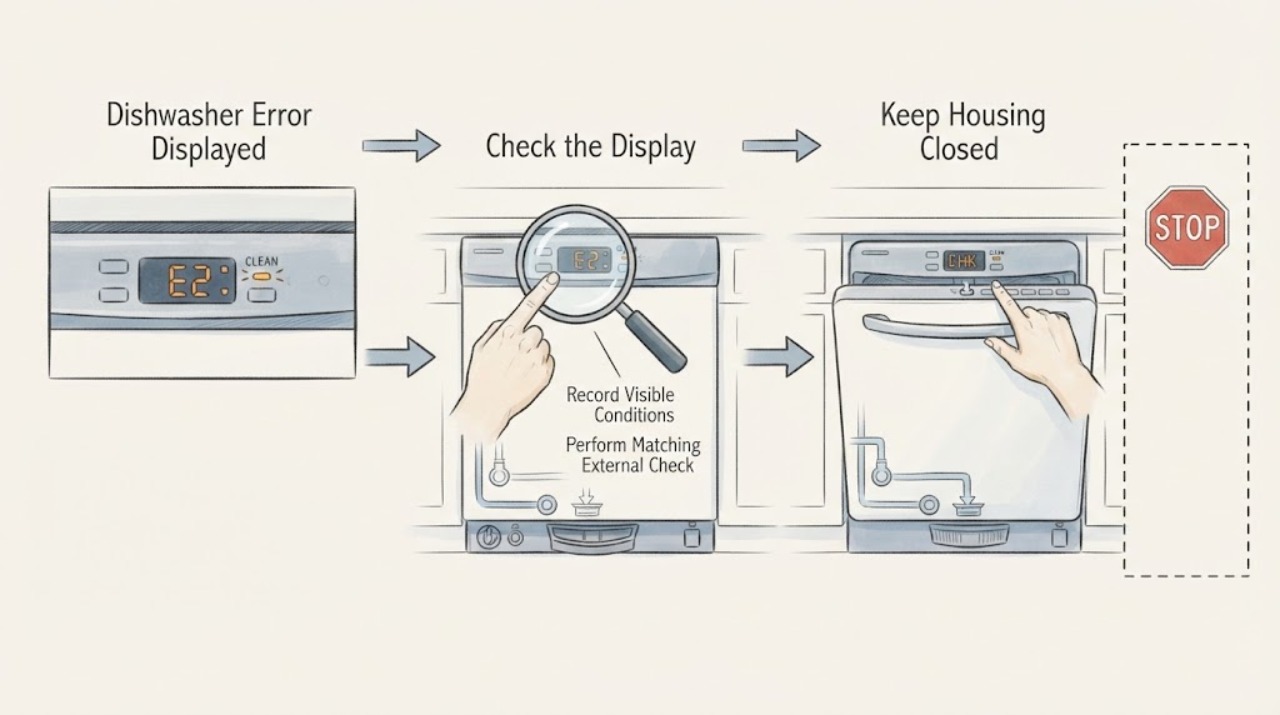
Do not guess from a single blinking light or combine code tables from different dishwasher models. Record the full KitchenAid model number, whether the panel shows a digital code or lights, and the complete repeating pattern, including pauses. KitchenAid says display models commonly show an F#E# code, while flashing clean-light models use two groups of flashes separated by pauses; it also warns that exact codes vary by model. Use the matching owner manual and official KitchenAid error article. Only after the identity is clear should you make an external check such as closing a door, confirming the water valve is open, checking a visible filter or drain hose, or clearing a documented control lock. A single model-appropriate power cycle may clear a transient error, but if the same code or lights return, water remains, the dishwasher leaks, or the check would require a panel, pump, heater, wiring, or live test, stop and arrange qualified service. Do not replace a part from a generic code list.
Before you begin
Safety first
- Do not remove panels, test energized wiring, bypass the door latch or float, change breaker size, or order a component solely from a generic code list. For a leak, smoke, sparking, hot cord, or water near electrical parts, stop using the dishwasher and isolate power only if safe before obtaining qualified service.
Work through in order
Diagnostic checks
Use only checks that match the exact appliance or system and its official guide.
-
Check 1
Record the complete KitchenAid model number, whether the dishwasher has a digital display, which indicator light or lights are active, whether the light is steady or flashing, and whether the cycle is running, paused, or finished.
Expected result: A digital F#E# code is visible, the clean light flashes, several cycle or option lights flash, only a control-lock indicator is on, or the pattern is incomplete.
Next step: Use the exact model manual and matching official code or light article. If the sequence is unclear, observe one full repeat without pressing buttons and record the pauses.
Stop if: Do not dismantle the control panel, force buttons, or continue if there is smoke, a hot cord, sparking, or water near electrical parts.
Why this matters
Why: The interface selects the applicable KitchenAid article. A control-lock or suspended-cycle indication is not automatically a component failure, while an incomplete pattern cannot safely be mapped to a code.
-
Check 2
For a display, copy every character exactly. For a flashing clean light, count the first group, short pause, second group, and longer pause before it repeats; record which light is flashing. Do not substitute a similar-looking code or a count from another model.
Expected result: The sequence repeats consistently as an F-E pair, the display shows a code such as F9E1 or H2O, the lights stop after the door is latched, or no stable sequence can be obtained.
Next step: Match the exact code and model to the official KitchenAid article. If no stable code can be recorded, use the manual or arrange service rather than guessing.
Stop if: Do not bridge terminals, enter an undocumented diagnostic mode, or remove a panel to reveal a hidden code.
Why this matters
Why: KitchenAid uses the two-part flash pattern to communicate a code, but exact codes vary by model. A light that stops after the door is properly closed can represent a suspended cycle on applicable models rather than a persistent fault.
-
Check 3
Follow only the external check named by the exact code article: for a water indication, confirm the under-sink valve is open and the visible supply hose is not kinked; for a drain indication, inspect the accessible filter, hose, disposer connection, air gap, or suds as the model instructions permit; for a door or lock indication, close the door firmly and check the model's control-lock state.
Expected result: The water supply is closed or restricted, a visible drain path is obstructed, excessive suds are present, the door was not latched, the control lock or delay mode was active, or the external checks are normal.
Next step: Correct only the documented external condition, then follow the exact article's resume or clear-code instruction. If the code returns or the issue requires internal access, stop and arrange service.
Stop if: Do not reach into a running dishwasher, remove energized components, access a pump or heater, or use live electrical measurements.
Why this matters
Why: A confirmed external condition can explain the matching code or indicator and gives a safe correction. Normal external checks do not identify an internal pump, valve, motor, heater, sensor, or control failure.
-
Check 4
If the matching KitchenAid guidance permits a control reset, cancel or drain an active cycle as instructed, disconnect power from an accessible plug or the dedicated breaker, wait the article's stated interval, restore power, close the door, and run the documented restart sequence. Do this once, not repeatedly.
Expected result: The code clears and the dishwasher completes the next operation, the same code or light pattern returns, or the unit will not safely drain, power, or latch.
Next step: Record the returning code and external checks, then use KitchenAid service support. Stop immediately for leaks, electrical symptoms, or a reset that would require touching wet or exposed wiring.
Stop if: Do not repeatedly cycle power, defeat the door latch, change breaker size, or work inside a hard-wired control circuit.
Why this matters
Why: A cleared code can have been transient. A returning code or inability to complete the reset means the reset did not resolve the underlying condition and is not evidence for a particular replacement part.
-
Check 5
Arrange qualified KitchenAid or appliance service when the exact code or light pattern cannot be identified, the same code returns after the model-supported external check or one reset, water remains or leaks, or diagnosis would require a pump, motor, heater, sensor, control, wiring, or panel access. Provide the model, exact code or sequence, cycle state, visible water, and what changed.
Expected result: The error is persistent, the dishwasher will not drain or latch, a leak or water near electrical parts is present, or smoke, sparking, a hot cord, or another hazard appears.
Next step: Stop using the dishwasher for a leak or electrical/fire warning and isolate power only from a dry, accessible position if safe. Obtain qualified service; do not restart it to reproduce the fault.
Stop if: Do not remove panels, test energized wiring, bypass a latch or float, or order a part solely from a code label.
Why this matters
Why: The remaining possibilities are model-specific internal or electrical conditions. A generic KitchenAid code table cannot establish a safe component diagnosis, and a hazard overrides further troubleshooting.
Use your observations
Decision map
Find the observation that best matches what you see, then follow the next safe action.
-
PATH 01Next step
What you see
The clean light flashes in two groups with a repeat pause, or a digital display presents an F#E# code.
Do this next
Write down the exact sequence and match it to the model-specific KitchenAid article before attempting a check.
Why this path and its safety boundary
Why it matters: This is a code-interpretation path. KitchenAid says the first group is the Function number and the second is the Error number, but exact meanings vary by model.
-
PATH 02Next step
What you see
All selected cycle or option lights flash after the door was opened, or a control-lock light is active and buttons do not respond normally.
Do this next
Close the door firmly or use only the model's documented control-lock release. If lights remain or a code returns, record it and use the service branch.
Why this path and its safety boundary
Why it matters: On applicable models, the lights can indicate a suspended cycle, while control lock disables buttons. This is different from a confirmed internal fault code.
-
PATH 03Next step
What you see
The exact model article identifies a water or drain path, such as the guide's F9E1 long-drain example, and the dishwasher has supply, standing-water, or suds symptoms.
Do this next
Correct the named external condition only as the official article permits, then resume or reset once as documented. Escalate if the code returns or water remains.
Why this path and its safety boundary
Why it matters: The matching external condition is more plausible than an unproven internal part failure. The guide's code examples must not be used when the display or model does not match.
-
PATH 04Next step
What you see
The code or light pattern is incomplete, does not match the model article, returns after the external check or one reset, or is accompanied by a leak or electrical warning.
Do this next
Keep the dishwasher off for a leak or electrical/fire hazard and arrange qualified service with the recorded code and observations. Do not perform live tests or bypass protection.
Why this path and its safety boundary
Why it matters: The error is not safely resolved by a generic interpretation. Model-specific control, pump, valve, motor, heater, sensor, wiring, or water-containment work may be involved.
Helpful context
Understand the symptom
Identify the display family before reading a code
KitchenAid describes digital display models that show an F#E# code and non-display models where a flashing clean light communicates two numbers through groups of flashes and pauses. Count the complete repeating sequence and write down which light is flashing. A single light or a partial count is not enough to choose a code article. The manufacturer also states that exact codes vary by model, so obtain the model-specific manual before treating a code as a diagnosis.
Use a code as a route, not a parts order
The KitchenAid error guide gives examples such as F8E4 for water detected in a drip tray, F7E2 for a wash-motor error, and F9E1 for a long drain. These are useful only when the displayed code and model article match. A code narrows the next observation; it does not prove that a pump, valve, motor, sensor, or control needs replacement.
Complete only visible, model-supported checks
Depending on the exact error, KitchenAid's public guidance includes checking that the water valve is open, the door is fully latched, control lock or delay mode is not active, and a visible filter or drain hose is not obstructed. For documented F9E1, KitchenAid also distinguishes a disposer knockout plug, air gap, hose, filter, and excessive suds. Do not remove a pump, heater, float, control panel, or wiring to continue the diagnosis.
Reset once only when the official path permits it
KitchenAid says a control reset can clear a transient error. Its general reset article instructs canceling an active cycle, disconnecting power, waiting at least one minute, restoring power, closing the door, and starting a cycle; it says to contact KitchenAid if the concern returns. Follow the exact model manual, especially where an outlet or hard-wired circuit is involved.
When checks do not resolve it
Need a professional?
Call qualified service when the exact code or light sequence is unknown, the error returns after one model-supported reset, the dishwasher will not drain or latch, water remains or leaks, or the next step would require a panel, pump, heater, wiring, or live test. Stop immediately for smoke, sparking, a hot cord, or water near electrical parts.
Safety scope: Do not remove panels, test energized wiring, bypass the door latch or float, change breaker size, or order a component solely from a generic code list. For a leak, smoke, sparking, hot cord, or water near electrical parts, stop using the dishwasher and isolate power only if safe before obtaining qualified service.
Common questions
FAQ
What does a flashing clean light mean on a KitchenAid dishwasher?
KitchenAid says a flashing clean light usually communicates an error through two groups of flashes. Count the first group, the pause, the second group, and the longer repeat pause; do not interpret one blink count without the complete sequence and model.
Are KitchenAid dishwasher error codes the same on every model?
No. KitchenAid explicitly says exact codes vary by model. Its examples include F8E4, F7E2, and F9E1, but use them only when the exact display and model article match. Find the owner's manual by model number before choosing a code-specific action.
Can I reset a KitchenAid dishwasher error code?
A model-supported control reset can clear a transient error. KitchenAid's general reset path says to cancel or drain, disconnect power, wait at least one minute, restore power, close the door, and restart; if the concern returns, contact KitchenAid. Do not repeatedly cycle power as a substitute for diagnosis.
What should I check for a KitchenAid F9E1 code?
KitchenAid describes F9E1 as a long-drain condition and lists external checks for the filter, drain hose, disposer knockout plug, air gap, obstructions, and excessive suds. Apply that list only when the displayed code and model article match; persistent F9E1 requires service.
When should I stop troubleshooting a KitchenAid dishwasher error?
Stop when the error returns after the model-supported check or one reset, the code cannot be identified, water remains or leaks, or the next step involves a panel, pump, heater, wiring, or live electrical test. Stop immediately for smoke, sparking, a hot cord, or water near electrical parts and obtain qualified service.
Read the exact guide
Official sources
- F9E1 - DishwasherKitchenAid Product Help · KitchenAid article for the F9E1 code; do not apply it to a different code or unidentified model.
- All Cycle And Option Lights flashing - DishwasherKitchenAid Product Help · Select KitchenAid dishwasher models; the page says the lights can flash when a door is opened during a running cycle.
- Owners CenterKitchenAid · KitchenAid owner-resource portal; use the exact model manual rather than a generic code list.
- Resetting the Dishwasher's Controls (Cycle Power)KitchenAid Product Help · KitchenAid general reset guidance; exact owner manual and electrical setup control.
- Home - Product Help | KitchenAidKitchenAid Product Help · KitchenAid official support portal; it routes model-specific help and service but is not a universal component diagnosis.
- Clean Light Flashing - DishwasherKitchenAid Product Help · KitchenAid dishwasher models using a flashing clean light; use the complete sequence and matching model article.
- Not Starting or Operating - DishwasherKitchenAid Product Help · KitchenAid dishwasher troubleshooting page; controls and features can vary by model.
- Dishwasher Error Codes - ReadingKitchenAid Product Help · KitchenAid error-reading guide; exact meanings and checks remain model-specific.
Community feedback
Share a repair observation
Share a plain-text repair observation. Accepted observations are published automatically; this page may take a moment to update.