
On this page
Start here
Quick answer
A KitchenAid oven message cannot be diagnosed safely from the word error alone: record the exact code or full wording, the model number, when it appeared, and whether the oven was hot, heating, locked, or completing a cycle. A message such as Call Service or an F0 E0 code needs the model-specific KitchenAid instructions; the manufacturer's guidance allows one safe power reset in the applicable procedure by switching the oven off at its breaker(s), waiting one minute, restoring power, starting Bake, and watching for the message for one minute. Do that only when there is no gas odor, smoke, burning smell, visible arcing, severe heat, water near electrics, or repeated tripping. If the message returns, the display is unresponsive, the door is unsafe, or the code concerns a control, wiring, sensor, or latch, leave the oven off and arrange qualified service rather than guessing a part or repeatedly resetting it.
Before you begin
Safety first
- This article supports ordinary-access observation and one model-approved reset only when the oven is safe. Do not open panels, work on energized wiring or gas parts, bypass a safety or door lock, force a hot door, or continue after an odor, smoke, arc, severe heat, water, or repeated-trip condition.
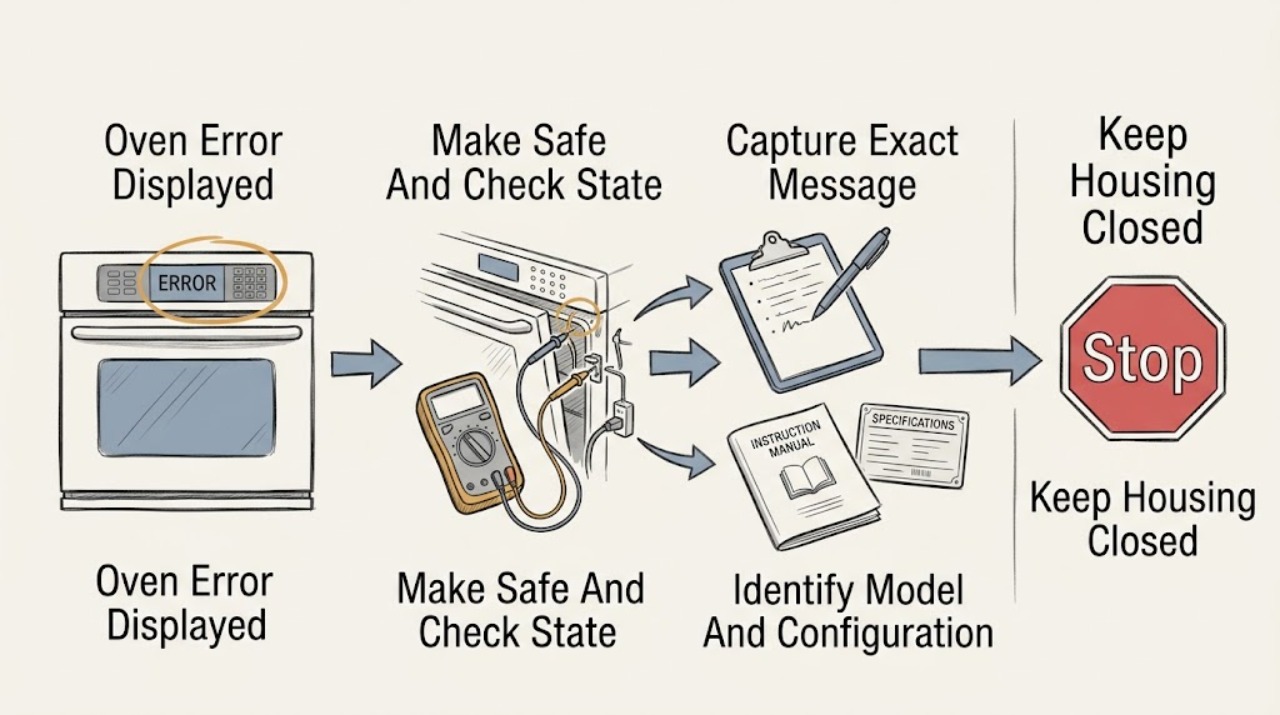
Work through in order
Diagnostic checks
Use only checks that match the exact appliance or system and its official guide.
-
Check 1
From a safe position, stop using the oven and check the surrounding area and display without touching wiring, removing panels, or reaching through a hot or locked door.
Expected result: Record whether there is gas odor or hissing, smoke, a burning smell, visible arcing, unusual heat, water near the appliance or outlet, a damaged cord, or a breaker that has tripped; also record whether the oven is heating, still running, self-cleaning, or merely displaying a message.
Next step: If the area is safe, leave the controls untouched and capture the display; if an unsafe condition is present, leave the oven off, move away, and use the appropriate emergency, gas, electrical, or qualified appliance-service route from a safe location.
Stop if: Do not operate switches or controls when gas is suspected, do not open the oven or electrical enclosure, and do not continue testing after smoke, arcing, burning odor, severe heat, water contact, or repeated breaker trips.
Why this matters
Why: Any gas, smoke, fire, arc, severe heat, water-and-electricity, damaged-power, or repeated-trip condition is a safety event rather than a routine code lookup. A cool, stable oven with only a message can proceed to documentation and model-specific instructions.
-
Check 2
Photograph the full display and write the exact code or message, including spaces, punctuation, alternating screens, indicator lights, and the time or cycle stage when it appeared.
Expected result: Classify the record as a complete named message such as Call Service, a complete code such as F0 E0, a feature/status prompt, a partial or unreadable code, or a blank/unresponsive display.
Next step: Keep the photograph and record with the model number, fuel type, selected function, oven temperature, and whether the message clears with Cancel; use these details when checking the model manual or requesting service.
Stop if: Do not repeatedly press keys to make an unknown message change, enter technician diagnostics, or infer a component from an incomplete code.
Why this matters
Why: A complete message can be matched to the exact KitchenAid model guidance. A partial code, a blank display, or a status prompt has a different decision path; guessing from a similar-looking code can send the repair in the wrong direction.
-
Check 3
Read the KitchenAid model number from the rating label or the owner's documentation only from an ordinary safe access point, and record whether the appliance is a wall oven, range, gas, electric, or dual-fuel configuration.
Expected result: Record a complete model number, serial information if safely visible, fuel configuration, whether the message occurs on one oven cavity or the whole control, and whether the manual is available.
Next step: Use the complete model number to open the matching KitchenAid manual or product-help page; if it cannot be identified, provide the photograph and label details to KitchenAid or a qualified technician.
Stop if: Do not move a built-in oven, remove trim, expose wiring, or continue if accessing the label requires dismantling the appliance or touching hot, wet, or damaged areas.
Why this matters
Why: The model determines which message definitions, reset directions, door-lock behavior, and service path apply. Without the model, a code that looks familiar cannot be assigned a reliable component or repair.
-
Check 4
Compare the complete message with the exact model's KitchenAid instructions and follow only the displayed low-risk command, such as Cancel or Enter, when the page explicitly directs it.
Expected result: Record whether the message clears, remains unchanged, changes to a different code, or returns as soon as the control is used; note whether the oven remains cool and otherwise responsive.
Next step: If the message remains or changes into a fault, stop normal use and prepare the exact record for service; proceed to the single reset only if the matched KitchenAid procedure allows it and the safety check remains clear.
Stop if: Do not force a locked door, cancel a hazardous hot or self-cleaning state, or use diagnostic key sequences not provided for the exact model.
Why this matters
Why: A control prompt that clears as its model instructions describe may be a state or retry condition. A persistent Call Service, F0 E0, or other unresolved code means the control has detected or cannot identify a fault and needs the model-specific service path rather than a guessed part.
-
Check 5
Only after the safety check is clear and the matched KitchenAid instructions call for a reset, switch off the labeled oven breaker(s), wait the procedure's one minute, restore power, and do not open the appliance or touch live parts.
Expected result: After power returns, record whether the display is normal, the same message remains, a new code appears, the clock or settings are lost, or the breaker trips again; do not start a heating cycle if an unsafe condition is present.
Next step: If the message persists, returns, or the breaker trips, leave the oven off and request service with the model and code record. If it clears, continue with the controlled Bake observation only when the exact instructions and safety conditions allow it.
Stop if: Do not reset repeatedly, remove an electrical cover, test energized wiring, or restore power after smoke, gas odor, arcing, water contact, overheating, or repeated tripping.
Why this matters
Why: KitchenAid's applicable Call Service, F0 E0, and feature-fault pages use a one-minute power reset as a limited troubleshooting step. A clear display is only a provisional result; a returning message or another trip shows that the underlying problem is not resolved by the reset.
-
Check 6
If power was restored normally and the exact KitchenAid procedure allows it, select Bake and observe the control and oven for the procedure's one-minute monitoring period from a safe position.
Expected result: Record whether the oven accepts the command, displays the same or a new code, begins a normal cycle, heats abnormally, remains locked, smells of gas or burning, smokes, arcs, or trips the breaker.
Next step: Stop the cycle and arrange qualified appliance service when the code returns or any abnormal behavior appears; if the oven remains normal, retain the record and monitor rather than repeating the reset.
Stop if: Stop immediately for gas odor, delayed ignition, smoke, burning smell, visible arc, excessive heat, door-latch trouble, or a breaker trip; do not continue a test to collect more evidence.
Why this matters
Why: A stable display and normal response after the prescribed observation supports a cleared transient control state, but it does not prove a board, sensor, latch, or wiring component is healthy. Any returning message or abnormal behavior points to service.
-
Check 7
For a persistent, returning, unreadable, or model-unmatched message, leave the oven off and assemble the service record instead of choosing a replacement component.
Expected result: Provide the exact code and full display photo, model number, fuel type, cavity, cycle and temperature, reset result, breaker behavior, door or lock state, and any safe observations about heating or odor.
Next step: Contact KitchenAid support or a qualified appliance technician and ask for model-specific diagnosis; keep the oven out of service until the technician says it is safe.
Stop if: Do not open panels, bypass a door or thermal safety, replace a board from a code search, or make live electrical or gas measurements.
Why this matters
Why: KitchenAid describes unresolved Call Service and F0 E0 conditions as requiring service; an error display alone does not identify a universally compatible control, keypad, sensor, latch, or wiring repair.
Use your observations
Decision map
Find the observation that best matches what you see, then follow the next safe action.
-
PATH 01Safety boundary
What you see
Gas odor or hissing, smoke, burning smell, visible arc, severe heat, water near electrics, damaged power, or repeated breaker trips is present.
Do this next
Stop using the oven, move away, and use the appropriate emergency, gas, electrical, or qualified-service route from a safe location; do not operate switches or test again when gas is suspected.
Why this path and its safety boundary
Why it matters: This is a safety hazard, not a routine display-code problem.
Safety stop: Do not continue any reset or heating observation.
-
PATH 02Safety boundary
What you see
The complete display says Call Service or the message remains after the model-directed Cancel action.
Do this next
If safe and the exact instructions apply, perform the single one-minute breaker reset, then monitor Bake for one minute; if the message remains or returns, leave the oven off and arrange service.
Why this path and its safety boundary
Why it matters: KitchenAid treats the message as a detected fault and directs power-reset and service steps rather than a guessed part.
Safety stop: Do not repeatedly reset or open the control area.
-
PATH 03Safety boundary
What you see
The complete code is F0 E0 or the exact model page identifies an equivalent electronic-control recognition fault.
Do this next
Use the model-specific one-minute reset only when safe, monitor the result, and request qualified service if the code returns or the oven is abnormal.
Why this path and its safety boundary
Why it matters: KitchenAid says the electronic oven control cannot recognize the problem; control or wiring may be involved, but the code does not authorize a part substitution.
Safety stop: Do not diagnose or repair control wiring from the code alone.
-
PATH 04Safety boundary
What you see
The range or oven shows a prompt such as PRESS ENTER TO TRY AGAIN or DISABLE POWER TO CLEAR, without an unsafe condition.
Do this next
Follow the exact displayed instruction once; if it calls for a power reset, use the one-minute procedure and monitor Bake. Escalate if the prompt returns.
Why this path and its safety boundary
Why it matters: KitchenAid provides a controlled retry or power-clear path for this type of display, but the correct behavior remains model-specific.
Safety stop: Do not improvise a key sequence or continue if the oven is hot, locked, smoking, or electrically abnormal.
-
PATH 05Safety boundary
What you see
The code is partial, unreadable, alternating, unfamiliar, or the model number is missing.
Do this next
Photograph the display, obtain the complete model number from safe access, and use the exact manual or service channel; keep the oven off if it cannot be safely characterized.
Why this path and its safety boundary
Why it matters: There is not enough identity information to assign a reliable KitchenAid definition or component.
Safety stop: Do not infer the meaning from a similar code or replace a part based on a search result.
-
PATH 06Safety boundary
What you see
The safe, model-approved reset clears the message and the controlled Bake observation remains normal.
Do this next
Keep the code and reset record, use the oven normally only while it remains stable, and stop if the message or abnormal behavior returns.
Why this path and its safety boundary
Why it matters: The reset may have cleared a transient control state, but it is not proof that every underlying component is healthy.
Safety stop: Do not repeat resets as preventive maintenance.
-
PATH 07Safety boundary
What you see
The same or a new code returns after reset, the display remains unresponsive, or the breaker trips again.
Do this next
Leave the oven off and arrange qualified service with the complete evidence record.
Why this path and its safety boundary
Why it matters: The fault is unresolved and needs model-specific diagnosis; repeated power cycling is not a repair.
Safety stop: Do not attempt another reset, open panels, bypass interlocks, or test energized circuits.
-
PATH 08Safety boundary
What you see
The display is associated with a hot oven, self-cleaning cycle, door-lock state, or a door that will not safely release.
Do this next
Follow the exact model's cooling and door-lock instructions; if the lock remains, the oven stays hot, or the state is unclear, stop and request service.
Why this path and its safety boundary
Why it matters: Forcing the door or interrupting a high-temperature state can create injury, heat, or equipment risk and may change the code context.
Safety stop: Do not force the door, defeat the lock, or reset while doing so would expose a person to heat or an unsafe condition.
Helpful context
Understand the symptom
Start with the exact message, not a guessed code meaning
KitchenAid display messages vary by model and by whether the oven is reporting a control state or a fault. Photograph the entire display and write down every character, punctuation mark, alternating message, indicator light, and the stage when it appeared. Keep the model number with the record so the correct manual or product-help page can be matched; do not turn a partial code into a diagnosis for a control board, sensor, or latch.
Separate a normal control message from a fault
A feature-unavailable prompt, lock or cycle status, and a power-loss message may require a control action described for that model. A Call Service prompt or an F0 E0 code is different: KitchenAid describes Call Service as a detected fault and F0 E0 as an electronic oven control that cannot recognize the problem. Follow only the instruction shown on the display or in the exact model manual; an unfamiliar code should remain an unresolved code, not a reason to substitute a part.
Use one controlled reset, then make the result the decision
When the oven is safe to handle and the applicable KitchenAid instructions call for it, press Cancel once if directed, then use the home's labeled oven breaker(s) to remove power for the specified one-minute reset. Restore power, choose Bake, and observe for one minute as KitchenAid describes. If the message clears and the oven behaves normally, keep the code record and monitor; if it returns or the oven behaves abnormally, stop and arrange service. Do not cycle power repeatedly or open panels to investigate.
Only after diagnosis
Potential parts
- electronic oven control board
Consider this only if the exact model documentation and qualified diagnosis identify the control as the failed component; Call Service or F0 E0 alone is not sufficient.
Confirm the complete model number and the manufacturer's fit information before any replacement; do not order from a code match alone. - user interface or keypad
Consider this only when the exact model's diagnosis links an unresponsive or incorrect input/display behavior to the user interface rather than the control or power supply.
Compatibility depends on the complete model and revision; qualified service should confirm the part and safe installation. - temperature sensor
Consider this only when the exact code and model procedure identify a temperature-sensing fault and a technician confirms the sensor or its circuit.
Do not infer sensor fit or failure from a generic error display; verify model-specific compatibility and wiring condition. - door latch or lock assembly
Consider this only when the exact model diagnosis identifies the latch or lock circuit and the door can no longer complete a safe, normal state.
Confirm the complete model and service procedure; never bypass the lock or force a hot door.
When checks do not resolve it
Need a professional?
Safety scope: This article supports ordinary-access observation and one model-approved reset only when the oven is safe. Do not open panels, work on energized wiring or gas parts, bypass a safety or door lock, force a hot door, or continue after an odor, smoke, arc, severe heat, water, or repeated-trip condition.
Common questions
FAQ
What should I do first when my KitchenAid oven shows an error?
Make sure there is no gas odor, smoke, burning smell, visible arc, severe heat, water near electrics, or repeated breaker trip. If safe, photograph the complete message, record the model number and cycle state, and match the exact wording to the KitchenAid instructions before trying one permitted Cancel or power-reset step.
What does F0 E0 mean on a KitchenAid oven?
KitchenAid describes F0 E0 as an electronic oven control that cannot recognize the problem. Follow the exact model's one-minute power-reset instruction only when safe; if the code remains or returns, leave the oven off and arrange qualified service rather than choosing a control board from the code alone.
Should I keep resetting a KitchenAid oven error?
No. Use the manufacturer's reset procedure at most as the directed troubleshooting step, then monitor the result. A returning message, another code, an unresponsive display, or another breaker trip means the fault is unresolved and needs model-specific service.
Can I replace a part based only on the error message?
No. The same-looking display can have different meanings by model and configuration, and a control, keypad, sensor, latch, wiring, or power problem can overlap. Provide the exact code and model to a qualified technician for diagnosis and fit confirmation.
Read the exact guide
Official sources
- Feature Not Available or Fault Detected - RangeKitchenAid · KitchenAid ranges showing the named control prompts; apply only when the appliance and exact displayed instruction match.
- Call Service - Wall OvenKitchenAid · KitchenAid wall ovens displaying Call Service or a related control message; use the exact model instructions when they differ.
- F0 E0 - Wall OvenKitchenAid · KitchenAid wall ovens displaying F0 E0; confirm the exact model and configuration before applying the procedure.
Community feedback
Share a repair observation
Share a plain-text repair observation. Accepted observations are published automatically; this page may take a moment to update.