
On this page
Start here
Quick answer
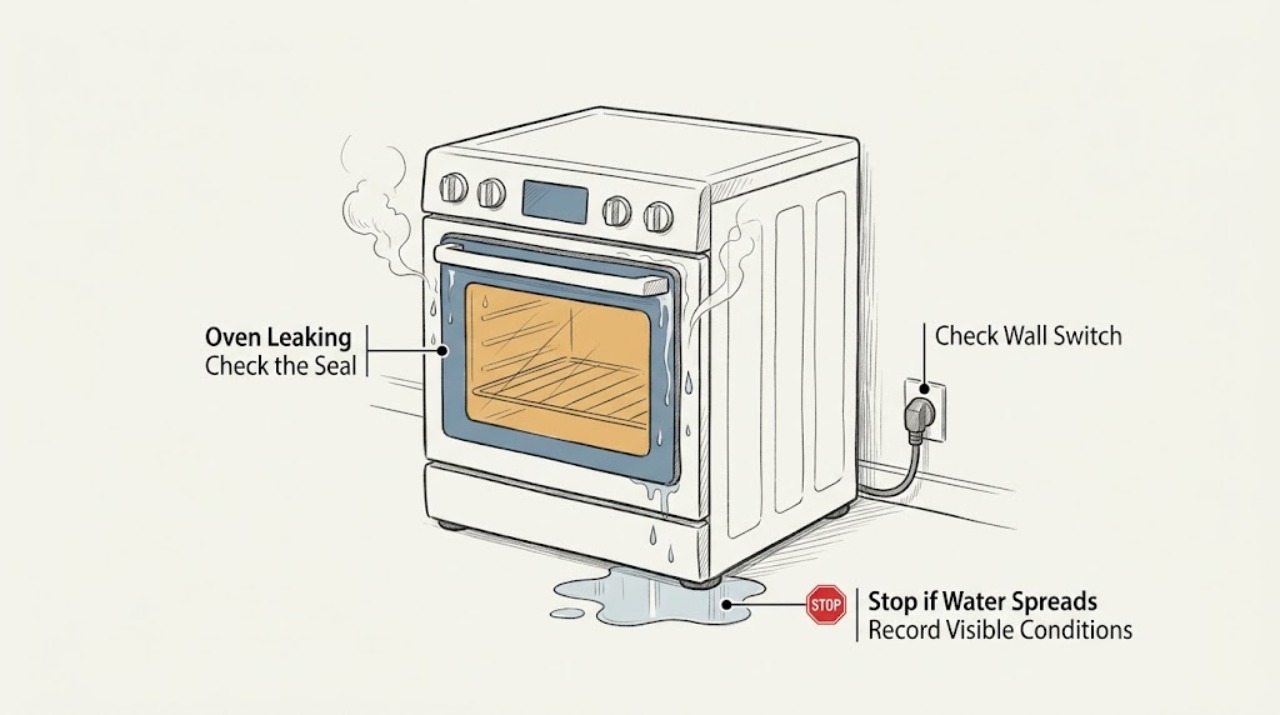
First decide whether the KitchenAid oven is producing steam or liquid water, and whether the liquid came from cooking, Steam Bake or Steam Clean, or an external connection. Moisture on the door glass and a small amount of condensation on the floor or cabinet can be normal with high-moisture food because steam condenses on cool surfaces and can leave through the vent. Water pooling, a leak that continues when the oven is off, a damaged door or seal, hot water, smoke, a burning or electrical smell, a spark, or suspected gas odor is not a normal condensation symptom. Stop the oven, keep clear of hot surfaces, and isolate power or gas only when this can be done safely; never open a hot Steam Clean cycle, test a gas leak with a flame, or remove panels. Record the model, oven mode, first wet point, and timing, then arrange qualified service for a persistent or unsafe leak.
Work through in order
Diagnostic checks
Use only checks that match the exact appliance or system and its official guide.
-
Check 1
Stop cooking or cleaning. Keep hands away from hot water, steam, the door glass, and any wet electrical area. If there is no gas odor, fire, smoke, active sparking, or wet control or outlet and the supply can be isolated safely, switch the oven off; otherwise move away and isolate power or gas only from a safe location.
Expected result: Record whether the water is hot, whether steam is still escaping, whether a gas odor or electrical smell is present, and whether a breaker or safety device operated.
Next step: Leave the area if there is fire, heavy smoke, or suspected gas and obtain emergency help from a safe location. Otherwise keep the oven isolated and arrange qualified service.
Why this matters
Why: Heat, smoke, sparks, electrical odor, a gas odor, or water at a live connection changes this from a moisture check to an immediate safety event. Do not restore power or gas to reproduce it.
-
Check 2
From a safe position after the oven is off and cool enough to observe, identify the first wet point without removing the door, trim, panels, racks, or vent covers: door glass or gasket, cavity floor, vent exit, control area, below the appliance, or a nearby water or gas connection.
Expected result: Note the highest wet point, the direction of the water trail, whether it is clear water, food residue, cleaner residue, or only a mist or film, and whether the oven was on or off.
Next step: Take a photograph from a safe distance and give the location and timing to service. Do not wipe inside a hot oven or reach behind the unit.
Why this matters
Why: A film on cool glass or near a vent can be condensation; a pool from the cavity floor, a connection, or an area that stays wet while off is not explained by ordinary door condensation alone.
-
Check 3
Record what was being cooked and which mode was selected: regular baking, broiling, gas baking, Steam Bake, Steam Clean, or another model-specific function. Do not start a new mode to compare results.
Expected result: Note whether the food was high in moisture, whether a steam rack or water container was used, and whether the wetness appeared during heating, after opening the door, or after the cycle ended.
Next step: If the pattern matches the exact model guidance and disappears as the oven cools, wipe only cool accessible surfaces. If it persists, spreads, or damages cabinetry, keep the oven out of service and request inspection.
Why this matters
Why: KitchenAid identifies high-moisture food and defined steam functions as causes of expected condensation or residual water on applicable models. That explanation does not cover an unexplained stream, continuing pool, or water near electrics.
-
Check 4
If Steam Bake or a steam oven function was used, wait for the oven and reservoir to cool before checking the visible water container or rack area. Follow only the exact model manual; do not open a hot cycle or overfill a container.
Expected result: Determine whether the water is in the documented reservoir or oven bottom after a steam function, or whether it is appearing outside the intended path.
Next step: Once fully cool, remove or empty only a user-accessible container as the model manual directs. Do not disassemble the boiler, pump, tubing, or door, and stop if water reaches wiring or controls.
Why this matters
Why: KitchenAid states that some water can remain in a steam rack reservoir after Steam Bake and that Steam Clean leaves hot water in the oven bottom during the cycle. Water outside the designed path, or water remaining with no steam function selected, needs service.
-
Check 5
If the oven was in Steam Clean, do not open the door while the cycle is active. Wait until the model indicates completion and the cavity is cool, then observe whether only the expected water and softened residue remain in the oven bottom.
Expected result: Record whether the water is confined to the oven bottom, whether it is unusually deep or escaping the cavity, and whether the cycle ended normally.
Next step: After cooling, follow the exact manual for wiping accessible moisture. If the water escaped, the oven cannot cool, or the door or seal is damaged, keep it isolated and call service.
Why this matters
Why: KitchenAid warns that water in the oven bottom is hot during Steam Clean and says the remaining water and debris are removed after the function completes. Escaping water, a failed cycle, or a hot door or control area is not a routine cleanup step.
-
Check 6
Inspect the visible door gasket, door corners, hinges, and vent area only when the oven is cool and isolated. Remove loose food soil from accessible surfaces with the method in the model guide, but do not move, stretch, or replace the gasket or block a vent.
Expected result: Look for a torn or displaced gasket, an object preventing closure, a door that sits unevenly, residue directing water outward, or a covered or blocked vent.
Next step: Do not use the oven if the door will not close, the gasket is damaged, water escapes around the door, or the vent or trim is damaged; arrange model-specific service.
Why this matters
Why: A damaged seal, misalignment, or blocked vent can change where heat and moisture travel. KitchenAid states that vents must remain open and that door sealing affects moisture behavior, but visual inspection cannot validate an internal hinge or seal repair.
-
Check 7
Check the surrounding cabinet, floor, wall, and any nearby sink, water line, or gas line only from a cool, safe position. Do not assume liquid beside the oven came from the oven, and do not open a gas fitting or remove built-in trim.
Expected result: Classify the source as oven vent condensation, a plumbing drip, a steam reservoir path, an external gas concern, or unknown.
Next step: For a plumbing drip, close the water supply only if safely reachable and call the appropriate professional. For gas odor, leave without operating switches or flames and contact emergency or gas-safety help from a safe location.
Why this matters
Why: KitchenAid documents that vented steam can condense on nearby floors or cabinets. A liquid trail from a plumbing connection or an unknown source needs separate inspection; a gas odor is an emergency gas-safety path, not a water leak.
-
Check 8
Record the full model number, fuel type, oven type, selected mode, door position, first wet point, water temperature, and whether the oven was recently installed, cleaned, or moved. Do not restore power or gas to fill gaps in the record.
Expected result: Check that the record distinguishes condensation on glass or cabinets from liquid pooling, an external connection leak, or suspected gas odor.
Next step: Give the record and safe photographs to an authorized KitchenAid service provider or a qualified appliance professional; include an electrician or gas professional when the corresponding supply is implicated.
Why this matters
Why: KitchenAid support is model and function specific: wall ovens, ranges, steam ovens, gas ovens, and electric ovens do not share every water path or safety check.
Use your observations
Decision map
Find the observation that best matches what you see, then follow the next safe action.
-
PATH 01Next step
What you see
Gas odor, hissing, suspected gas escape, fire, smoke, or electrical arcing
Do this next
Stop troubleshooting. Do not operate switches, use flames, or continue using the oven; leave and contact emergency or gas-safety help from a safe location. For smoke or electrical damage, keep power isolated and obtain qualified help.
-
PATH 02Next step
What you see
Water is hot, actively flowing, reaching controls or wiring, or the oven is still in a steam or cleaning cycle
Do this next
Do not open, wipe, move, or disassemble the oven. Wait only as directed for a safe cool-down; if water escaped the designed path, isolate the appliance and arrange service.
-
PATH 03Next step
What you see
Moisture is a temporary film on door glass or a small amount near a vent after high-moisture cooking and disappears as the oven reaches temperature or cools
Do this next
Keep vents clear and wipe only cool accessible surfaces. If moisture becomes a stream, pool, repeated cabinet damage, or appears with a door or seal defect, stop and request service.
-
PATH 04Next step
What you see
Water is confined to the documented steam reservoir or cool oven bottom after an applicable steam function
Do this next
Follow the exact model manual after the oven is cool. Do not overfill, open an active cycle, or work on the steam system; any escape outside the intended path needs service.
-
PATH 05Next step
What you see
Leak is around a torn gasket, misaligned door, blocked vent, damaged trim, or inside the cabinet
Do this next
Keep the oven out of service and arrange model-specific professional inspection. Do not stretch the gasket, remove the door, or access internal wiring.
-
PATH 06Next step
What you see
Liquid comes from a nearby plumbing connection or the source cannot be identified
Do this next
Do not attribute it to condensation. Isolate water only if safely reachable and arrange qualified plumbing or appliance inspection; keep the oven away from water and electricity.
Helpful context
Understand the symptom
Not every wet spot is a failed seal
KitchenAid says moisture on oven glass can be steam condensing on a cool door, especially when cooking high-moisture foods. Steam can also leave through vents and condense on a floor or cabinet. That pattern is different from liquid that continues to pool, appears while the oven is off, comes from a damaged door or hose, or reaches an electrical connection. Use the first wet point and the mode in use to decide which path applies.
Steam features have their own boundaries
Only some KitchenAid ovens have a Steam Bake or Steam Clean function. The official guidance says a steam rack or water container can leave expected moisture, and Steam Clean leaves hot water in the oven bottom until the cycle is complete and the cavity cools. Do not add cleaner or additives to a steam-clean cycle, open a hot cycle to inspect it, or assume a steam feature exists on a model without checking its manual.
Treat gas and electricity as separate hazards
A suspected gas leak is not a liquid-leak diagnosis. Do not light anything, operate electrical switches, or continue troubleshooting; leave the area and contact emergency or gas-safety help from a safe location. For electrical damage, smoke, sparks, heat, or a tripped breaker, isolate the supply only from a safe position and leave appliance and wiring work to qualified professionals.
When checks do not resolve it
Need a professional?
Arrange professional help for persistent pooling, liquid outside the expected steam path, a leak while the oven is off, a damaged or misaligned door or gasket, blocked or damaged vents, water near electrical parts, hot escaping water, smoke, sparks, burning odor, an unidentified source, or any gas odor. Do not use the oven until it has been cleared.
Common questions
FAQ
Is water on a KitchenAid oven door always a leak?
No. KitchenAid says steam from high-moisture food can condense on cool door glass and may dissipate as the oven heats or cools. A pool, stream, persistent wetness, damaged seal, or water outside the intended steam path needs service.
Why is there moisture on the cabinet or floor below the oven?
Vented steam can condense on a nearby cabinet or floor, especially after high-moisture cooking. Keep vents clear; if liquid is persistent, excessive, or unrelated to cooking, isolate the oven and arrange inspection.
Can Steam Clean leave water inside the oven?
Yes, the KitchenAid Steam Clean guidance describes hot water in the oven bottom during the cycle and instructs that remaining water is removed after completion and cooling. Do not open an active hot cycle.
What if the water is from a Steam Bake reservoir?
On applicable models, some water may remain in the reservoir after Steam Bake. Wait for the oven to cool and follow the exact model manual; water escaping the reservoir path or appearing on an oven without that function needs service.
What if I smell gas near an oven that appears to be leaking water?
Treat the gas odor as a separate emergency, not as condensation. Do not operate switches or flames or continue troubleshooting; leave and contact emergency or gas-safety help from a safe location.
Can I replace the KitchenAid oven door gasket myself?
Do not stretch, remove, or replace a gasket as a first response to an unexplained leak. If the gasket, hinges, door alignment, or trim is damaged, keep the oven out of use and arrange model-specific service.
Read the exact guide
Official sources
- Water-Damaged Electrical EquipmentElectrical Safety Foundation International · Water-damaged electrical equipment and qualified evaluation before power is returned
- Moisture On Door - Range - Product Help | KitchenAidKitchenAid Product Help · KitchenAid range door moisture, gas-oven condensation, and Steam Bake reservoir guidance
- Oven Not Working - Gas - Product Help | KitchenAidKitchenAid Product Help · KitchenAid gas-oven supply, grounding, gas valve, and qualified-service guidance
- Using the Steam Clean Function - Product Help | KitchenAidKitchenAid Product Help · KitchenAid steam oven and Steam Clean water, cooling, and cleaning safety guidance
- Condensation on Inner Window - Wall Oven - Product Help | KitchenAidKitchenAid Product Help · KitchenAid wall-oven door condensation and moisture from high-moisture foods
- Condensation on Floor or Cabinet - Wall Oven - Product Help | KitchenAidKitchenAid Product Help · KitchenAid wall-oven vent condensation on floors and cabinets
Community feedback
Share a repair observation
Share a plain-text repair observation. Accepted observations are published automatically; this page may take a moment to update.