
On this page
Start here
Quick answer
A KitchenAid oven can normally make a cooling-fan hum after or during cooking, short clicks while a gas burner ignites, and occasional pops or cracks as porcelain, steel, or an element expands and cools. Classify the sound by type and timing before touching anything: fan noise that moves air, a brief ignition sound that ends when the flame is established, and occasional heat-related ticks are different from a new rubbing, grinding, electrical snap, loud bang, delayed ignition, gas odor, or noise with smoke or an abnormal flame. Keep the oven off for any fuel smell, fire, smoke, arcing, repeated breaker trip, severe vibration, or inability to stop it. Do not reach into a hot cavity, adjust gas parts, or open panels; persistent abnormal noise needs model-specific service.
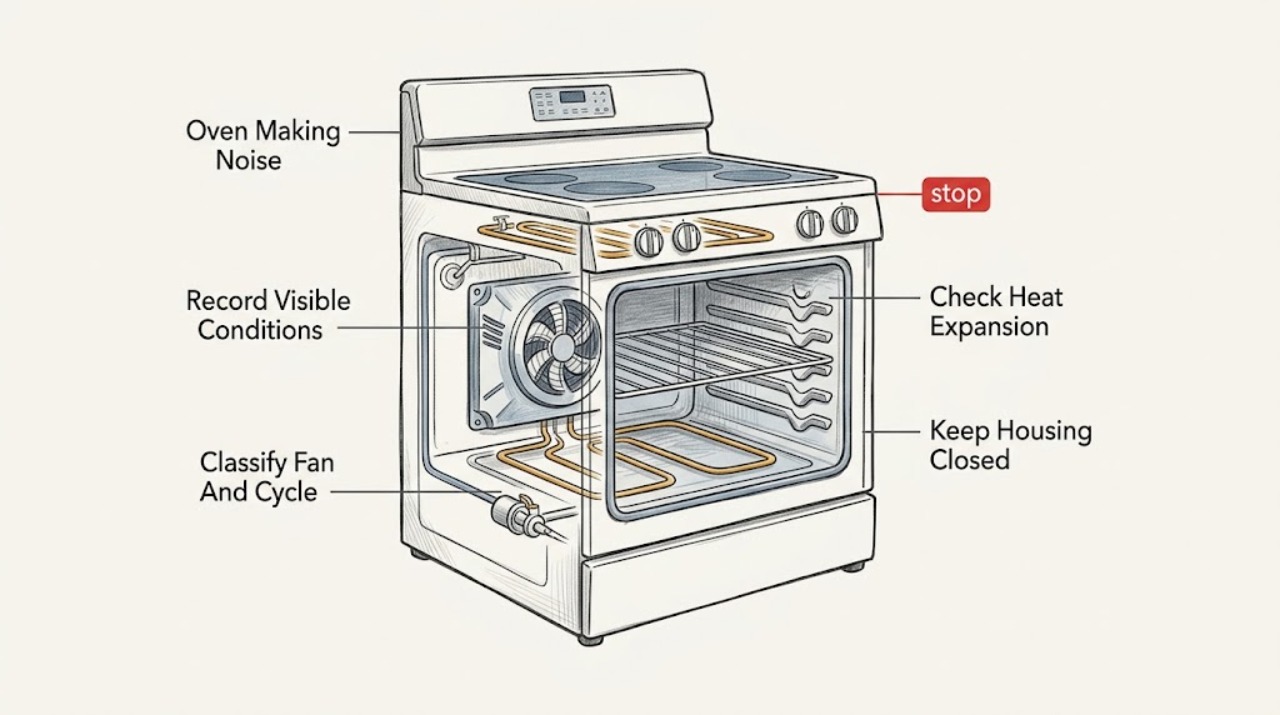
Work through in order
Diagnostic checks
Use only checks that match the exact appliance or system and its official guide.
-
Check 1
Stop the oven and record the sound from a safe position: hum, fan, click, tick, pop, crack, whoosh, rubbing, grinding, scraping, bang, or electrical snap. Note whether there is smoke, a burning smell, gas odor, visible flame trouble, arcing, abnormal heat, or a breaker trip.
Expected result: The sound is brief and tied to a cycle event, repeats periodically, continues after shutdown, is continuous or worsening, or appears with a safety symptom.
Next step: For smoke, fire, gas odor, arcing, an unusually hot connection, or inability to stop the oven, keep it off and use emergency or qualified service. Otherwise continue with cool, external checks.
Stop if: Do not open the door toward smoke, touch hot parts, or restart solely to reproduce a dangerous sound.
Why this matters
Why: Brief cycling sounds can be normal, while continuous mechanical or electrical sounds and any odor, smoke, gas issue, or arcing are stop conditions. The event and timing help separate fan, heat, ignition, and mechanical paths.
-
Check 2
When the oven is cool enough to approach, note whether the sound is moving air from the vent, begins during BAKE, BROIL, or CLEAN, continues after the cycle, or appears only when convection is selected. Keep vents clear and do not insert anything into them.
Expected result: The fan moves air and stops after cooling, the sound is a smooth hum, the fan makes rubbing or metal-on-metal noise, or airflow is absent while the oven is hot.
Next step: If the sound is a smooth documented fan pattern, monitor it. If it scrapes, vibrates, smells hot, or the oven overheats, stop using it and arrange service.
Stop if: Do not remove the fan cover, reach toward the blade, block a vent, or run a fan with panels removed.
Why this matters
Why: KitchenAid identifies automatic cooling-fan operation during and after cooking as normal. A rubbing, grinding, stalled, or worsening fan sound is not the same pattern and can require service; a hot oven with abnormal airflow needs caution.
-
Check 3
If the sound is an occasional pop, tick, or crack, record whether it occurs while the oven heats or cools and whether cooking performance remains normal. From a cool cavity, check only that visible racks and any user-removable bottom panel are seated as the model manual shows.
Expected result: The sound is occasional during temperature change, comes from a loose visible rack or panel, is a sharp repeated bang, or is paired with smoke, flame trouble, or a damaged element.
Next step: Reseat only a cool, clearly user-removable rack or panel according to the manual. If the sound remains loud, changes, or comes with heat or fire signs, request service.
Stop if: Do not bend panels, touch an element, use foil to cover the oven bottom, or test a suspected damaged part while hot.
Why this matters
Why: KitchenAid says heating and cooling of porcelain and steel, element movement, and in some models a removable bottom panel can create popping or cracking. A loud bang, damaged part, or safety symptom is outside that normal pattern.
-
Check 4
If the KitchenAid oven is gas, observe only from outside whether the click or whoosh occurs at ignition and whether the flame establishes promptly and evenly. Turn the control off immediately if the burner does not light; do not lean into the cavity or attempt repeated ignition.
Expected result: A short click or whoosh ends after ignition, clicking continues without a stable flame, ignition is delayed with a bang, the flame is abnormal, or gas odor is present.
Next step: For a stable documented ignition pattern, use the oven only as directed. For any failed or delayed ignition or gas odor, keep the controls off and contact qualified gas service or emergency help from a safe location.
Stop if: Do not relight repeatedly, use a match, adjust gas pressure, remove an igniter, or continue with a gas odor or loud bang.
Why this matters
Why: KitchenAid describes brief ignition clicks and a whoosh as normal when the gas burner lights. Continued failed ignition, delayed ignition, an abnormal flame, or odor indicates a gas or ignition fault and can allow unburned gas to accumulate.
-
Check 5
With the oven cool and off, remove only cookware and loose items that the user manual permits, and check that visible racks are not rubbing the cavity or each other. Do not remove fixed panels, heating elements, insulation, or gas covers.
Expected result: The noise disappears with a loose rack or pan removed, a rack is bent or rubbing, an object is trapped near the door or fan, or the sound remains with the cavity empty.
Next step: Correct only a plainly loose, cool, user-accessible rack position according to the manual. If the sound remains or needs disassembly to inspect, stop and request service.
Stop if: Do not reach behind guards, remove the convection cover, force a rack, or operate with a loose metal object inside.
Why this matters
Why: A loose rack or cookware can create a harmless vibration, but a bent rack, trapped object, fan obstruction, or persistent sound from an empty cavity needs further assessment. The empty-cavity result helps the technician distinguish accessory vibration from an internal fault.
-
Check 6
If the noise is an electrical snap, occurs with a display fault, or coincides with a breaker trip, leave the oven off and inspect only the visible plug, cord, or nearby connection from a dry position if accessible. Record the exact code and whether the circuit trips again without repeated resets.
Expected result: There is scorching, melted insulation, a loose or hot connection, a repeated trip, a code, or no visible external issue.
Next step: Keep the oven isolated and arrange licensed electrical or appliance service for any electrical warning sign, code, or recurring trip. Do not run another cycle to verify it.
Stop if: Do not open the control area, probe live terminals, replace a fuse repeatedly, or bypass an interlock or breaker.
Why this matters
Why: Damage, arcing, heat, or a repeated trip indicates an electrical hazard. A code can narrow the model-specific path but does not identify a safe user repair. No visible damage does not clear internal wiring or controls.
-
Check 7
When the sound does not match a documented fan, ignition, or heat-expansion pattern, stop using the oven and give the technician the model, fuel type, sound recording, cycle, temperature, timing, odor or smoke details, and whether the cavity was empty.
Expected result: A qualified technician confirms a fan, motor, element mount, rack or panel, igniter, valve, control, or installation issue, or the sound cannot be reproduced safely.
Next step: Use KitchenAid or qualified appliance service, and use licensed gas or electrical service for the corresponding fuel or circuit issue. Keep the oven off until cleared.
Stop if: Do not disassemble, adjust gas parts, bypass thermal protection, or continue testing after smoke, gas odor, arcing, or a severe bang.
Why this matters
Why: The same description can come from different parts and fuel systems. A model-specific inspection is required before selecting a replacement component or declaring a sound normal.
Use your observations
Decision map
Find the observation that best matches what you see, then follow the next safe action.
-
PATH 01Safety boundary
What you see
Gas odor, delayed ignition, repeated failed lighting, an abnormal flame, or a loud ignition bang is present.
Do this next
Turn the oven control off if safe, avoid flames and electrical switches, leave for a strong odor or fire, and contact the gas supplier or emergency services from a safe location.
Why this path and its safety boundary
Safety stop: Do not relight, inspect the gas path, or perform another ignition test.
-
PATH 02Safety boundary
What you see
Smoke, burning electrical odor, visible arcing, a hot or damaged connection, or a repeated breaker trip is present.
Do this next
Stop using the oven and isolate power only from a dry, safe position if that does not involve touching damaged equipment; arrange emergency or licensed electrical service.
Why this path and its safety boundary
Safety stop: Do not restart, reset the breaker repeatedly, or open the oven.
-
PATH 03Safety boundary
What you see
The sound is a smooth airflow or hum during cooking or after a cycle and there is no odor, smoke, rubbing, or overheating.
Do this next
Keep vents clear and monitor according to the model manual; fan operation may continue while the cavity and controls cool.
Why this path and its safety boundary
Safety stop: Rubbing, grinding, vibration, unusual heat, or a new odor changes this to service.
-
PATH 04Safety boundary
What you see
An occasional pop, crack, or tick occurs during heating or cooling with normal cooking and no safety symptoms.
Do this next
Check only cool, user-removable racks or panels against the manual and monitor the sound; request service if it becomes loud or changes.
Why this path and its safety boundary
Safety stop: Do not touch hot elements or deform panels.
-
PATH 05Safety boundary
What you see
A short click or whoosh occurs as a gas burner ignites, the flame establishes promptly, and the sound follows the documented cycle.
Do this next
Use the oven according to the exact manual and monitor for change.
Why this path and its safety boundary
Safety stop: Continued clicking, delayed ignition, abnormal flame, gas odor, or a loud bang requires immediate shutdown and service.
-
PATH 06Safety boundary
What you see
The sound is continuous, rubbing, scraping, grinding, loud impact, or remains with the cavity empty.
Do this next
Keep the oven off and request qualified appliance service with the recording and timing details.
Why this path and its safety boundary
Safety stop: Do not remove guards or run the oven with a suspected obstruction.
-
PATH 07Safety boundary
What you see
The sound does not fit a documented pattern, returns after a cool external check, or is accompanied by a code or performance change.
Do this next
Stop use and arrange model-specific service rather than declaring the noise normal or selecting a part from the sound alone.
Why this path and its safety boundary
Safety stop: Do not bypass safety controls or perform live testing.
Helpful context
Understand the symptom
Sound timing is the quickest useful clue
Note whether the sound starts with preheating, repeats as temperature cycles, continues after the oven is switched off, occurs only with convection, or happens when a gas burner lights. KitchenAid says its automatic cooling fan can run during and after a cycle, while heating and cooling can produce popping or cracking. Those patterns are usually different from a continuous scrape, grinding sound, loud impact, or a sound paired with smoke, odor, or flame trouble.
Gas ignition sounds have a narrow normal boundary
On a gas KitchenAid oven, short clicking or a brief whoosh when the burner ignites can be normal. The flame should establish promptly and the sound should stop or follow the model's documented cycling pattern. A delayed light, repeated failed ignition, gas smell, unusual flame, or loud bang is not a normal noise to keep testing. Turn the controls off and use qualified gas service or emergency guidance.
Do not turn a noise complaint into a live repair
A fan blade, loose rack, panel, element mount, igniter, valve, or control can produce overlapping sounds, and the correct diagnosis depends on model and fuel type. Ordinary checks are limited to cool, visible, user-accessible items. Do not remove covers, probe wiring, adjust a burner, or run the oven with a safety component bypassed. Record the sound and arrange qualified service when the safe pattern does not fit.
Safety boundary
Stop conditions
- Gas odor, delayed ignition, an abnormal flame, a loud gas bang, or a burner that repeatedly fails to light.
- Smoke, burning electrical odor, visible arcing, a hot or damaged cord or connection, or repeated breaker trips.
- A continuous scrape, grind, severe vibration, loud impact, or a fan that rubs or stalls.
- A damaged element, cracked or displaced panel, liquid near electrical controls, or an inability to stop the oven.
- Any need to open panels, adjust gas parts, probe live wiring, or bypass a safety control.
Only after diagnosis
Potential parts
- oven cooling or convection fan assembly
Consider only after a qualified diagnosis confirms a fan, motor, or blade fault rather than normal airflow.
Confirm the exact model and manufacturer fit information; a hum or noise alone does not identify the assembly. - oven heating element or mounting hardware
Consider only when service confirms a damaged element or mounting issue associated with a persistent heat-cycle noise.
Verify the exact model and electrical specification before ordering; do not touch or test an element while energized or hot. - gas oven igniter or gas valve assembly
Consider only after qualified gas service confirms an ignition or valve fault and rules out normal brief cycling.
Gas-path parts require exact model fit and qualified installation; a click or bang alone is not a part diagnosis.
When checks do not resolve it
Need a professional?
Arrange appliance service for continuous rubbing, grinding, severe vibration, loud impact, an unexplained code, or noise that remains with the cavity empty., Arrange qualified gas service for delayed ignition, repeated failed lighting, an abnormal flame, a loud ignition bang, or any gas odor., Use licensed electrical service for arcing, a scorched or hot connection, damaged wiring, or a repeated breaker trip., Use the exact KitchenAid manual for fan timing, convection behavior, fuel type, removable panels, and model-specific codes., Stop immediately and use emergency help for fire, smoke, strong gas odor, or an unsafe electrical condition; do not run another test.
Common questions
FAQ
What oven noises are normal on a KitchenAid range?
A cooling-fan hum, occasional heat-related pops or cracks, and brief gas ignition clicks or a whoosh can be normal when they occur in the matching cycle and stop or follow the documented pattern. A continuous or worsening noise needs service.
Why does my KitchenAid oven fan keep running after it is off?
The automatic cooling fan can continue after a cycle while it cools the cavity and controls. If it scrapes, grinds, vibrates, smells hot, or the oven overheats, stop using the oven and arrange service.
Is a popping sound from a KitchenAid oven dangerous?
Occasional popping or cracking during heating and cooling can come from normal material expansion. A loud bang, gas odor, delayed ignition, smoke, an abnormal flame, or a damaged part is not normal; turn the oven off and request qualified service.
Why does my KitchenAid gas oven click repeatedly?
Short clicks while the igniter establishes a flame can be normal. If clicking continues without a stable flame, ignition is delayed, a loud bang occurs, or gas odor is present, turn the control off and do not attempt another ignition.
Can I remove the oven panel to find the noise?
No. Limit checks to cool, visible, user-accessible racks or panels shown in the exact manual. Do not remove guards, probe wiring, adjust gas parts, or operate with a safety component bypassed.
Read the exact guide
Official sources
- Pop or Popping Noise in Oven - Range - Product Help | KitchenAidKitchenAid · KitchenAid oven heating and cooling pops, gas valve cycling, and removable panel noise
- Washing Machines SafetyElectrical Safety First · Electrical safety guidance for appliance damage, heat, arcing, water, and breaker trips
- Whoosh or Poof Noise in Oven - Range - Product Help | KitchenAidKitchenAid · KitchenAid gas oven ignition whoosh or poof sound and cycle timing
- Click or Clicking Noise in Oven - Range - Product Help | KitchenAidKitchenAid · KitchenAid gas oven ignition clicking and flame-detection behavior
- Dacor Modernist Cooktops 36 Induction Cooktop User ManualDacor · Official cooking-appliance safety guidance for burning smell, smoke, arcing, liquid entry, cracks, gas leak, and self-repair boundaries
- Fan Noise - Non Convection - Range - Product Help | KitchenAidKitchenAid · KitchenAid oven cooling-fan operation, airflow, timing, and service boundary
- Gas Appliance Connector SafetyU.S. Consumer Product Safety Commission · Government gas-leak emergency guidance for immediate exit and avoiding ignition sources
Community feedback
Share a repair observation
Share a plain-text repair observation. Accepted observations are published automatically; this page may take a moment to update.