
On this page
Start here
Quick answer
For a KitchenAid KODC304EWH that appears dead, first distinguish a blank display from a locked, delayed, demo or energy-saving control state, then check the household oven breaker or fuse. If the failure followed an outage and F9/F9 E0 appears, KitchenAid calls for a one-minute breaker reset and electrical verification if the code returns. Do not remove this built-in oven, open the terminal box or perform live electrical tests; a repeat trip, persistent blank display or recurring code needs a licensed electrician or KitchenAid service.
Before you begin
Safety first
- Do not remove the wall oven, open the terminal box, probe live wiring, bypass controls or repeatedly reset a breaker that trips.
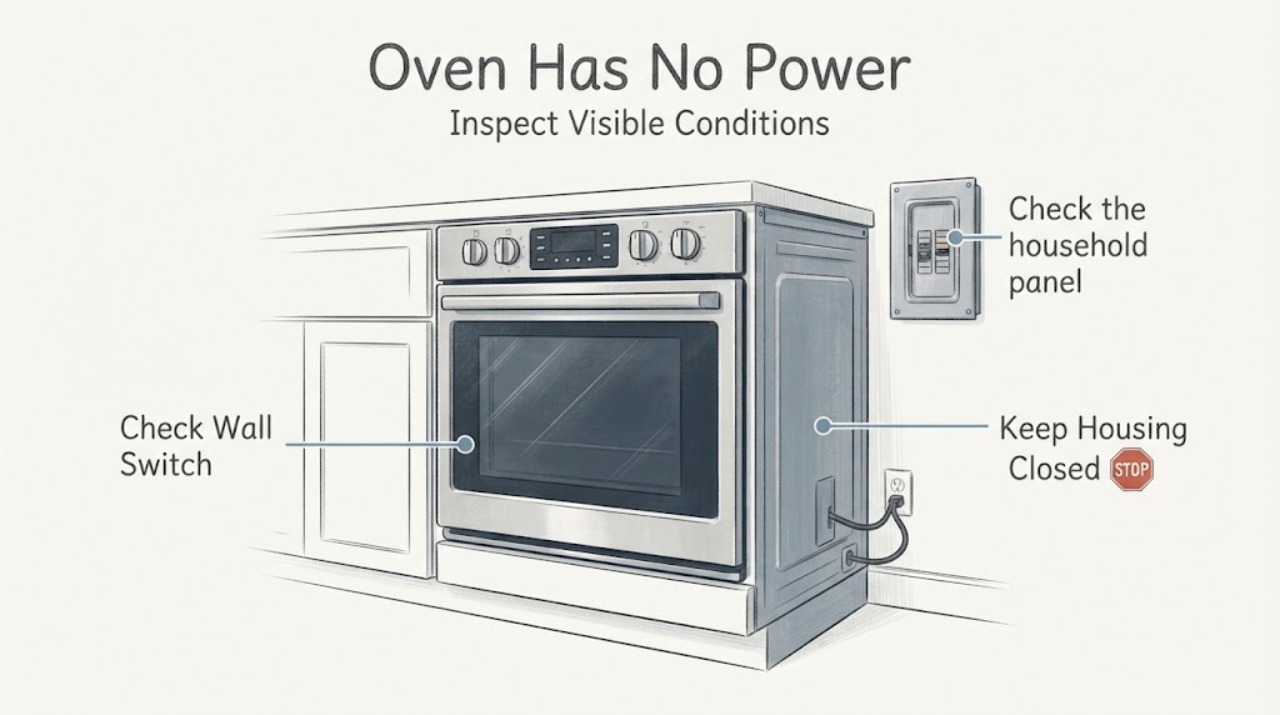
Work through in order
Diagnostic checks
Use only checks that match the exact appliance or system and its official guide.
-
Check 1
Look at the control panel and record whether it is completely blank, lit but unresponsive, showing a lock/demo/energy-saving message, or showing an error. Do not remove the oven or open its cabinet.
Expected result: The display is blank, the display is lit with a mode/message, or the control shows F9/F9 E0.
Next step: Use the KODC304EWH control guide from KitchenAid’s model lookup for any mode-specific button sequence. If the display remains dead, continue with the household breaker check.
Why this matters
Why: KitchenAid distinguishes a blank display/Energy Save state, control lock/demo/delayed start and power-event codes; these are not proof of a failed control board.
-
Check 2
Check the household panel for the oven circuit breaker or fuse. Reset a tripped breaker only from the panel and only once; do not access the oven junction box or terminal block.
Expected result: The breaker/fuse is tripped or open, or it is on and the oven remains dead.
Next step: If the breaker trips again, leave it off and contact a licensed electrician or KitchenAid service. If it stays on but the oven remains dead, use the model-specific service path.
Why this matters
Why: KitchenAid lists a tripped breaker or blown fuse as an external cause of no operation. A breaker that trips again indicates an unresolved electrical condition.
-
Check 3
If the loss of operation followed an outage or surge and the display shows F9 or F9 E0, switch the oven circuit breaker off for one minute, then restore it and watch the control for one minute.
Expected result: The code clears and operation returns, or the code returns/operation remains absent.
Next step: If the code returns, disconnect power and have a qualified electrician verify the supply or arrange KitchenAid service. Do not keep cycling the breaker.
Why this matters
Why: KitchenAid associates F9/F9 E0 with a power-supply event; a persistent code may indicate miswired or unsafe electrical supply rather than a simple reset need.
-
Check 4
If the display is lit, check the exact model guide for Control Lock, Demo Mode, Delayed Start or Energy Save. Cancel only a clearly displayed delayed start or follow the documented unlock/mode instruction.
Expected result: A lock, demo, delayed-start or energy-saving state is identified, or no such state is shown.
Next step: Apply only the KODC304EWH guide’s documented mode control. If no mode explains the problem, do not infer an internal part failure from the display alone; arrange service.
Why this matters
Why: These modes can make a functioning oven appear unavailable or keep heating disabled; availability and button sequences vary by model.
-
Check 5
If the oven was newly installed or recently reconnected, stop at the external observation and ask the installer or qualified electrician to verify the hardwired connection against the installation instructions.
Expected result: The failure began after installation/reconnection, or the oven previously worked and no installation work preceded the failure.
Next step: Have a qualified professional verify the connection. For an established installation with no recent work, request KitchenAid service after the breaker/mode checks.
Why this matters
Why: KitchenAid identifies incorrect terminal wiring/strain relief as an installation context, but built-in oven connection work is not a user power-reset step.
Use your observations
Decision map
Find the observation that best matches what you see, then follow the next safe action.
-
PATH 01Next step
What you see
The display is lit and shows a lock, demo, delayed-start or energy-saving state.
Do this next
Use the KODC304EWH control guide to cancel/unlock the documented state; if no documented mode applies, arrange service.
Why this path and its safety boundary
Why it matters: The oven may have power but be intentionally prevented from starting or showing its normal idle display.
-
PATH 02Next step
What you see
The oven breaker/fuse is open, or it trips again after one household-panel reset.
Do this next
Leave the breaker off if it trips again and contact a licensed electrician or KitchenAid service; do not inspect live wiring.
Why this path and its safety boundary
Why it matters: The household supply or appliance circuit has an unresolved electrical condition.
-
PATH 03Next step
What you see
F9 or F9 E0 appears after an outage and returns after the one-minute breaker reset.
Do this next
Disconnect power and have a qualified electrician verify the supply, then use KitchenAid service if the appliance still fails.
Why this path and its safety boundary
Why it matters: KitchenAid treats the persistent code as possible incorrect or unsafe power supply requiring verification.
-
PATH 04Next step
What you see
The display stays blank and the breaker remains on, or the control remains unresponsive after documented mode checks.
Do this next
Use KitchenAid’s model-specific service route with KODC304EWH and the recorded symptoms; do not remove the built-in oven or open its electrical enclosure.
Why this path and its safety boundary
Why it matters: The external checks did not restore operation; the cause cannot be safely identified from the user interface.
Helpful context
Understand the symptom
Confirm what “no power” means
A completely blank display is different from a lit control that is locked, in Demo Mode, set to Delayed Start or in Energy Save. KitchenAid lists all of these as possible reasons an electric oven may appear not to work. The KODC304EWH is in KitchenAid’s KODC304E 24-inch double-wall-oven family, but its exact control guide should determine the available modes and buttons.
Check the household supply, not the oven wiring
KitchenAid’s public troubleshooting starts with a tripped household breaker or blown fuse and separates that from an installation/reconnection problem. Reset only at the household panel. A built-in oven’s terminal block, junction box and wiring are service or qualified-electrician work; do not remove the oven to reach them.
Treat recurring power codes as an electrical boundary
After a power outage, KitchenAid says F9 or F9 E0 can appear from an unexpected power-supply event. Its guidance allows a one-minute breaker reset, then calls for electrical verification if the code returns. Repeated resets cannot establish whether the fault is in household wiring or the appliance.
Use exact model support for the next step
KitchenAid’s Product Lookup requires the model number to retrieve manuals and literature. Provide KODC304EWH, the serial label if available, the display state, breaker behavior and whether the failure began after an outage or installation. That record gives service the information needed without unsafe internal testing.
When checks do not resolve it
Need a professional?
Contact a licensed electrician for a breaker that trips again, recurring F9/F9 E0 or suspected supply miswiring. Contact KitchenAid service for persistent no power after the external checks.
Safety scope: Do not remove the wall oven, open the terminal box, probe live wiring, bypass controls or repeatedly reset a breaker that trips.
Have this ready
- Provide model KODC304EWH, serial number, display state, breaker/fuse behavior, any F9/F9 E0 code, recent outage or installation history and whether either oven responds.
Common questions
FAQ
Should I pull out the KODC304EWH to check the wiring?
No. KitchenAid’s public guidance identifies new-installation wiring as a professional context and directs users to installation instructions or service. A built-in oven terminal box and live supply are not user troubleshooting points.
What does F9 or F9 E0 mean when the oven has no power?
KitchenAid says these codes can follow an unexpected power-supply event. Its guidance allows one one-minute household-breaker reset; if the code returns, disconnect power and have the electrical supply verified.
Can a blank display be Energy Save mode?
On select models, KitchenAid says Energy Save can blank the display. Check the exact KODC304EWH control guide before assuming the oven has lost power; if the breaker is on and the display remains dead, arrange service.
Read the exact guide
Official sources
- Oven Not Working - ElectricKitchenAid Product Help · Opened KitchenAid’s official Product Help article. It covers new-installation/power-event context, control lock/demo mode, delayed start, breaker/fuse checks, F9/F9 E0 escalation and service; it does not authorize opening a built-in oven or live electrical testing.
- Nothing is Working - ElectricKitchenAid Product Help · Opened KitchenAid’s official no-function article. It supports breaker/fuse, power-outage, control lock, delayed start, demo mode and Energy Save observations, with model-specific manual/service boundaries.
- KitchenAid 24-inch Built-In Wall Ovens: Product PresentationWhirlpool Corporation / KitchenAid · Opened the manufacturer-hosted PDF. Its family table lists KODC304E* in the 24-inch double-wall-oven range and shows WH as an available color; it establishes family identity only and does not replace the exact user manual.
- Product Lookup - Product HelpKitchenAid Product Help · Opened official model lookup. It requires the model number to locate product manuals/literature and gives KitchenAid service contact routing; it is used to scope KODC304EWH documentation, not as evidence for an internal component fault.
Community feedback
Share a repair observation
Share a plain-text repair observation. Accepted observations are published automatically; this page may take a moment to update.