
On this page
Start here
Quick answer
An LG washing machine may appear not to heat because the selected cycle mixes household hot and cold water, the hot supply is cold or slow to arrive, the machine is intentionally moving on after its heating time limit, or the particular model's internal heater or steam function has a fault. Start by selecting the cycle and temperature in the order shown by the model manual, then check the home's hot water and the external hot and cold hose connections. Do not assume every LG washer has an internal heater: LG documents heater-under-the-tub steam operation only for models with that feature. If a matching heater error returns after the one model-authorized reset, or there is scalding water, a leak near electrical parts, a burning smell, smoke, arcing, or a repeated breaker trip, stop using the washer and arrange qualified service.
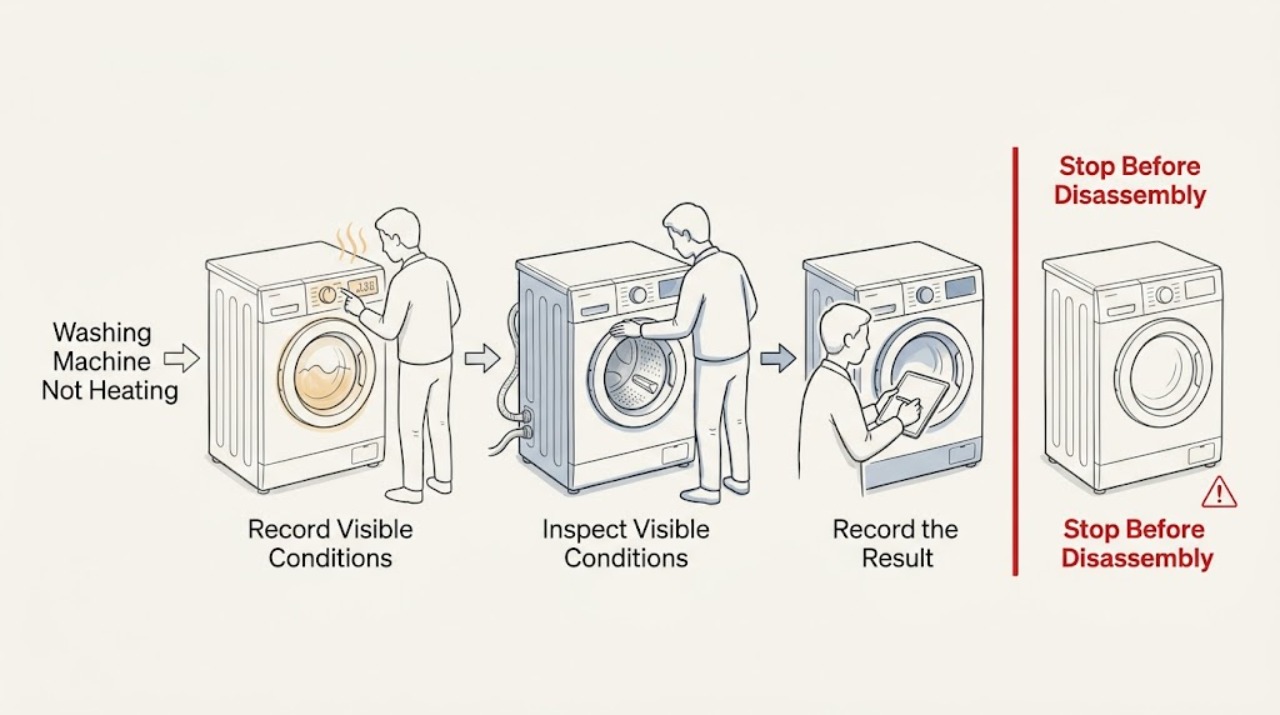
Work through in order
Diagnostic checks
Use only checks that match the exact appliance or system and its official guide.
-
Check 1
Record the washer model, load cycle, temperature selection, whether Steam or an auxiliary heating option is present, and the stage at which the water seems cold. Compare the selected cycle and temperature with that exact model's manual, choosing the cycle before changing its temperature.
Expected result: If the temperature control was set before the cycle or the chosen cycle fixes its own temperature, the washer may be operating at its default rather than the value expected. If the model has no documented internal heater or Steam feature, do not diagnose a heater from a cool first fill.
Next step: Run the model-appropriate cycle once with the documented temperature setting, then continue to the water-supply check if the result is still unexpectedly cold.
Why this matters
Why: LG states that the cycle determines available temperature choices and that some cycles use fixed temperatures; the feature and control behavior vary by model.
-
Check 2
At a nearby sink, run the household hot water briefly and observe whether it becomes hot. Without disconnecting a wet connection or moving the washer, inspect that the hot and cold supply valves are open, the hoses are not visibly kinked, and the hot and cold connections are not reversed for the model.
Expected result: If the sink water is not hot, the washer cannot receive the expected household hot supply. If the hot hose is closed, kinked, reversed, or leaking, the fill temperature can be wrong or unsafe. If the home's hot water is normal and the external connections look correct, continue to cycle and heating behavior.
Next step: Correct only an obvious, dry, external valve or setting issue according to the model manual. If a hose or fitting leaks, stop the washer and water supply when safely accessible and arrange service rather than tightening a hot or damaged connection.
Why this matters
Why: LG explains that water temperature depends on the home water heater, plumbing distance, and hot/cold mixing; its guidance also calls for the hot hose to be connected to a hot tap with the valve fully open where applicable.
-
Check 3
On a model and cycle that support the selected temperature, observe whether the washer slowly warms the water and then advances, especially when the incoming water is very cold or only a cold hose is connected. Do not open the door to check hot water during operation; wait for the cycle's safe pause or completion.
Expected result: A longer heating period followed by normal cycle progress can be the documented energy-saving behavior. A cycle that always advances cold despite a normal hot supply, correct settings, and a feature that should heat water is a service symptom.
Next step: If the behavior is consistent with the model's documented operation, use the washer normally or connect the supported hot supply to shorten heating. If it is repeatable and outside that behavior, record the cycle and request service.
Why this matters
Why: LG says colder incoming water takes longer and that some washers move to the next phase after a set time even if the target temperature is not reached; this can be normal rather than a heater failure.
-
Check 4
If the washer has Steam, select a documented steam-capable cycle and option exactly as the model manual shows, then observe the indicators without opening the door or reaching inside. If the display reports a heater error, preserve the complete code and the cycle stage before taking any reset step.
Expected result: Steam may not be visible because it is produced at the bottom with the door closed, and the drum may remain still during the heating stage. A persistent heater error or no progress after the model's documented sequence points to service.
Next step: Do not add steam to a cycle or fabric that the manual excludes. For a matching heater code, perform only the model-authorized single restart; if the code returns, stop using the feature and arrange service.
Why this matters
Why: LG documents that Steam models heat a small amount of water under the tub and that the drum does not rotate during this process; it also states that the HE error on applicable combo units needs service if it repeats after the documented restart.
-
Check 5
If the display shows an error, photograph the full code, model, selected cycle, water temperature, and whether the drum was filling, heating, or washing. Use the exact model's LG support page or manual; do not substitute a code from another washer. If that page permits a power-down and restart, do it once only after the washer is stable, dry externally, and free of hazard signs.
Expected result: A code that clears and does not return may have been transient. A code that returns, an unknown code, or a washer that cannot complete the documented restart requires qualified diagnosis.
Next step: Give service the full code, model, cycle, temperature setting, incoming water result, and any leak or electrical symptom; do not repeatedly reset or operate through the error.
Why this matters
Why: LG's HE guidance is explicitly scoped to applicable combo units, while temperature and Steam behavior also varies by model. A generic heater-code interpretation is unsafe.
-
Check 6
Before any further run, inspect the floor, hose ends, plug, cord, and nearby outlet for water, a hot connector, discoloration, damage, burning odor, smoke, or signs of arcing. If water has reached electrical equipment or a breaker has tripped, keep hands dry and do not restore power merely to test the heater.
Expected result: A dry washer with stable power and no warning signs can continue with model-specific diagnosis. A leak near electrical parts, water-damaged equipment, hot or damaged wiring, smoke, sparks, shock, or repeated breaker operation is an immediate stop.
Next step: Stop using the washer, isolate water or power only when safely accessible, and arrange qualified appliance or electrical inspection. Do not remove panels or test a heater live.
Why this matters
Why: ESFI and CPSC treat water with electricity, damaged cords, hot receptacles, arcs, smoke, and repeated trips as shock or fire hazards rather than routine troubleshooting.
Use your observations
Decision map
Find the observation that best matches what you see, then follow the next safe action.
-
PATH 01Next step
What you see
The selected cycle fixes its temperature, the washer has no documented internal heater, or the incoming water is cold and the cycle advances after a long heating period.
Do this next
Treat this as a possible normal or supply-temperature condition. Confirm the model's cycle behavior and supported hot-water connection before calling it a failed heater.
-
PATH 02Next step
What you see
The sink's hot water is not hot, or the hot valve is closed, the hose is visibly kinked, or the model's hot and cold connections are reversed.
Do this next
Resolve the household hot-water or obvious external connection issue safely. If the connection leaks or is damaged, stop and arrange plumbing or appliance service.
-
PATH 03Next step
What you see
The home's hot supply and external connections are normal, but the same supported cycle remains cold beyond the model's expected behavior.
Do this next
Record the cycle, temperature, model, and timing and request qualified service for the washer's heating, sensing, or control path.
-
PATH 04Next step
What you see
A Steam-capable model is heating with the door closed and the drum temporarily still, with no error or hazard sign.
Do this next
Allow the documented heating stage to complete; invisible steam does not prove that the feature is inactive. Do not open the door or reach inside during the hot stage.
-
PATH 05Next step
What you see
A matching heater error returns after its single model-authorized restart, or the code is not listed for the exact model.
Do this next
Stop using the heater or affected cycle and arrange qualified service with the full code, model, cycle, and water-supply observations.
-
PATH 06Next step
What you see
There is hot or leaking water near electrical parts, a burning smell, smoke, visible spark or arc, a shock, a hot or damaged cord or outlet, or a repeated breaker trip.
Do this next
Stop immediately. Do not reach into water, reset repeatedly, open panels, or run another cycle; isolate the appliance only from a safe dry position and call qualified appliance or electrical help.
Helpful context
Understand the symptom
First decide whether the water is actually meant to be hot
LG washers do not all heat water in the same way. On some models, the wash temperature is mainly the result of the selected cycle and the hot and cold water supplied by the home. On models with Steam or another documented heating feature, a heater can warm a small amount of water under the tub. A cold tub at the beginning of a cycle, invisible steam behind a closed door, or a cycle that advances after a long cold fill is not by itself proof of a failed heater.
Use the model manual for the feature boundary
Record the full model number before changing settings. LG notes that images and available options vary by product, and some cycles use fixed temperatures. Selecting a temperature before selecting the cycle can leave the washer using that cycle's default temperature. Steam options may also prevent manual temperature selection.
Do not turn a temperature complaint into a water or electrical hazard
The external checks below are limited to the display, cycle settings, the sink's hot water, visible hose and valve condition, and the result of a normal cycle. Do not handle a hot hose, reach into hot water, remove panels, test a heater with live power, or repeatedly run a cycle after a leak, burning smell, smoke, spark, shock, or breaker trip.
Safety boundary
Stop conditions
- Stop the washer for a leak that reaches electrical parts, water around the plug or outlet, a hot or damaged connector, burning odor, smoke, visible arc or spark, shock, or a breaker that trips again. Do not restore power to test it.
- Stop and do not reach inside for scalding water, steam escaping unexpectedly, or an active high-temperature cycle. Allow the model's safe pause or cool-down procedure and arrange service if the condition is abnormal.
- Do not remove panels, probe a live heater, bypass a door or temperature safety, disconnect a hot hose, or repeatedly reset a heater error. Use qualified appliance service; use a licensed electrician for an outlet, cord, wiring, or recurring breaker concern.
When checks do not resolve it
Need a professional?
Request qualified appliance service when an LG washer remains cold despite correct cycle settings and a normal household hot supply, when a supported internal heating or Steam feature fails, when a matching heater error returns, or when the cycle cannot complete. Use a licensed electrician for water-damaged electrical equipment, a hot or damaged outlet or cord, shock, or recurring breaker trips. Treat leaks near electricity, scalding water, burning odor, smoke, sparks, or unexpected steam as immediate stop conditions.
Common questions
FAQ
Does every LG washing machine have an internal water heater?
No. Do not assume it. LG documents standard temperature behavior based on the home's water supply and separately describes an under-tub heater for models with the Steam function. Check the exact model manual before diagnosing a heater.
Why does my LG washer move on before the water reaches the selected temperature?
LG says colder incoming water takes longer and some washers advance after a set heating time to save energy. Confirm the cycle and hot-water connection for the exact model before treating that behavior as a failure.
Why cannot I see steam from my LG washer?
On LG Steam models, steam can be generated at the bottom with the door closed, so it may not be visible, and the drum can remain still while heating. Follow the model cycle and do not open the door or reach inside the hot stage.
What should I do if an LG washer shows HE?
First confirm that the guidance applies to your model, record the code, and follow only its documented single restart. If HE returns, stop using the affected heating cycle and arrange service.
When is a temperature problem unsafe?
Stop for scalding water, a leak near electrical parts, a hot or damaged cord or outlet, burning odor, smoke, sparks, shock, or a repeated breaker trip. Do not restore power or keep running the washer to test heating.
Read the exact guide
Official sources
- [LG Washing Machine] Using the Steam FunctionLG USA Support · LG description of the under-tub heater, steam cycle timing, invisible steam, and a stationary drum during heating
- Appliance Safety TipsElectrical Safety Foundation International · ESFI guidance on repeated breaker trips, damaged appliances, water near electricity, and damaged cords
- [LG Washing Machine] Why Isn’t the Water Heating Up During a Wash?LG USA Support · LG explanation of cold supply, energy-saving time limit, hot hose, valve, and cold-only operation
- HE Error CodeLG USA Support · LG guidance scoped to applicable combo units for one documented restart and service when HE repeats
- [LG Washing Machine] Water does not heat up or reach the set temperatureLG USA Support · LG guidance for cold incoming water, heating time, cycle progression, and supported hot-water connection
- LG Frontload Washer - How to Adjust the Water TemperatureLG USA Support · LG guidance to select a cycle before temperature, fixed-temperature cycles, and Steam option limits
- CPSC Guide to Home Wiring HazardsU.S. Consumer Product Safety Commission · CPSC guidance on repeated breaker trips, hot receptacles, arcing, sparks, smoke, and damaged cords
Community feedback
Share a repair observation
Share a plain-text repair observation. Accepted observations are published automatically; this page may take a moment to update.