
On this page
Start here
Quick answer
When a Maytag oven displays an error, photograph the complete code exactly as shown, record the model, whether the oven is electric, gas, or dual-fuel, and note whether it appeared at power-up, while heating, during cleaning, or after a power event. Do not interpret an F# E# code from a different model or assume that a blank clock, LOC/Lock, CAL, SAB, or PF display is the same as a component failure. Maytag's general cooking-appliance guide says some displays have simple model-dependent explanations and that some codes can be cleared by a one-time power reset, while a returning code needs service. Only after the oven is cool, no gas odor, smoke, burning smell, sparking, uncontrolled heat, damaged wiring, or tripped circuit is present, follow the exact owner's manual or Maytag code page for one reset; if the error returns, the oven should remain out of service for qualified appliance service.
Before you begin
Safety first
- This article supports documentation, ordinary safe-access observation, and one model-approved power reset only when the oven is cool and hazard-free. Do not repeatedly reset, run a cycle to reproduce the code, open panels, enter diagnostics, probe live parts, bypass protection, or alter gas components.
Work through in order
Diagnostic checks
Use only checks that match the exact appliance or system and its official guide.
-
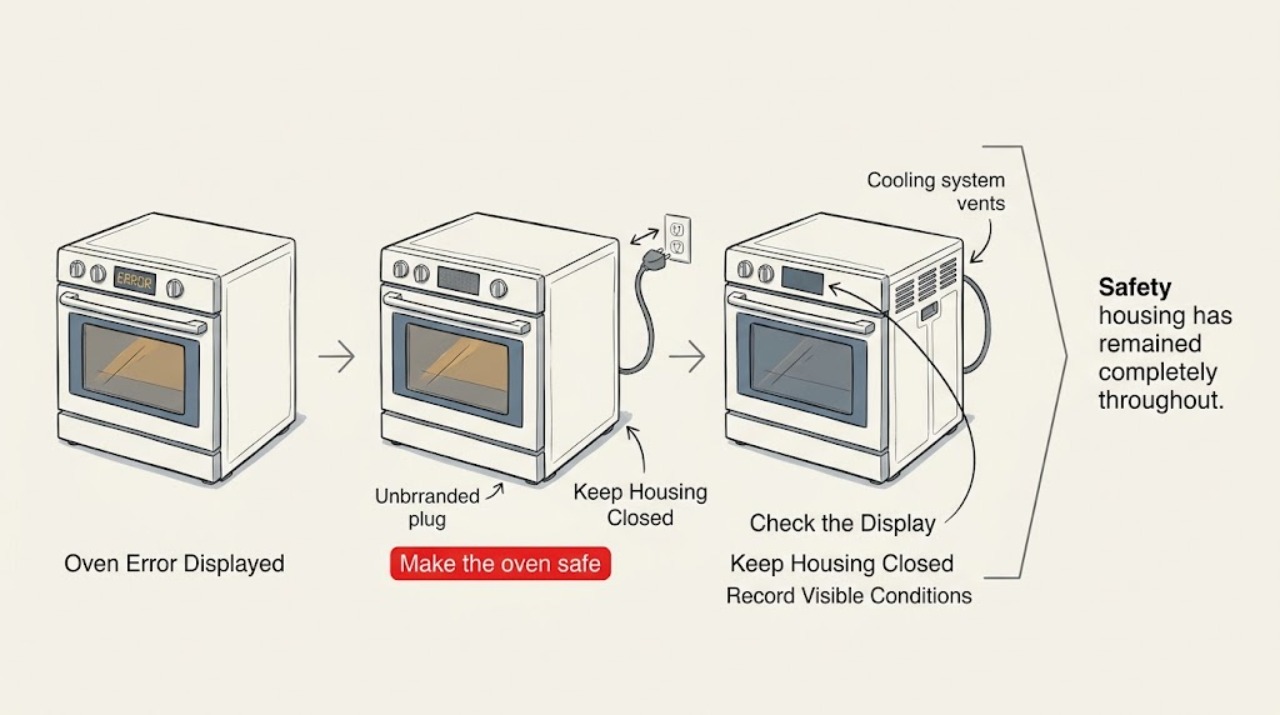
Make the oven safe and preserve the message
Stop pressing keys and do not start another cooking or cleaning cycle. From a safe position, note whether the oven is electric, gas, or dual-fuel, whether a cooktop flame is present, and photograph the entire display and any active indicator. Keep the door closed if the cavity is hot unless opening it is necessary to prevent an immediate hazard.
Expected result: The display is stable, the code is legible, the oven is cooling normally, and there is no gas odor, smoke, burning smell, sparking, uncontrolled flame, or persistent heating; or a hazard is present.
Next step: If no hazard is present, continue documenting the code and operating phase. If a hazard is present, leave the oven out of service and use qualified or emergency help from a safe location.
Stop if: Stop immediately for gas odor, delayed ignition, abnormal flame, smoke, burning smell, sparking, exposed wiring, a cracked control area, or heat that continues with controls Off.
Why this matters
Why: A stable code can be researched against the exact model. A hazard makes the display secondary: gas odor, smoke, arcing, or continued heating requires stopping use rather than troubleshooting the code.
-
Record the model, code, and phase
Read the model and serial label from ordinary safe access without moving a built-in oven or entering a hot or damaged area. Write every character of the message, including spaces, dashes, letters, numbers, and whether it is shown as F# E# or E# F#. Record when it appeared: at power-up, after a power outage, while preheating, during bake or broil, during cooling, or during self-clean.
Expected result: The model and complete code are available, the code is a named message such as LOC/Lock, CAL, SAB, or PF, or the label/code cannot be safely reached or is incomplete.
Next step: Use the model number with Maytag's manuals and product-help pages, or give the model, full code, fuel type, and phase to a qualified technician. Do not substitute a similar-looking code.
Stop if: Do not remove panels, pull out a wall oven, reach behind the appliance, or operate the oven just to reproduce or clarify an incomplete message.
Why this matters
Why: Maytag's own guide groups messages differently and says the owner's manual controls model-specific procedures. An incomplete code or missing model prevents reliable cross-model interpretation.
-
Check whether the display is a mode or power message
Compare the recorded display with the exact Maytag model guidance without changing wiring or entering diagnostics. Look for LOC, Lock, Locked, CAL, SAB, PF, a flashing time, a blank clock, or a C temperature indicator, and note whether the oven otherwise responds normally.
Expected result: The display matches a documented lock, Sabbath, calibration, Celsius, power-failure, or clock state, or it is an unrecognized F# E# or E# F# code or a control that does not respond.
Next step: For a documented mode, follow only the exact owner's manual sequence. For an unrecognized, recurring, or nonresponsive control, preserve the state and arrange service rather than guessing at a reset or part.
Stop if: Do not enter a hidden service or diagnostic mode, clear stored faults, or change calibration when the code is unknown, the oven is hot, or a safety symptom is present.
Why this matters
Why: Maytag describes these named messages as feature, setting, or power states on applicable models, while an unrecognized or recurring fault code may involve control, wiring, sensor, or supply conditions. A display name alone does not prove the fault source.
-
Check the power event without opening the electrical system
Record whether the message followed a power outage, flicker, recent installation, breaker trip, or other appliance load. From a dry, stable position, observe whether the display is powered, whether a breaker is visibly in the tripped position, and whether the plug, cord, or accessible receptacle shows heat, moisture, scorching, or damage. Do not remove covers or measure live parts.
Expected result: The message follows a power event but the connection looks normal, or there is a tripped breaker, damaged or hot connection, repeated trip, moisture, smoke, or another abnormal electrical sign.
Next step: If the connection is normal and the exact manual permits a one-time reset, proceed only after all hazards are absent. For a tripped or repeatedly tripping circuit, damaged connection, or suspected miswiring, keep the oven isolated and contact a qualified electrician.
Stop if: Do not repeatedly reset the breaker, touch a hot or wet connection, use an extension cord, remove an outlet or oven cover, or continue after smoke, arcing, burning smell, or exposed conductor.
Why this matters
Why: Maytag identifies power failure and, for some F9/F9 E0 cases, possible miswired or abnormal electrical supply as display causes. A visible electrical hazard is not a reset problem and requires electrical assessment.
-
Separate temperature, control, and cooling symptoms
Without starting a new cycle, note whether the cavity is cooling, whether a cooling fan continues as expected for the model, whether the oven keeps heating with every control Off, and whether the error appeared during preheat, bake, broil, or self-clean. Do not touch the cavity, element, burner, door glass, or vent to measure heat.
Expected result: The oven is cooling and the code is gone, the temperature or fan behavior is abnormal, the code appeared during a specific heating phase, or heat persists with controls Off.
Next step: Record the phase and cooling behavior for service. Leave the oven isolated if heat persists, a fan or control behaves abnormally, or the code returns during a heating or cleaning phase.
Stop if: Stop for uncontrolled heat, smoke, a burning odor, abnormal flame, delayed ignition, a hot or damaged door, sparking, or a cooling failure accompanied by an error.
Why this matters
Why: The phase helps a technician distinguish a display event from a temperature-sensing, control, cooling, element, or gas-ignition branch, but it does not identify a component. Persistent heating is a control or safety stop condition.
-
Use a one-time documented power reset only when safe
Only after the oven is cool, all controls are Off, no gas odor or fire/electrical symptom is present, and the exact Maytag guidance for the model permits it, power the unit down at its normal circuit control for the documented interval. Restore power once, observe the display without starting a cycle, and do not repeat the sequence if the code returns.
Expected result: The display clears and remains clear during the observation, or the same code returns, a new code appears, the control is unresponsive, the breaker trips, or heating starts unexpectedly.
Next step: If the code returns or behavior is abnormal, leave the oven out of service and provide the original and post-reset displays to a qualified technician. Do not perform additional reset cycles.
Stop if: Do not reset when the oven is hot or hazardous, when the circuit is wet or damaged, when the breaker repeatedly trips, or when the reset would require opening a panel or reaching live parts.
Why this matters
Why: Maytag documents a one-minute power reset for some errors and says to monitor for return. Clearing a message is not proof that the cause is repaired; a returning or changed fault requires service.
-
Prepare a model-specific service handoff
Give the technician the model and serial information, complete display text, fuel type, installation type, phase when the message appeared, power-event history, whether one documented reset was attempted, and all hazard observations. Keep the oven out of service while arranging help if the code returned or any safety boundary was reached.
Expected result: The evidence identifies a documented mode, a one-time cleared message with normal behavior, or a recurring/unknown fault or safety symptom.
Next step: Use qualified Maytag appliance service for the oven and a qualified electrician for supply, breaker, wiring, or receptacle concerns. For gas odor, smoke, fire, or an electrical emergency, leave the area and contact emergency help from a safe location.
Stop if: Do not reconnect, heat, self-clean, enter diagnostics, replace a fuse or breaker, bypass a door or thermal safety, or perform internal electrical or gas work.
Why this matters
Why: A cleared named mode may be handled by the owner's manual. A recurring or unknown error needs model-specific diagnosis; Maytag's guidance directs service when the message remains or returns.
Use your observations
Decision map
Find the observation that best matches what you see, then follow the next safe action.
-
PATH 01Safety boundary
What you see
The exact model guide identifies LOC/Lock, CAL, SAB, PF, a flashing time, a blank clock, or a Celsius indicator and the oven has no hazard symptom.
Do this next
Follow the exact owner's manual instructions for that model and preserve the original display if the message does not clear.
Why this path and its safety boundary
Why it matters: The display may be a feature, setting, or power-state message rather than proof of a failed part.
Safety stop: Stop if the oven heats with controls Off, a code returns, the display is unresponsive, or any smoke, gas odor, sparking, or electrical damage appears.
-
PATH 02Safety boundary
What you see
An F# E# or E# F# message appears after a power outage, flicker, installation, or breaker event.
Do this next
Record the supply event and have the model-specific manual and electrical supply reviewed. Use a one-time documented reset only if the exact model guidance permits it and no hazard is present.
Why this path and its safety boundary
Why it matters: Maytag associates some messages, including F9/F9 E0 on applicable products, with power or wiring conditions, but the code does not establish the exact cause across models.
Safety stop: Do not repeatedly reset, change breaker protection, open wiring, or continue if the breaker trips again or the connection is hot, wet, scorched, or arcing.
-
PATH 03Safety boundary
What you see
The message appears during preheat, bake, broil, self-clean, cooling, or while temperature or fan behavior is abnormal.
Do this next
Keep the oven out of service if the code returns or behavior is abnormal and provide the phase and temperature/cooling observations to qualified appliance service.
Why this path and its safety boundary
Why it matters: A temperature-sensing, control, cooling, heating, or gas-ignition branch may be relevant, but the operating phase cannot identify a failed component.
Safety stop: Stop for persistent heating, smoke, burning smell, gas odor, delayed ignition, abnormal flame, sparking, a damaged door, or a hot control area.
-
PATH 04Safety boundary
What you see
The oven is cool and hazard-free, the exact Maytag guidance permits a power reset, and the message clears after one reset without abnormal behavior.
Do this next
Keep the code photo and reset result, follow the model manual, and stop using the oven if the message returns.
Why this path and its safety boundary
Why it matters: The display event may have been transient, but clearing it does not prove the underlying condition is repaired.
Safety stop: Do not repeat the reset or start a cooking or cleaning cycle if a new code, unexpected heat, smoke, odor, sparking, or breaker trip occurs.
-
PATH 05Safety boundary
What you see
The same or a different error returns after the documented reset, or the display remains nonresponsive.
Do this next
Leave the oven out of service and arrange qualified appliance diagnosis using the complete code, model, fuel type, and phase history.
Why this path and its safety boundary
Why it matters: The fault is not resolved by the reset and may involve the control, wiring, sensor, supply, heating, or another model-specific system.
Safety stop: Do not clear the stored message, enter diagnostics, bypass a safety device, or replace a part based only on a cross-model code list.
-
PATH 06Safety boundary
What you see
There is gas odor, a delayed ignition or abnormal flame, smoke, burning smell, sparking, arcing, uncontrolled heat, exposed wiring, or a hot/damaged electrical connection.
Do this next
If safe, leave controls Off and isolate gas or power only from a safe, accessible location; leave the area and contact emergency, gas, electrical, or qualified appliance help from outside the hazard area.
Why this path and its safety boundary
Why it matters: This is an immediate stop-use condition; the display code is not safe to troubleshoot.
Safety stop: Do not operate switches or flames near a gas odor, relight the burner, open panels, touch a hot or wet connection, or re-energize the oven for a test.
Helpful context
Understand the symptom
A display message is not yet a diagnosis
Maytag uses several families of messages. An F# E# or E# F# code may indicate a control, wiring, sensor, power, or other model-specific condition; LOC or Lock can indicate Control Lock; CAL can indicate calibration; SAB can indicate Sabbath Mode; and PF can indicate a power failure. A clock that is blank or flashing can also be a display setting or power event. Preserve the exact characters and the model before deciding what the message means.
Separate the safe observation from the reset
The first checks are documentation and hazard screening: identify the oven type, record the operating phase, and look from a safe position for smoke, gas odor, abnormal flame, persistent heating, sparking, or electrical damage. A power reset is a limited recovery step in Maytag's published guidance, not a way to bypass a protection event. It should not be repeated when the code returns or the oven behaves abnormally.
Model and fuel type control the next branch
Maytag's support material separates electric ovens, gas ovens, ranges, and wall ovens, and directs owners to model-specific manuals. Do not use an electric-range code explanation on a gas wall oven, or a wall-oven reset sequence on a different control family. Gas odor, delayed ignition, an abnormal flame, smoke, or a control that will not stop heating is a stop-use condition, not a display-clearing exercise.
Safety boundary
Stop conditions
- Do not interpret an error code from another Maytag model, range, wall oven, fuel type, or control family.
- Do not repeatedly reset power, reset a tripped breaker, replace a fuse or breaker, or use a reset to defeat a safety shutdown.
- Do not open the oven, remove panels, enter diagnostics, probe live wiring, bypass a door or thermal safety, or alter gas components.
- Stop immediately for gas odor, delayed ignition, abnormal flame, smoke, burning smell, sparking, arcing, exposed wiring, or a control that continues heating with every control Off.
- Stop for a hot, wet, loose, scorched, cracked, or damaged plug, cord, receptacle, control area, door glass, or circuit; do not touch the connection.
- Do not move a built-in oven or reach into a hot cavity, vent, burner, element, or restricted installation area to identify a code.
Only after diagnosis
Potential parts
- oven electronic control or user-interface assembly
Consider this category only if model-specific diagnosis links the recurring display or control behavior to the control or interface after the supply is verified.
Confirm the exact Maytag model, control revision, and technician diagnosis before ordering; do not substitute a board from a similar-looking oven. - oven temperature sensor
Consider this category only if the exact error and qualified tests identify a temperature-sensing fault on the applicable model.
Confirm the exact model and sensor specification; do not use a sensor replacement as a way to clear an unexplained code. - oven cooling fan or fan circuit
Consider this category only if a model-specific code or professional diagnosis identifies restricted cooling or a failed fan circuit.
Confirm the exact model and safe installation procedure; do not open the oven or test energized fan wiring.
When checks do not resolve it
Need a professional?
Arrange qualified Maytag appliance service when an error is unknown, incomplete, model-specific guidance is unavailable, the display is unresponsive, the code returns after one documented reset, or temperature, fan, heating, ignition, or door behavior is abnormal. Use a qualified electrician for a tripped or suspect circuit, miswiring, breaker, receptacle, cord, or supply issue. For gas odor, smoke, fire, arcing, exposed conductors, uncontrolled heating, or another immediate hazard, stop using the oven, leave the area when safe, and contact emergency or gas/electrical help from a safe location.
Safety scope: This article supports documentation, ordinary safe-access observation, and one model-approved power reset only when the oven is cool and hazard-free. Do not repeatedly reset, run a cycle to reproduce the code, open panels, enter diagnostics, probe live parts, bypass protection, or alter gas components.
Common questions
FAQ
What should I record when my Maytag oven displays an error?
Record the complete code exactly as shown, the model, electric/gas/dual-fuel type, and the phase when it appeared. Photograph the display before pressing keys. Also note any power event, temperature or fan abnormality, gas odor, smoke, burning smell, sparking, or breaker trip.
Can I use any Maytag error-code list for my oven?
No. Maytag separates ranges, wall ovens, electric products, gas products, and model families. Use the exact model manual and product-help page; a similar-looking F# E# code from another appliance does not establish the cause.
What does LOC or Lock mean on a Maytag oven?
Maytag's general cooking-appliance guide identifies LOC, Lock, or Locked as a Control Lock state on applicable models. Follow the exact owner's manual for that model. If the oven heats unexpectedly, the display is unresponsive, or another error appears, stop using it and arrange service.
How many times should I reset a Maytag oven after an error?
Only use the exact model-approved reset once, and only when the oven is cool and free of gas, smoke, burning, sparking, uncontrolled-heat, or electrical hazards. Maytag says to monitor for recurrence; a returning code or abnormal behavior means service, not another reset.
Should I keep using the oven if the code clears?
Not automatically. A cleared display may be transient, but keep the code and reset record. Do not use the oven if the message returns or if there is persistent heating, abnormal ignition or flame, smoke, burning smell, sparking, a damaged connection, or a breaker problem.
Read the exact guide
Official sources
- Appliance Manuals and LiteratureMaytag · General Maytag documentation lookup; the model number is required to select the applicable manual.
- Oven Not Working - Product HelpMaytag Product Help · Maytag product-help category map used to prevent cross-type and cross-fuel interpretation.
- Call Service - Wall OvenMaytag Product Help · Maytag wall-oven guidance; use the matching model instructions for other control families.
- Error Codes for Cooking AppliancesMaytag Product Help · General Maytag cooking-appliance guidance; exact model owner's manual controls when the general page differs.
- Owner's ManualMaytag · One Maytag built-in-oven manual family; examples must not be generalized to another model without checking its manual.
Community feedback
Share a repair observation
Share a plain-text repair observation. Accepted observations are published automatically; this page may take a moment to update.