
On this page
Start here
Quick answer
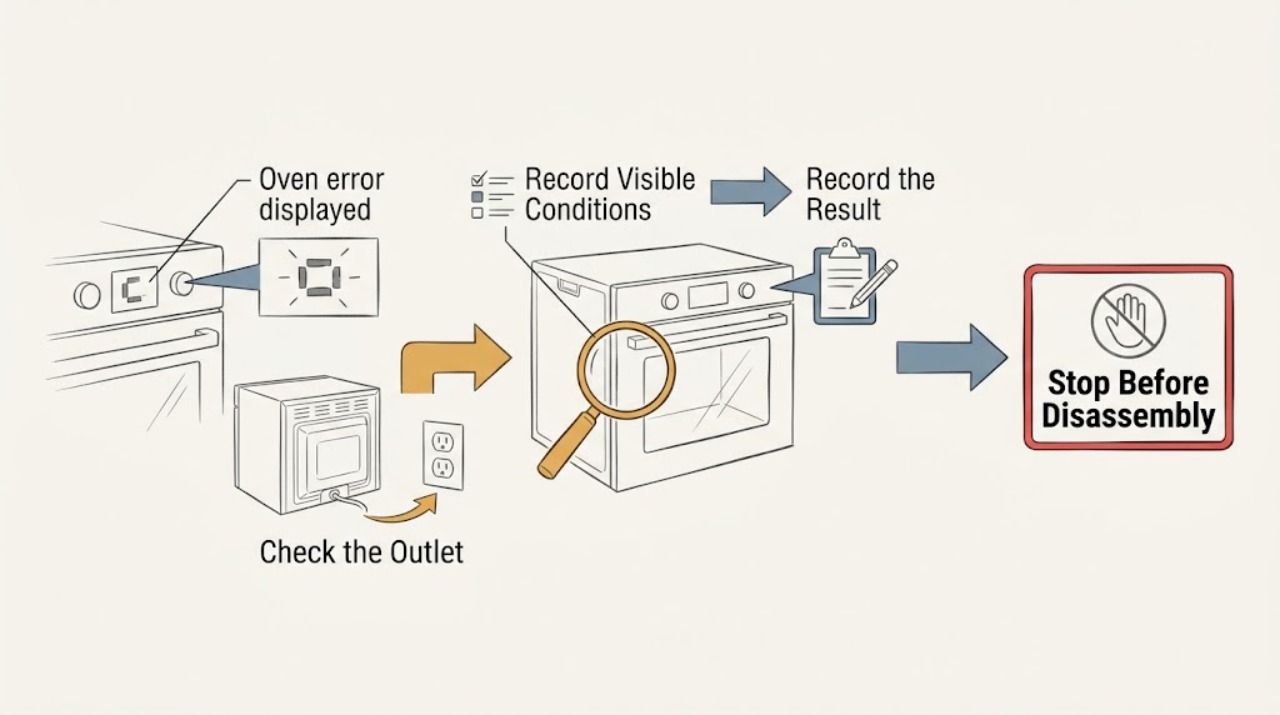
Do not apply a generic meaning to an oven error display. Photograph or write the complete code, symbols, model, fuel type, operating mode, and moment it appeared before clearing anything. If the display indicates excessive temperature, the oven keeps heating, there is gas odor, smoke, abnormal flame, arcing, a carbon-monoxide alarm, broken glass, or a breaker trip, stop using the oven and seek the appropriate emergency or qualified service help. If there is no hazard, use the exact model manual to decide whether a single authorized reset is allowed, then watch for the code to return. A recurring, unknown, or safety-related code means leave the oven off and arrange qualified appliance service.
Work through in order
Diagnostic checks
Use only checks that match the exact appliance or system and its official guide.
-
Check 1
Before pressing buttons or resetting power, check from a safe position for smoke, fire, gas odor, an abnormal flame, a delayed bang, a carbon-monoxide alarm, visible arcing, a hot cord or outlet, broken glass, or an oven that continues heating after being turned off. If any is present, stop.
Expected result: A safety or overheating symptom changes the task from code interpretation to immediate hazard response. A silent display with no hazard sign permits only documentation and model-specific checks.
Next step: Do not search for the cause or operate controls in the hazard area. Leave for smoke, fire, gas odor, or a carbon-monoxide alarm and contact emergency or gas-safety help from outside; keep the oven off until cleared.
Why this matters
Why: Resetting or running a malfunctioning fuel-burning or electrical oven can worsen fire, shock, burn, or carbon-monoxide risk.
-
Check 2
Record the complete error exactly as shown, including letters, numbers, punctuation, icons, beeps, flashing indicators, and whether the display alternates messages. Record the model number, brand, fuel type, oven cavity, and any temperature or lock indicator.
Expected result: A complete code tied to a specific model and cavity is usable evidence; a partial code, a generic “F” or “E,” or a code copied without its symbols is not enough to select a repair step.
Next step: Photograph the display if safe and use the exact owner's manual or official support page. Do not substitute a code from a similar-looking appliance.
Why this matters
Why: Error-code meanings and permitted actions are model-specific, so cross-brand guesses can lead to a wrong reset or unsafe operation.
-
Check 3
Note when the code appeared: during startup, preheat, baking, broiling, self-clean, cooling, a door movement, a power outage, a wet control panel, or a temperature event. Record whether the oven still heats, the door is locked, the controls respond, and whether the code clears when a key is pressed.
Expected result: A code during self-clean or high heat may follow a temperature or lock condition; a code after an outage may point toward power or control state; a code that returns during a particular function narrows the service handoff without proving a part failure.
Next step: Stop if the oven remains hot, locked unexpectedly, continues heating, or the code returns. Otherwise keep the notes for the model-specific troubleshooting path.
Why this matters
Why: The stage and associated behavior often matter as much as the code text, and they prevent treating an over-temperature or locked oven as an ordinary alert.
-
Check 4
If the model manual explicitly permits a reset, the oven is cool, no hazard sign is present, and the circuit is safe to reach, perform that documented reset once using the external plug or breaker procedure. Do not open the panel, touch wiring, or reset a circuit that is tripping or damaged.
Expected result: A code that clears and does not return may have been a temporary control state. A code that returns, a display that stays abnormal, or a breaker that trips again indicates a fault requiring service.
Next step: Leave the oven off and request qualified service when the code returns or the manual does not authorize a reset. Never repeat resets to keep using the oven.
Why this matters
Why: A reset reinitializes controls; it does not confirm that a sensor, lock, heater, ignition, wiring, or power supply is safe.
-
Check 5
Compare the exact code with the official manual or support page for that model and check only the listed external conditions, such as a fully closed door, a dry control surface, a removable probe connection, or a documented mode setting. Do not remove panels, bypass a lock, adjust gas, or test a component.
Expected result: If the official guide gives a simple user correction and the code does not return, the issue may have been a mode or connection state. If the guide says service, the code is absent from the list, or the correction fails, the cause remains unresolved.
Next step: Keep the oven out of service for an unresolved or recurring code and arrange appliance repair. Provide the code, model, stage, and external observations.
Why this matters
Why: Official model scope prevents unsupported claims about what an error code means or which part fits.
-
Check 6
Prepare a service handoff with the model and serial information, exact code and symbols, fuel type, affected cavity, operating stage, temperature or lock state, reset history, power interruptions, sounds, odors, flame or smoke observations, and whether other oven functions respond.
Expected result: A precise timeline distinguishes a transient display state from a temperature, door, power, control, ignition, or combustion problem and helps the technician choose the correct model documentation.
Next step: Arrange qualified appliance service. For gas odor, fire, smoke, carbon-monoxide alarm, or immediate electrical danger, obtain emergency or gas-safety clearance before ordinary repair and do not reuse the oven.
Why this matters
Why: The code alone does not establish a safe repair, and internal diagnosis may involve mains electricity, high heat, or gas.
Use your observations
Decision map
Find the observation that best matches what you see, then follow the next safe action.
-
PATH 01Next step
What you see
The code is accompanied by smoke, fire, gas odor, abnormal flame, a carbon-monoxide alarm or symptoms, arcing, broken glass, overheating, or a hot damaged cord.
Do this next
Arrange qualified service and follow the exact model guidance.
Why this path and its safety boundary
Why it matters: Treat it as an emergency, leave the hazard area, and contact emergency or gas-safety help from outside. Do not reset, inspect, or reuse the oven until qualified responders clear it.
-
PATH 02Next step
What you see
The code is complete but the brand, model, cavity, or operating stage is unknown.
Do this next
Arrange qualified service and follow the exact model guidance.
Why this path and its safety boundary
Why it matters: Do not guess the meaning. Record the missing identity details and use the exact manual or qualified service; keep the oven off if its behavior is abnormal.
-
PATH 03Next step
What you see
The official model guide documents a low-risk correction or one authorized reset, and the oven is cool with no hazard sign.
Do this next
Arrange qualified service and follow the exact model guidance.
Why this path and its safety boundary
Why it matters: Follow only that documented step once and monitor for recurrence. Stop and request service if the code returns, the oven behaves abnormally, or the circuit trips.
-
PATH 04Next step
What you see
The code indicates excessive temperature, a lock or door issue, or a fault that suspends heating or controls.
Do this next
Arrange qualified service and follow the exact model guidance.
Why this path and its safety boundary
Why it matters: Turn the oven off if safe, allow cooling where the manual requires it, do not force the door or bypass a safety device, and arrange qualified service if the state persists.
-
PATH 05Next step
What you see
The display clears but the oven still will not heat, will not start, remains locked, or repeats the same code during use.
Do this next
Arrange qualified service and follow the exact model guidance.
Why this path and its safety boundary
Why it matters: Treat the underlying symptom as unresolved. Leave the oven unused and give the technician the complete code, timeline, and affected function.
Helpful context
Understand the symptom
An error display is a symptom, not a universal diagnosis. Similar-looking letters and numbers can mean different things across brands, regions, fuel types, and model families. A code may relate to temperature, a door or lock, a probe, controls, power quality, or an internal fault. Keep the oven's identity and the exact event together so a manual or technician can interpret it safely.
The safest user checks stay outside the appliance: read the display, note when it appeared, check for hazard signs, and follow only the model's documented clear or reset path. Never open the control panel, bypass a safety device, test live wiring, adjust gas components, or continue operating an oven that is overheating or showing combustion symptoms.
Safety boundary
Stop conditions
- Stop immediately for smoke, fire, gas odor, abnormal flame, delayed ignition, carbon-monoxide alarm or symptoms, excessive heat, continued heating after shutoff, arcing, electric shock, broken glass, a hot or damaged cord, or repeated breaker trips.
- Do not guess across brands, repeatedly reset, open panels, touch wiring, bypass a lock or safety device, adjust gas components, test live voltage, force a door, or keep operating an oven while an unresolved safety-related code is displayed.
- Keep the oven out of service when the code returns, is not documented for the exact model, the reset fails, the oven remains locked or abnormal, or the cause cannot be identified from safe external checks.
Common questions
FAQ
Can I look up an oven error code by the letter and number alone?
Not reliably. Record the complete display, brand, model, fuel type, cavity, and operating stage, then use that model's official manual or support page. Similar codes can mean different things on different ovens.
Should I reset the oven when an error appears?
Only if the exact model instructions authorize a reset and there is no heat, gas, smoke, fire, lock, or electrical hazard. Do it once, then stop if the code returns or the oven behaves abnormally.
What does it mean if the error disappears but the oven still does not work?
The underlying problem may remain even if the display cleared. Keep the oven off if it will not start, heat, unlock, or operate normally, and give service the full code, timeline, and affected function.
Read the exact guide
Official sources
- Oven Error Codes and Alarms GuideElectrolux · Manufacturer examples for exact code recording, model-specific reset, temperature, door-lock, and service escalation
- Carbon Monoxide Fact SheetU.S. Consumer Product Safety Commission · Fuel-burning appliance, carbon-monoxide, and qualified-service safety
- Introduction to electrical safetyHealth and Safety Executive · Electrical shock, arcing, fire, and competent-person service boundaries
- Ovens - Error CodesThermador · Manufacturer example for fault-code recording, reset limits, and service escalation
- Error Codes for Cooking AppliancesWhirlpool Product Help · Manufacturer examples for code formats, model-specific meanings, power events, lock state, and one reset path
Community feedback
Share a repair observation
Share a plain-text repair observation. Accepted observations are published automatically; this page may take a moment to update.