
On this page
Start here
Quick answer
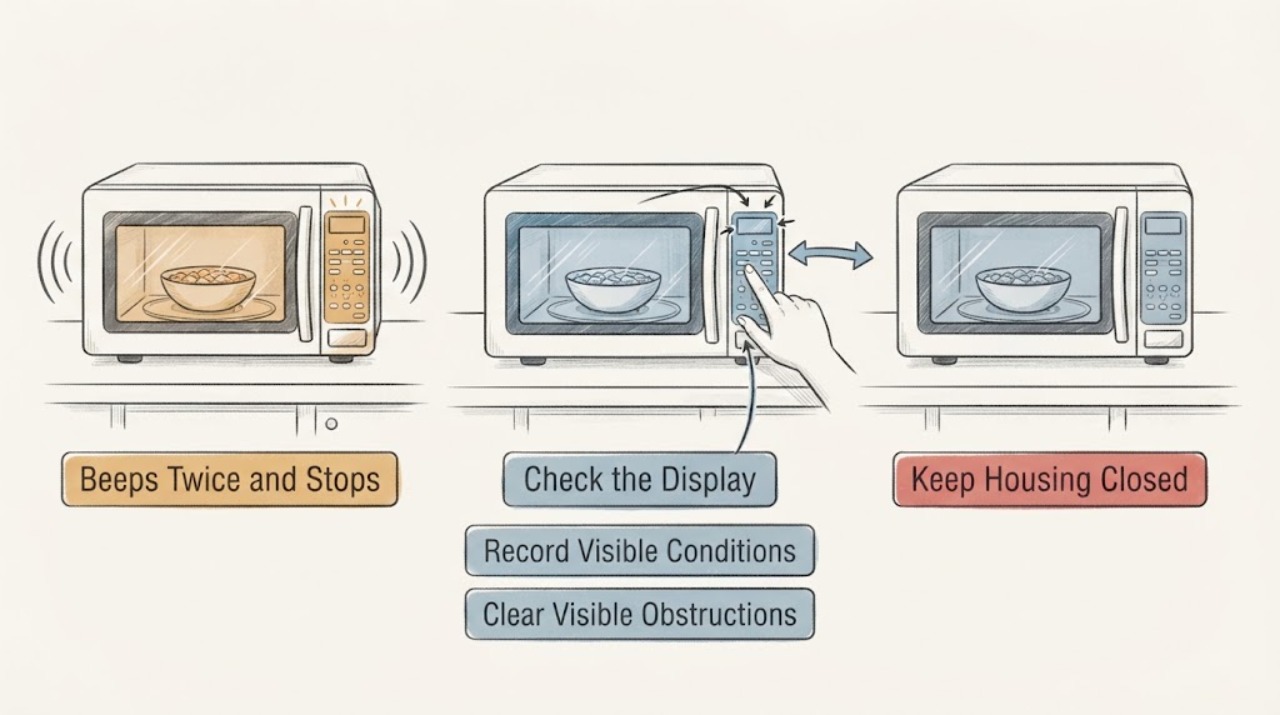
Two beeps immediately after starting a Panasonic NN-ST676S do not by themselves prove a failed high-voltage part. Panasonic's opened NN-ST676S instructions document two beeps between programmed stages, and its Genius Sensor guidance says two beeps can occur when steam is detected before the remaining cooking time appears. First record whether the display continues counting down, shows remaining time, returns to the clock/colon, or shows a code, and whether the program was Sensor Cook/Reheat or manual Power Level cooking. With the door closed and no visible damage, perform one correct manual water comparison using a microwave-safe cup, the specified glass tray, and roller ring. If the water stays cold, the program ends after two beeps without the expected display transition, the door will not latch, an H-code appears, or there is smoke, arcing, burning odor, or cavity/waveguide damage, unplug the oven and arrange authorized Panasonic service. Do not open the cabinet, probe high-voltage parts, defeat the door interlock, or operate the oven empty.
Before you begin
Safety first
- Do not remove the outer panel, probe or test the high-voltage circuit, adjust microwave-leakage or interlock parts, bypass the door switch, operate the oven empty, use metal, or continue after smoke, arcing, burning odor, cavity/waveguide damage, overheating, a hot/damaged outlet, or a breaker trip.
Work through in order
Diagnostic checks
Use only checks that match the exact appliance or system and its official guide.
-
Check 1
Read the rating label and confirm the model is NN-ST676S. Record whether the program was Sensor Cook/Reheat, manual Power Level, or a multi-stage program; note the exact timing of the two beeps and the display before and after them. Do not open the door during a sensor program just to inspect the food.
Expected result: The display continues a countdown, shows remaining sensor time, returns to the clock/colon, shows a code, or the program and display state are unclear.
Next step: Write down the full sequence and use the matching NN-ST676S manual procedure once. Do not diagnose a magnetron, inverter, relay, or switch from the beep count alone.
Stop if: Stop for an H-code, smoke, arcing, burning odor, damaged door/cavity/waveguide cover, hot or damaged outlet, or any need to remove the outer panel.
Why this matters
Why: Two beeps can be an expected stage or sensor transition. Panasonic says remaining cooking time should appear after steam detection, while two beeps can also occur between programmed stages. A return to clock/colon without the expected transition is a different observation from a normal continuation.
-
Check 2
With the oven empty of food but cool, verify externally that the door closes fully and the latch area has no visible obstruction or damage. Confirm the specified glass tray and roller ring are seated and can rotate freely without forcing them. Do not operate the microwave empty.
Expected result: The door closes normally, the door is misaligned/damaged, or the tray/roller ring is missing, blocked, or damaged.
Next step: Clear only an obvious external obstruction and seat the specified tray/roller ring when cool. Arrange authorized service for door, latch, interlock, cavity, or waveguide damage.
Stop if: Do not run with a door gap, damaged seal/cavity, absent tray, suspected interlock fault, or an empty cavity.
Why this matters
Why: A door or interlock condition can prevent correct operation, and Panasonic requires the specified tray path. A door, interlock, cavity, or tray problem is not a user-level high-voltage repair.
-
Check 3
After the display and door checks are normal, perform one supervised manual cooking comparison with a microwave-safe cup of water, the correct glass tray and roller ring, and the NN-ST676S manual Power Level/time controls. Stay nearby and do not use metal or an empty cavity.
Expected result: The water warms, remains cold while the display counts down, the oven stops at two beeps with no expected display transition, or the turntable does not rotate normally.
Next step: Stop testing after this result. For cold water, an unexplained immediate stop, or abnormal tray behavior, unplug the oven and arrange authorized Panasonic service; do not repeat cycles to force a different outcome.
Stop if: Stop immediately for smoke, arcing, sparks, burning odor, unusual noise, overheating, a hot outlet, or a breaker trip.
Why this matters
Why: Warm water shows that microwave energy is being produced, so a food-specific or sensor-program issue remains possible. Cold water after a complete manual run supports a repeatable no-heat fault. A two-beep stop without the expected transition does not identify a component, and abnormal tray behavior is a separate service issue.
-
Check 4
If the two beeps occurred during Genius Sensor Cook or Sensor Reheat, keep the door closed until the documented sensor transition is complete and check whether remaining cooking time appears. If the program ends without a time, use manual time and power only as the single controlled comparison; do not repeatedly restart the sensor cycle.
Expected result: Remaining time appears, the sensor program returns to the clock/colon, the food is a poor sensor candidate, or manual water also stays cold.
Next step: Use manual cooking once for an appropriate time/power setting. If manual water remains cold or the program repeatedly stops, unplug the oven and request authorized service.
Stop if: Do not open the door to defeat the sensor sequence, use tightly sealed containers, heat an empty cavity, or continue after smoke, arcing, or overheating.
Why this matters
Why: Panasonic says steam detection can trigger two beeps before remaining time appears, and its sensor guidance limits when an automatic program is meaningful. A sensor result alone does not prove a no-heat component fault; failure of the manual water comparison is the stronger service signal.
-
Check 5
If the display returns immediately to the clock/colon after a start, verify externally that the Stop/Reset pad was not pressed and the door was not opened. Re-enter the intended program once and press Start once; do not hold or repeatedly press controls.
Expected result: The door was opened, Stop/Reset was pressed, no countdown began, the program was left idle, or the same two-beep stop occurs with a secure door and correct program.
Next step: Record the exact display and sequence. If one correct restart still stops, unplug the oven and arrange Panasonic or qualified microwave service.
Stop if: Do not bypass the door switch, open the cabinet, perform high-voltage measurements, or keep restarting an unexpected stop.
Why this matters
Why: Panasonic states that opening the door or pressing Stop/Reset during operation requires Start again, and an unattended programmed sequence can cancel. A repeatable stop with correct controls moves the issue toward service rather than a user setting.
-
Check 6
Record any H-code, repeated beep pattern, display behavior, power level/time, water-test result, door/latch condition, tray rotation, and any smoke, arcing, odor, noise, heat, or breaker history for the service request.
Expected result: An H-code returns, the oven does not heat in a correct manual test, the two-beep stop persists, or any unsafe symptom is present.
Next step: Leave the oven unplugged and arrange authorized Panasonic service. Provide the exact NN-ST676S market information and recorded sequence instead of ordering a high-voltage part from the symptom alone.
Stop if: Do not remove panels, test the high-voltage circuit, bypass the interlock, or operate after smoke, arcing, burning odor, cavity damage, or a breaker trip.
Why this matters
Why: Panasonic's safety boundary treats returning H-code/no-heat conditions and cabinet, interlock, or cavity work as professional-service matters. A beep pattern without a confirmed diagnosis is not a part number.
Use your observations
Decision map
Find the observation that best matches what you see, then follow the next safe action.
-
PATH 01Next step
What you see
Two beeps occur during Sensor Cook/Reheat and a remaining cooking time then appears while the door stays closed.
Do this next
Let the sensor program complete once. If the food remains cold, use one manual water comparison; do not open the door early or repeatedly restart the sensor cycle.
Why this path and its safety boundary
Why it matters: This matches Panasonic's documented Genius Sensor transition after steam detection, not necessarily a no-heat failure.
-
PATH 02Next step
What you see
Two beeps occur between programmed stages or the display changes but continues a countdown.
Do this next
Do not interrupt the sequence. If a different result is needed, use an appropriate manual time/power setting rather than treating the beep as a component code.
Why this path and its safety boundary
Why it matters: Panasonic documents two beeps as a normal between-stage event. A continued countdown and warming water make a basic no-heat diagnosis less likely.
-
PATH 03Next step
What you see
The oven returns to clock/colon immediately after two beeps, no remaining time appears, or a correct manual water test leaves the water cold.
Do this next
Unplug the oven after the single controlled observation and arrange authorized Panasonic service with the exact display and program sequence.
Why this path and its safety boundary
Why it matters: The event is not explained by the documented normal sensor/stage transition. A repeatable no-heat or unexpected program stop remains possible, but the beep count does not identify the failed part.
-
PATH 04Next step
What you see
The door will not close securely, an H-code appears, the tray path is damaged, or there is smoke, arcing, burning odor, cavity/waveguide damage, overheating, or a breaker trip.
Do this next
Stop use, unplug only from a dry safe position if no immediate hazard prevents it, and arrange authorized Panasonic or qualified microwave service. Leave and follow local emergency guidance for fire or immediate danger.
Why this path and its safety boundary
Why it matters: This is a safety or professional-service branch. Panasonic prohibits user adjustment or repair of the door, interlock, cabinet, and microwave-leakage-related parts.
Helpful context
Understand the symptom
The meaning of two beeps depends on where they occur in the program. Panasonic documents them as a normal transition between programmed stages, and its Genius Sensor guidance says two beeps can mean steam was detected and the remaining cooking time is about to appear. A brief pause or display change is therefore not the same observation as a microwave that runs a full manual cycle while leaving water cold.
Use only external, low-risk checks. Stop immediately for smoke, arcing, a burning smell, a damaged door or cavity, a loose or damaged waveguide cover, a hot or damaged outlet, or any need to remove the outer panel. Panasonic reserves cabinet, interlock, and microwave-leakage work for a qualified service person.
When checks do not resolve it
Need a professional?
Call Panasonic service when one correctly entered manual program and controlled water test still produce a cold cup or an immediate two-beep stop, when an H-code returns, or when door/interlock/cavity damage is present. Use qualified electrical help for a damaged outlet or repeated breaker trip and the local emergency route for fire or immediate danger.
Safety scope: Do not remove the outer panel, probe or test the high-voltage circuit, adjust microwave-leakage or interlock parts, bypass the door switch, operate the oven empty, use metal, or continue after smoke, arcing, burning odor, cavity/waveguide damage, overheating, a hot/damaged outlet, or a breaker trip.
Have this ready
- Provide the complete NN-ST676S model/market information, program type, power level, selected time, exact beep timing, display before and after, whether a countdown or remaining sensor time appeared, door/latch state, tray/roller condition, water-test result, and any code or unsafe symptom.
Common questions
FAQ
What do two beeps mean on a Panasonic NN-ST676S?
They are not a standalone failure code. Panasonic documents two beeps between programmed stages, and its Genius Sensor instructions say two beeps can occur when steam is detected before remaining cooking time appears. Note the display and program before deciding that the oven has stopped heating.
Why does the microwave beep twice and return to the clock?
If no remaining time or countdown appears, the normal stage/sensor explanation has not been confirmed. Check that the door was not opened, Stop/Reset was not pressed, and the program was entered correctly; make one manual water comparison. If it still stops or the water stays cold, unplug it and arrange service.
Can I test this Panasonic microwave with a cup of water?
Only as one controlled, supervised comparison: use a microwave-safe cup of water, the specified glass tray and roller ring, the manual cooking controls, and no metal. Never operate the cavity empty. Stop immediately for smoke, arcing, burning odor, unusual noise, overheating, a hot outlet, or a breaker trip.
Should I replace the magnetron or inverter because it stops after two beeps?
No. The beep count does not identify a part. A correct manual water test that remains cold, a returning H-code, or a damaged door/cavity requires authorized service; microwave cabinet and high-voltage work are not user repairs.
Read the exact guide
Official sources
- How to use the Sensor/Auto Cook feature on the microwave ovenPanasonic · Opened Panasonic's North American sensor-cooking guidance, which explicitly lists the NN-ST676 family and explains that two beeps after steam detection precede the remaining cooking time. It supports classifying the beep as a sensor transition, not diagnosing a component.
- Features and Specifications - Microwave Oven - NN-ST676SPanasonic · Opened Panasonic North American support page for the exact NN-ST676S model. It identifies the model, 120 V/60 Hz supply, touchpad controls, 10 power levels, glass-tray accessory, and North American operating scope.
- NN-ST676S Operating InstructionsPanasonic · Opened the exact-model Panasonic operating-instructions PDF. It supports the two-beep programmed-stage behavior, tray/roller safety, door/interlock and cabinet prohibitions, empty-cavity/metal warnings, and manual control boundaries.
- How to manually program the power and time on a Microwave OvenPanasonic · Opened Panasonic's manual-programming guidance, which explicitly lists NN-ST676 among the models and documents P10-P1 power selection, time entry, Start, and completion behavior. It supports one controlled manual comparison without implying a component diagnosis.
Community feedback
Share a repair observation
Share a plain-text repair observation. Accepted observations are published automatically; this page may take a moment to update.