
On this page
Start here
Quick answer
If a Roper washer is running but clothes are not getting clean, first identify whether the result is soil left behind, detergent residue, dye transfer, or a cycle that does not complete. Sort the load and leave room for items to move freely, use only HE detergent, and measure the amount for the load and soil level instead of adding more. Select a cycle, temperature, and soil setting that match the fabric and soil, and verify that both hot and cold faucets are open and the hoses are connected as the exact model manual requires. Inspect the accessible dispenser for buildup and use a Clean Washer cycle only if the exact Roper manual lists that cycle and its procedure. If the washer is not draining, has a leak or water near electrical parts, or shows smoke, burning odor, sparks, hot wiring, or repeated breaker trips, stop using it and arrange qualified service.
Before you begin
Safety first
- This article covers ordinary-access observation and model-documented operating or cleaning steps only. Do not mix chemicals, handle hot or contaminated water unsafely, open panels, bypass interlocks, work on energized parts, or continue testing a leaking or electrically unsafe washer.
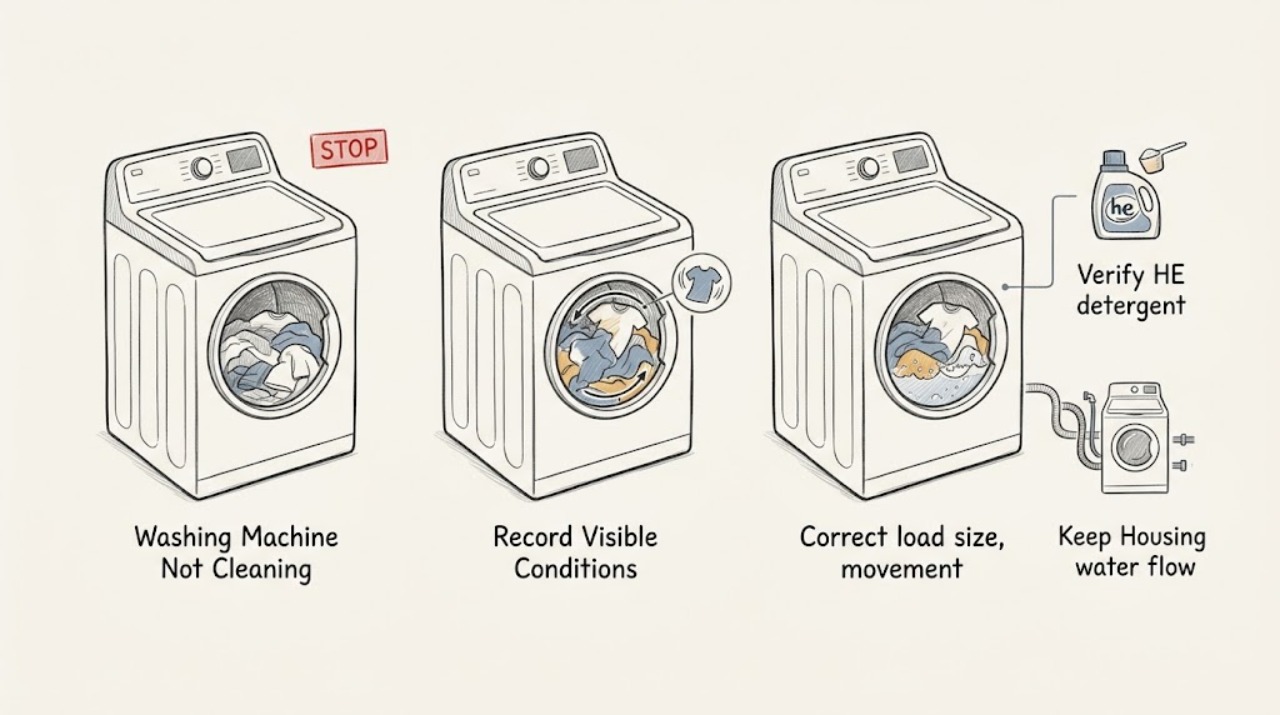
Work through in order
Diagnostic checks
Use only checks that match the exact appliance or system and its official guide.
-
Record the exact cleaning failure
Before changing settings, record the Roper model number and the cycle, temperature, soil or water-level setting, load size, detergent type and amount, and where the result is poor. Separate visible soil left behind, detergent or softener residue, color transfer, a load that remains wet, and a cycle that stops or never agitates or tumbles.
Expected result: The washer completes its cycle with normal wash movement but leaves soil, or it has weak/no movement, standing water, an error, unusual noise, or an incomplete cycle.
Next step: Use the symptom category to follow the distinct load, detergent, water, dispenser, or drainage check below, and keep the model manual available for feature names.
Stop if: Stop if the washer leaks, water reaches an outlet or cord, the cord or plug is hot or damaged, there is smoke, a burning odor, sparking, or a breaker trips repeatedly.
Why this matters
Why: Normal wash movement with soil left behind focuses on loading, detergent, cycle, temperature, and water supply. Standing water or an incomplete cycle can prevent rinsing and spinning, so it is not only a detergent problem.
-
Correct load size, movement, and sorting
With the washer stopped and safe to access, sort garments by color and care label, remove obvious non-washable items, and redistribute the load so items are loose and can move freely around the washplate or within the drum. Reduce the load if it is packed tightly or forms a single dense heap.
Expected result: The load is tightly packed, overfilled, uneven, mixed with incompatible colors or fabrics, or it already has clear room to move and was correctly sorted.
Next step: Run the same safe test with a smaller, sorted load and compare the result; do not use a larger detergent dose to compensate for an overloaded washer.
Stop if: Stop if the basket or drum is damaged, the washer moves violently, makes metal-on-metal contact, or a load cannot be redistributed without reaching into a moving machine.
Why this matters
Why: A dense or poorly sorted load can limit contact with water and detergent, leave soil behind, or cause color transfer. A correctly sized, mobile load makes a detergent or cycle cause more plausible.
-
Verify HE detergent and the measured dose
Identify the detergent label and measure the amount according to its instructions for this load and soil level. Use only detergent labeled HE, and do not add extra detergent because the clothing looks dirty. If a pod or pac is used, follow its package and the exact Roper manual rather than cutting or dissolving it by hand.
Expected result: The detergent is non-HE, the amount was estimated or increased repeatedly, the load is heavily sudsed, or the HE dose is measured and appropriate for the load.
Next step: For the next controlled load, use the measured HE dose and document the result; do not add bleach, softener, or another cleaner to compensate for a poor wash.
Stop if: Do not mix bleach, ammonia, acids, descalers, detergents, or other cleaners, and stop if chemical fumes or skin or eye irritation occurs; leave the area and follow the product safety instructions.
Why this matters
Why: Non-HE or excess detergent can produce oversudsing, residue, poor cleaning, poor rinsing, and a reduced spin. An appropriate HE dose makes loading, cycle, water, and dispenser checks more useful.
-
Match cycle, temperature, soil setting, and water supply
Use the exact Roper manual to select a cycle and soil or water-level option suited to the fabric and soil. Check from safe access that the hot and cold faucets are open as required, both supply hoses are connected to the correct inlets, and neither hose is visibly kinked. Use warm or hot water only when the garment care label, installation, and model instructions permit it.
Expected result: The selected cycle is too short or gentle for the soil, the temperature is unsuitable, a faucet is closed, a hose is kinked or connected incorrectly, or the settings and supply appear correct.
Next step: Correct only the documented setting or visible supply issue, then compare a small, sorted load; if the hose or inlet requires disassembly, stop and arrange service.
Stop if: Treat hot hoses or water as a scald risk. Stop for a leaking connection, water near electrical parts, a damaged hose, unusual heat, or any need to open the cabinet or manipulate internal wiring.
Why this matters
Why: A wash cycle controls movement, temperature, time, and spin, so a mismatch can leave soil behind even with correct detergent. Inadequate or misrouted water supply can also prevent the intended wash action.
-
Inspect the accessible dispenser and residue
After the washer is off, inspect the dispenser area from ordinary access for caked detergent, softener residue, a blocked siphon opening, or an overfilled compartment. Clean only removable or accessible parts using the exact Roper manual’s method; do not pour an unapproved product into a dispenser or assume every Roper model has the same layout.
Expected result: Residue blocks a compartment or opening, an additive was put in the wrong compartment, the dispenser was overfilled, or the dispenser is clean and used as documented.
Next step: Restore only the documented dispenser arrangement, use the measured product in its specified compartment, and compare the next load; request service if the dispenser cannot be cleaned without disassembly.
Stop if: Do not mix chemicals in the dispenser, use bleach or another product where the model manual does not allow it, force a drawer or siphon, or work with water near electrical parts.
Why this matters
Why: Residue, overfilling, low-temperature cycles, or an incorrect additive location can keep detergent or softener from entering at the intended time and can put residue back on clothing. A clean, correctly used dispenser shifts attention to load, cycle, water, and drainage.
-
Use Clean Washer only when the Roper model supports it
Check the exact Roper Use and Care manual for a Clean Washer or equivalent maintenance cycle and its required product, load state, and frequency. If the manual documents it, run that cycle only with the washer empty and the specified product and then follow the documented rinse or wipe steps; if the manual does not document it, do not invent a cycle or substitute a chemical.
Expected result: The exact manual documents the feature and procedure, documents a different maintenance method, or provides no applicable washer-cleaning feature.
Next step: Follow only the exact Roper procedure and reassess cleaning with a normal sorted load; if the manual is unavailable or the feature is unsupported, ask the manufacturer or technician for the model-specific maintenance method.
Stop if: Do not run a cleaning cycle with clothing, an active leak, standing water near electrical parts, smoke, burning odor, sparks, or a damaged lid or door lock; do not combine cleaners.
Why this matters
Why: Whirlpool guidance says a documented washer-cleaning cycle can remove detergent or softener buildup and may recalibrate water level on some compatible models, but that does not prove the same feature or procedure exists on every Roper washer.
-
Check the safe drainage boundary
If clothing is wet or coated with residue, note whether the washer completes its drain and spin. From safe external access, look for a visibly kinked or obstructed drain hose and record any drain error or standing water; do not open panels, reach into the washer, or test a pump on an energized machine.
Expected result: Water remains in the tub, the drain hose is visibly kinked or blocked, excess suds are present, a drain error appears, or the washer drains normally.
Next step: Correct only a visible hose-position issue allowed by the manual and perform one controlled comparison; call a qualified technician for persistent standing water, an internal blockage, a pump concern, or repeated drain errors.
Stop if: Stop immediately for a leak, standing water close to an outlet or cord, hot or chemically contaminated water, a damaged hose, smoke, burning odor, sparks, or repeated breaker trips.
Why this matters
Why: Incomplete drainage prevents effective rinsing and spinning, and excess suds can reduce spin performance. Normal drainage makes load, detergent, cycle, supply, and dispenser causes more likely, while a concealed blockage or pump fault requires model-specific service.
-
Escalate when the basic setup is correct
After one documented comparison with a correctly sized sorted load, measured HE detergent, model-appropriate cycle and temperature, available water supply, clean accessible dispenser, and normal drainage, compare the result with the original symptom. Keep the model number, settings, products, error messages, photos of residue or leaks, and the before-and-after result.
Expected result: Cleaning improves, the same problem persists, or the washer develops a new leak, unusual movement, noise, odor, heat, or electrical symptom.
Next step: Use the service branch and give the technician the recorded model and test history; do not keep increasing detergent, changing chemicals, or repeating cycles indefinitely.
Stop if: Leave the washer out of service for smoke, burning odor, sparks, hot wiring or outlet, active leak, water contacting electrical parts, severe vibration, or a breaker that trips again.
Why this matters
Why: Improvement supports a setup or maintenance cause. Persistence after the documented checks can involve an inlet, water-level sensing, wash action, control, dispenser, drain, or other model-specific fault that should not be guessed from a generic parts list.
Use your observations
Decision map
Find the observation that best matches what you see, then follow the next safe action.
-
PATH 01Safety boundary
What you see
The load is tightly packed, heavily unbalanced, or mixed in a way that allows color transfer or conflicts with care labels.
Do this next
Sort the load, reduce it, and distribute items loosely before comparing a model-appropriate cycle.
Why this path and its safety boundary
Why it matters: The wash action and detergent cannot contact items as intended, or dye and fabric-care problems are being mistaken for poor cleaning.
Safety stop: Stop for violent movement, a damaged basket or drum, metal contact, or a need to reach into a moving machine.
-
PATH 02Safety boundary
What you see
Non-HE or excess detergent, heavy suds, a wrong compartment, or visible dispenser buildup is present.
Do this next
Use measured HE detergent in the documented compartment and clean only the accessible dispenser parts permitted by the Roper manual; do not add another chemical.
Why this path and its safety boundary
Why it matters: Oversudsing or delayed dispensing can leave residue and reduce cleaning, rinsing, and spin performance.
Safety stop: Do not mix cleaners or force the dispenser, and stop for fumes, irritation, leaks, or water near electrical parts.
-
PATH 03Safety boundary
What you see
The cycle, soil or water-level setting, temperature, faucet, or supply hose does not match the model’s documented setup.
Do this next
Correct the documented setting or visible faucet and hose issue, respecting garment labels and hot-water safety, then compare one controlled load.
Why this path and its safety boundary
Why it matters: The washer may not provide the required time, movement, temperature, or water flow for the load.
Safety stop: Stop for a hot-water burn risk, leaking connection, damaged hose, or any internal access requirement.
-
PATH 04Safety boundary
What you see
The exact Roper manual documents a washer-cleaning cycle, or the manual does not document that feature.
Do this next
Use only the exact documented procedure, or obtain model-specific guidance rather than substituting another brand’s instructions.
Why this path and its safety boundary
Why it matters: A documented maintenance cycle may address buildup on a compatible platform; absence of the feature means a generic cycle or chemical recipe is not established for this model.
Safety stop: Do not run with clothing, a leak, standing water near electrical parts, smoke, burning odor, sparks, or mixed cleaners.
-
PATH 05Safety boundary
What you see
The washer leaves standing water, shows a drain error, produces excess suds, or does not complete spin.
Do this next
Inspect only the external hose position allowed by the manual and arrange qualified service for persistent water, internal blockage, pump, or control concerns.
Why this path and its safety boundary
Why it matters: Rinsing and spin performance can be compromised by a drain path, suds, pump, control, or model-specific fault.
Safety stop: Stop for a leak, hot or chemically contaminated water, water contacting electrical parts, smoke, burning odor, sparks, or repeated breaker trips.
-
PATH 06Safety boundary
What you see
A correctly loaded, sorted test with measured HE detergent, suitable cycle and temperature, adequate supply, accessible dispenser, and normal drainage still does not clean.
Do this next
Keep the washer out of service if any hazard is present and request qualified Roper appliance service with the model, settings, symptoms, and test history.
Why this path and its safety boundary
Why it matters: The remaining cause may be an appliance component or model-specific control or water-level issue that cannot be identified safely from generic symptoms.
Safety stop: Do not bypass a lid or door lock, open energized panels, test live wiring, or keep repeating cycles with added chemicals.
Helpful context
Understand the symptom
Define what “not cleaning” means
A washer can leave soil behind, leave powder or softener residue, transfer color, or stop before the wash action or drain is complete. Those symptoms point to different checks. Record the exact Roper model, cycle, temperature, soil or water-level setting, load size, detergent, and whether the drum or washplate moved normally. Whirlpool Product Help is useful reference guidance for compatible washer platforms, but the exact Roper Use and Care manual controls which cycles, dispensers, temperatures, and cleaning procedures your model has.
Loading and detergent change the wash result
Items packed tightly around a washplate or drum cannot move through detergent and water effectively. Sort by color and care label, reduce an overfilled load, and distribute items rather than making a dense heap. Use only detergent labeled HE and measure it according to the detergent instructions and the load and soil level. More detergent is not a stronger wash: excess or non-HE detergent can create suds and leave residue or reduce the washer’s ability to rinse and spin.
Treat water, dispenser, and cleaning-cycle features as model-specific
Confirm the supply faucets and hoses from safe, ordinary access, and use warm or hot water only when the fabric label and the Roper manual permit it. A dispenser may be located differently or may not accept every additive on every model; clean only accessible parts and only as the manual directs. A Clean Washer cycle is not universal. Use it only when the exact Roper documentation specifies that feature, product, and procedure, and do not run any test when water is leaking or could contact electrical parts.
Know when cleaning performance is a service problem
A poorly draining washer can leave clothes wet and full of residue even when the wash action is adequate. From safe access, look for a visibly kinked or blocked drain hose and note any drain error or standing water; do not open panels or reach into a moving or energized machine. Persistent poor cleaning after a correctly sized load, HE detergent, appropriate cycle, adequate water supply, accessible dispenser cleaning, and model-approved washer cleaning needs model-specific diagnosis rather than repeated chemical or mechanical experiments.
Safety boundary
Stop conditions
- Stop using the washer for smoke, burning or melting odor, sparks, arcing, a hot or damaged cord, a hot outlet, or repeated breaker trips; disconnect power only if it is safe to reach without touching water or damaged wiring.
- Stop for an active leak, standing water near an outlet, plug, cord, or appliance wiring, or any water-contact electrical hazard. Close the water supply only if it is safely accessible and arrange service.
- Treat hot water as a scald hazard and do not handle hot hoses, standing water, or chemicals without the precautions required by the exact manual and product label.
- Do not mix bleach, ammonia, acids, descalers, detergent, softener, or other cleaners; do not invent a Clean Washer chemical procedure when the Roper manual does not specify one.
- Do not open panels, reach into a moving drum or washplate, bypass a lid or door lock, test energized wiring, or disassemble an inlet, pump, control, or dispenser as a user check.
- Stop for violent movement, metal-on-metal noise, a damaged tub or basket, a cracked lid or door, or a hose or connection that leaks after an external check.
Only after diagnosis
Potential parts
- dispenser assembly or siphon insert
Consider this category only if the exact model’s dispenser is damaged or remains unable to dispense after the documented cleaning and placement checks.
Confirm the complete Roper model and the exact dispenser configuration with the manufacturer or technician; do not substitute a generic insert. - water inlet valve or inlet screen
Consider this category only after service diagnosis confirms inadequate or misdirected fill on the exact model, not merely because clothes remain dirty.
Verify the model-specific part and electrical and hose configuration through qualified service; do not disassemble or test the valve as a user check. - drain pump or drain-path component
Consider this category only when persistent standing water, a documented drain fault, and model-specific diagnosis point to the pump or drain assembly after safe external checks.
Confirm the exact Roper model and diagnosis before ordering; do not open the appliance or handle residual water to test a pump.
When checks do not resolve it
Need a professional?
Request qualified appliance service when the washer still leaves soil after the documented load, HE detergent, cycle, temperature, supply, dispenser, model-approved cleaning, and drainage checks; when it will not complete, leaves standing water, repeatedly shows a drain or water-fill issue, or has a suspected inlet, water-level, wash-action, pump, control, or dispenser fault. Treat a leak, water near electrical parts, smoke, burning odor, sparks, hot wiring or outlet, severe vibration, or repeated breaker trips as a stop-use escalation.
Safety scope: This article covers ordinary-access observation and model-documented operating or cleaning steps only. Do not mix chemicals, handle hot or contaminated water unsafely, open panels, bypass interlocks, work on energized parts, or continue testing a leaking or electrically unsafe washer.
Common questions
FAQ
Why is my Roper washer running but leaving clothes dirty?
Start by separating a true soil problem from residue, color transfer, poor drainage, or an incomplete cycle. A tightly packed load, wrong cycle or temperature, closed water faucet, or incorrect detergent can all reduce cleaning. Use the exact Roper manual for model-specific settings.
Can I use regular detergent in a Roper high-efficiency washer?
Use only detergent labeled HE when the washer requires HE detergent. Excess or non-HE detergent can create suds and residue and can reduce cleaning, rinsing, and spin performance. Measure the dose for the load and soil level instead of adding more.
Can too many clothes cause poor cleaning?
Yes. Items need room to move through water and detergent. Reduce a tightly packed load, sort it by color and care label, and distribute items loosely around the washplate or in the drum.
Should I use a hotter cycle to make clothes cleaner?
Use a temperature and cycle that the garment label and exact Roper manual allow. Hotter is not automatically better, and it creates a scald risk during hose or standing-water checks.
Why are detergent marks or softener spots left on clothing?
Possible causes include too much detergent, non-HE detergent, a blocked or overfilled dispenser, low-temperature use, or a load that cannot move freely. Clean only accessible dispenser parts by the exact manual and do not mix cleaning chemicals.
Does every Roper washer have a Clean Washer cycle?
No feature should be assumed across models. Check the exact Roper Use and Care manual. If it documents Clean Washer, follow its required empty-load, product, and follow-up procedure; otherwise do not substitute another model’s recipe.
Can poor draining make a washer seem like it is not cleaning?
Yes. Standing water or an incomplete drain and spin can leave detergent and soil residue and wet clothing. Check only the visible drain-hose position allowed by the manual and request service for persistent water, internal blockage, pump concerns, or repeated errors.
When should I stop using the washer?
Stop for an active leak, water near electrical parts, smoke, burning odor, sparks, a hot or damaged cord or outlet, severe movement, metal contact, or repeated breaker trips. Do not open panels, bypass the lid or door lock, or continue testing with added chemicals.
Read the exact guide
Official sources
- Fabric Softener Not DispensingWhirlpool Product Help · Official Whirlpool product-help reference for compatible washer-platform dispenser issues; exact Roper dispenser layout and additive rules govern.
- Not Draining - WasherWhirlpool Product Help · Official Whirlpool product-help reference for compatible washer-platform drainage checks; exact Roper installation and service instructions govern.
- Not Cleaning ClothingWhirlpool Product Help · Official Whirlpool product-help reference for compatible washer-platform practices; the exact Roper model manual controls feature and procedure applicability.
- Not Rinsing WellWhirlpool Product Help · Official Whirlpool product-help reference used for compatible washer-platform rinsing and residue principles; verify the exact Roper manual.
Community feedback
Share a repair observation
Share a plain-text repair observation. Accepted observations are published automatically; this page may take a moment to update.