
On this page
Start here
Quick answer
Treat the display as unconfirmed until you identify the characters from a photo: Samsung's official error lists define LE and LC as leakage indications, but the opened model-specific support and error pages do not establish a separate LEB code. Because this report also includes water in the drip tray and detergent left after the cycle, resolve the possible leak indication first and do not keep running overnight cycles. With power and water off as safely possible, check only for visible moisture and ordinary-access residue, then verify that the dispenser is not overfilled or obstructed, the spray arms can move, the load is not blocking the dispenser, and the incoming water meets the model guidance. If the exact display returns, water remains, or an empty cycle still leaves detergent, stop and request Samsung service; do not infer a motor seal, pump, valve, heater, or dispenser replacement from the symptom.
Before you begin
Safety first
- No pulling out the built-in appliance, cabinet or electrical-cover access, live testing, leak-sensor bypass, or repeat overnight cycles while an error or moisture condition is present.
Work through in order
Diagnostic checks
Use only checks that match the exact appliance or system and its official guide.
-
Check 1
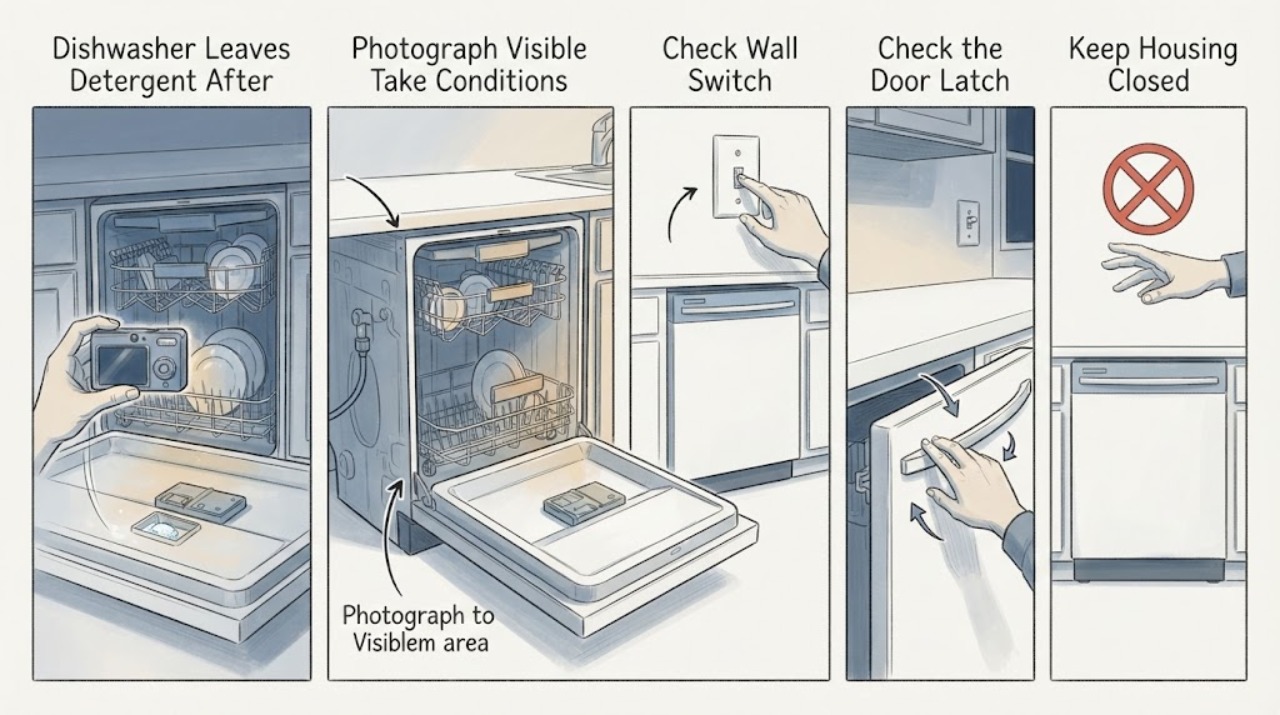
Photograph the front panel as soon as the display is visible and copy every character exactly; also photograph the model/serial label without pulling the built-in dishwasher out.
Expected result: Check whether the display is LEB, LE, LC, or another combination, whether a decimal or segment is present, and whether the indication is steady, blinking, or accompanied by a status light.
Next step: Keep the display as unconfirmed until it matches the exact model instructions. Do not reset first or silently rewrite LEB as LE.
Stop if: Stop using the dishwasher for visible water, a continuous drain pump, smoke, sparks, an electrical odor, or a hot control area.
Why this matters
Why: Samsung's official Canada list defines LC and LE as leakage indications but does not establish LEB as its own code. A misread character can send the diagnosis to the wrong branch, so the exact display and full model suffix must stay visible to service.
-
Check 2
Because the report includes water in the drip tray, switch off the dishwasher and close its water supply as safely possible before looking for moisture from outside the cabinet.
Expected result: Note visible water under the door or at accessible hose connections, a damp floor or toe-kick edge, a wet drip-tray area if visible without removal, or no visible moisture. Do not pull out the built-in unit or open a cover.
Next step: If moisture or the exact leakage indication remains, leave water and power off and request service. Only after the leak path is cleared should detergent and cleaning performance be evaluated.
Stop if: Do not energize the dishwasher to find a leak, remove the drip tray, reach under the machine, or open electrical covers.
Why this matters
Why: Samsung defines LE/LC as moisture detection, even when a leak is not obvious. No visible water does not clear a leak sensor, and detergent residue after a leak-related event does not prove that a motor seal or another part is the cause.
-
Check 3
With the dishwasher powered off and the door open, inspect the detergent dispenser from ordinary access: use the recommended detergent type and amount, keep it at or below the fill line, and wipe away buildup around the door and latch.
Expected result: After a safe, non-leak cycle is permitted by the model guidance, note whether the dispenser door opened, whether detergent is caked in the cup or ran down the door, and whether a dish or utensil blocked the door.
Next step: Clean only visible dispenser buildup with warm water and correct the amount or placement. If the door does not open or residue persists after the error/moisture issue is resolved, request service.
Stop if: Do not pry the dispenser open, add detergent outside the cup, use hand-washing liquid, or run another cycle while a leak indication or water hazard remains.
Why this matters
Why: Samsung says overfilling, incorrect tablet placement, or detergent buildup can prevent the dispenser door from opening or the detergent from dissolving. If the door opens and residue remains, the water, spray, or temperature path still needs checking; it is not proof of a failed dispenser assembly.
-
Check 4
Check the rack layout and spray path without disassembly: make sure tall items are not blocking the dispenser or spray arms, and turn each accessible spray arm gently with the machine off.
Expected result: Note whether an item blocks the dispenser door, a spray arm catches on a dish, nozzle openings have visible food debris, or the arms turn freely.
Next step: Rearrange only the load and clear plainly visible nozzle debris. If spray action or cleaning remains poor, preserve the display and water observations and arrange service.
Stop if: Do not remove pump covers, insert tools into nozzles, reach into moving parts, or pull the built-in dishwasher out to inspect the motor.
Why this matters
Why: Samsung identifies blocked moving parts, blocked spray arms, and clogged nozzles as causes of detergent not dissolving or dishes remaining dirty. Free arm movement does not prove that the circulation pump is healthy.
-
Check 5
Once no leak indication or moisture remains and the exact manual permits operation, compare one controlled cycle with the prior result; check the incoming hot-water setting against Samsung's model guidance rather than guessing from the dish temperature.
Expected result: Record whether the cycle completes, the dispenser opens, detergent dissolves, spray sounds are normal, dishes are wet or dry, and LEB/LE or another code returns. Samsung's detergent guide notes that some tablets need water at least 120°F to dissolve, while the exact model instructions take priority.
Next step: If the display or dirty-dish symptom returns, stop repeat testing and give Samsung service the exact model suffix, display photo, water/moisture result, dispenser result, cycle, and detergent details.
Stop if: Do not run a cycle to test a known leak, bypass the leak sensor, test live electrical parts, or keep using the dishwasher overnight while the display or moisture issue is unresolved.
Why this matters
Why: A complete cycle with an open dispenser but undissolved detergent points toward water temperature, spray/flow, detergent choice, or loading; a returning error, standing water, or incomplete cycle takes priority over cleaning-performance adjustments.
Use your observations
Decision map
Find the observation that best matches what you see, then follow the next safe action.
-
PATH 01Next step
What you see
The panel truly reads LE or LC, or LEB is accompanied by water in the drip tray, visible moisture, or continuous draining.
Do this next
Leave water and power off as safely possible and request qualified Samsung service; do not pull out the built-in unit or name a motor seal from the report.
Why this path and its safety boundary
Why it matters: Samsung defines LE/LC as leakage or moisture detection. The leak-related branch takes priority over detergent, loading, or cleaning-quality adjustments, even when the visible leak is small or absent.
-
PATH 02Next step
What you see
The display is visually LEB, but no opened official Samsung guide matches LEB as a separate code and there is no confirmed leak evidence.
Do this next
Do not reset repeatedly. Use the exact-model support/manual path and provide the photo and cycle stage to Samsung service before further testing.
Why this path and its safety boundary
Why it matters: The character identity is unresolved. Treating LEB as LE could misroute the user, while treating it as a normal status display could miss an error; the full model suffix and photo are needed.
-
PATH 03Next step
What you see
The leak indication is gone, the dispenser door opens, no dish blocks the spray arms, but detergent remains and the load is dirty or merely wet.
Do this next
Check the documented detergent amount, water requirement, nozzle visibility, and load arrangement once. If the empty or controlled cycle still leaves detergent, request service.
Why this path and its safety boundary
Why it matters: The remaining possibilities include water temperature, detergent amount or type, spray/flow, loading, and an internal operating fault. The result does not isolate a dispenser, pump, valve, heater, or motor.
-
PATH 04Next step
What you see
The dispenser opens and detergent dissolves on an otherwise complete cycle, but dishes remain dirty.
Do this next
Use the correct cycle and load arrangement and follow the model's detergent and water guidance. Request service if cleaning remains poor or any error or leak indication returns.
Why this path and its safety boundary
Why it matters: The dispenser is no longer the leading observation. Samsung's cleaning guidance points next to cycle choice, loading, water temperature, rinse aid, and cleanliness of the dishwasher rather than an automatic part replacement.
Helpful context
Understand the symptom
Read LEB before assuming LE
On this older front-control model, a display reading can be easy to misread. Samsung's opened Canada error guide lists LC and LE as leakage errors, while the exact-model support page identifies the DW80J3020UW/AC family; neither opened official page establishes “LEB” as a separate code. Preserve a photo and the full suffix instead of silently changing LEB to LE or treating it as a dispenser fault.
Why detergent residue is a second branch
Samsung says a code or blinking-light problem should be handled first when detergent does not dispense. Once the moisture indication is gone and the cabinet is safe, the dispenser door, detergent amount, water temperature, spray-arm movement, loading, and water access can be checked from ordinary access. A remaining tablet or powder does not by itself identify a dispenser, pump, or motor part.
When checks do not resolve it
Need a professional?
Use qualified Samsung service for a recurring LE/LC/uncertain LEB display, any moisture or drip-tray water, an incomplete cycle, or detergent left after one permitted controlled cycle with the leak path resolved.
Safety scope: No pulling out the built-in appliance, cabinet or electrical-cover access, live testing, leak-sensor bypass, or repeat overnight cycles while an error or moisture condition is present.
Common questions
FAQ
Is LEB the same as Samsung LE?
Do not assume that. The opened Samsung error lists define LE and LC as leakage indications but do not establish LEB as a separate code. Photograph the display and verify the complete DW80J3020UW suffix before choosing a code-specific action.
Can detergent left after the cycle identify a bad dispenser?
No. Check the leak or error indication first, then ordinary-access dispenser fill, buildup, blocked door, spray-arm movement, loading, and water-temperature conditions. If the dispenser still leaves detergent after those checks, request service rather than ordering a part.
Should I keep running the dishwasher overnight to see whether it cleans?
No while LEB/LE or moisture is unresolved. Keep water and power off for visible leakage or a continuous drain condition, and use one controlled cycle only after the exact manual and service guidance permit it.
Read the exact guide
Official sources
- Common Samsung dishwasher error codes and their meaningSamsung Canada · Samsung states this guide is specific to dishwashers sold in Canada and lists LC and LE as leakage errors caused by moisture detection; it does not provide a separate LEB definition in the opened list.
- Samsung Dishwasher - detergent and soap left after cycleReddit r/appliancerepair · Exact-model community report for Samsung DW80J3020UW: LEB display, water in the drip tray, then soap left on the door and dirty dishes after an attempted repair.
- Detergent does not dispense in Samsung dishwasherSamsung US · Samsung says to handle an error code or blinking lights first, then check dispenser fill level, buildup, water temperature, obstructions, spray-arm movement, and one controlled cycle.
- Front Button Control 50 dBA Dishwasher | Samsung Support CASamsung Canada · The Samsung support page identifies the front-button dishwasher as DW80J3020UW/AC and exposes its model-specific manuals, support topics, and service path; use the complete suffix when checking an LEB or LE display.
- Samsung dishwasher is displaying an error codeSamsung US · Samsung's US error-code guide says some models use blinking lights and instructs users to troubleshoot before resetting; it lists LC and LE as leakage errors and does not establish LEB as a separate code.
- Dishwasher cycle ends before dishes are cleanSamsung US · Samsung's cleaning guide directs the reader to handle error codes or detergent-dispensing issues first, then considers cycle choice, loading, detergent amount, water temperature, and cleaning when food remains.
Community feedback
Share a repair observation
Share a plain-text repair observation. Accepted observations are published automatically; this page may take a moment to update.