
On this page
Start here
Quick answer
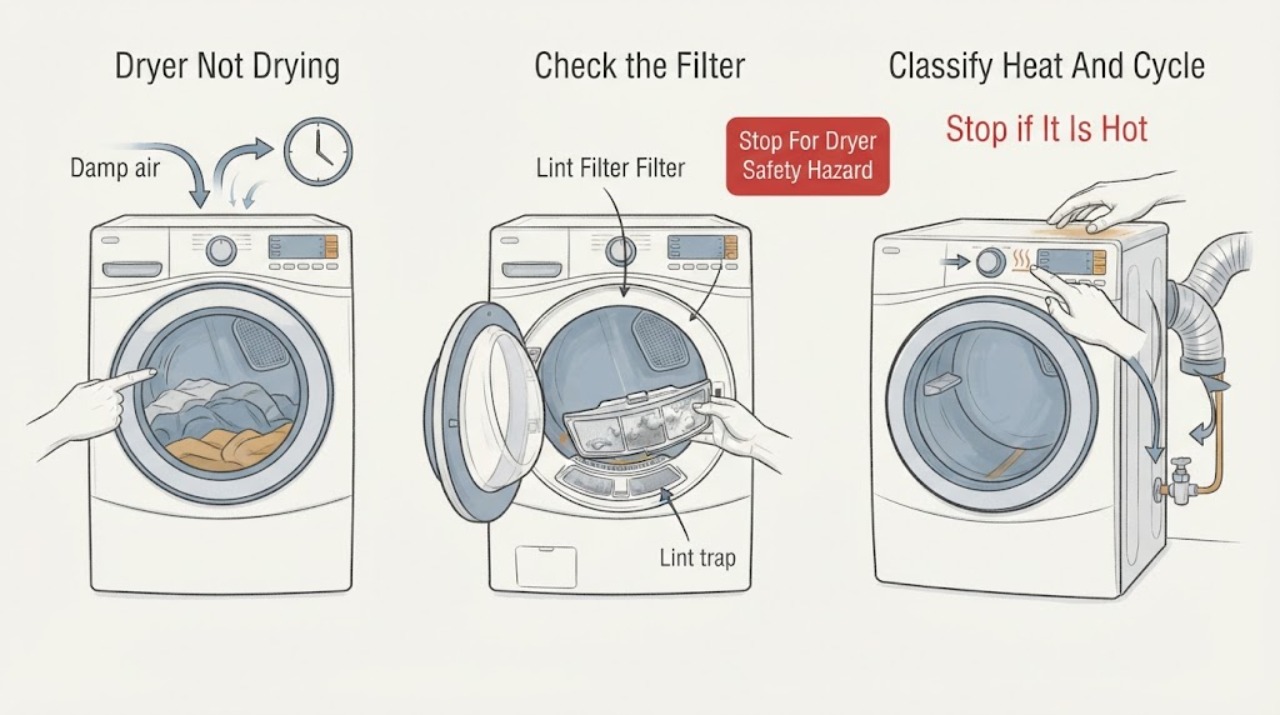
If a Samsung dryer leaves clothes damp, first decide whether it has no heat, weak heat with a long cycle, or normal heat but an early Sensor Dry stop. Use the correct cycle, turn off Eco Dry only if the model has it and you need more heat, clean the lint filter, and check the exhaust path or heat exchanger according to the model. Mixed or very small loads can fool moisture sensors. Ventless and heat-pump models may use a drain hose and a heat exchanger instead of a conventional exhaust duct; check those only when your model has them. For a gas model, the gas supply must be available, but do not work on the gas line. Stop immediately for smoke, gas odor, burning or electrical smell, overheating, sparks, or repeated breaker trips.
Before you begin
Safety first
- Keep the dryer off for smoke, gas odor, burning or electrical smell, overheating, sparks, or repeated trips. Vented dryers need a clear, correctly fitted exhaust path; ventless or heat-pump models need their model-specific heat exchanger and drainage path. Never bypass a safety control or work inside the dryer or on its gas connection.
Work through in order
Diagnostic checks
Use only checks that match the exact appliance or system and its official guide.
-
Check 1
Stop the cycle and keep the dryer out of service if there is visible smoke, gas odor, burning or electrical smell, a spark, abnormal heat, a damaged cord, or a repeated breaker trip. Do not operate switches or use a phone in a gas-smell area; leave and seek help from a safe location.
Expected result: The dryer is hazard-free and cool enough for external checks, or one of the listed hazards is present.
Next step: For smoke, gas odor, or fire, clear the area and contact emergency help from outside. For burning or electrical smell without an active emergency, leave the dryer off and arrange qualified service.
Why this matters
Why: A safety symptom is not a drying-performance branch. Continuing to run or reset the dryer can increase fire, shock, or gas risk.
-
Check 2
With the drum empty or with a normal safe load as directed by the manual, note the selected cycle, Dry Level, Eco Dry status where available, whether the drum turns, and whether any warmth is present during the cycle. Record any display code or alert instead of guessing what it means.
Expected result: There is no heat, some heat but a long cycle, normal heat with damp clothes, a cycle that ends very quickly, or a code or alert.
Next step: Use the matching branch below and the exact model manual; do not repeat a cycle that produces a safety warning or abnormal heat.
Why this matters
Why: No heat directs the check toward power, gas supply on a gas model, and service. Warm but slow drying points toward airflow or load. Early Sensor Dry completion points toward sensors, load size, or Dry Level. A code may require its own Samsung procedure.
-
Check 3
Turn the dryer off and let it cool. Clean the lint filter. If it is a vented model, inspect the accessible exhaust connection and outside hood for kinks, crushing, lint restriction, or a flap that cannot open. If it is a ventless or heat-pump model, check the manual for the accessible heat-exchanger or optional-filter cleaning and any drain-hose requirement instead of applying a vented-dryer assumption.
Expected result: The lint filter or vent path is restricted, the vent hood cannot open freely, a heat-exchanger alert is displayed, the drain hose is not draining where fitted, or the accessible paths are clear.
Next step: Clean only the user-accessible parts described for the exact model and retest once. If the path is clear but heat is absent, an alert returns, or water cannot drain, request service.
Why this matters
Why: Restricted airflow or a dirty heat exchanger can leave moisture in the dryer and reduce heat. A ventless unit may have no outside exhaust duct, and a fitted drain hose adds a separate water path.
-
Check 4
Separate heavy fabrics from light items, avoid overloading, and select a cycle and Dry Level suitable for the fabric. Confirm that the selected cycle is not Air Fluff, a low-heat option, a steam-only option, or Eco Dry when the model uses that setting to reduce heat. On a ventless model, confirm that the cycle is intended to provide heat rather than cooling only.
Expected result: The load was bulky, mixed, too small to tumble or contact sensors, overloaded, or assigned to a low/no-heat or steam/cooling cycle; or the cycle and load are appropriate.
Next step: Correct the load or cycle once and compare the result. If the same appropriate load is still damp, continue to the sensor and supply checks rather than adding heat indefinitely.
Why this matters
Why: A load can be damp even when the dryer is working, and some cycles intentionally use little or no heat. A correct cycle with an appropriate load and continuing dampness points back to airflow, sensor, supply, or service.
-
Check 5
If the cycle ends quickly while clothing is still wet, turn the dryer off and clean the accessible moisture-sensor bars with a soft cloth and the model-approved mild cleaning method. Then use an adequate load or a Manual Dry cycle only when the manual supports it, and set a suitable Dry Level for the fabric.
Expected result: The sensor bars have residue, the load is very small or mixed with light and heavy items, or the bars and load are appropriate but the cycle still stops early.
Next step: If the cycle completes normally after the clean-and-load check, monitor it. If it still stops early or an error appears, keep the dryer out of service as appropriate and arrange model-specific support.
Why this matters
Why: Residue or poor sensor contact can make the dryer decide that the load is dry too soon. A clean sensor and suitable load with early stopping suggests a control or sensor fault.
-
Check 6
For a dryer with no heat, check the household breaker or fuses and the fully seated external power connection only from a dry, safe position. If the model is gas, confirm only that the supply has not been intentionally shut off; do not loosen, test, or alter the gas connection. If the model is ventless and has a drain hose, confirm that the hose is routed and draining as the manual specifies.
Expected result: A supply interruption, abnormal voltage or code, gas supply shutoff on a gas model, drain problem on a ventless model, or no external cause is found.
Next step: Restore only a clearly switched-off external supply once and follow the manual's startup procedure. If a breaker trips again, no heat remains, the drain still fails, or a code returns, stop and request qualified service.
Why this matters
Why: A supply or drainage issue can prevent a dryer from heating or removing moisture. Correct external supply with no heat points to an internal heater, sensor, control, or other fault.
Use your observations
Decision map
Find the observation that best matches what you see, then follow the next safe action.
-
PATH 01Next step
What you see
There is visible smoke, gas odor, burning or electrical smell, a spark, abnormal overheating, or repeated breaker tripping.
Do this next
Stop immediately. For gas odor or smoke, clear the building and contact emergency help from outside; for electrical or burning odor, leave the dryer off and arrange qualified service. Do not reset or run another cycle.
-
PATH 02Next step
What you see
The drum tumbles but there is no warmth on the correct cycle.
Do this next
Check the external breaker or fuse, cycle and Eco Dry setting, and gas availability only when the model is gas. Clean the lint and applicable heat-exchanger path; if no heat remains, request service.
-
PATH 03Next step
What you see
There is warmth but clothes remain damp or the cycle takes unusually long.
Do this next
Prioritize the lint filter, vent blockage and vent routing on a vented model, or heat exchanger and drain path on a ventless model. Correct the load and cycle, then escalate if airflow and settings are correct.
-
PATH 04Next step
What you see
A Sensor Dry cycle ends quickly while heavy or bulky items remain damp.
Do this next
Clean the moisture sensors, separate the load, use a suitable Dry Level, and meet the model's minimum-load guidance. If early stopping persists with a suitable load, request service.
-
PATH 05Next step
What you see
The Samsung model is ventless or heat-pump and has a heat-exchanger alert or connected drain hose.
Do this next
Use the exact model's heat-exchanger cleaning and drain instructions. Do not disconnect or add an exhaust duct based on a vented model's procedure; request service if the alert or leak persists.
Helpful context
Understand the symptom
Name the drying symptom
Not drying can mean no warm air at all, weak heat and a long cycle, a cycle that ends quickly, or clothing that is only damp in a mixed or bulky load. The distinction changes the next check. Record the selected cycle, Dry Level, Eco Dry status where available, whether the drum tumbles, whether any warmth is present, and any code or alert. Check the model manual before using a button combination because Samsung controls and features vary by model.
The airflow path matters
For vented dryers, lint and a kinked, crushed, poorly fitted, or blocked exhaust path can keep heat and moisture from leaving. Samsung's vent-blockage guidance is model-specific, so run that test only if your manual or control panel supports it. Ventless or heat-pump models use a different moisture path and may have a heat exchanger or drain hose; do not disconnect an exhaust duct or assume that a vented-dryer test applies to a ventless model.
Sensor Dry can finish before heavy items are dry
Sensor Dry uses the moisture bars to decide when to end. A small load may not contact the sensors reliably, while a mixed load can put already-dry light items against the bars before bulky items are dry. Clean the accessible sensor bars as Samsung directs, choose an appropriate Dry Level, and separate heavy fabrics rather than repeatedly restarting the same overloaded or unbalanced load.
Do not trade drying time for fire or gas risk
Never keep running a dryer that smells of gas, shows smoke, has a burning or electrical odor, sparks, overheats, or trips protection. Do not open the cabinet, bypass a thermal or door safety, test a gas valve, alter a gas connection, or work on live wiring. If the dryer has no heat after its safe external checks, or a vent or heat-exchanger warning returns after cleaning, arrange Samsung or qualified appliance service.
Safety boundary
Stop conditions
- Stop for visible smoke, gas odor, burning or electrical smell, sparks, abnormal overheating, or repeated breaker trips.
- Do not open the dryer cabinet, bypass a safety device, alter a gas connection, or work on live wiring.
- Do not use plastic or foil exhaust materials, run with a crushed or disconnected vent, or keep running against a vent or heat-exchanger warning.
- Do not apply vented-dryer procedures to a ventless or heat-pump model unless its manual explicitly permits them.
- If a fault code or abnormal-voltage warning returns after the manual-approved external check, stop testing and request service.
When checks do not resolve it
Need a professional?
Request qualified Samsung or appliance service when a correct cycle has no heat after safe external checks, a vent or heat-exchanger path is clear but drying remains poor, Sensor Dry still ends early with a suitable load and clean sensors, a code persists, a ventless drain continues to fail, or the dryer has abnormal noise or operation. Stop immediately for smoke, gas odor, burning or electrical smell, overheating, sparks, or repeated breaker trips.
Common questions
FAQ
Why is my Samsung dryer running but leaving clothes damp?
Start with the lint filter and the appropriate vent or heat-exchanger path, then check the cycle and load. A blocked vent, overloaded or mixed load, Eco Dry, Sensor Dry behavior, or a ventless drain issue can all change the result. Persistent no heat or poor drying needs service.
Could Sensor Dry finish while clothes are still wet?
Yes. Residue on the moisture bars, a very small load, or light items drying before heavy items can make a Sensor Dry cycle finish early. Clean the accessible sensors, separate the load, and choose a suitable Dry Level or manual cycle as the model allows.
What should I check on a Samsung ventless dryer?
Check the lint filter, model-specified heat exchanger and optional filter, correct cycle, load size, and drain hose if fitted. Ventless models do not use the same outside exhaust procedure as conventional vented dryers; follow the exact manual.
What if my Samsung gas dryer has no heat?
Confirm that the model is gas and that the gas supply has not been intentionally shut off, but do not loosen or test the gas connection. Also check the cycle, lint filter, and applicable vent path. If heat does not return, request qualified service.
When should I stop using the dryer?
Stop for smoke, gas odor, burning or electrical smell, sparks, abnormal overheating, a damaged cord, or repeated breaker trips. Do not run another cycle or use switches in a gas-smell area; leave and get help from a safe location.
Read the exact guide
Official sources
- Clothes are not dry after using Samsung dryerSamsung Electronics · Samsung dryer drying, heat, lint filter, vent blockage, sensor, cycle, and load troubleshooting
- Samsung dryer smells or smokesSamsung Electronics · Samsung dryer smoke, gas odor, burning smell, electrical smell, lint, and service safety guidance
- Cycles, settings, and features on your Samsung dryerSamsung Electronics · Samsung dryer Eco Dry, Sensor Dry, mixed-load, Dry Level, and cycle feature behavior
- Clothes are not dry after Samsung ventless dryer cycleSamsung Electronics · Samsung ventless dryer heat exchanger, drain hose, cycle, load, lint filter, and gas-model applicability
Community feedback
Share a repair observation
Share a plain-text repair observation. Accepted observations are published automatically; this page may take a moment to update.