
On this page
Start here
Quick answer
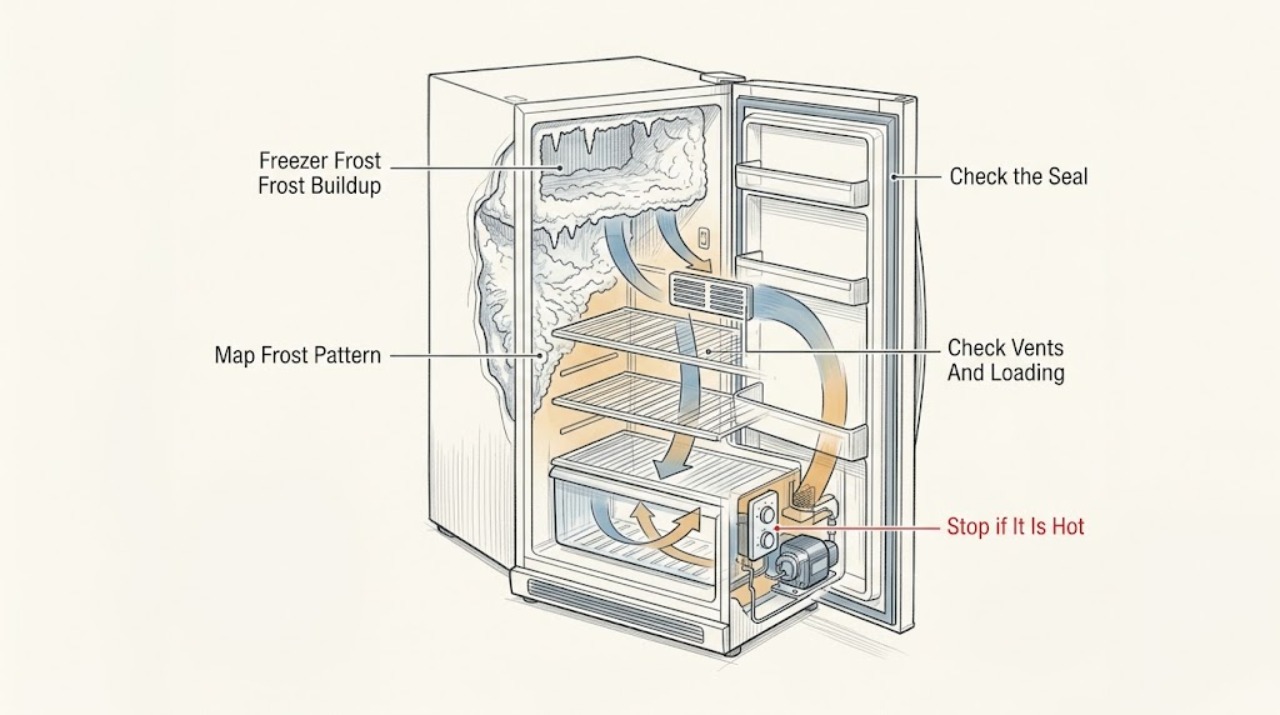
Samsung says freezer frost forms when warm, moist air enters through a door that is left open, food or drawers that prevent sealing, a damaged gasket, or blocked vents. First identify whether the frost is a thin local film, a door-edge band, a vent blockage, or a heavy layer across the compartment. Check that the door closes fully, the rubber seal is clean and intact, food leaves the vents clear, and no temporary cooling mode or temperature setting is driving excess cold. For light frost, Samsung allows a damp cloth followed by drying; heavier frost may require a manual defrost. Never use a hair dryer, heat gun, knife, or other direct heat or sharp tool. Protect food at a safe temperature, keep a wet appliance or receptacle untouched, and request service if the seal is damaged, frost returns after the cause is corrected, the freezer cannot hold temperature, or the defrost system appears to fail.
Work through in order
Diagnostic checks
Use only checks that match the exact appliance or system and its official guide.
-
Check 1
Without chipping the ice, photograph and map the frost from a safe position: door perimeter, rear wall or vents, ceiling, floor, one corner, or most of the freezer. Note whether the door was recently left open, a warm load was added, or frost appeared after a move or power interruption.
Expected result: Frost is concentrated at one door edge or vent, appears around several edges, or covers most of the compartment; the freezer is still cold or food is softening.
Next step: Keep the door closed while you prepare for the next check and preserve the photo. If food is warming, use an appliance thermometer and move food only when safe to do so; do not leave the door open for an extended inspection.
Stop if: Stop if the compartment, cord, receptacle, or surrounding floor is wet, the appliance has been in standing water, smoke or burning odor is present, or food safety cannot be maintained.
Why this matters
Why: A local edge pattern supports a sealing or obstruction check, while a broad layer can restrict airflow and require defrosting. Softening food adds a food-safety and urgency decision rather than identifying a specific failed part.
-
Check 2
Close the freezer door normally and inspect the visible rubber gasket all the way around for dirt, a tear, split, warp, pull-away, or a section held open by a package, drawer, shelf, or frost. Remove only an obvious loose obstruction without forcing the door or seal.
Expected result: The door closes flush with no visible gap, a package or drawer blocks closure, the gasket is dirty but intact, the gasket is pulled out of its channel, or the gasket is damaged.
Next step: Rearrange only items that clearly prevent closure; clean an intact gasket with warm soapy water and dry it with a soft cloth. Press a pulled-away gasket back into its channel only if it fits without force. Request service for a damaged seal or a door that still will not close.
Stop if: Do not stretch, glue, heat, cut, or replace a gasket by guesswork, and do not disassemble hinges or drawer hardware unless the exact model manual instructs it.
Why this matters
Why: Samsung links incomplete closure and damaged or dirty seals to warm-air entry and recurring frost. A loose seal that can be pressed back into its channel is different from a torn or split gasket, which needs service.
-
Check 3
With the door open only briefly, look for food packages, bins, or frost covering the rear freezer vents. Restore the clearance specified by Samsung for the compartment, avoid packing food against the vents, and do not push a package against the door seal.
Expected result: Vents are blocked by food or frost, the compartment is overpacked near the door or back wall, or airflow paths are clear but frost continues.
Next step: Move only loose food that can be handled without damaging packages and keep the vents clear. If frost has frozen the vent area shut, proceed to the safe defrost branch; do not force food or ice away.
Stop if: Do not use a knife, screwdriver, metal pick, or direct heat to clear a vent or separate frozen food.
Why this matters
Why: Samsung says blocked vents prevent moisture from leaving and can let frost build further; it specifies two inches of space in front of the vents in its frost guidance. Clear airflow can reduce recurrence only when the door also seals correctly.
-
Check 4
Read the freezer setting and any active Power Freeze or similar mode without changing several controls at once. Compare the displayed setting with an appliance thermometer placed between frozen packages, and note whether the frost began after a setting change or a long high-cooling cycle.
Expected result: A temporary high-cooling mode is active, the setpoint is colder than intended, the measured temperature is near the food-safe target, or the measured temperature is rising despite heavy frost.
Next step: Use the exact model’s controls to turn off an unintended temporary mode or restore the intended setting once. If the freezer remains warm, keep the door closed and protect the food while arranging service.
Stop if: Do not repeatedly change settings to force cooling, bypass a temperature alarm, or use food appearance alone to decide that thawed food is safe.
Why this matters
Why: Samsung notes that Power Freeze can run for an extended period on some models and that temperature settings affect overcooling. A rising temperature with heavy frost can mean blocked airflow or an unresolved cooling/defrost problem rather than a setting alone.
-
Check 5
After the door and vent observations, compare frost on the door edge with frost around the rear airflow path and note whether the freezer fan noise changes when the door is opened, without touching a fan or removing an interior panel.
Expected result: Frost remains localized near the gasket, frost surrounds the vent or fan area, the freezer fan becomes quiet when the door opens, or the frost and noise remain after the compartment is cleared externally.
Next step: Do not reach toward the fan. If frost is heavy or obstructs the airflow path, use the manual-defrost procedure in the next action; if the fan noise or frost returns afterward, request service.
Stop if: Do not remove the rear cover, bend a fan guard, chip ice around the fan, or use a heat source to make the fan run.
Why this matters
Why: A localized seal pattern points toward warm-air entry; frost around a fan or vent can obstruct airflow. Samsung explains that fan contact with ice can cause noise and that manual defrost may clear it, but service is needed to correct a recurring original cause.
-
Check 6
If the frost is heavy or cannot be cleared by hand, follow Samsung’s manual-defrost sequence for the exact refrigerator/freezer model: remove perishable food and ice, place towels underneath, disconnect power as the manual allows, prop the doors open, and let the frost melt naturally. Replace wet towels until melting stops or the documented defrost period has passed, then restore power and allow the freezer to cool before reloading.
Expected result: Light frost wipes away and the compartment dries, heavy frost melts without damage, water continues to accumulate, or frost returns after a complete safe defrost and a correctly closing door.
Next step: Dry the compartment and verify the door and vents before returning food. If water reaches electrical parts, the appliance cannot be safely disconnected, the defrost cannot complete, or frost returns, leave it out of service and request qualified repair.
Stop if: Never use a hair dryer, heat gun, space heater, open flame, knife, ice pick, or other sharp tool or heat source to accelerate defrosting.
Why this matters
Why: Samsung allows light frost to be wiped and dried, says heavy buildup may need defrosting, and specifically warns not to use a hair dryer. Recurrence after the air-entry checks and defrost means the defrost or sealing cause remains unresolved.
-
Check 7
After the freezer is dry and powered only when safe, monitor an appliance thermometer between frozen packages and record whether frost, soft food, alarms, or unusual fan behavior returns. Keep the door closed as much as possible while deciding what to do with food.
Expected result: The freezer returns to its intended temperature and frost does not return, or food is softening, the temperature is above the safe target, frost returns quickly, or the door/seal/airflow problem remains.
Next step: Arrange Samsung or qualified appliance service for recurrence, damaged seals, persistent warm temperature, blocked defrost airflow, or alarms. Follow FDA food-safety guidance and discard food when time and temperature history cannot establish safety.
Stop if: Do not taste questionable food, keep repeatedly refreezing food with an unknown temperature history, or operate the freezer after water reaches electrical components.
Why this matters
Why: A stable temperature and no recurrence support an air-entry or loading cause that was corrected. Warming food or recurring frost requires service and a food-safety decision; a reset or manual defrost alone does not prove the appliance is repaired.
Use your observations
Decision map
Find the observation that best matches what you see, then follow the next safe action.
-
PATH 01Next step
What you see
Defrost water reaches a receptacle, cord, control, wiring, or the appliance has been in standing water.
Do this next
Do not touch the wet plugged-in appliance or re-energize it. Keep people away and arrange qualified appliance or electrical evaluation before use.
-
PATH 02Next step
What you see
Frost is concentrated at a door edge, the door does not close fully, a package blocks closure, or the gasket is dirty, pulled away, torn, or split.
Do this next
Remove the obvious obstruction, clean and dry an intact seal, or press a loose seal into its channel only without force. Request service for a damaged seal or persistent gap, then clear the frost safely.
-
PATH 03Next step
What you see
Food or frost blocks rear vents, the freezer is packed against airflow paths, or the frost pattern surrounds the vent or fan area.
Do this next
Restore the model’s airflow clearance and use the natural manual-defrost branch if frost remains. Never chip ice or use direct heat; request service if the pattern returns.
-
PATH 04Next step
What you see
A high-cooling mode is active, the setting was changed, and the freezer otherwise holds temperature without a damaged seal or blocked airflow.
Do this next
Restore the intended setting using the exact model controls and monitor with an appliance thermometer. Persistent frost or warming food still requires service.
-
PATH 05Next step
What you see
Frost is heavy or too hard to remove by hand, but the appliance and surrounding electrical area are dry and safe to disconnect.
Do this next
Follow Samsung’s model-appropriate natural manual-defrost sequence with towels, no direct heat or sharp tools, then dry and verify the door and vents before returning food.
-
PATH 06Next step
What you see
Frost returns after a complete safe defrost and correct closure, the freezer remains warm, alarms recur, or the fan/defrost path appears obstructed.
Do this next
Keep the door closed, protect food using verified temperature and time information, and arrange qualified Samsung appliance service. Do not open panels or replace a defrost component by guesswork.
Helpful context
Understand the symptom
Use the frost pattern to choose the first check
A narrow band around the door edge or frost near one gap suggests warm humid air entering at that location. Frost on or around a rear vent suggests an airflow obstruction. A broad, heavy layer throughout the freezer can block air movement and may need a full manual defrost, but it does not by itself prove that a particular heater, sensor, or fan has failed. Photograph the pattern before removing it so a technician can see what returned.
Defrosting is not the same as correcting the cause
Samsung’s guidance treats defrosting as a way to clear a heavy buildup, while the lasting prevention step is to stop warm air from entering. A manual defrost followed by a clean, correctly closing door can be useful evidence. If frost returns quickly, if food is warming, or if the freezer remains blocked by ice around its airflow path, preserve the evidence and request service rather than repeatedly heating or scraping the compartment.
Safety boundary
Stop conditions
- wet plugged-in appliance, cord, receptacle, or controls
- standing water around the appliance
- smoke or burning odor
- torn or split door gasket
- cracked or damaged interior parts
- need for sharp tools, direct heat, or panel removal
- food with unknown or unsafe temperature history
When checks do not resolve it
Need a professional?
Call qualified service for a torn or split gasket, a door that will not close, frost that returns after the door and vents are corrected, persistent warming, recurring fan or defrost obstruction, or any water near electrical components. Keep questionable food out of service until its temperature and time history can establish safety.
Common questions
FAQ
Why does frost keep forming in my Samsung freezer?
Samsung says warm, moist air can enter through a door left open, food or drawers that prevent complete closure, a dirty or damaged gasket, or blocked vents. Check the frost pattern, door, seal, and airflow before assuming a defrost part has failed.
Can I use a hair dryer to remove Samsung freezer frost?
No. Samsung specifically warns that a hair dryer can damage the refrigerator. Use a damp cloth for light frost or follow the model-appropriate natural manual-defrost procedure for heavy frost. Never use direct heat or sharp tools.
Is food safe after a Samsung freezer develops heavy frost?
Frost alone does not establish whether food is safe. Use an appliance thermometer and the food’s time and temperature history. FDA guidance says food stored at 0°F remains safe, and food that is thawed should be evaluated by temperature rather than appearance or odor; when safety cannot be established, discard it.
Read the exact guide
Official sources
- Freezer too cold on Samsung refrigeratorSamsung · Samsung freezers when a temperature or high-cooling mode may contribute to excess frost
- Samsung refrigerator or freezer doors will not closeSamsung · Samsung freezer doors or drawers that may admit warm air and cause recurring frost
- Are You Storing Food Safely?U.S. Food and Drug Administration · Food safety decisions when a freezer is warming or food may have partially thawed during frost removal
- Frost forms in the Samsung freezer, refrigerator, or ice bucketSamsung · Samsung refrigerator/freezer compartments when frost pattern, door seal, airflow, and safe defrost decisions are being assessed
- Understanding the different noises coming from your Samsung refrigeratorSamsung · Samsung freezer frost that contacts a fan or requires the published manual-defrost sequence
- Cooling issues with Samsung refrigerator or freezerSamsung · Samsung freezer temperature and airflow checks when frost is associated with warming food or blocked circulation
Community feedback
Share a repair observation
Share a plain-text repair observation. Accepted observations are published automatically; this page may take a moment to update.