
On this page
Start here
Quick answer
For a Samsung RF261BEAESR freezer that was recently realigned, first make sure the pull-out drawer closes flush, its seal is continuous, and no bin, package, frost, or rail/auto-close component is keeping it open. Confirm the refrigerator is in normal cooling mode and the freezer setting matches the model documentation, then place a thermometer between frozen packages and keep the drawer closed. Samsung says a freezer reading can need up to eight hours undisturbed and recommends waiting 28 hours before reassessing a cooling concern; use roughly a full day after a successful realignment as a recovery window, not as proof that the appliance is healthy. Protect food if it rises above 0°F or begins to thaw. If the drawer still will not close, frost returns, or the freezer remains above 0°F after that closed-door window, stop guessing at refrigeration parts and arrange qualified service.
Before you begin
Safety first
- Do not open refrigerator panels, access energized wiring, make electrical measurements, force or bend drawer hardware, use heat to clear frost, or guess at a fan, compressor, defrost, or sealed-system part from the temperature symptom.
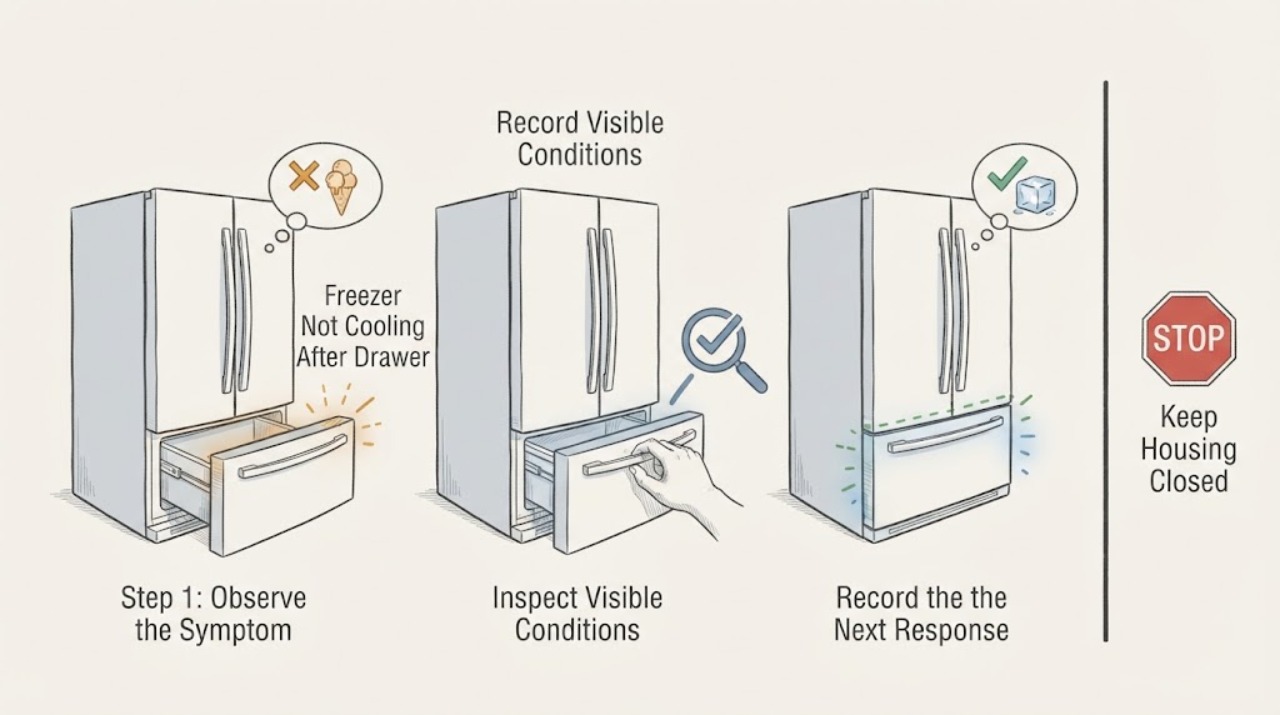
Work through in order
Diagnostic checks
Use only checks that match the exact appliance or system and its official guide.
-
Check 1
Protect the frozen food before troubleshooting. Move vulnerable food to a known-safe freezer or insulated container if it is soft, thawing, or warming, and record when the drawer was realigned, when cooling was restored, and the current freezer temperature. Stop immediately for smoke, burning odor, sparks, a hot cord, water near electrical parts, repeated breaker trips, or abnormal cabinet heat.
Expected result: Food remains hard and cold, food is partially thawed, the display is off or shows a cooling-disabled mode, or there is an electrical or heat hazard.
Next step: Keep the drawer closed and continue only with dry, external checks when there is no hazard. If a hazard is present, leave the appliance off and arrange qualified appliance or electrical help.
Stop if: Do not repeatedly open the freezer to inspect food, reset a hot breaker, or continue operating during smoke, burning odor, sparks, water near electrics, or overheating.
Why this matters
Why: Food condition changes the priority from waiting for recovery to preserving food safety. A display or mode problem can disable cooling without identifying a refrigeration component, while a hazard makes further testing unsafe.
-
Check 2
With the drawer empty enough to see the closure path, check that it travels evenly on both sides and closes fully without being pushed or held. Look for a package, bin, ice, or a displaced rail/auto-close/index-roller component that leaves a gap. Use the RF261BEAESR/AA manual linked from Samsung's model support page for any removal or reseating procedure; do not force the drawer or improvise a part position.
Expected result: The drawer closes flush and stays closed, the drawer springs back open or sits high on one side, the gasket has a visible gap, or a rail/roller/clip is visibly out of position.
Next step: Remove only an obvious storage obstruction and follow the exact model instructions once. If the drawer cannot close flush or a rail/roller/clip is damaged or uncertain, stop and request service.
Stop if: Do not force the drawer, disassemble hinges or rails, bend the frame, or keep running the refrigerator with a persistent seal gap.
Why this matters
Why: A closure gap admits warm moist air and can both slow recovery and create frost. A drawer that remains mechanically misaligned after reattachment is not evidence of a failed compressor or fan; it means the installation/closure path is unresolved.
-
Check 3
Inspect the gasket and accessible airflow space after the drawer is aligned. Wipe a dirty gasket with a damp cloth and dry it, check for a continuous contact line around the closed drawer, and keep packages below the freezer ceiling and away from visible vents. Look for frost concentrated along the drawer edge or covering the rear airflow area.
Expected result: The gasket is clean and continuous, a paper slips out easily at one section, food blocks an opening, or frost is concentrated at the edge or rear wall.
Next step: Correct only the visible package obstruction and use the documented safe defrost method for this model. If the seal is damaged, frost is heavy/recurring, or meltwater approaches electrical areas, stop and arrange service.
Stop if: Do not use a hair dryer, heat gun, knife, sharp tool, or removed-panel procedure to clear frost; do not touch wet electrical parts.
Why this matters
Why: A seal gap or blocked airflow can explain a warm freezer after drawer work without proving an internal part failure. Heavy or recurring frost suggests that warm air is still entering or that professional defrost-system diagnosis may be needed.
-
Check 4
Check the control panel for an explicit Cooling Off, Shop, Demo, or other cooling-disabled indication, then confirm the freezer setting using the exact RF261BEAESR/AA documentation rather than a button combination from another Samsung model. Make one intended setting correction if needed; do not keep lowering the setting to force a result.
Expected result: The panel shows a cooling-disabled mode, the freezer setting is warmer than intended, or the panel shows ordinary cooling with no off indication.
Next step: Exit the displayed mode only with the documented model-specific sequence, then leave the drawer closed. If the mode returns or the display is erratic, arrange service rather than guessing at controls.
Stop if: Do not remove a control panel, alter wiring, enter undocumented diagnostics, or repeatedly cycle controls.
Why this matters
Why: An off/demo mode or an accidental setting can make the freezer seem not to cool while the lights or some fan behavior remain normal. If normal mode and the intended setting are already present, changing the setting again will not explain a mechanical closure gap or recurring frost.
-
Check 5
Place a freezer thermometer between frozen packages, not in a glass of water, and close the drawer. Note the reading after it has been undisturbed for up to eight hours, then reassess at about 24 to 28 hours after the successful realignment with minimal door opening. Compare the result with the model documentation and Samsung's below-0°F frozen-food target.
Expected result: The temperature is trending down, reaches 0°F or colder, remains above 0°F after the full-day window, or cannot be measured because food is already thawing.
Next step: Keep a properly cooling, fully closed drawer closed and monitor normally. If the freezer remains above 0°F, food softens, or frost grows, protect food and request qualified service with the temperature timeline.
Stop if: Do not chase readings by repeatedly opening the drawer, place the thermometer in water, or refreeze food whose safety is uncertain.
Why this matters
Why: A falling reading during the first day supports recovery after a closure correction; it does not identify a particular refrigeration component. A stable reading above 0°F after the drawer closes correctly makes waiting less useful and warrants diagnosis.
-
Check 6
Only when the drawer closes, the setting is normal, airflow is clear, and there is no hazard, perform at most one user-accessible power cycle if the plug or circuit is dry and safely accessible. Restore power and leave the refrigerator closed while it cools; do not use repeated resets as a diagnosis.
Expected result: Cooling resumes and the temperature falls, the freezer stays warm, the drawer fault returns, or the appliance trips protection again.
Next step: If cooling does not return or the fault recurs, leave the appliance off as appropriate, protect the food, and give a qualified technician the model, temperature timeline, closure observations, frost pattern, and mode/settings checked.
Stop if: Do not repeatedly unplug, reset a breaker, open panels, make electrical measurements, or run the refrigerator with damaged or wet electrical parts.
Why this matters
Why: A single safe reset can clear a transient control state, but it cannot prove that the drawer seal, airflow, defrost system, fan, compressor, or sealed system is sound. Repeated failure after a correct realignment and stabilization window is a service decision.
Use your observations
Decision map
Find the observation that best matches what you see, then follow the next safe action.
-
PATH 01Next step
What you see
The drawer remains high on one side, springs open, leaves a visible gasket gap, or a rail/auto-close/index-roller part is visibly displaced after the recent realignment.
Do this next
Follow the exact RF261BEAESR/AA manual once for safe reseating if the component is accessible. If alignment cannot be restored without force or the component is damaged, stop and request service.
Why this path and its safety boundary
Why it matters: The first unresolved decision is mechanical closure, which can admit warm air and produce frost; the observation does not identify a refrigeration part.
-
PATH 02Next step
What you see
The drawer closes flush, the gasket contacts continuously, the setting is normal, vents are clear, and the thermometer trends colder during the first eight hours.
Do this next
Keep the drawer closed and reassess at roughly 24 to 28 hours. Do not order a part while the temperature is still improving and no hazard is present.
Why this path and its safety boundary
Why it matters: The pattern is compatible with recovery after a realignment and reduced door opening. It does not prove that a compressor, fan, or sealed system is healthy.
-
PATH 03Next step
What you see
After 24 to 28 hours of correct closure, normal mode, clear airflow, and minimal door opening, the freezer remains above 0°F or food continues to soften.
Do this next
Protect the food and arrange qualified Samsung appliance service. Provide the exact model, measured temperatures and times, drawer-alignment history, seal/frost observations, and any display indication; do not guess a refrigeration part.
Why this path and its safety boundary
Why it matters: The closed-door recovery branch has failed. The timing alone cannot distinguish airflow, defrost, fan, control, compressor, or sealed-system causes.
-
PATH 04Next step
What you see
The rear wall or drawer edge develops heavy or recurring frost, especially after the drawer appears aligned.
Do this next
Stop improvised defrosting, keep food protected, and follow only the model's documented defrost procedure or request service if frost is heavy, returns, or approaches electrical areas.
Why this path and its safety boundary
Why it matters: Warm-air leakage or restricted airflow remains possible, while recurring frost can also require internal defrost diagnosis. A frost pattern is evidence for the next service check, not a part identification.
-
PATH 05Safety boundary
What you see
There is smoke, burning odor, sparking, a hot/damaged cord, water near electrical parts, repeated breaker operation, or abnormal overheating.
Do this next
Keep clear, stop operating the refrigerator, and use qualified emergency, appliance, or electrical help as appropriate. Keep food protected without touching wet or energized parts.
Why this path and its safety boundary
Why it matters: This is an urgent electrical or fire-safety branch, not a normal cooling-recovery delay.
Safety stop: No restart, panel removal, live measurement, or repeated breaker reset.
Helpful context
Understand the symptom
The RF261BEAESR is a Samsung French Door refrigerator with a bottom pull-out freezer drawer. Because the reported change is a recent drawer realignment, closure and seal position are the first distinct decision: a drawer can appear nearly aligned yet leave a warm-air gap, obstruct airflow, or allow frost to build. Samsung's support guidance treats an incorrectly reattached drawer as something to check against the model instructions before assuming an internal cooling failure.
Do not judge recovery from a short burst of cold air or from the display alone. Use a thermometer between frozen packages with the drawer closed. Samsung notes that an accurate reading may take up to eight hours without opening the doors and says to wait 28 hours before checking again after a temperature adjustment. That gives a practical full-day stabilization window after the drawer is correctly seated, while food that is already thawing must be protected during the wait.
When checks do not resolve it
Need a professional?
Call qualified Samsung appliance service if closure cannot be restored safely, the seal or drawer hardware is damaged, frost recurs, or the freezer remains warm after the model-specific setting and closed-door recovery checks. Use qualified electrical help for outlet, cord, breaker, or supply concerns.
Safety scope: Do not open refrigerator panels, access energized wiring, make electrical measurements, force or bend drawer hardware, use heat to clear frost, or guess at a fan, compressor, defrost, or sealed-system part from the temperature symptom.
Have this ready
- Provide RF261BEAESR/AA if that is the rating-label suffix, the serial/rating-label details, date and nature of the drawer realignment, the drawer closure result, set and measured temperatures with times, mode/display observations, airflow and frost pattern, food condition, and any hazard signs.
Common questions
FAQ
How long should this freezer take to reach temperature after the drawer is realigned?
Do not judge it from a short test. Samsung says a thermometer reading can need up to eight hours with the doors closed and recommends waiting 28 hours before checking again after a temperature adjustment. If the drawer now seals correctly, use a roughly full-day, 24-to-28-hour closed-door window while protecting food; a freezer still above 0°F after that window needs service rather than a guessed part.
Can a misaligned freezer drawer cause a not-cooling symptom?
Yes, if the drawer does not close or the gasket does not seal, warm moist air can enter, cooling can suffer, and frost can form. That is why closure, seal contact, rails, and visible obstructions are checked before concluding that an internal cooling component failed.
Should I keep lowering the freezer setting while I wait?
No. Confirm the model-appropriate setting once and monitor with a thermometer between frozen packages and minimal door opening. Repeated setting changes do not fix a drawer gap, blocked airflow, or recurring frost, and they make the recovery timeline harder to interpret.
When should I stop waiting and call for service?
Call when the drawer cannot close flush, the gasket or drawer hardware is damaged or uncertain, heavy frost returns, or the measured freezer remains above 0°F after correct closure and about 24 to 28 hours of closed-door stabilization. Stop immediately for smoke, burning odor, sparks, water near electrics, overheating, or repeated breaker trips.
Read the exact guide
Official sources
- RF261BEA French Door Refrigerator Product SpecificationsSamsung · Samsung specification PDF naming RF261BEAESR and describing the French Door refrigerator and bottom pull-out freezer configuration.
- RF261BEAESR | Samsung Support CaribbeanSamsung · Exact Samsung support page for RF261BEAESR/AA; used to anchor the model and direct the reader to its Quick Guide, Installation Guide, and User Manual.
- When to put food in your new Samsung refrigeratorSamsung · Official Samsung guidance used only for the pull-out freezer airflow warning and conservative food-loading/recovery context, not as an exact RF261BEAESR startup promise.
- Samsung refrigerator or freezer doors will not closeSamsung · Samsung support troubleshooting page used for the closure consequence and model-guided French Door freezer drawer alignment checks; it is not used to diagnose a specific refrigeration part.
- What temperature should I set my Samsung refrigerator to?Samsung · Samsung's official temperature guidance used for the below-0°F frozen-food target, thermometer placement, eight-hour undisturbed reading, and 28-hour recheck; the exact model manual remains authoritative for model-specific settings.
Community feedback
Share a repair observation
Share a plain-text repair observation. Accepted observations are published automatically; this page may take a moment to update.