
On this page
Start here
Quick answer
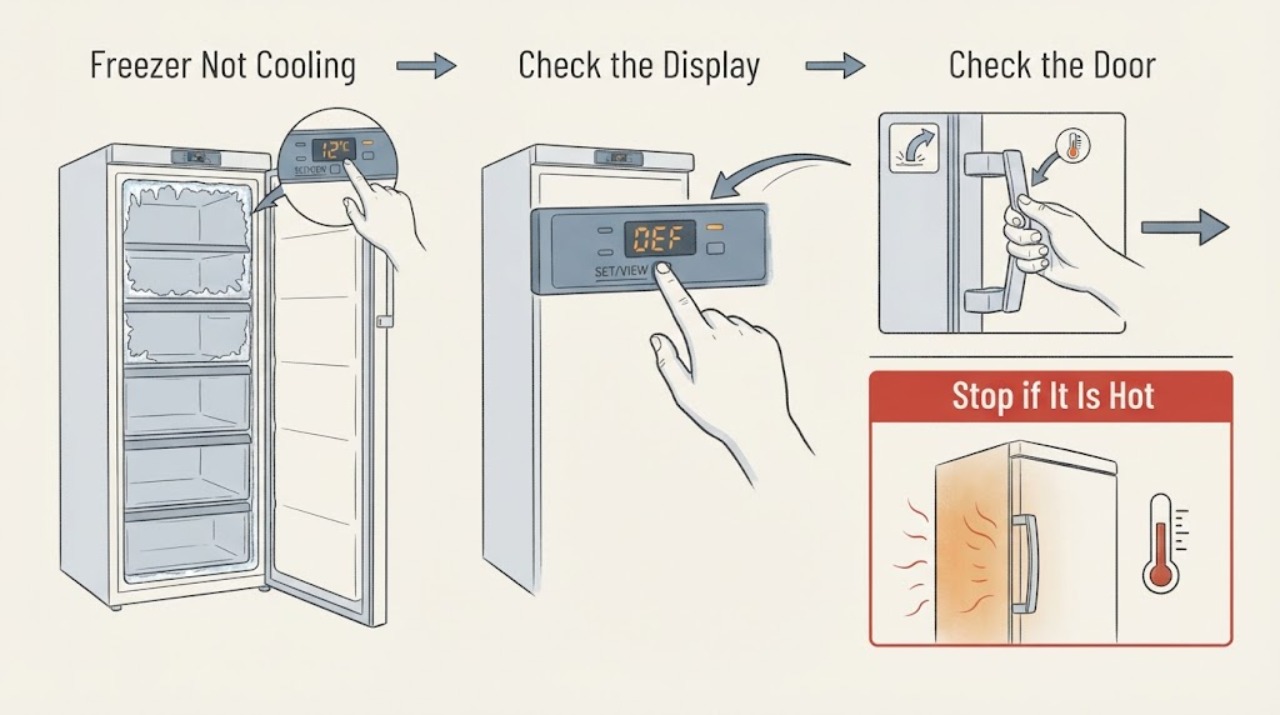
First protect the food and determine whether the freezer is warm but running, or has no cooling at all. Check that the freezer is in its normal mode rather than Cooling Off, confirm the set temperature and actual temperature, make sure the door closes and its gasket seals, and clear food from the interior vents. A thick frost layer can block airflow and point to a door-seal or defrost problem; never use a hair dryer to speed defrosting. One safe, model-appropriate power cycle can clear a transient control state, but a recurring fault, warm food, water near electrics, overheating, smoke, burning odor, or a breaker trip requires service and food-safety action.
Work through in order
Diagnostic checks
Use only checks that match the exact appliance or system and its official guide.
-
Check 1
Keep the freezer closed and inspect the display, interior light, and food condition without touching wiring or wet electrical parts. Note whether the freezer is completely warm, partially cold, making a fan or compressor sound, showing Cooling Off or another mode, or displaying a code.
Expected result: The display or light is absent, the compartment is warm, food is soft or thawing, the display shows an Off/Shop indication, or a fault code is present.
Next step: Keep the door shut, protect the food, and continue with mode and temperature checks only if there is no electrical or heat hazard. Record any code exactly for service.
Stop if: Stop for smoke, burning odor, sparks, water near electrical parts, a hot cord, repeated breaker trip, or abnormal overheating.
Why this matters
Why: A blank display suggests an external power or control issue; an Off/Shop indication can disable cooling while other functions appear normal; a code requires model-specific interpretation. Soft or thawing food is a food-safety concern as well as a cooling symptom.
-
Check 2
Check the control panel for Cooling Off, Shop, Demo, or an Off indication and confirm that the freezer compartment is in its normal cooling mode. Use the exact model manual or Samsung's model-specific support page for the unlock or mode-change sequence; do not guess a combination from another model.
Expected result: The panel explicitly shows Cooling Off/Shop/Demo or a freezer Off state, or it shows an ordinary freezer temperature with no off-mode indication.
Next step: If the display confirms that mode, exit it using the documented model-specific sequence and reassess without repeatedly cycling controls. If no off mode is shown, continue to temperature and airflow checks.
Stop if: Do not remove panels or alter wiring to exit a mode. Stop if the display is erratic or the mode returns immediately.
Why this matters
Why: Samsung states that Cooling Off mode leaves lights and fan behavior available while the compressor does not run, so neither compartment cools. A top-freezer compartment can also have an Off mode that disables cooling.
-
Check 3
Check the freezer setting and actual temperature. If a thermometer is available, place it between frozen packages rather than in a glass of water, keep the door closed while it stabilizes, and compare the result with the model's recommended setting. Avoid frequent door opening while monitoring.
Expected result: The setting is warmer than intended, the freezer is above the preferred 0°F target, or the display and measured compartment temperature disagree substantially.
Next step: Restore the model-appropriate freezer setting once and monitor with the door closed. If the compartment remains warm or food continues to soften, continue to seal, airflow, and frost checks and plan service.
Stop if: Do not keep opening the door to chase a reading, and stop if food is spoiling or a cooling component is overheating.
Why this matters
Why: A setting can be changed accidentally, and a display can represent an average rather than the temperature at every location. Samsung recommends 0°F or below for freezer food and notes that a measurement needs undisturbed time to become meaningful.
-
Check 4
Inspect the freezer door, gasket, drawers, shelves, and the space in front of interior vents. Remove a package or drawer that prevents full closure, clean a dirty gasket with a damp cloth and dry it, and look for a visible gap or frost concentrated around the seal.
Expected result: The door is blocked or misaligned, the gasket is dirty, torn, warped, or loose, a paper slips out without slight resistance, or frost is concentrated near the door edge.
Next step: Remove only the obvious storage obstruction and clean or reseat a loose seal as the model permits. If the gasket is damaged or the door still will not close, request service.
Stop if: Do not force a misaligned door, disassemble hinges, or continue operating with a torn seal if frost and temperature loss are worsening.
Why this matters
Why: A door that does not close or seal allows warm moist air inside, which can reduce cooling and create frost. A damaged seal is not corrected by changing the temperature setting.
-
Check 5
Look for frost covering the rear wall or vents and check that food is not packed against the airflow openings. Remove only light, accessible frost with a damp cloth and dry the area; for heavy frost, follow the model's documented defrost procedure or schedule service. Never use a hair dryer or sharp tool.
Expected result: Vents are blocked by food or ice, the rear wall has a heavy frost layer, or frost returns after the door and storage obstruction are corrected.
Next step: Restore clear airflow and use only the safe defrost method identified for the model. If frost returns, the freezer stays warm, or a fan is rubbing ice, stop and request service.
Stop if: Do not use a hair dryer, knife, heater, or panel removal to clear frost; stop if meltwater reaches electrical areas.
Why this matters
Why: Samsung explains that warm moist air can freeze, and that blocked vents or frost itself can restrict airflow. Recurring heavy frost after a good seal and clear storage can require diagnosis of the defrost or sealing system.
-
Check 6
After the mode, temperature, door, airflow, and frost checks show no hazard, perform at most one safe power cycle: unplug the refrigerator or switch off its circuit only if the connection is user-accessible and dry, wait two minutes, restore power, and then leave the door closed while it begins cooling. Do not use this as a substitute for diagnosis.
Expected result: Cooling returns and the temperature begins to fall, or the freezer stays warm, the same mode/code returns, the compressor never starts, or the appliance trips protection again.
Next step: If cooling does not return or the fault recurs, stop testing and arrange qualified appliance service. Keep the food protected and provide the technician with the temperature, mode/code, frost pattern, sounds, and checks completed.
Stop if: Do not repeatedly unplug, reset a breaker, or run the appliance if it is hot, wet, smoking, sparking, or electrically damaged.
Why this matters
Why: Samsung documents a single power cycle as a troubleshooting step for cooling concerns. If the problem persists after restoration, the cause may be a control, fan, compressor, defrost, sealed-system, or supply fault that cannot be safely identified from outside.
Use your observations
Decision map
Find the observation that best matches what you see, then follow the next safe action.
-
PATH 01Next step
What you see
The panel shows Cooling Off, Shop, Demo, or a freezer Off state.
Do this next
Use the exact model's documented sequence to leave that mode; cooling should not be judged until the mode is cleared.
-
PATH 02Next step
What you see
The freezer is set too warm or the measured compartment temperature is above the preferred target.
Do this next
Restore the model-appropriate setting once, close the door, and monitor without repeated opening; request service if the temperature remains unsafe.
-
PATH 03Next step
What you see
A package, drawer, or damaged/dirty gasket prevents the door from sealing.
Do this next
Remove the obstruction and clean or reseat the seal only as permitted; replace or service a damaged gasket.
-
PATH 04Next step
What you see
Food or heavy frost blocks the rear vents or frost returns after a good seal is restored.
Do this next
Clear only accessible light frost safely and restore air space; heavy or recurring frost requires the model's defrost procedure or technician diagnosis.
-
PATH 05Next step
What you see
Cooling returns after one safe power cycle and the temperature begins falling.
Do this next
Keep the door closed and monitor food and temperature; investigate if the fault returns.
-
PATH 06Next step
What you see
The freezer has smoke, burning odor, visible spark, water near electrics, overheating, a damaged cord, or a repeated breaker trip.
Do this next
Stop immediately, keep clear, and contact qualified electrical or appliance help; protect the food separately.
Helpful context
Understand the symptom
Start with food safety and the display
Keep the freezer door closed while you diagnose it and move vulnerable food to a known-cold freezer if the compartment is warming. Use the actual compartment temperature rather than relying only on the display. Samsung's guidance uses 0°F or below as the preferred freezer temperature; follow local food-safety guidance for food that has warmed or partially thawed.
A freezer can have power without cooling
Lights, a display, and even a fan do not prove that the compressor is cooling. If the screen shows a Cooling Off, Shop, or similar indication, Samsung says the refrigerator can appear to operate while the compressor does not run. The exact key combination to leave that mode varies by model, so use the model manual rather than trying a random button sequence.
Frost is a clue, not a reason to force defrosting
Warm moist air entering through a blocked or damaged seal can create frost, and frost can then cover vents and reduce airflow. Remove only light frost using the manufacturer's safe method. Do not chip at the liner, apply a hair dryer, or remove panels to reach a defrost heater or refrigerant system.
When to stop
Stop immediately for smoke, a burning smell, a hot or damaged cord, sparks, water near electrical components, a repeated breaker trip, or a compressor or fan that is abnormally hot. Cooling-system diagnosis, sealed-system work, and electrical repairs belong to a qualified technician.
Safety boundary
Stop conditions
- Stop for smoke, burning odor, visible sparks, a hot or damaged cord, or a breaker that trips again; do not repeatedly reset protection.
- Stop if water is near electrical components, the cabinet is overheating, or a fan or compressor is abnormally hot; do not touch wet electrics.
- Do not use a hair dryer, heater, knife, or sharp tool to defrost, and do not remove panels to reach the fan, defrost system, compressor, or refrigerant circuit.
- Stop if the door or gasket is damaged, the door cannot close, or heavy frost returns after a safe seal and airflow correction.
- If food is thawing or spoiling, keep the door closed, transfer food to a known-cold freezer when safe, and follow applicable food-safety guidance while arranging service.
Only after diagnosis
Potential parts
- freezer door gasket
Consider only if the gasket is visibly damaged or fails the seal check after cleaning and removing storage obstructions.
Confirm the complete refrigerator model and manufacturer fit information before ordering or installing any gasket. - evaporator fan assembly
Consider only if airflow is absent or a technician confirms the fan is not operating after mode, temperature, door, and frost causes are ruled out.
Fan assemblies vary by model and compartment; require model-specific diagnosis and fit confirmation. - defrost system component
Consider only when heavy frost repeatedly blocks airflow after the door seal and storage conditions are corrected and a technician confirms a defrost fault.
Do not infer a heater, sensor, or control part from frost alone; confirm the model and diagnosis first.
When checks do not resolve it
Need a professional?
Call a qualified appliance technician if the freezer remains warm after the correct mode, temperature, seal, airflow, frost, and one safe power-cycle check, or if heavy frost returns. Provide the model, measured temperature, display mode or code, frost location, and observed sounds. Use a qualified electrician for outlet, cord, fuse, breaker, or supply concerns. Treat smoke, burning odor, sparks, water near electrics, overheating, and repeated breaker trips as urgent stop conditions.
Common questions
FAQ
Why is my Samsung freezer running but not getting cold?
Check Cooling Off mode, the temperature setting, door seal, blocked vents, and heavy frost. Lights or a fan do not prove that the compressor is cooling; if the freezer remains warm after one safe power cycle, request service.
What is Cooling Off mode on a Samsung freezer?
It is a display or Shop mode in which the appliance can have lights or fan activity while the compressor does not cool the compartments. The exit sequence varies by model, so use the exact Samsung support page or owner's manual.
How can I safely clear frost from a Samsung freezer?
Clear only light, accessible frost with the manufacturer's safe method and dry the area. Do not use a hair dryer, heater, knife, or sharp tool. Heavy or returning frost should be handled using the model's documented defrost procedure or by a technician.
What temperature should a Samsung freezer reach?
Samsung's guidance prefers 0°F or below for freezer food. Measure between frozen packages, keep the door closed while the reading stabilizes, and use the model manual if its recommendations differ.
Read the exact guide
Official sources
- Frost forms in the Samsung freezer, refrigerator, or ice bucketSamsung Support · Samsung freezer frost, door sealing, vent clearance, and safe defrost guidance
- Cooling issues with Samsung refrigerator or freezerSamsung Support · Samsung refrigerator and freezer cooling troubleshooting
- Support Home | Official Samsung Support USSamsung Support · Samsung model-specific support and manual lookup
- Main panel and Cooling Off modeSamsung Support · Samsung refrigerator Cooling Off mode behavior and model-specific controls
- Samsung refrigerator or freezer doors will not closeSamsung Support · Samsung refrigerator and freezer door obstruction, gasket, and alignment checks
- What temperature should I set my Samsung refrigerator to?Samsung Support · Samsung refrigerator and freezer temperature measurement and recommended settings
Community feedback
Share a repair observation
Share a plain-text repair observation. Accepted observations are published automatically; this page may take a moment to update.