
On this page
Start here
Quick answer
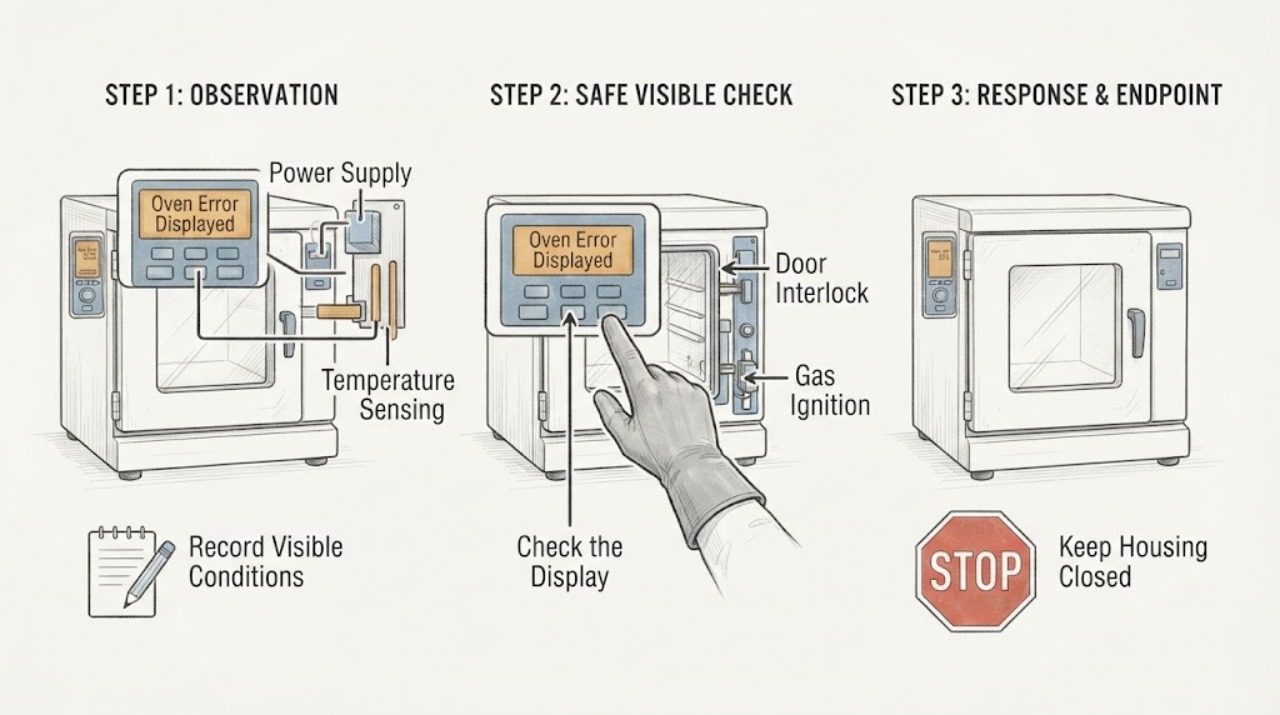
When a Samsung oven displays an error, record the exact characters, model number, fuel type, and what the oven was doing before you try anything. Samsung's error guide covers only selected codes and gives model-specific instructions: a door code points to door closure and the door switch, -dE- or -dC- points to the partition, tESt or tE5t indicates Demo mode, bAd LinE concerns the power connection, C-10 can be a SmartThings diagnostic result, and C-24 indicates an unusually fast temperature rise that may involve a blocked vent. Do not treat one code as a universal diagnosis. If there is smoke, a gas odor, an abnormal flame, arcing, water near electrical parts, a burning smell, or a tripped breaker, stop using the oven and arrange professional help. Otherwise, follow the exact model manual and perform no more than one safe power reset; if the code returns, request service.
Before you begin
Safety first
- This article supports identification and ordinary-access observation only. Gas work, internal electrical or heating diagnosis, interlock work, panel removal, hard-wired connection work, and component replacement belong to qualified service.
Work through in order
Diagnostic checks
Use only checks that match the exact appliance or system and its official guide.
-
Check 1
Stop the oven from a safe position and screen for immediate danger before pressing buttons or resetting power.
Expected result: Look and listen only from ordinary safe access for smoke, a gas odor, an abnormal or uncontrolled flame, arcing, a burning smell, water near electrical parts, unusually severe heat, a hot or discolored outlet, or a breaker that has tripped.
Next step: Keep the oven off and arrange qualified appliance or electrical/gas service when a hazard is present. If none is present, continue by recording the exact code and model before touching settings.
Stop if: Do not relight, repeatedly start, open an energized control area, test a gas connection, or reset a breaker while smoke, gas odor, arcing, water contact, or a burning smell remains.
Why this matters
Why: Any of those signs changes the task from code interpretation to a safety response; the error display is not a reason to continue testing. The absence of those signs permits only low-risk identification and visible checks.
-
Check 2
Photograph the display and record every character exactly as shown, then record the oven model, fuel type, selected mode, and the stage when the message appeared.
Expected result: Classify the message as a letter/number code, dashes, a word such as door, or a setup message; note whether it appeared during cooking, cooling, Self Clean, Twin Cooking, or a SmartThings diagnosis.
Next step: Open the manual for the exact model and compare the complete display, not just a similar-looking character. Keep the photograph and stage information for service if the message is absent from that manual.
Stop if: Stop if the display is accompanied by smoke, gas odor, abnormal flame, arcing, water contact, or uncontrolled heating; do not keep reproducing the message to obtain a clearer photograph.
Why this matters
Why: A complete identity record prevents a code from one Samsung platform being applied to another. C-10, for example, has a different meaning when it appears during SmartThings self-diagnosis than when it appears spontaneously during cooking.
-
Check 3
Compare the exact display with Samsung's range and wall-oven error guide and the exact model manual, keeping each code in its own branch.
Expected result: Determine whether it is door, -dE- or -dC-, tESt or tE5t, bAd LinE, C-10, C-24, C-F0, or an unlisted/recurring message; record whether the guide says the code is a setup state, a temperature condition, a power issue, or service-related.
Next step: Follow only the matching model instruction in the next applicable action; for an unlisted or recurring code, retain the record and prepare a service request instead of trying unrelated resets.
Stop if: Do not infer a failed sensor, board, igniter, or lock from the code name alone and do not use a procedure written for another Samsung model or fuel configuration.
Why this matters
Why: A listed code may have a narrow model-dependent check. An unlisted or recurring code has not been identified safely by this comparison, so changing parts or borrowing a procedure from another model would be guesswork.
-
Check 4
For a door message or a -dE-/-dC- message, let the oven cool if it was hot, then inspect only the visible door closure and the model-specified partition position without forcing anything.
Expected result: For door, note whether the door closes fully and whether the visible plunger or switch moves freely when the door is open. For -dE-/-dC-, note whether the divider is present, pushed fully into the model-specified positions, or absent while something may be pressing its rear switch.
Next step: Correct only an obvious, manual-approved closure or partition-position issue and recheck once. If the door will not close, the switch is stiff, the code persists, or the divider arrangement is uncertain, stop and request service with the photograph and model.
Stop if: Do not pry or lift the door, defeat the interlock, force the divider, remove panels, or continue operating with a damaged hinge, glass, seal, latch, or switch.
Why this matters
Why: A door message can reflect incomplete closure or a switch that does not move; Samsung says a persistent door message with the door closed requires service. The divider messages concern Twin Cooking setup and do not establish a failed board or sensor.
-
Check 5
For tESt/tE5t or an unresponsive panel, compare the screen and selected function with the exact manual, then make the panel clean and dry from ordinary access.
Expected result: Check whether the display explicitly indicates Demo mode, Control Lock, a hot-panel state, Self Clean, Twin Cooking, or a temperature-probe function, and whether other buttons respond after the surface is dry.
Next step: Use only the exact model's documented control sequence to leave Demo mode or unlock the panel. If the state is not identified or the panel remains unresponsive, stop and prepare a service request.
Stop if: Do not spray liquid into the controls, use sharp objects, bypass Control Lock, or remove the console to reach a switch or board.
Why this matters
Why: Demo mode prevents heating, while some controls are intentionally unavailable during Self Clean, Twin Cooking, or probe use. A panel that remains locked or unresponsive after the model-appropriate state is cleared may need service rather than repeated button presses.
-
Check 6
For bAd LinE, a blank display, or a power-related error, observe the external plug, outlet, and household breaker only if they are accessible without moving the range or touching wiring.
Expected result: Record whether the display is blank, the breaker is open, the outlet or plug is hot or discolored, or the cord and connection appear loose or damaged; do not open a junction box or measure the circuit.
Next step: Use the model installation manual and a qualified installer or electrician for any connection or supply question. If there is no hazard and the model manual permits it, continue to the single-reset action only once.
Stop if: Do not move a hard-wired range, remove covers, touch terminals, use an extension lead, or repeatedly reset a breaker.
Why this matters
Why: Samsung associates bAd LinE with an improperly connected power connection, but the correct connection and supply depend on the exact installation. Heat, damage, repeated tripping, or an inaccessible connection makes this an electrical service boundary.
-
Check 7
For C-24 or a gas-oven error associated with heating, observe the visible vent area, display temperature behavior, and fuel-specific symptoms without opening the appliance or repeating ignition tests.
Expected result: For C-24, record whether a pan or other object visibly blocks the rear cooktop vent and whether the oven was rising unusually fast. For gas models, record whether there was gas odor, delayed ignition, an abnormal flame, or no normal heat, but do not test a valve, pressure, igniter, or burner wiring.
Next step: Remove only an obvious external vent obstruction if the model instructions allow it and let the oven cool. For persistent C-24, any gas symptom, or any internal heating/ignition suspicion, keep the oven off and request qualified service.
Stop if: Do not adjust gas pressure, remove gas parts, continue ignition attempts, bypass a door or flame safeguard, or work on energized heating or ignition wiring.
Why this matters
Why: Samsung describes C-24 as a temperature sensor detecting a faster-than-normal rise and generally points to a blocked vent. Gas heating and ignition faults remain model- and installation-dependent; gas odor or abnormal ignition is a hazard, not a troubleshooting branch.
-
Check 8
Only when the oven is cool, dry, stable, and free of the hazards above, perform the one reset allowed by the exact model instructions, then observe the display without starting a cooking or ignition test.
Expected result: Turn the range off and back on using its controls; if the model guide permits a breaker reset and the breaker is safely accessible, restore it after the documented wait. Record whether the code clears, returns immediately, or returns during the next normal use.
Next step: Stop testing and request service when the code returns, the oven will not heat or control normally, or the model-specific instruction is unavailable. Give the technician the code photograph, model, fuel type, stage, setup state, and reset result.
Stop if: Do not repeat the reset cycle, repeatedly run Self Clean or ignition, or continue operation when the display returns with smoke, gas odor, abnormal heat, arcing, water, or a tripped breaker.
Why this matters
Why: A cleared message does not prove that an internal fault is repaired. A message that returns after the single reset is evidence for service, especially for an unlisted code, C-F0, a door code, or a gas/heating symptom.
Use your observations
Decision map
Find the observation that best matches what you see, then follow the next safe action.
-
PATH 01Safety boundary
What you see
Smoke, gas odor, abnormal flame, arcing, burning smell, water near electrical parts, severe uncontrolled heat, or a tripped breaker is present.
Do this next
Keep the oven off, leave the area if gas or smoke is present, and seek qualified emergency, gas, electrical, or appliance help from a safe position.
Why this path and its safety boundary
Why it matters: The appliance is not safe to keep testing, and the display code cannot be used to authorize a reset.
Safety stop: Do not operate switches or flames in a gas-smell situation, continue ignition attempts, or touch wet electrical equipment.
-
PATH 02Safety boundary
What you see
The exact display is door, the door does not close fully, or the visible door switch does not move freely.
Do this next
Allow cooling, check ordinary closure without force, and request service if the code persists, the switch is stiff, or the door, hinge, glass, or seal is damaged.
Why this path and its safety boundary
Why it matters: Closure or the door-interlock sensing path is implicated, but the code does not identify which internal part has failed.
Safety stop: Do not pry, defeat the interlock, or run the oven with a door that cannot close normally.
-
PATH 03Safety boundary
What you see
The message is -dE-/-dC-, tESt/tE5t, Control Lock, or a function is unavailable during Self Clean, Twin Cooking, or probe use.
Do this next
Use only the exact model manual to restore the divider, leave Demo mode, unlock controls, or end an incompatible function; request service if the state cannot be identified or persists.
Why this path and its safety boundary
Why it matters: The display may be reporting a model setup or control state rather than a failed component.
Safety stop: Do not force a divider, bypass a lock, or remove the control panel.
-
PATH 04Safety boundary
What you see
The display is blank, the message is bAd LinE, or the breaker has opened.
Do this next
Observe only accessible external signs and use a qualified installer or electrician for connection, supply, or repeated-trip diagnosis; do not move a hard-wired range.
Why this path and its safety boundary
Why it matters: Power connection or supply is a possible branch, but the correct connection is installation- and model-specific.
Safety stop: Stop for heat, discoloration, damage, water, exposed wiring, or a breaker that trips again.
-
PATH 05Safety boundary
What you see
C-24 appears and a visible rear vent obstruction is present, or the oven temperature is rising unusually fast.
Do this next
Clear only the visible obstruction if the model instructions allow it, let the oven cool, and request service if C-24 returns or heating remains abnormal.
Why this path and its safety boundary
Why it matters: Samsung associates this code with a temperature sensor detecting a fast rise and generally identifies a blocked vent as a possible cause.
Safety stop: Do not open the appliance or continue operation with smoke, abnormal heat, burning smell, or a damaged vent.
-
PATH 06Safety boundary
What you see
A gas model has gas odor, delayed ignition, an abnormal flame, no normal heat, or an error during ignition.
Do this next
Keep the appliance off, avoid ignition tests, leave the area for a gas odor, and request qualified gas/appliance service from a safe location.
Why this path and its safety boundary
Why it matters: This is a gas-safety and qualified-service boundary; the generic error page cannot establish a safe user repair.
Safety stop: Do not adjust pressure, disassemble gas parts, or repeatedly attempt ignition.
-
PATH 07Safety boundary
What you see
The code is unlisted, misread, returns after one safe reset, or appears outside the stage described by the model manual.
Do this next
Stop troubleshooting and request service with the exact code, photograph, model, fuel type, stage, and reset result.
Why this path and its safety boundary
Why it matters: The available evidence does not safely identify the failed component or a compatible user action.
Safety stop: Do not borrow another model's code table, order a part from the code alone, or keep cycling power.
Helpful context
Understand the symptom
Treat the displayed characters as evidence, not a diagnosis
A Samsung display can show letters, numbers, dashes, or a message that is easy to misread. Photograph the screen and write down the model number, whether the appliance is gas, electric, or dual fuel, and the stage at which the message appeared: preheat, baking, broiling, self-clean, cooling, or a SmartThings test. Samsung's public guide lists only codes for which it has a specific resolution, so the same-looking display should not be interpreted from a different model's manual.
Use the code's own branch and keep setup states separate
Some messages describe a setup state rather than a failed component. A door message can remain until the door is fully closed or a door switch is working. -dE- or -dC- can involve the divider used by a Twin Cooking model. tESt or tE5t is Demo mode, in which the oven will not heat. A locked or unresponsive panel can instead reflect a hot oven, Control Lock, Self Clean, Twin Cooking, or a temperature probe state. Use the exact manual for the installed model before changing a setting.
Keep gas and electrical boundaries explicit
A gas Samsung oven still uses electrical controls and ignition, but an error message is not permission to test a gas valve, pressure, igniter wiring, or an exposed circuit. If a gas odor, abnormal flame, delayed ignition, smoke, arcing, or a burning smell appears, stop, leave the appliance off, and seek qualified service from a safe position. If there is no hazard, limit yourself to visible external observations, the model instructions, and one safe reset.
When the code returns, preserve the useful record
A recurring message is more useful to a technician when the exact code, model, fuel type, program, temperature setting, door state, recent cleaning or installation work, and result of the single reset are preserved. Samsung's support pages provide model lookup, manuals, troubleshooting, and a service path; they do not make a generic error page a substitute for the appliance's manual or a diagnosis of an internal control, sensor, lock, wiring, or ignition fault.
Safety boundary
Stop conditions
- Stop immediately for smoke, gas odor, abnormal or uncontrolled flame, arcing, burning smell, water near electrical parts, severe uncontrolled heat, or a tripped breaker.
- Do not bypass a door or flame interlock, adjust gas pressure, open gas or electrical compartments, test energized wiring, or continue ignition attempts.
- Do not force the door, divider, control panel, latch, hinge, glass, seal, or any self-clean mechanism.
- Do not repeatedly reset power or run cooking, Self Clean, or ignition cycles to reproduce an error.
- Stop and request qualified service when the exact model instruction is unavailable, a code returns after one safe reset, or the door, vent, display, heating, or power connection remains abnormal.
When checks do not resolve it
Need a professional?
Request qualified Samsung appliance service when the code is unlisted or recurring, the door message persists with a closed door, the panel remains locked or unresponsive, C-24 returns, C-F0 cannot be resolved by the exact model's documented update path, bAd LinE or a blank display persists, or any gas, heating, electrical, smoke, water, or structural hazard is present.
Safety scope: This article supports identification and ordinary-access observation only. Gas work, internal electrical or heating diagnosis, interlock work, panel removal, hard-wired connection work, and component replacement belong to qualified service.
Common questions
FAQ
What should I do first when my Samsung oven displays an error?
Before resetting, photograph the exact display and record the full model, fuel type, cooking stage, and any Self Clean, Twin Cooking, probe, or SmartThings state. Screen for smoke, gas odor, abnormal flame, arcing, burning smell, water near electrical parts, severe heat, or a tripped breaker; if any is present, keep the oven off and seek qualified help.
Can I reset a Samsung oven error code?
Samsung says many range codes can be cleared by a reset, but the exact model instructions control. When the oven is cool, dry, and free of hazards, perform no more than one documented control or power reset. If the code returns, stop cycling power and request service.
What does the Samsung oven door error mean?
Samsung describes the door message as a door that is not closed. Let a hot oven cool, check ordinary closure and the visible plunger without force, and request service if the door closes but the message persists or the switch is stiff. Never defeat the door interlock.
Why does my Samsung oven show tESt or tE5t?
Samsung identifies tESt or tE5t as Demo mode, in which the oven does not heat. Use the exact model manual for the documented way to leave Demo mode; do not assume the display proves a failed heating part.
When is a Samsung oven error a service issue?
Request qualified service for an unlisted or recurring code, a persistent door or panel problem, C-24 that returns, power or installation concerns, or any gas odor, abnormal flame, smoke, burning smell, arcing, water near electrical parts, severe heat, or repeated breaker trip.
Read the exact guide
Official sources
- Samsung oven door is lockedSamsung · Samsung US range and oven door-lock troubleshooting; steps and button names can vary by model.
- Samsung range or wall oven error codesSamsung · Samsung's US troubleshooting guide for selected range and wall-oven information codes; exact model manual controls when a code or feature differs.
- Install your Samsung gas or electric rangeSamsung · Samsung US installation guidance; the installed model's installation manual and local qualified professionals control the actual connection.
- Self Clean or other buttons do not light up or respond, or panel is locked on Samsung ovenSamsung · Samsung US range and wall-oven control-panel guidance; exact functions and button sequences vary by model.
- Samsung oven temperature issuesSamsung · Samsung US oven temperature troubleshooting; fuel type and repair steps depend on the exact model.
- Ranges | Samsung Support USSamsung · Samsung US range support index used to locate the exact model documentation and support path.
- Samsung Range FAQs | Samsung USSamsung · Samsung US range FAQ; model-specific manuals and support pages remain authoritative for individual controls and installations.
Community feedback
Share a repair observation
Share a plain-text repair observation. Accepted observations are published automatically; this page may take a moment to update.