
On this page
Start here
Quick answer
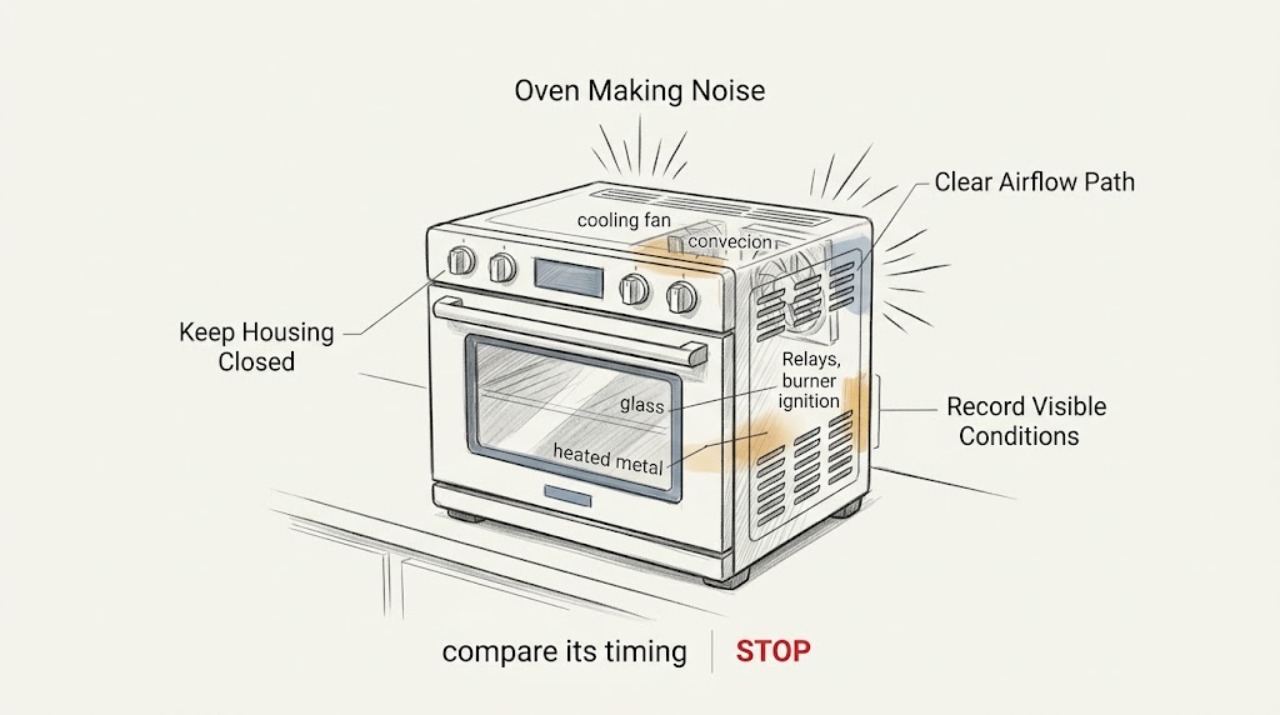
First identify when the sound occurs, whether the oven is electric, gas, induction, or dual-fuel, and whether the sound is a quiet repeating hum or a new loud mechanical or gas-related noise. Samsung describes relay clicks, normal fan airflow, some metal expansion, and gas ignition sounds as possible operating noises, but squealing, grinding, persistent abnormal clicking, loud popping, smoke, a burning smell, arcing, an abnormal flame, or a gas odor is not a reason to keep testing. Stop safely and use the exact model guide or professional service.
Before you begin
Safety first
- Do not open panels, touch hot components, bypass an interlock, test energized wiring, look for a gas leak, or repeatedly ignite a noisy burner. Gas odor, smoke, arcing, uncontrolled heat, or immediate danger requires safe evacuation and appropriate emergency help first.
Work through in order
Diagnostic checks
Use only checks that match the exact appliance or system and its official guide.
-
Check 1
From a safe distance, write down the oven model, fuel type, selected mode, and exactly when the noise begins and ends; describe it as clicking, humming, airflow, ticking, squealing, grinding, banging, hissing, or popping without touching hot parts.
Expected result: The noise is quiet and tied to a mode or temperature change, or it is new, harsh, loud, continuous, or unrelated to a normal cycle event.
Next step: Follow the matching branch below. If the sound is hazardous or cannot be safely characterized, stop operating the oven and request service rather than reproducing it.
Why this matters
Why: Timing separates likely relay, fan, ignition, and heat-expansion sounds from a possible mechanical, electrical, or fuel-system fault. Model and fuel type determine which explanation is applicable.
-
Check 2
If the sound is a quiet hum, airflow, or whir that starts during cooking or continues briefly after switching the oven off, identify whether the model has a cooling fan or convection fan and confirm that the sound follows the cooking or cooling period.
Expected result: The sound is low and regular, airflow changes with the selected convection setting, or the fan is scraping, squealing, grinding, or louder than before.
Next step: Leave a normal quiet cooling sound alone. If the fan sound is harsh, escalating, or persists outside the model's expected cooling behavior, stop using the oven and arrange model-specific service; do not reach into the fan area.
Why this matters
Why: Samsung describes cooling and convection fan operation as normal sources of airflow or low humming, including some continued cooling after use. Scraping, squealing, grinding, or a significantly louder sound is not the same pattern.
-
Check 3
If the noise is a click or occasional tick during heating, compare its timing with a heating mode starting or cycling and inspect only the visible, cool oven interior for a loose rack, tray, divider, or item touching the wall.
Expected result: The click follows relay or heating cycles and the racks are seated, or the sound is a loud repeated crack, impact, or metallic scrape that does not track a normal cycle.
Next step: After the oven is fully cool, reseat only a visibly loose rack or tray as the model manual permits, then observe one normal cycle. Stop if the sound is loud, worsening, accompanied by smoke or odor, or remains after removable items are secure.
Why this matters
Why: Samsung attributes some oven clicks to circuit relays and some ticking or banging to metal expanding and contracting. A loose removable item can also rattle, while a loud or persistent mechanical sound needs a different assessment.
-
Check 4
On a gas or dual-fuel model, observe ignition only during a normal start from the manufacturer's instructions and from a safe distance; note whether clicking stops promptly after the burner lights and whether the flame appearance is normal for that exact model.
Expected result: A brief click accompanies ignition and stops, or clicking continues, ignition is delayed, there is a whoosh or bang, the flame is abnormal, or a gas-like odor is present.
Next step: For brief normal ignition, use the model guide. For persistent clicking, delayed ignition, an abnormal flame, a whoosh or bang, or any gas odor, stop the appliance, avoid switches or ignition tests, leave the area if needed, and seek qualified gas or appliance help from a safe location.
Why this matters
Why: Samsung identifies igniter clicking during gas ignition as an expected sound, but persistent clicking or delayed or abnormal ignition can indicate a condition that should not be investigated by repeated starts. A gas odor takes priority over noise diagnosis.
-
Check 5
With the oven fully cool and not running, inspect only visible shelves, trays, the door edge, and the surrounding vent area for an object, foil, packaging, or spill residue that could vibrate or contact a surface; do not remove covers or fan guards.
Expected result: A removable item is visibly loose or obstructing a vent, or all visible parts are secure while the noise remains.
Next step: Remove or reseat only the cool, removable item according to the manual and make one controlled observation. If the sound remains or the vent is damaged or blocked, stop and request service.
Why this matters
Why: A loose rack or obstruction can create a rattle, but a persistent sound with no visible cause points toward a fan, relay, motor, burner, element, or control issue that requires model-specific evaluation.
-
Check 6
If the sound is accompanied by a panel problem or an unexpected restart, check the display and the accessible electrical supply only from a dry, safe location; do not open the appliance or perform an energized meter test.
Expected result: The display is blank or blinking, the breaker has tripped, the outlet or connection is hot or damaged, or power and controls appear normal while the noise continues.
Next step: Stop for any hot connection, arcing, smoke, visible damage, or repeated trip and obtain qualified electrical or appliance help. If the supply is normal but the noise persists, use the model support guide and request service.
Why this matters
Why: A control or power disturbance can accompany relay noise, but a hot connection, repeated trip, arcing, or visible damage is an electrical safety event rather than a routine sound.
-
Check 7
After the oven is cool and only when no hazard is present, use the exact model guide for a single permitted power cycle if the issue is a minor panel or control glitch; record the noise before and after and do not use a reset to override a safety symptom.
Expected result: The sound does not return during a normal, closely observed cycle, or it returns immediately, becomes louder, or is joined by smoke, odor, flame trouble, overheating, or a trip.
Next step: If the noise returns or any hazard appears, leave the oven off and arrange model-specific service. Do not keep cycling power or operating the oven to collect more evidence.
Why this matters
Why: Samsung describes a short power cycle as a way to clear some control-panel issues, not as proof that a noisy fan, relay, burner, or mechanical part is healthy.
Use your observations
Decision map
Find the observation that best matches what you see, then follow the next safe action.
-
PATH 01Next step
What you see
The sound is a quiet, regular fan hum or airflow during cooking or brief cooling afterward.
Do this next
Arrange qualified service and follow the exact model guidance.
Why this path and its safety boundary
Why it matters: This can be normal cooling or convection operation. Check the model guide only if the duration, volume, or pattern differs from normal use.
-
PATH 02Next step
What you see
A brief click tracks heating or ignition and stops as expected.
Do this next
Arrange qualified service and follow the exact model guidance.
Why this path and its safety boundary
Why it matters: Relay switching or gas igniter operation may explain it. Keep the model and fuel type in mind and do not replace a component based on sound alone.
-
PATH 03Next step
What you see
The oven makes squealing, grinding, scraping, or a new harsh fan noise.
Do this next
Arrange qualified service and follow the exact model guidance.
Why this path and its safety boundary
Why it matters: Stop using the oven and request service. Do not reach through the cavity or remove fan covers to locate the sound.
-
PATH 04Next step
What you see
The noise is a loud or persistent bang, crack, pop, or impact rather than an occasional heat-related tick.
Do this next
Arrange qualified service and follow the exact model guidance.
Why this path and its safety boundary
Why it matters: Stop the cycle if safe, keep clear while hot, and arrange service if the sound is not clearly explained by a cool removable rack or the model guide.
-
PATH 05Next step
What you see
A gas model has continuing clicks, delayed ignition, a whoosh or bang, abnormal flame, or gas odor.
Do this next
Arrange qualified service and follow the exact model guidance.
Why this path and its safety boundary
Why it matters: Stop ignition attempts immediately. Avoid switches and flames, leave the area for a safe location, and obtain qualified gas or appliance assistance.
-
PATH 06Next step
What you see
The noise occurs with smoke, a burning or electrical smell, arcing, a hot connection, uncontrolled heat, or repeated circuit trips.
Do this next
Arrange qualified service and follow the exact model guidance.
Why this path and its safety boundary
Why it matters: Stop immediately and isolate the appliance only by a safe normal method from a dry location. Do not resume testing until qualified help has assessed it.
-
PATH 07Next step
What you see
A visible cool rack, tray, divider, foil, or other removable item is loose and the sound stops after it is safely reseated.
Do this next
Arrange qualified service and follow the exact model guidance.
Why this path and its safety boundary
Why it matters: Use the oven only within the model instructions and monitor one normal cycle. If the sound returns, stop and request service.
-
PATH 08Next step
What you see
The noise remains after visible items are secure or returns after one permitted power cycle.
Do this next
Arrange qualified service and follow the exact model guidance.
Why this path and its safety boundary
Why it matters: Treat it as unresolved. Give service the model, fuel type, mode, timing, sound description, and any display or safety observations.
Helpful context
Understand the symptom
Normal sounds have a pattern
A Samsung oven can click as relays switch, move air with a cooling or convection fan, and make occasional ticks or pops as heated metal expands and contracts. A gas model may click while its igniter lights a burner, and a gas system may make a model-dependent hiss while gas is flowing. The useful distinction is timing and character: a quiet sound tied to a mode or temperature change is different from a new grinding, squealing, harsh buzzing, repeated explosive pop, or sound that continues after controls are off.
Keep the checks outside the appliance
Do not remove panels, reach around a hot burner or element, defeat a door or control safety feature, or perform energized electrical checks. Keep the exact model guide available because Samsung oven layouts and fuel systems differ. If a sound is accompanied by smoke, flame trouble, a gas odor, exposed wiring, or a hot electrical connection, stop before trying to identify its source by touch or repeated operation.
Use timing to narrow the path
Note whether the noise starts at preheat, when a heating mode cycles, when convection begins, while the oven cools, during gas ignition, or only when a rack or tray moves. A short recording made from a safe distance can help service, but do not deliberately reproduce a hazardous sound.
Safety boundary
Stop conditions
- Stop immediately for gas odor, delayed ignition, a whoosh or bang at ignition, abnormal flame, smoke, burning odor, arcing, or uncontrolled heat.
- Stop for a hot or damaged plug, outlet, connection, repeated circuit trips, visible wiring, or any wet electrical area.
- Stop for grinding, squealing, scraping, violent banging, or a rapidly worsening noise; do not remove panels or fan guards.
- Do not keep reproducing a hazardous noise, bypass a door or control safety feature, or use a reset to hide a persistent fault.
Only after diagnosis
Potential parts
- convection or cooling fan assembly
Consider only when the exact model guide and a qualified inspection connect the noise to a fan bearing, blade, motor, or fan-control fault.
Confirm the complete oven model and manufacturer fit information before selecting a part. - gas igniter or burner ignition component
Consider only for a confirmed gas-model ignition fault after safe observation; a click or gas odor alone does not identify a part.
Fuel type, model, burner design, and approved service procedure must be confirmed before any replacement. - relay, control, or heating component
Consider only after qualified diagnosis links persistent abnormal clicking or heating noise to a specific control or heating circuit.
Do not choose an electrical component from sound alone; confirm model-specific documentation and fit.
When checks do not resolve it
Need a professional?
Use qualified service for persistent or worsening noise, suspected fan, relay, motor, burner, ignition, element, wiring, or control faults, or whenever the exact model guidance does not explain the sound.
Safety scope: Do not open panels, touch hot components, bypass an interlock, test energized wiring, look for a gas leak, or repeatedly ignite a noisy burner. Gas odor, smoke, arcing, uncontrolled heat, or immediate danger requires safe evacuation and appropriate emergency help first.
Common questions
FAQ
Is clicking from a Samsung oven normal?
It can be. Samsung describes relay clicks during oven use and igniter clicks while a gas burner lights. The click should match the mode or ignition event; persistent, loud, or worsening clicking needs the exact model guide or service.
Why does my Samsung oven fan keep running after cooking?
The cooling fan may continue until internal components cool, and the convection fan can run at intervals. A quiet expected cooling sound differs from scraping, squealing, grinding, or a noise that is much louder than before.
What Samsung oven noises mean I should stop immediately?
Stop for gas odor, delayed ignition, an abnormal flame, a loud ignition bang, smoke, burning odor, arcing, uncontrolled heat, a hot electrical connection, or repeated circuit trips. Do not reproduce the sound to diagnose it.
Can I fix a noisy Samsung oven by replacing the fan or igniter?
Not from sound alone. A fan or ignition part is conditional on the exact model, fuel type, timing, and a safe diagnosis. Persistent or hazardous noise should be assessed by qualified service.
Read the exact guide
Official sources
- Samsung Wall Oven FAQsSamsung · Samsung wall-oven unusual-noise distinctions, maintenance, and service guidance
- Samsung oven fan is making a noise or will not turn offSamsung · Samsung oven cooling-fan and convection-fan operation and normal sound pattern
- Samsung cooktop and range: common sounds and operational noisesSamsung · Samsung range and oven operating sounds, including relays, fans, gas ignition, and heat expansion
- Samsung range or wall oven panel is blank, blinking, or incorrectSamsung · Samsung range or wall-oven power, display, circuit reset, and service guidance
- Samsung Range FAQsSamsung · Samsung range normal-noise examples, fuel-type differences, and power-cycle guidance
Community feedback
Share a repair observation
Share a plain-text repair observation. Accepted observations are published automatically; this page may take a moment to update.