
On this page
Start here
Quick answer
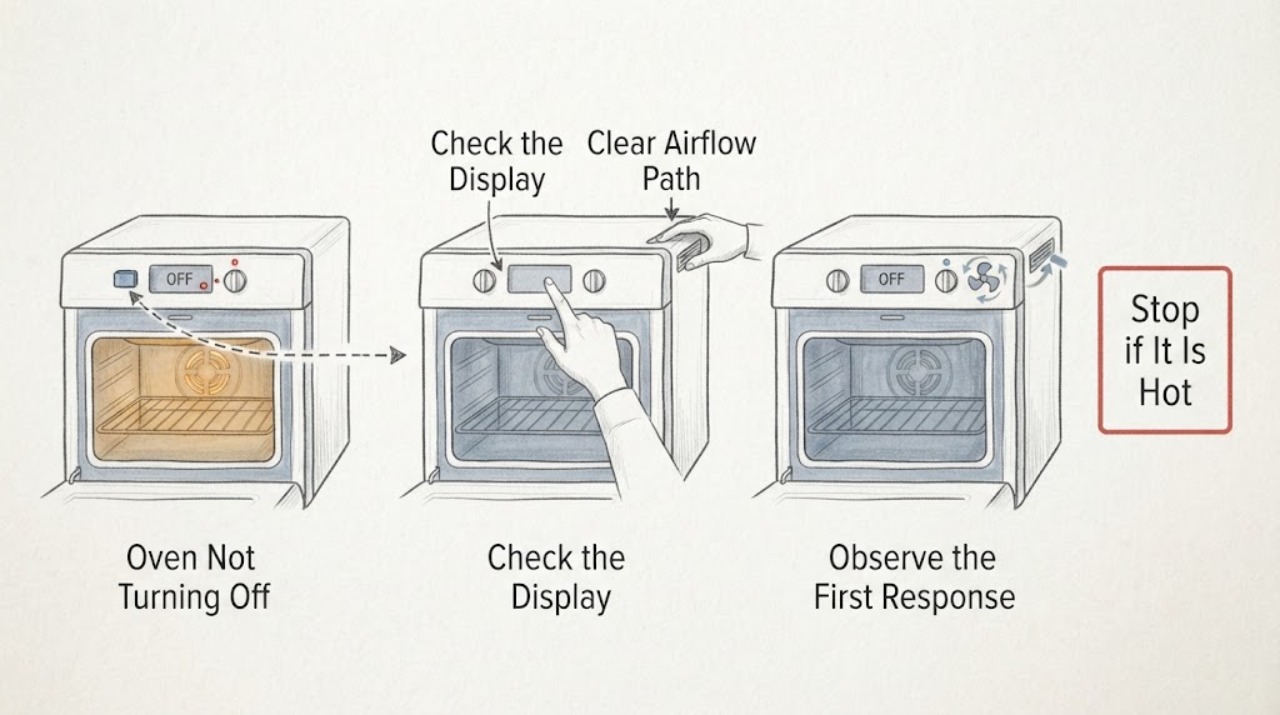
First separate a fan or lit display from continued heating. Samsung ovens can keep a cooling fan running after cooking while the electronics cool, and a convection fan can cycle during operation. If a heating element remains visibly energized, a gas flame remains after the controls are set to Off, the temperature keeps rising, or the controls do not respond, stop using the oven and isolate its energy only from a safe, dry, accessible location; arrange qualified service. Do not repeatedly reset, open the control area, bypass an interlock, or continue testing a gas oven with an odor.
Work through in order
Diagnostic checks
Use only checks that match the exact appliance or system and its official guide.
-
Check 1
From a safe position, press the model-labeled Off or Cancel control once, then note whether the display changes, the oven heat source stops, and only airflow remains.
Expected result: The display leaves the cooking mode and no element glow or gas flame is visible, but a fan continues; or the display changes while heat continues.
Next step: For fan-only operation, allow the oven to cool without blocking vents. If heat continues, stop normal use and follow the energy-isolation and service branch below.
Why this matters
Why: Fan-only operation is consistent with a cool-down, while heat continuing after the command points to a control, sensing, or energy-control fault.
-
Check 2
Listen and look only from outside the hot cavity: identify whether the sound is a steady airflow, a cycling rear fan, repeated clicking, or an accompanied error indication; do not touch hot surfaces or reach into the oven.
Expected result: A quiet airflow or intermittent convection sound occurs with falling heat, versus grinding, squealing, continuous clicking, smoke, or a fault display.
Next step: If the sound is abnormal or accompanied by heat that does not respond to Off, stop the appliance and document the sound and display for service.
Why this matters
Why: Samsung describes cooling and convection airflow as normal on applicable models; abnormal noise, smoke, or a fault indication needs a model-specific check or service.
-
Check 3
Read the exact model number and review that model’s Samsung manual for active modes, timer behavior, and control-lock indicators; compare the display with the selected mode without starting another cooking cycle.
Expected result: A timed or delayed operation, Keep Warm, Sabbath, Self Clean, Control Lock, or another model-specific state is shown, or no such state is shown.
Next step: Follow only the manual’s cancellation sequence. If the oven still heats after the documented cancellation, stop using it and request service.
Why this matters
Why: A mode can make the display or fan behavior appear to continue, but it does not justify continued heat after the mode is canceled; Samsung notes that features and controls vary by model.
-
Check 4
Check the front display for a complete information code, alternating characters, a lock symbol, or an unusually fast temperature-rise indication; record it and the operating mode before changing anything.
Expected result: A code is present, the code disappears after Off, or the same code returns while the oven remains hot or unresponsive.
Next step: Use the manual for that exact code. If Samsung’s documented one-time reset is appropriate and the oven is not presenting a hazard, perform it once; if the code returns, stop and arrange service.
Why this matters
Why: Samsung’s code meanings and responses are model-dependent. A returning code or an oven that keeps heating is not resolved by guessing at a different code.
-
Check 5
For a gas Samsung oven, observe only from a safe distance whether the burner is actually off after Off and whether there is any gas odor; do not relight, adjust a fitting, remove a panel, or repeat ignition attempts.
Expected result: No flame or odor is present, versus a flame remains, ignition is delayed, the flame looks abnormal, or gas is smelled.
Next step: If there is an odor, delayed ignition, abnormal flame, or uncertainty, leave the area and contact the local gas emergency service from a safe location. If there is no gas hazard but the burner does not follow Off, stop use and call a qualified appliance technician.
Why this matters
Why: A remaining or abnormal flame and any suspected leak are safety issues, not a normal fan cool-down. The gas branch takes priority over further troubleshooting.
-
Check 6
For an electric Samsung oven, do not probe wiring or open the control area; from a cool, unpowered state only, note whether the exterior vent is visibly obstructed or damaged without inserting tools or removing covers.
Expected result: The vent area is clear and intact, or airflow is blocked, the cabinet is damaged, or the electrical supply shows heat damage or repeated tripping.
Next step: Clear only a loose external obstruction when the appliance is cool. For damage, repeated trips, a hot connection, smoke, or arcing, isolate from a safe dry location if possible and arrange qualified service.
Why this matters
Why: Restricted airflow can affect cooling, while heat damage or repeated trips indicates an electrical fault. Neither observation authorizes an internal repair.
-
Check 7
If the controls are unresponsive and there is no gas odor, smoke, arcing, or active uncontrolled flame, use the model-authorized power-cycle instruction once: isolate the oven’s supply from a safe, dry, accessible position, wait for the manual’s interval, then restore power.
Expected result: The controls recover and the oven remains off, or the same heat/control problem returns after the single reset.
Next step: Leave the oven unused and request service if the problem returns, the display stays frozen, or the oven does not obey Off. Do not use this step during a gas emergency or if the supply area is wet or damaged.
Why this matters
Why: A reset may clear a temporary control fault, but recurrence is evidence that the oven needs diagnosis; repeated resets can hide an unsafe failure.
-
Check 8
Prepare a service record with the full model number, fuel type, selected mode, what Off or Cancel did, whether heat or flame continued, fan duration or sound, any code, and any odor, smoke, trip, or visible damage.
Expected result: The record distinguishes fan-only cool-down from a heat-source or control failure and identifies whether the behavior is repeatable.
Next step: Keep the oven out of service until the technician confirms that the heat source and controls operate normally; do not order a part from a symptom alone.
Why this matters
Why: Those observations let Samsung support or a qualified technician choose the correct model-specific procedure without unsafe exploratory disassembly.
Use your observations
Decision map
Find the observation that best matches what you see, then follow the next safe action.
-
PATH 01Next step
What you see
Only the fan or display remains active and heat is falling
Do this next
Treat it as a possible normal cool-down, keep vents clear, and use the model guide; seek service if the fan becomes abnormal or never cools the appliance normally.
-
PATH 02Next step
What you see
An element stays energized, a burner stays lit, or the cavity keeps getting hotter after Off
Do this next
Stop use, keep clear of hot surfaces, isolate energy only from a safe accessible position, and arrange qualified appliance service.
-
PATH 03Next step
What you see
Gas odor, delayed ignition, unusual flame, smoke, arcing, or a hot/damaged connection is present
Do this next
Do not continue testing or operate switches. Leave the area and contact the appropriate gas or emergency service from a safe location; use the appliance only after it is cleared.
-
PATH 04Next step
What you see
A timer, lock, Sabbath, Self Clean, Keep Warm, or other model-specific mode explains the display
Do this next
Follow the exact Samsung manual cancellation steps once; escalate if heat continues or the control does not respond.
-
PATH 05Next step
What you see
An information code returns after the documented single reset
Do this next
Stop resetting and provide the complete code, model, and operating stage to Samsung support or a qualified technician.
-
PATH 06Next step
What you see
The oven is wet, the supply area is damaged, or a breaker repeatedly trips
Do this next
Do not touch the appliance or supply in an unsafe position; keep it out of use and obtain qualified electrical or appliance service.
Helpful context
Understand the symptom
What ‘still on’ can mean
A Samsung oven has more than one moving or powered system. The visible convection fan circulates cooking air, while an internal cooling fan protects electronics. A fan sound or a display that stays lit is not, by itself, proof that the oven is still heating. The useful dividing line is whether heat is still being produced after Off or Cancel: a fan-only cool-down is different from a glowing element, a continuing gas flame, or an oven that keeps getting hotter. Model features and button labels differ, so use the manual for the exact model when a setting is unclear.
Use the observation to choose the next step
Record what the display says, which mode was selected, and whether the sound is airflow, clicking, or a fault indication. A single model-authorized reset can clear a control glitch, but a returning code or repeated loss of control is evidence for service rather than a reason to keep cycling power. Keep the oven out of use whenever the heat source does not follow the controls.
Gas and high-heat boundaries
Only apply gas-specific checks to a gas model. A brief ignition sound is different from a flame that remains after Off, delayed ignition, an unusual flame, or a gas odor. Smoke, a strong burning smell, arcing, a hot or damaged connection, or uncontrolled heat is a stop condition. Do not remove panels or attempt to diagnose a valve, relay, igniter, sensor, or control board as a live appliance repair.
Safety boundary
Stop conditions
- Stop immediately for a gas odor, delayed ignition, an abnormal flame, smoke, arcing, a burning electrical smell, or uncontrolled heat.
- Do not reach into a hot cavity, remove panels, probe live wiring, bypass a door or control interlock, adjust gas fittings, or repeatedly relight or reset the oven.
- If water is near the appliance or the supply connection is hot or damaged, do not touch it; keep people away and obtain qualified help.
- Do not resume cooking until a qualified technician has addressed a heat source that remained on after Off or a control that repeatedly failed.
Only after diagnosis
Potential parts
- oven control board or relay
Consider only if qualified diagnosis shows the control is not removing power from the heat source or is not responding to Off.
Confirm the complete oven model and Samsung fit information before any part decision. - temperature sensor
Consider only if model-specific testing identifies an invalid temperature signal or uncontrolled temperature behavior.
Sensor appearance is not proof of fit; verify the exact model with Samsung or the technician. - cooling fan assembly
Consider only if a qualified diagnosis finds abnormal fan noise, failure to cool, or a fan-control fault after normal settings are excluded.
Cooling and convection fans differ by model; do not order from a generic symptom.
When checks do not resolve it
Need a professional?
Call qualified appliance service when the heating element or gas burner does not follow Off, the controls remain unresponsive, a code returns, or abnormal fan behavior persists., Use the model-specific Samsung support path for the full model number, fuel type, code, mode, and the observed fan-versus-heat behavior., Use the local gas emergency or emergency service from a safe location for suspected gas leakage, fire, smoke, or symptoms of combustion exposure.
Common questions
FAQ
Why is my Samsung oven fan still running after I turn it off?
The internal cooling fan may continue while the electronics cool, and the convection fan may cycle on applicable models. Confirm that the heating element or burner is no longer producing heat; persistent heat is not a normal fan cool-down.
Is a lit Samsung oven display proof that the oven is still heating?
No. A display can remain lit while the heat source is off. Check the selected mode and whether heat is still being produced, without touching hot surfaces.
What should I do if the Samsung oven keeps heating after Off?
Stop using it. If there is no immediate gas, smoke, or electrical hazard, isolate energy only from a safe accessible position and arrange qualified service. Do not open panels or repeatedly reset it.
Could a Samsung oven setting make it seem like it will not turn off?
A timer, delayed operation, Keep Warm, Sabbath, Self Clean, or Control Lock can change the display or control response on some models. Use the exact model manual to cancel the mode once; escalate if heat continues.
What if my Samsung gas oven smells like gas when it will not turn off?
Do not operate switches, create a flame, relight the oven, or continue testing. Leave the area and contact the local gas emergency service from a safe location.
When should a Samsung oven that will not turn off be serviced?
Arrange qualified service for continued element or burner heat, an unresponsive control, a returning information code, abnormal fan noise, repeated trips, or any damage. Treat gas odor, smoke, fire, or arcing as an emergency.
Read the exact guide
Official sources
- Samsung Wall Oven FAQsSamsung · Samsung wall-oven settings, fan behavior, reset, and support
- Samsung range or wall oven error codesSamsung · Samsung oven information codes and escalation
- Flame issues on Samsung gas cooktop or rangeSamsung · Samsung gas flame appearance and gas-range assembly
- Samsung oven fan is making a noise or will not turn offSamsung · Samsung oven cooling and convection fan behavior
- Wall Oven SupportSamsung · Samsung model manuals and support requests
- Methane: general informationUK Health Security Agency · General response to suspected methane or natural-gas release
- Samsung oven temperature issuesSamsung · Samsung oven heat, controls, breaker, and model-specific troubleshooting
- Odor or smoke from Samsung ovenSamsung · Samsung oven odor and smoke situations
Community feedback
Share a repair observation
Share a plain-text repair observation. Accepted observations are published automatically; this page may take a moment to update.