
On this page
Start here
Quick answer
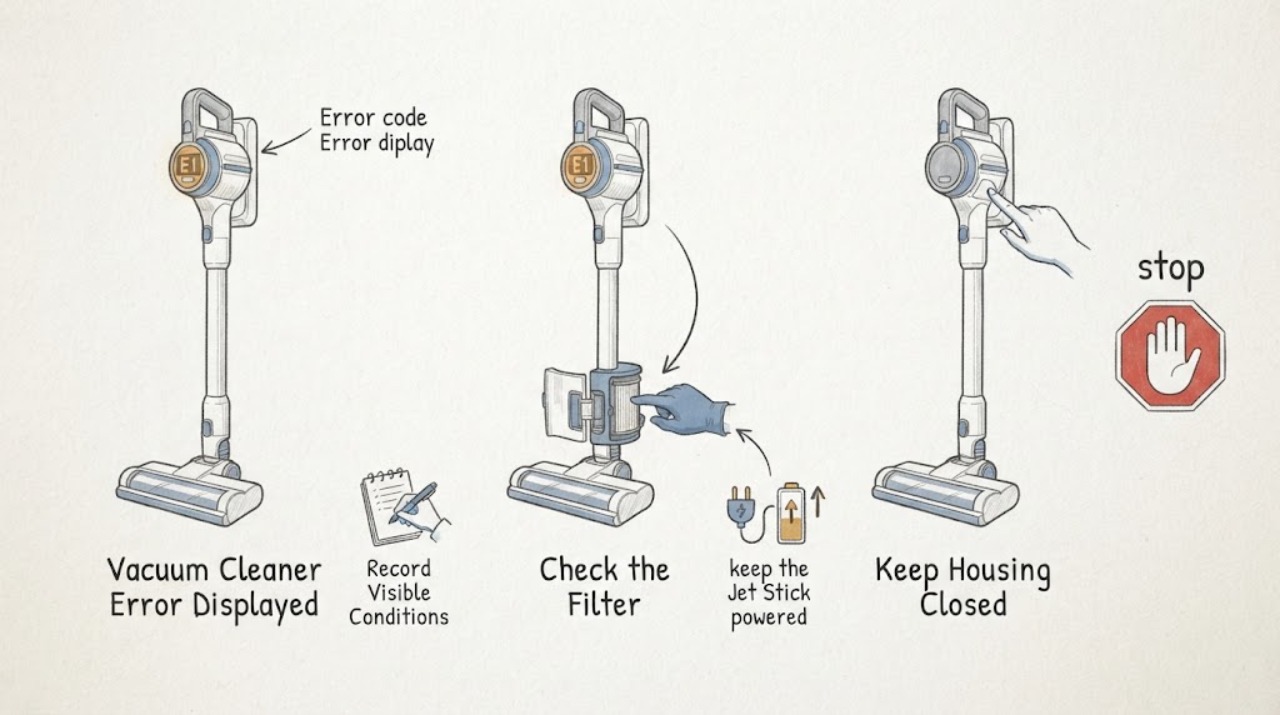
Start by recording the exact Samsung vacuum alert: the icon or code, any red light or voice message, and whether the machine is a Jet Stick, Jet Bot, or another family. Do not apply one model's code meanings to another model. On Jet Stick models, Samsung documents Clogged, Spinning brush stuck, and No filter icons for blocked dust paths, foreign matter at the brush, and an incorrectly assembled washable micro filter. On Bespoke Jet Bot Combo models, a blinking red LED and voice guide can identify a brush, wheel, sensor, bin, battery, or main-system condition. Turn the vacuum off, or place the robot in its documented sleep mode, before clearing accessible debris. If the exact alert is not resolved by the model-specific cleaning and reseating steps, returns after one supervised retest, or is accompanied by smoke, burning odor, liquid ingress, unusual heat, or battery damage, stop using it and arrange Samsung or qualified appliance service.
Work through in order
Diagnostic checks
Use only checks that match the exact appliance or system and its official guide.
-
Check 1
From outside the vacuum, record the exact icon, alphanumeric code, red-light pattern, or spoken message. Note whether it appears on a handheld or stick display, on a robot, in SmartThings, or at the Clean Station, and record what the vacuum was doing when it appeared.
Expected result: The alert identifies a clogged path, spinning brush, or missing filter; a robot message names a brush, wheel, sensor, bin, tank, battery, or system; or the message is not recognizable from the exact model's documentation.
Next step: Keep the message and model number together, then use the exact model manual or Samsung support page. If the alert cannot be matched, continue only with the safe power-off and visible-condition checks below and plan for model-specific support.
Why this matters
Why: The alert location and wording determine which product family and check sequence apply. A familiar Jet Stick icon is not evidence that an unrelated robot message has the same meaning.
-
Check 2
If this is a Samsung Jet Stick or similar cordless stick, turn it off before checking the dustbin, pipe, suction opening, and accessible brush for a visible blockage. Check that the washable micro filter and dustbin parts are assembled as the exact model manual shows; do not run the vacuum with the filter removed or still wet.
Expected result: Dust or foreign matter is blocking the dust path or brush, the filter is missing or mis-seated, or those areas are clear and correctly assembled.
Next step: Clean and dry removable parts and reassemble them exactly, then perform one supervised retest. If the alert remains with clear paths and correct assembly, use the model's support procedure rather than opening the motor or control housing.
Why this matters
Why: Samsung maps the Clogged icon to the dustbin, pipe, or suction part, the Spinning brush stuck icon to foreign matter at the brush, and the No filter icon to an incorrectly assembled washable micro filter. A clear path with a correctly assembled filter makes those simple causes less likely.
-
Check 3
If the display identifies a spinning brush or the brush will not rotate, keep the Jet Stick powered off while inspecting the roller for hair, cloth, or other foreign matter. Follow the exact brush-removal instructions for the model and keep fingers clear of the roller; do not wash the spinning brush or suction part unless the manual explicitly allows it.
Expected result: The roller is tangled, the obstruction can be removed using the model-approved method, or the roller remains clear but the alert or no-rotation condition returns.
Next step: After the brush is clear and reassembled, turn the vacuum off and on once as Samsung describes and retest briefly. If the brush stops again or the alert returns, stop using the attachment and arrange service.
Why this matters
Why: A tangible tangle supports brush protection or obstruction as the likely trigger. A clear roller with a recurring alert makes a brush motor, connection, sensor, or control fault more likely and cannot be diagnosed safely by the icon alone.
-
Check 4
If this is a Bespoke Jet Bot Combo, put the robot into Sleep mode before clearing an indicated brush, side brush, wheel, mop, sensor window, dustbin, or Clean Station component. Inspect only the accessible area named by the voice guide or SmartThings status, and keep the Clean Station unplugged while cleaning it.
Expected result: The named area contains foreign material or a missing or mis-seated bin, tank, tub, or plate; the area is clear and correctly seated; or the message reports a LIDAR, 3D, object-recognition, camera, battery, or main-system reset.
Next step: Remove only the accessible obstruction or reseat the named component, exit Sleep mode, and observe once. For a sensor, battery, or main-system message, follow the exact reset instruction once; if it returns, contact Samsung Support.
Why this matters
Why: A matching obstruction or seating problem makes the documented physical cause more likely. A clear, correctly seated component plus a sensor, battery, or main-system message is outside a generic debris fix.
-
Check 5
If the alert appears after the vacuum stops, feels unusually warm, or follows a full dustbin or blocked path, stop operation and let the Jet Stick cool naturally before trying it again. Do not keep cycling the power while it is hot, and do not bypass a thermal or battery protection message.
Expected result: After the dustbin and accessible obstructions are addressed and the vacuum has cooled, it operates normally once; it still will not operate; or it repeatedly overheats or stops.
Next step: Use one brief supervised retest only after the vacuum is cool and correctly assembled. If it does not recover or overheats again, leave it off and request service.
Why this matters
Why: Samsung says a Jet Stick may shut off to prevent overheating from a full dustbin or clog and recommends a cool-down period. Persistent or repeated stopping after those conditions are removed is not explained by a one-time thermal event.
-
Check 6
Use a reset only when the exact Samsung page or manual for the identified product tells you to do so. For a Jet Bot Combo sensor, battery, or main-system message, record the result of that documented reset; for a Jet Stick brush alert, use the documented power-off and restart after cleaning.
Expected result: The alert clears and the vacuum completes one short supervised test, or the same alert returns immediately or after operation resumes.
Next step: Stop at the repeat alert and give Samsung Support the model number, exact wording or icon, when it appears, and the checks already completed. Do not open the battery pack, motor, or control housing.
Why this matters
Why: A single clear after the documented physical cause is corrected supports a transient protection or seating state. A repeat alert after the prescribed reset indicates an unresolved condition and should not be treated as a successful repair.
Use your observations
Decision map
Find the observation that best matches what you see, then follow the next safe action.
-
PATH 01Next step
What you see
The alert is a Jet Stick Clogged, Spinning brush stuck, or No filter icon and you find a matching blockage, tangle, or filter assembly problem.
Do this next
Turn the vacuum off, clean and dry the relevant removable parts, reassemble them correctly, and perform one brief supervised retest. Stop and request service if the same icon returns with the path clear.
Why this path and its safety boundary
Why it matters: The observed condition matches Samsung's documented icon meaning and is more likely than an unspecified electronic error.
-
PATH 02Next step
What you see
A Jet Bot Combo voice or SmartThings message names a brush, wheel, mop, sensor window, dustbin, tank, tub, or plate and the named area is visibly blocked or mis-seated.
Do this next
Place the robot in Sleep mode, clear or reseat only the named accessible component, and observe once. If the message persists, use the exact model instructions or contact Samsung Support.
Why this path and its safety boundary
Why it matters: The physical finding supports the specific obstruction or seating condition described by Samsung for that message.
-
PATH 03Next step
What you see
The vacuum reports a battery, LIDAR, sensor, main-system, or repeated thermal condition, or it remains hot or stops again after the accessible cleaning checks.
Do this next
Stop using the vacuum, do not disassemble the battery or housing, and arrange Samsung or qualified appliance service with the exact alert and model information.
Why this path and its safety boundary
Why it matters: The result points beyond a simple blockage or seating correction and may involve protection, sensing, battery, or control service.
-
PATH 04Next step
What you see
The code or message cannot be matched to the exact Samsung model, or the alert returns after the model-approved check and one reset or retest.
Do this next
Preserve a photo or exact transcription, model and serial information, and the observed timing, then use Samsung Support for the correct manual and service path.
Why this path and its safety boundary
Why it matters: The available general guidance is insufficient to identify the fault safely; importing a code meaning from another Samsung vacuum could send the diagnosis in the wrong direction.
Helpful context
Understand the symptom
An error displayed on a Samsung vacuum is a symptom family, not one universal code list. The same red light can mean a blocked suction path or filter assembly on a Jet Stick, while a robot may report a stuck wheel, sensor window, dustbin, clean-station tank, battery, or main system. Identify the product family and preserve the exact message before cleaning or resetting.
The official red-light article is a Jet cleaner reference and says the display design can differ by model. Use the complete model number to open its manual or Samsung support page when the displayed code is not one of the documented examples here. A model mismatch is a reason to stop applying that sequence, not to guess a replacement part.
Only after diagnosis
Potential parts
- washable micro filter
Consider a replacement only if the exact model documentation identifies the filter as damaged, missing, or no longer serviceable after correct cleaning and assembly; a No filter alert alone does not establish that the filter is defective.
Confirm the complete Samsung model and the manufacturer's fit information before ordering any filter. Do not substitute a filter because its shape appears similar. - brush assembly
Consider this category only if the exact model procedure confirms the roller or brush assembly is damaged or remains inoperative after foreign matter is removed and the documented restart is completed.
Brush assemblies differ by Samsung vacuum family and floor head. Confirm exact model compatibility and the approved service procedure before replacement.
When checks do not resolve it
Need a professional?
Request Samsung or qualified appliance service when the exact alert is not documented for the model, the alert returns after the prescribed cleaning and one reset or retest, the vacuum repeatedly overheats or stops, a battery or main-system message persists, or there is smoke, burning odor, liquid ingress, sparking, or visible battery damage. Leave the vacuum off and do not open the battery, motor, or control housing.
Common questions
FAQ
What do Samsung Jet Stick Clogged, Spinning brush stuck, and No filter icons mean?
Samsung maps Clogged to a blocked dustbin, pipe, or suction part; Spinning brush stuck to foreign matter at the spinning brush; and No filter to a washable micro filter that is missing or incorrectly assembled. The display design varies by model, so confirm the exact manual before applying the sequence.
Should I reset a Samsung vacuum as soon as an error appears?
Record the exact alert first and correct any matching accessible obstruction or seating problem. Reset only when the exact model guidance calls for it; a reset that clears the message briefly does not prove the underlying condition is fixed.
What if the error returns or the Samsung vacuum overheats?
Stop operation, address only the model-approved dustbin or clog checks, and allow a potentially overheated Jet Stick to cool before one supervised retest. If the error or thermal stop returns, or the alert names a battery, sensor, or main system, leave it off and request service.
Read the exact guide
Official sources
- Samsung Jet Stick suddenly stops during cleaningSamsung Support US · Samsung Jet Stick models covered by the support article.
- Icon appears on the Samsung Jet StickSamsung Support US · Samsung Jet Stick models covered by the support article; exact display design can vary by model.
- Bespoke Jet Bot Combo voice says there is a problemSamsung Support US · Samsung Bespoke Jet Bot Combo models covered by the support article; messages and components are model-specific.
- Vacuums | Samsung Support USSamsung Support US · Samsung vacuum cleaners supported through Samsung Support US.
- What should I do when a red light appears on my Jet cleaner?Samsung UK · Samsung Jet cleaner guidance; the article notes that display design differs by model.
- How to clean your Bespoke Jet Bot Combo and Clean StationSamsung Support US · Samsung Bespoke Jet Bot Combo and Clean Station models covered by the support article.
Community feedback
Share a repair observation
Share a plain-text repair observation. Accepted observations are published automatically; this page may take a moment to update.