
On this page
Start here
Quick answer
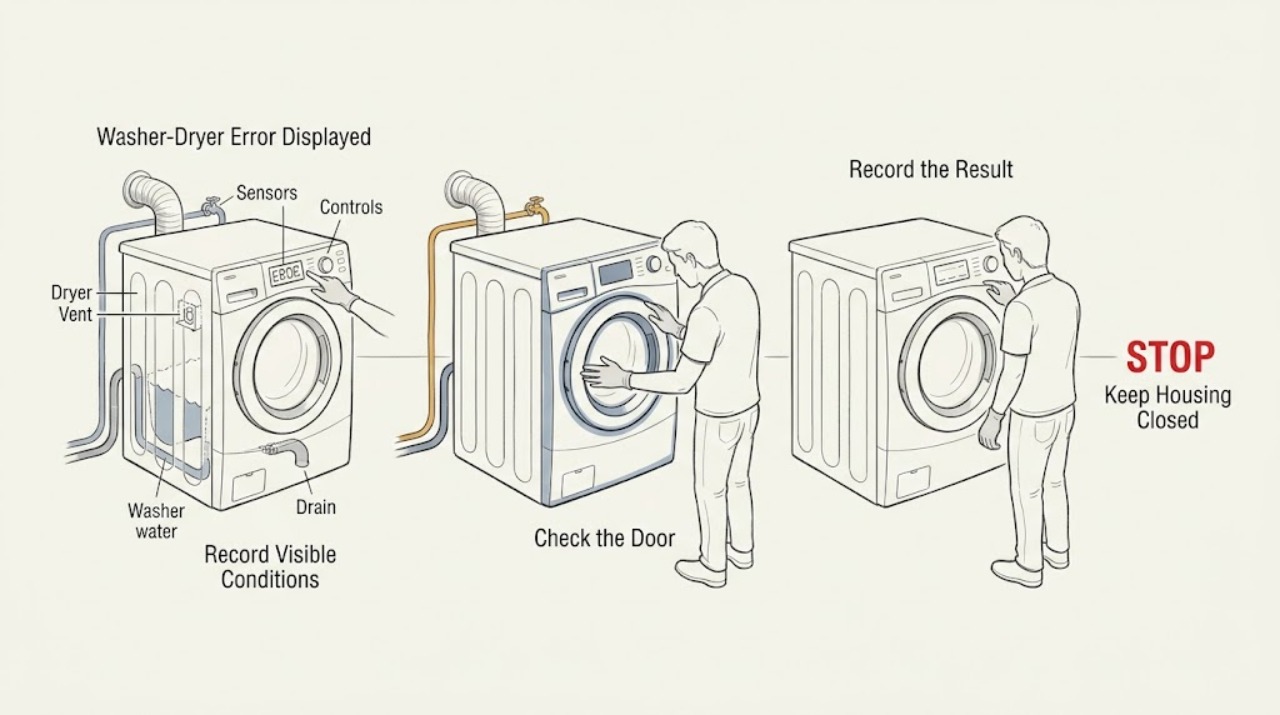
Start by photographing the exact Samsung code or blinking-light pattern before switching the appliance off or resetting it, and note whether it appeared on the washer or dryer side. Samsung uses different meanings for codes that can look similar across models, so the model-specific manual is the authority. On the washer, a water, drain, leak, or door code leads to safe checks of valves, hoses, the visible drain route, and door closure. On the dryer, a door, temperature, heating, vent, or communication code leads to the matching visible check, such as the lint screen and exhaust path. Do not run Samsung Smart Install when an error is already displayed, do not interrupt a download code, and stop for a leak, burning smell, smoke, abnormal heat, damaged cord, repeated breaker trip, or any need to open the cabinet.
Before you begin
Safety first
- This article covers code capture, manual matching, and safe user-accessible observations only. A qualified professional must handle internal electrical, water, drain, heating, motor, sensor, control, and cabinet work.
Work through in order
Diagnostic checks
Use only checks that match the exact appliance or system and its official guide.
-
Record the exact code before resetting
From a safe, dry position, photograph the complete display or blinking-light pattern, note whether it is on the washer or dryer, and record what the appliance was doing when it stopped. Do not erase the display by resetting first, and do not start a diagnostic routine while a code is already shown.
Expected result: The code is readable and tied to a washer or dryer function, the display shows only blinking lights, or the message is incomplete or ambiguous.
Next step: Write down the model and serial information if safely visible, then open the Samsung guide and manual for that model. If the code remains unreadable, preserve the photo and arrange service rather than guessing.
Stop if: Do not repeatedly reset, run Smart Install, or open the control area to read a code.
Why this matters
Why: Samsung's code guides use the exact characters and appliance side to select the next check, and Samsung says Smart Install is not for an appliance already displaying an error. An incomplete code cannot safely identify a part or cause.
-
Follow the washer water, drain, leak, or door branch
If the code is on the washer, inspect only normal user-accessible conditions that match the Samsung guide: look for water, confirm the supply valves are open, check visible supply and drain hoses for kinks, and verify that laundry is not caught in the door and the latch closes normally. Do not remove rear retainers, open panels, or reach into a wet appliance.
Expected result: A water or leak code is accompanied by moisture, a kinked hose, or visible water; a door code is accompanied by an obstruction or damaged latch; or the visible checks look normal.
Next step: Stop the washer and arrange service for an active leak, damaged latch, missing hose retainer, recurring code, or any fault that remains after the model-approved visible check. For a clear, dry, accessible obstruction, correct only what the exact manual permits and record the result.
Stop if: Do not run another cycle over a leak, touch standing water near electrical parts, remove the rear drain-hose retainer, or bypass the door lock.
Why this matters
Why: Samsung associates its water-level or leakage group with moisture or a sensor condition, its supply group with water-entry problems, its drain group with an obstructed route, and its door group with closure and latch detection. A normal visible check does not clear an internal valve, pump, sensor, or lock fault.
-
Follow the dryer door, temperature, heat, or vent branch
If the code is on the dryer, inspect the door latch and closure from outside, clean the lint screen, and check the accessible exhaust path for an obvious blockage or crushed section as the Samsung guide permits. Do not remove cabinet panels, make live measurements, or continue heating when the dryer is unusually hot or produces smoke or a burning smell.
Expected result: The code corresponds to a door, temperature, heating, or vent group; lint or a visible exhaust obstruction is present; the door or latch is damaged; or the accessible path is clear but the code remains.
Next step: Clean only the accessible lint and exhaust path allowed by the manual, then follow the exact code procedure once. If the code returns, the door is damaged, heat is abnormal, or the vent needs concealed access, leave the dryer off and request service.
Stop if: Do not operate a hot, smoking, sparking, or burning-smelling dryer or dismantle its vent or cabinet as a test.
Why this matters
Why: Samsung identifies door codes with the latch and door sensors, temperature and heating codes with heat sensing or restricted airflow, and vent-test codes with exhaust blockage. A clear lint screen does not prove that an internal sensor, heater, motor, or control is sound.
-
Check whether the code is a protected download or communication state
Compare the displayed characters with the Samsung guide before removing power. If the dryer shows the documented download message, leave it powered and allow the update process to finish as Samsung instructs; if it shows a communication or frequency message, use only the model-specific restart instruction after recording the code.
Expected result: The message is a download-in-progress code, a communication or frequency code, or an unlisted message.
Next step: Follow the matching Samsung instruction once and monitor the result without interrupting a protected update. Request service when the code remains, returns, or is not covered by the exact manual.
Stop if: Do not unplug or switch off a dryer during a documented firmware download, repeatedly cycle power, or open the control panel.
Why this matters
Why: Samsung warns that interrupting a download can make the dryer inoperable, while a communication or frequency message may have a defined restart path. An unlisted message needs the exact manual rather than an assumed reset.
-
Use the model manual for codes with more than one meaning
Match the full model number, region, appliance side, and displayed characters to Samsung's manual and support page. Pay particular attention to codes Samsung marks as model-dependent, such as a code that can represent a door condition on one washer and an unbalanced-load condition on another.
Expected result: The manual provides a matching explanation and safe check, provides more than one possible meaning, or does not list the code.
Next step: Follow only the matching manual branch and preserve the code history. If the explanation is ambiguous or the same code returns, request qualified Samsung appliance service with the model and photos.
Stop if: Do not substitute a code meaning from another model, region, washer, or dryer, and do not replace a component from the code alone.
Why this matters
Why: A model-dependent or unlisted code cannot identify a failed part from its text alone. Samsung's own guides route unlisted or persistent codes to the manual and support rather than a universal interpretation.
-
Set the service boundary and prepare the handoff
Keep the affected washer or dryer unused when the code returns, a leak or damaged door is present, a cycle cannot complete, the appliance overheats, or diagnosis would require a panel, wiring, pump, valve, heater, motor, sensor, or control to be accessed. Provide the model, code, appliance side, cycle, visible checks, water or vent observations, and any protective-device behavior to the technician.
Expected result: The code clears after the exact model-approved external check and no unsafe symptom is present, or the code persists, returns, or is accompanied by damage, moisture, heat, odor, smoke, or a trip.
Next step: Monitor only within the manual's normal-use boundary after a documented safe correction. Otherwise leave the appliance off and arrange qualified appliance service; use urgent local help for fire, smoke, gas odor, or immediate electrical danger.
Stop if: Do not open the cabinet, make live tests, bypass a lock or sensor, or keep running a cycle that leaks, overheats, smokes, sparks, or trips power.
Why this matters
Why: A cleared code may reflect a correctable accessible condition, but it does not authorize internal repair. A persistent or hazardous code needs professional diagnosis and may involve more than the named message.
Use your observations
Decision map
Find the observation that best matches what you see, then follow the next safe action.
-
PATH 01Safety boundary
What you see
A readable washer code points to water supply, drainage, leakage, or door closure and the related visible condition is present.
Do this next
Follow the Samsung washer branch for valves, visible hoses, drain routing, or door closure; stop and request service for an active leak, damaged latch, missing retainer, or recurring code.
Why this path and its safety boundary
Safety stop: Do not touch standing water near electrical parts, remove cabinet panels, or bypass the door lock.
-
PATH 02Safety boundary
What you see
A readable dryer code points to the door, temperature, heating, or vent and an accessible lint, exhaust, or latch condition is present.
Do this next
Correct only the accessible condition allowed by the exact manual, then follow the code procedure once. Request service if the message returns or the dryer is hot, damaged, or inaccessible.
Why this path and its safety boundary
Safety stop: Do not continue heating with smoke, burning smell, abnormal heat, damaged wiring, or a damaged door.
-
PATH 03Safety boundary
What you see
The dryer shows a documented download-in-progress message.
Do this next
Leave the dryer powered and follow Samsung's download guidance; request support if the message remains beyond the manual's stated process.
Why this path and its safety boundary
Safety stop: Do not unplug or switch off the dryer during the documented download.
-
PATH 04Safety boundary
What you see
The code is model-dependent, unlisted, incomplete, or returns after the model-approved external check.
Do this next
Use the exact model manual and preserve the code history, then arrange qualified service instead of assigning a universal meaning or ordering a part.
Why this path and its safety boundary
Safety stop: Do not substitute another model's code table, run repeated diagnostics, or open the control system.
-
PATH 05Safety boundary
What you see
There is a leak, standing water near electrics, smoke, burning odor, sparking, abnormal heat, damaged cord, repeated breaker trip, or another immediate hazard.
Do this next
Stop use, keep people clear, isolate power or water only from a dry and safe location, and request urgent qualified help or local emergency assistance as appropriate.
Why this path and its safety boundary
Safety stop: Do not touch wet electrical parts, restart the appliance, or attempt internal repair.
Helpful context
Understand the symptom
The code is a clue, not a diagnosis
A Samsung washer-dryer may display a code, blink a light pattern, or stop a cycle. The same-looking characters can vary by model and by whether they appear on the washer or dryer, and Samsung notes that some codes have more than one meaning. Preserve the display and use the exact model guide before selecting a component.
Use only the matching branch
Washer codes commonly point toward water level or leakage, supply, drainage, door locking, motor, heater, or control conditions. Dryer codes can point toward the door, temperature, heat, vent, motor, communication, or a firmware download. The safe response is to follow the matching Samsung instructions and stop when the page calls for service, rather than applying a washer reset to a dryer or repeatedly cycling an unresolved error.
Safety boundary
Stop conditions
- Do not run Samsung Smart Install when an error is already displayed.
- Do not unplug or switch off a dryer during a documented firmware download.
- Stop for a leak, standing water near electrical parts, smoke, burning odor, sparking, abnormal heat, damaged cord, repeated breaker trip, or a damaged door or latch.
- Do not open the cabinet, make live measurements, bypass a safety device, or replace a part from a code alone.
Only after diagnosis
Potential parts
- washer door latch or lock assembly
Consider this category only when the exact model code and a qualified diagnosis confirm a damaged or failed door-lock path after visible closure checks.
Match the full model, revision, connector, and door configuration through Samsung or qualified service; a door code alone does not prove this part. - washer drain pump or drain hose
Consider this category only when a qualified diagnosis confirms an internal drain fault after the visible hose and drain-route checks.
Confirm the full model, pump or hose configuration, connection type, and fit information before ordering; do not open a wet appliance to test it. - dryer lint filter or exhaust component
Consider this category only when the exact model and inspection confirm a damaged filter or an approved replacement exhaust component rather than a concealed airflow or sensor fault.
Match the model and approved vent specifications; do not substitute a component or alter a concealed vent from an error message alone.
When checks do not resolve it
Need a professional?
Arrange qualified Samsung appliance service when an error remains after the exact model-approved external check, returns after a restart, is unlisted or model-ambiguous, or indicates a pump, valve, lock, heater, motor, sensor, control, or wiring issue. Request urgent help for a leak, smoke, burning odor, sparking, abnormal heat, damaged cord, repeated breaker trip, or immediate electrical danger. Keep the affected side off while waiting.
Safety scope: This article covers code capture, manual matching, and safe user-accessible observations only. A qualified professional must handle internal electrical, water, drain, heating, motor, sensor, control, and cabinet work.
Have this ready
- Full model and serial information if safely visible
- Exact code or blinking-light pattern and a photograph
- Whether the message appeared on the washer or dryer
- Selected cycle, timing, and what the appliance did before stopping
- Visible water, hose, door, latch, lint, vent, heat, odor, smoke, and power observations
- Any model-approved check attempted and whether the code returned
Common questions
FAQ
Should I reset a Samsung washer-dryer as soon as an error appears?
First photograph and identify the exact code and appliance side. Samsung says not to run Smart Install when an error is already displayed, and a dryer download message must not be interrupted. Follow the matching model guide before any restart.
What do common Samsung washer codes point to?
Samsung's washer guide groups examples around water supply or leakage, drainage, door closure, motor, heater, and communication or control conditions. The same characters can vary by model, so use the full model manual rather than a universal code list.
What should I check for a Samsung dryer temperature or vent code?
When the dryer is cool and safe, clean the lint screen and inspect the accessible exhaust path as the exact guide permits. Samsung associates temperature and heating messages with heat sensing or restricted airflow, and directs owners to service when the message returns.
When does a Samsung error require service?
Request service when the code is unlisted, model-dependent, persistent, or returns after the approved external check, or when it points to an internal lock, pump, valve, heater, motor, sensor, or control. Stop immediately for leaks, smoke, burning odor, sparking, abnormal heat, damaged cords, or repeated power trips.
Read the exact guide
Official sources
- Run diagnostics on your Samsung washer or dryerSamsung · Samsung's official diagnostic guide; it explicitly says not to run Smart Install when the appliance is already displaying an error.
- Appliance and Electrical Fire SafetyU.S. Fire Administration · Government guidance used for damaged cords, major-appliance power, and fire-risk stop boundaries.
- Samsung dryer displays an error codeSamsung · Samsung's U.S. official dryer code guide; exact code meanings and permitted checks vary by model.
- Samsung washing machine information and error codesSamsung · Samsung's U.S. official washer code guide; exact code meanings and available checks vary by model and region.
- Clothes are not dry after using Samsung dryerSamsung · Samsung's official dryer support guide used only for accessible lint, vent, power, and service boundaries; it is not a universal code table.
Community feedback
Share a repair observation
Share a plain-text repair observation. Accepted observations are published automatically; this page may take a moment to update.