
On this page
Start here
Quick answer
If a Samsung washer-dryer leaves water in the drum or shows a no-drain or overflow error, first turn it off and let water from a recent hot cycle cool. Check that the appliance is level and that the drain hose is not kinked, damaged, too deep, too low, or sealed airtight in the standpipe. On front-load models only, use the emergency drain hose and clean the accessible pump or debris filter after the water is cool, following the exact model manual. Refit the filter and hose cap securely, then run one supervised test cycle. If the pump still does not drain, the hose is damaged, the machine leaks, the door remains locked, or the error returns, stop and arrange qualified Samsung appliance service. Do not remove the rear hose-holder screw, open a pump with hot water inside, or reach into a moving machine.
Work through in order
Diagnostic checks
Use only checks that match the exact appliance or system and its official guide.
-
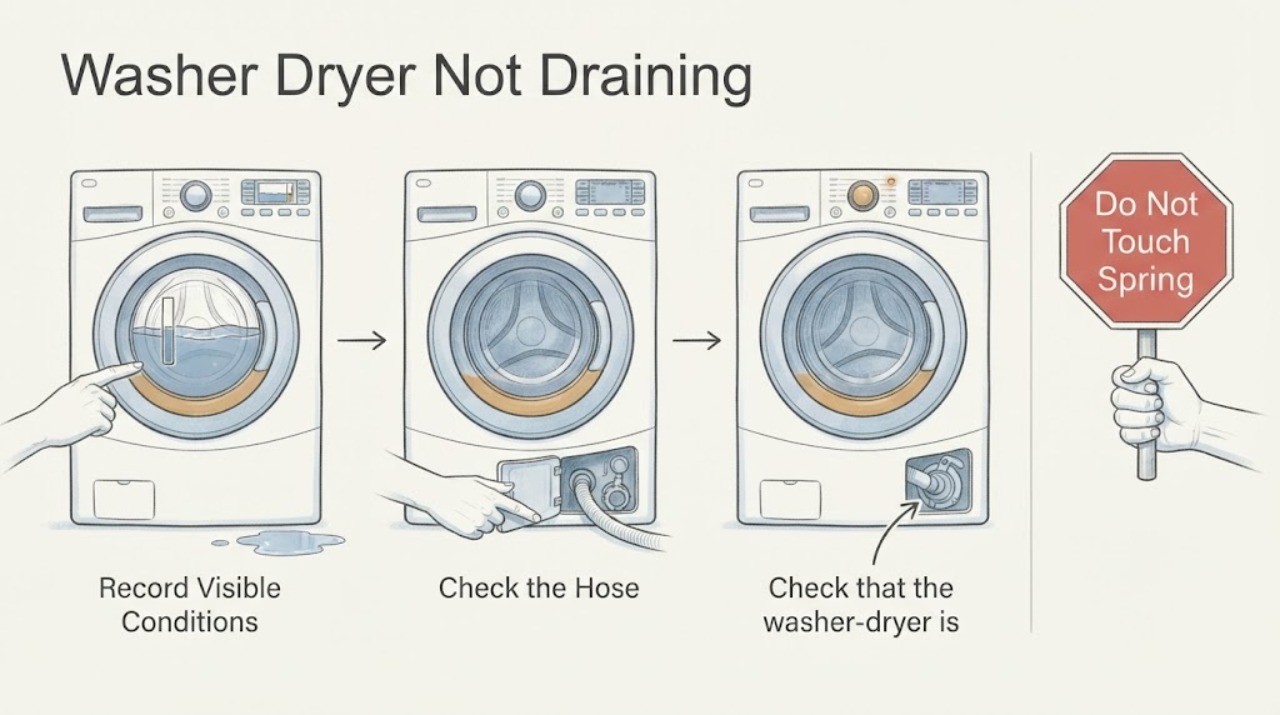
Record the drain symptom and cool the water
Note the exact display code or message, whether the drum is full, the cycle stage where it stopped, whether the pump hums or is silent, and whether water is leaking. Turn the washer-dryer off normally; if a hot cycle recently ran, wait about one hour for the water to cool before opening any drain access. Keep the door closed if water is still inside a front-load model.
Expected result: A no-drain or overflow error with water in the drum confirms a drainage branch. A silent pump, humming pump, slow trickle, or water on the floor provides different clues, while a locked door may be a normal safety response to retained water.
Next step: Proceed to the hose and level checks for all models. Use the emergency-drain and pump-filter branch only after the water is cool and only if the exact model has those features.
Why this matters
Why: The cycle stage and water temperature determine whether a user can safely perform an external drain or filter check; the symptom does not identify a failed pump by itself.
-
Check that the washer-dryer is level and stable
With the machine off, gently check whether it rocks at its corners and whether the floor is stable. Follow the exact model instructions to adjust accessible leveling feet, keeping all feet in firm contact with the floor and tightening any applicable lock nuts. Do not drag the appliance aggressively or work around a damaged floor.
Expected result: Samsung states that an unlevel washer may not drain correctly. A stable, level machine with retained water points toward the hose, filter, pump, or household drain rather than leveling.
Next step: Correct a minor, model-approved leveling issue and then inspect the drain hose. Arrange service if the machine cannot be leveled, rocks after adjustment, or continues not to drain.
Why this matters
Why: A level cabinet supports the intended drain path and reduces movement that can shift a hose; leveling alone cannot clear an internal blockage.
-
Inspect drain-hose routing and the standpipe
Trace the visible drain hose from the washer to the standpipe, laundry tub, or sink. Confirm it is not kinked, bent, crushed, or damaged; is secured by its holder; is not inserted too deeply; and does not form an airtight seal. Compare the hose height and insertion with the exact Samsung installation instructions rather than pulling the machine farther out than is safe.
Expected result: Samsung identifies incorrect hose installation as a common cause of no-drain errors. A hose inserted too deeply or sealed airtight can siphon; one that is too low can drain at the wrong time; a kink or damaged hose can restrict flow or leak.
Next step: Correct only an accessible routing or securing issue described by the manual. Do not remove the rear holder screw or use a hose extension kit. If the hose is damaged or routing is correct but drainage fails, arrange service.
Why this matters
Why: A hose-routing fault can mimic a pump failure and may develop after the machine has been installed for a long time; the external path must be correct before internal parts are considered.
-
Check the household drain without disconnecting a pressurized line
Observe whether the standpipe, laundry tub, or sink accepts water normally and whether water backs up outside the washer when another fixture drains. Clear only an accessible household blockage using normal plumbing methods, and keep the washer's electrical connection dry. Do not remove the washer's rear hose holder or disconnect internal hoses.
Expected result: A household drain that backs up suggests a plumbing restriction rather than a washer pump fault. If the household drain accepts water but the washer leaves water after a correct hose and filter check, an internal pump, hose, or control fault is more likely.
Next step: Arrange qualified plumbing service for a blocked standpipe or sink. Continue with the front-load pump-filter check only when the household path is open and the model provides that filter.
Why this matters
Why: The appliance and household drain are connected systems; a restriction downstream can prevent the washer from emptying even when its pump operates.
-
Drain retained water through the emergency hose when provided
For a front-load Samsung model with an accessible emergency drain hose, place a towel and a suitable container under the hose, then open its cap only after the water has cooled. Drain gradually, reseal the cap firmly, and secure the hose in its holder. Do not force a door or use this procedure if the manual for the model shows a different arrangement.
Expected result: A steady flow through the emergency hose shows that water can leave through that path. No flow, an uncontrolled leak, a damaged cap, or a model without an emergency hose requires stopping rather than improvising.
Next step: Once no more water flows, turn the washer off and proceed to the model-specific pump-filter check if applicable. Arrange service for a leak, blocked hose, or door that remains locked.
Why this matters
Why: Emergency draining protects the floor and may unlock a front-load door after the water is gone, but it does not clear the main pump path or prove the pump works.
-
Clean the accessible pump or debris filter on front-load models
Only on a front-load model with a pump-filter access panel, and only after the water is cool, open the panel, drain remaining water through the emergency hose, and remove the filter as the model guide directs. Rinse debris from the filter with a soft brush, check the visible pump impeller for debris without forcing it, reinstall the filter fully, and refit the hose cap and panel. Top-load models without a removable filter should skip this step.
Expected result: Lint or foreign material in the filter or impeller can reduce draining. A clean filter with no visible obstruction but continuing no-drain behavior points toward the drain hose, pump, wiring, or control rather than another filter cleaning cycle.
Next step: Use the exact model manual when the illustrated steps differ. Recheck the hose routing and run one supervised test; arrange service if water remains or the filter cannot be removed or resealed safely.
Why this matters
Why: The filter is a model-dependent user-maintenance point; removing it while water is hot or failing to reseal it can cause burns or a leak.
-
Check the door lock and control state without forcing it
After water has been safely removed, confirm that the door-lock indicator behaves as the model manual describes and that the cycle can be cancelled or restarted normally. Do not pull a front-load door open while water is detected, bypass the lock, or reach into the drum.
Expected result: Samsung notes that front-load doors remain locked while water is detected to prevent a spill, and the door may unlock after emergency draining and a power cycle. A door that remains locked after the water is gone suggests a separate lock or control issue.
Next step: Follow only the model-specific unlock sequence. Arrange service if the door stays locked, the lock light remains on without water, or the washer cannot select a cycle.
Why this matters
Why: A locked door may be a consequence of the no-drain condition rather than its cause; forcing it can create a flood or damage the interlock.
-
Run one supervised drain test
After correcting a visible hose, level, household-drain, or applicable filter condition, close all access panels and start one model-approved short or drain cycle while staying nearby. Observe whether water exits, whether the pump sounds normal, whether the machine leaks or overflows, and whether the no-drain message returns.
Expected result: A complete drain without a renewed error supports a corrected external restriction. Continued standing water, a silent or abnormal pump, a leak, overflow, or a returned error confirms that the fault remains.
Next step: Stop the test, protect the floor, and arrange qualified Samsung appliance service for a failed drain. Use plumbing service when the household standpipe backs up, and do not repeatedly reset the washer.
Why this matters
Why: One controlled test verifies the change without repeatedly operating a possibly blocked pump or leaking machine.
Use your observations
Decision map
Find the observation that best matches what you see, then follow the next safe action.
-
PATH 01Next step
What you see
The water is still hot, the machine is leaking, the floor or outlet is wet, or the cord or plug is damaged.
Do this next
Stop, keep clear, and allow qualified service to handle the appliance. Do not open the filter, operate controls with wet hands, or expose electrical parts to water.
-
PATH 02Next step
What you see
The drain hose is kinked, damaged, inserted too deeply or too low, airtight, unsecured, or missing its rear holder.
Do this next
Correct only the accessible model-approved routing and securing issue. Do not remove the rear holder screw or use an extension; replace a damaged hose through qualified service.
-
PATH 03Next step
What you see
The household standpipe, laundry tub, or sink backs up while the washer drains.
Do this next
Stop the washer and arrange qualified plumbing service for the downstream restriction. Do not assume the drain pump is defective.
-
PATH 04Next step
What you see
A front-load model has cool retained water and a removable pump or debris filter.
Do this next
Use the emergency hose and filter procedure in the exact model guide, reseal every cap and filter, and run one supervised test. Stop for a leak or blocked filter that cannot be cleared safely.
-
PATH 05Next step
What you see
The hose, household drain, level, and applicable filter are correct but water remains or the no-drain error returns.
Do this next
Keep the washer-dryer out of use and arrange qualified Samsung appliance service for pump, internal hose, wiring, sensor, or control diagnosis.
-
PATH 06Next step
What you see
The door remains locked after water has been safely removed, or the machine shows smoke, burning odor, sparks, or repeated breaker operation.
Do this next
Do not force the door or restart the machine. Disconnect only if safe and arrange qualified appliance or electrical help.
Helpful context
Understand the symptom
A no-drain complaint has several possible causes
Water left in the drum can result from a kinked or incorrectly routed hose, a standpipe connection that siphons, an unlevel appliance, a blocked pump filter on an applicable front-load model, a drain pump fault, or a household drain restriction. A washer-dryer may also keep the door locked while water is detected. Record the error, water level, cycle stage, and whether you hear the pump before changing anything.
Drain water without creating a flood or burn hazard
If the last cycle used hot water, Samsung advises waiting about one hour for the water to cool before working near the drain filter. Use a towel and a container that can hold the water, and open an emergency drain hose only on models that provide one and only as the manual directs. Do not force a locked door, tip the machine, remove the rear hose-holder screw, or work on live wiring.
Only after diagnosis
Potential parts
- drain hose or hose holder
Consider this only when the visible hose is damaged or qualified inspection confirms that the hose or holder cannot maintain the model's required routing.
Hose geometry and holder arrangement vary by model; do not remove the rear holder screw or use an unapproved extension. - pump or debris filter
Consider this only when an applicable filter is damaged or qualified testing confirms an internal pump or filter-housing fault after debris and routing checks.
Top-load models may not have a removable pump filter; confirm the exact model and keep water and electricity separated. - drain pump
Consider this only when the household drain, hose, level, and applicable filter are clear but qualified testing confirms that the pump cannot move water.
Drain pumps are model-specific and may require electrical and water-safety work; verify fitment through qualified service. - door interlock or control component
Consider this only when water is gone but the door remains locked or the control will not advance and qualified diagnosis confirms an interlock or control fault.
The interlock is safety-critical and model-specific; never bypass it or order a control from a symptom alone.
When checks do not resolve it
Need a professional?
Arrange qualified Samsung appliance service when the washer-dryer still will not drain after a correct hose check and applicable pump-filter cleaning, the drain pump is abnormal or silent, the hose or filter cap is damaged, water leaks, the door remains locked after safe draining, or the no-drain error returns. Use qualified plumbing service for a backed-up household drain. Allow hot water to cool first and stop immediately for flooding, water near electricity, smoke, burning odor, sparks, a damaged cord, or repeated breaker operation. Do not remove the rear hose-holder screw, bypass the door lock, or open an internal pump or panel.
Common questions
FAQ
Why is my Samsung washer-dryer not draining?
Check the level, drain-hose routing and height, household standpipe, and—on front-load models only—the cool-water emergency hose and pump filter. A clean path with a returned error needs qualified pump or control diagnosis.
How do I drain a Samsung washer-dryer with water inside?
Let water from a recent hot cycle cool, then use the emergency drain hose only if the exact front-load model provides one. Use a towel and container, reseal the cap, and never force the locked door.
Does every Samsung washer have a pump filter?
No. Samsung states that the removable pump or debris filter check applies to front-load models; top-load models may not have one. Follow the exact model manual rather than opening an unmarked panel.
Can a drain hose cause a Samsung washer-dryer not to drain?
Yes. A kinked or damaged hose, incorrect height, too-deep insertion, airtight standpipe connection, missing holder, or household drain blockage can prevent correct drainage or cause siphoning.
When should I call for Samsung washer-dryer drainage service?
Arrange service when water remains after the hose and applicable filter checks, the pump is abnormal, the error returns, the door stays locked after safe draining, or the machine leaks. Stop immediately for hot water, flooding, water near electricity, smoke, sparks, or a damaged cord.
Read the exact guide
Official sources
- Samsung washing machine is leakingSamsung Support · Drain-hose height and insertion, air gap, kinks, holder, pump-filter drainage, and leak boundary
- How to clean your Samsung washerSamsung Support · Hot-water cooling, emergency drain hose, filter removal and cleaning, impeller inspection, resealing, and model-manual boundary
- Samsung washing machine will not drainSamsung Support · Cool-water caution, level, drain-hose routing, pump-filter applicability, and single drain test
- Install a Samsung washing machine in your homeSamsung Support · Drain-hose insertion, height, air gap, securing, leveling, and test-cycle guidance
- Samsung washing machine will not start or fill with waterSamsung Support · Door lock while water is detected, emergency draining, and service boundary
Community feedback
Share a repair observation
Share a plain-text repair observation. Accepted observations are published automatically; this page may take a moment to update.