
On this page
Start here
Quick answer
First identify whether the Samsung washer-dryer has no heat, weak heat, a cycle that ends too quickly, a cycle that takes too long, or clothes that were still soaking wet after the wash. Check that the selected cycle actually heats, turn off Eco Dry when an applicable model intentionally reduces heat, and use the correct Dry Level. Clean the lint filter and, for ventless or combo models, the user-accessible heat exchanger or related filter as the exact manual directs. Check that the drain hose removes water and that the load is not too large, too small, or mixed in a way that makes Sensor Dry stop early. On vented models, run the model-specific vent test and clear a confirmed restriction. If the dryer shows an error, has no heat after airflow checks, overheats, smells burnt, leaks, or repeatedly fails, stop and arrange qualified Samsung service.
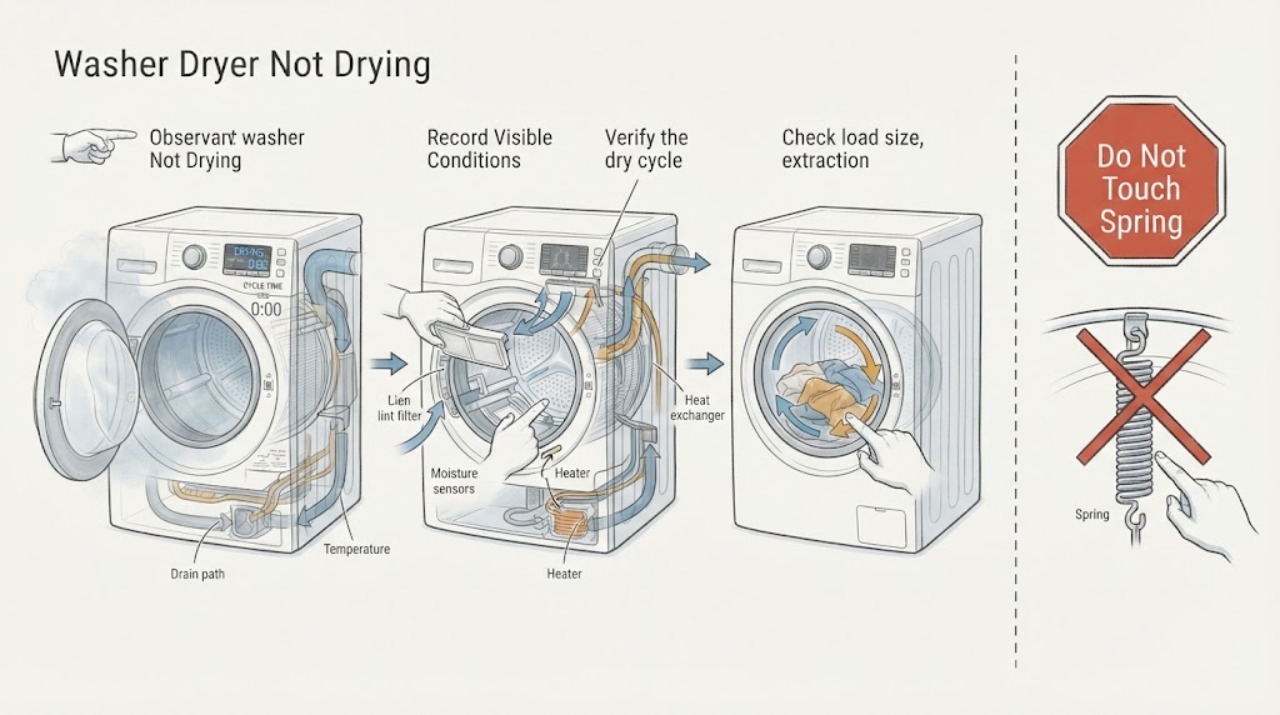
Work through in order
Diagnostic checks
Use only checks that match the exact appliance or system and its official guide.
-
Classify the drying failure and record the model
Record the exact model, whether it is a vented dryer, ventless dryer, or washer-dryer combo, the wash and dry cycles used, load size and fabric mix, total run time, and whether clothes are damp, soaking wet, cold, warm, or overheated. Note any display code, warning, unusual sound, leak, smell, or repeated stop.
Expected result: Cold clothes after a heating cycle suggest a no-heat branch; some warmth with long drying suggests airflow or load conditions; a cycle ending quickly suggests moisture-sensor or small-load behavior; soaking-wet items immediately after washing suggest the wash spin or drain stage also needs attention. Damp laundry after a steam cycle can be expected.
Next step: Continue with the cycle and load checks for damp or cold results, the airflow and heat-exchanger checks for long or weak drying, and the error-code branch for a displayed warning.
Why this matters
Why: The appliance type and failure stage decide whether to inspect a vent, heat exchanger, drain, sensor, cycle setting, or service fault; a generic dryer checklist can be wrong for a combo model.
-
Verify the dry cycle and heat settings
Use the exact model guide to confirm that the selected cycle includes drying and heat for the fabric. Check whether Eco Dry, a low temperature option, Steam Dry, Air Fluff, or a wrinkle-care phase is active, and select a model-approved timed or normal dry test with the intended Dry Level. Do not override a safety warning or run a cycle unsuitable for the fabric.
Expected result: Samsung notes that Eco Dry can begin without hot air and extend the cycle, some cycles do not require heat, Steam Dry can leave laundry damp, and Wrinkle Prevent tumbles without heat after the cycle. If the intended heated test provides no warmth, the symptom is not merely a setting choice.
Next step: Correct only the documented cycle or setting and observe one test. If a proper heated cycle still has no heat or a code, move to airflow and service checks.
Why this matters
Why: A valid cycle and setting must be established before judging heater performance; feeling no heat during a cooling or low-energy phase does not prove failure.
-
Check load size, extraction, and fabric mix
Remove obvious overloading, separate heavy fabrics from light items, reposition bulky bedding, and avoid a load so small that it cannot tumble or contact the sensors. If clothes leave the wash soaked, confirm the washer stage completed and that the machine is not retaining water before judging the drying system.
Expected result: Samsung states that overloading extends drying time, bulky items may need repositioning, heavy and light fabrics dry at different rates, and extremely small loads may not tumble or contact Sensor Dry bars. Soaked items from the wash can make any subsequent drying cycle appear ineffective.
Next step: Run one balanced, model-approved load and compare the result. If the same load remains damp with normal heat and airflow, continue to the filter, vent, sensor, and error branches.
Why this matters
Why: A load that is too large, too small, or unevenly wet can produce damp results without a heater fault; the dryer cannot compensate for poor tumbling or excessive starting moisture.
-
Clean the lint filter and ventless heat exchanger when applicable
With the appliance stopped and cool, remove and clean the user-accessible lint filter as the model guide directs. For a ventless or combo model that displays a heat-exchanger or optional-filter prompt, open and clean that component only according to the exact instructions; refit every cover before testing.
Expected result: Samsung identifies a clogged lint filter, exhaust duct, or heat exchanger as a cause of weak heat or damp clothes. A clean accessible path with continued poor drying points toward the vent, drain, sensor, heater, or control rather than repeated filter cleaning.
Next step: Complete the model-approved cleaning once and run one test. Stop for damaged covers, overheating, smoke, or a recurring cleaning alert and arrange service.
Why this matters
Why: Lint and dust can restrict heat and moisture movement, but the cleaning method and accessible parts differ between vented, ventless, and combo designs.
-
Check vent airflow on vented models
If the Samsung washer-dryer uses an exhaust vent, run the model-specific vent blockage test with an empty, cool drum if the manual provides one. Inspect the visible vent hose and external hood for kinks, crushing, loose joints, lint, or a flap that cannot open. Do not enter the duct, remove a wall fitting, or substitute plastic or foil where the model prohibits it.
Expected result: A blockage-test result such as Clg, Cg, C80, or C90 indicates restricted exhaust on models that use those codes; a pass with continued no heat or damp clothes shifts the diagnosis toward the appliance. A ventless or combo model may require a heat-exchanger and drain check instead.
Next step: Clear only an accessible vent restriction, then repeat the model test once. Arrange qualified service or duct cleaning if the restriction is inside the building or the test remains abnormal.
Why this matters
Why: Heat and moisture must leave the appliance through its intended path. A blocked vent can lengthen cycles or cause reduced heat to limit overheating risk, but a test code is model-specific.
-
Clean and test the moisture sensors for early cycle ending
If the cycle ends after a few minutes with damp clothes, locate the two curved metal moisture-sensor bars near the lint-filter housing or inside the drum as the model guide shows. With the appliance cool and stopped, wipe them with a soft cloth and a small amount of dish soap, dry them, and retry an appropriate Sensor Dry load.
Expected result: Samsung explains that residue from dryer sheets can make Sensor Dry detect dryness too early. A larger balanced load that continues normally after cleaning supports a sensor or load-condition explanation; immediate early ending with clean sensors needs service or a different cycle test.
Next step: Use Damp Alert or a higher Dry Level when appropriate and separate heavy fabrics. If the cycle still ends early with damp items, use a manual dry test and arrange service if the fault persists.
Why this matters
Why: Sensor Dry ends based on detected moisture, so clean sensors and sufficient contact matter. A sensor result does not diagnose the heater, vent, or control without the rest of the symptom pattern.
-
Check the combo drain path and water handling
For a washer-dryer combo or ventless model with a drain hose, confirm the hose is connected as the exact manual shows, is not kinked or blocked, and is actually removing water. Check the drain result after a drying cycle without opening internal panels. Stop for a leak or water near electrical parts.
Expected result: Samsung's ventless guidance says that when a drain hose is connected, it must drain properly; retained water can keep a combo from completing drying or leave clothes damp. A correct external path with persistent water points toward an internal pump, sensor, or control fault.
Next step: Correct only a visible, manual-approved hose condition and run one test. Arrange qualified service for a persistent leak, standing water, or a pump that does not drain.
Why this matters
Why: Some combo designs condense moisture and depend on the drain path, so a drying complaint can be a water-removal problem rather than an airflow problem.
-
Use any displayed code and run one supervised confirmation
Record the complete display code before clearing it and compare it with the exact model manual. If the code is a documented vent, temperature, door, communication, motor, or control indication, follow only the model-approved external step. After correcting a setting, load, filter, vent, sensor, or drain condition, run one supervised drying test and stop for smoke, gas odor, burning smell, abnormal heat, leak, or a renewed error.
Expected result: A complete dry cycle after an external correction supports a temporary or operating-condition issue. A returned code, no heat after a clear vent, overheating, abnormal sound, retained water, or repeated early ending confirms an unresolved fault.
Next step: Keep the washer-dryer out of use and arrange qualified Samsung service when the code returns or the drying fault persists. Preserve the code, cycle, load, and test observations for the technician.
Why this matters
Why: Error codes narrow the service branch but do not prove a replaceable part is defective. Repeated resets or cycles can worsen a heating, motor, pump, or electrical fault.
Use your observations
Decision map
Find the observation that best matches what you see, then follow the next safe action.
-
PATH 01Next step
What you see
The selected cycle is Steam Dry, Eco Dry, Air Fluff, cooling, wrinkle care, or another phase that intentionally provides little or no heat.
Do this next
Use the exact model guide to select an appropriate heated cycle and Dry Level, then run one test. Do not judge heat during a no-heat phase.
-
PATH 02Next step
What you see
Clothes are overloaded, very small, bulky, mixed by weight, or already soaking wet after the wash.
Do this next
Correct the load and verify the wash spin and drain stage. Run one balanced model-approved load before suspecting a dryer component.
-
PATH 03Next step
What you see
The lint filter, vent, heat exchanger, or visible airflow path is clogged, kinked, crushed, or reported blocked by a model-specific test.
Do this next
Clean or correct only the accessible model-approved path and repeat the test once. Arrange duct or appliance service for an inaccessible or recurring blockage.
-
PATH 04Next step
What you see
A Sensor Dry cycle ends early while clothes remain damp, or a small mixed load does not contact the moisture sensors consistently.
Do this next
Clean the sensors, use a suitable load and Dry Level, or use a model-approved manual cycle. Arrange service if early ending persists with clean sensors.
-
PATH 05Next step
What you see
A combo or ventless model retains water, the drain hose leaks or is blocked, or the machine cannot complete drying.
Do this next
Check only visible, model-approved drain routing and protect the floor. Arrange qualified service for persistent water, a leak, or an internal pump fault.
-
PATH 06Next step
What you see
The dryer has no heat on a proper heated cycle after the accessible airflow checks, displays a recurring error, overheats, or produces smoke, gas odor, burning smell, sparks, or abnormal heat.
Do this next
Stop using the appliance, disconnect only if safe, keep clear, and arrange qualified appliance or electrical service. Do not open panels, test energized wiring, or repeatedly restart it.
Helpful context
Understand the symptom
Not drying is not one symptom
A washer-dryer can leave clothes damp because the wash did not extract enough water, because the selected dry cycle is intentionally low heat, because lint or airflow is restricted, because a Sensor Dry cycle stopped on lighter items, or because the heating or control system has a fault. Steam cycles can also leave laundry damp by design. Note the cycle, load, heat, time, and any code before changing settings.
Keep heat, lint, and electrical work within the safe boundary
Clean only user-accessible filters, sensors, and heat-exchanger surfaces described by the exact model guide. Let hot components cool, keep water away from controls and outlets, and do not open panels, probe live wiring, bypass a door lock, or operate through smoke, a burning odor, a gas smell, or abnormal heat. For a gas model, stop and seek qualified help for any suspected gas or ignition problem.
Only after diagnosis
Potential parts
- lint filter or heat-exchanger filter
Consider this only when the applicable user-accessible filter is damaged or qualified inspection confirms it cannot maintain the required airflow after cleaning.
Filter and heat-exchanger arrangements vary by vented, ventless, and combo model; verify the exact model and use only model-approved components. - exhaust vent or airflow component
Consider this only when a model-specific vent test or qualified inspection confirms an inaccessible vent, blower, or airflow fault after external cleaning.
Vent systems have installation and fire-safety requirements; do not substitute materials or dismantle building ductwork without qualified help. - heater or temperature sensor
Consider this only when the correct heated cycle and airflow path are verified but qualified testing confirms a heater or temperature-sensing fault.
Heating components are model-specific and can remain hot or electrically energized; verify fitment through qualified service. - moisture sensor
Consider this only when clean sensor bars and suitable loads still cause premature ending and qualified testing confirms a sensor or connection fault.
Sensor layout and compatibility vary by model; do not bypass or replace a sensor based on damp clothes alone. - drain pump or drain component
Consider this only when the external drain path is clear but a qualified test confirms that the pump or internal water path is not removing condensation or wash water.
The pump and internal hoses are model-specific and may expose water and electrical hazards; use qualified service.
When checks do not resolve it
Need a professional?
Arrange qualified Samsung appliance service when the washer-dryer has no heat on a correct heated cycle after accessible airflow checks, a code returns, drying remains poor with a correct load and clean path, water is retained, the drain leaks, the sensors or controls behave abnormally, or the machine repeatedly stops. Use qualified duct or electrical service for inaccessible vent or supply problems. Stop immediately for smoke, gas odor, burning smell, sparks, abnormal heat, a damaged cord, or water near electricity. Do not open panels, bypass a door lock, or replace a heater, pump, sensor, or control from a symptom alone.
Common questions
FAQ
Why is my Samsung washer-dryer not drying clothes?
Check the cycle and Dry Level, load size and starting wetness, lint filter, heat exchanger or vent, moisture sensors, and combo drain path. A proper heated cycle with a clean path that still leaves clothes damp needs service diagnosis.
Why does my Samsung washer-dryer have no heat?
Confirm the cycle should heat and that Eco Dry, cooling, Steam Dry, or Wrinkle Prevent is not being mistaken for a heating phase. Clean the accessible airflow path and check codes; persistent no heat needs qualified service.
Can an overloaded washer-dryer cause damp clothes?
Yes. Samsung notes that overloaded, bulky, mixed, or extremely small loads can dry unevenly or make Sensor Dry end before heavier items are dry. Run one balanced, model-approved load.
Why does my Samsung Sensor Dry cycle end too quickly?
Residue on the moisture sensors or too small a load can make the cycle detect dryness early. Clean the sensor bars with a soft cloth and mild dish soap, use a suitable load and Dry Level, and arrange service if the behavior persists.
When should I call for Samsung washer-dryer drying service?
Arrange service for persistent damp clothes after correct external checks, no heat, recurring errors, retained water, leaks, abnormal noise, or overheating. Stop immediately for smoke, gas odor, burning smell, sparks, or water near electricity.
Read the exact guide
Official sources
- Samsung washing machine will not drainSamsung Support · Level, drain path, pump-filter applicability, and supervised drain test
- Clothes are not dry after Samsung ventless dryer cycleSamsung Support · Circuit, lint filter, exhaust or heat exchanger, cycle, load, bulky items, small loads, gas supply where applicable, and drain-hose checks
- Cycles, settings, and features on your Samsung dryerSamsung Support · Eco Dry, Dry Level, Damp Alert, mixed loads, small-load behavior, and no-heat wrinkle-care operation
- Clothes are not dry after using Samsung dryerSamsung Support · Steam and Eco Dry behavior, heat classification, lint filter, vent blockage test, exhaust requirements, moisture sensors, load size, and service boundary
- Samsung dryer displays an error codeSamsung Support · Door, temperature, heating, communication, frequency, vent-test, child-lock, motor, control, and service branches
Community feedback
Share a repair observation
Share a plain-text repair observation. Accepted observations are published automatically; this page may take a moment to update.