
On this page
Start here
Quick answer
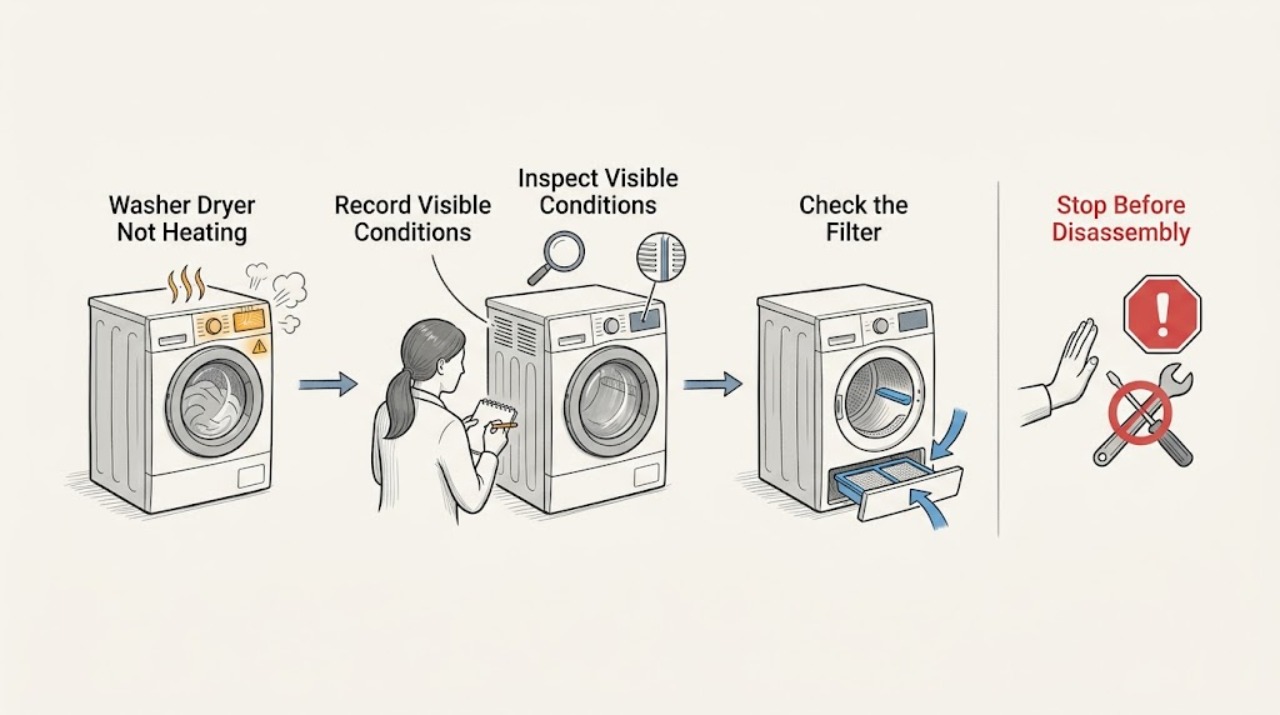
First identify whether the Samsung washer-dryer is failing to heat water during washing or failing to produce warm air during drying. For the drying function, check that the selected cycle is supposed to use heat, turn off Eco Dry if the model offers it, clean the lint filter and model-specific heat exchanger, and check the exhaust or condensation path. A cool start or cooling phase can be normal, but a dryer that produces no warmth on a heating cycle after the basic checks needs service. Stop immediately for a burning smell, smoke, sparking, an abnormal-temperature alert, a damaged power connection, or a gas odor. Do not open panels, test live wiring, or work on a gas supply or heating component.
Work through in order
Diagnostic checks
Use only checks that match the exact appliance or system and its official guide.
-
Check 1
Identify whether the problem occurs in the wash portion or dry portion, and write down the selected cycle, heat or dryness setting, and whether the drum tumbles, the controls stay on, or an alert appears.
Expected result: Wash water is cold but drying warms normally, or drying has no warmth while washing is normal. Alternatively, the selected cycle is a no-heat, Eco Dry, steam, or cooling phase.
Next step: Use the exact model manual for the cycle’s expected behavior. If the complaint is drying heat, select a model-approved heating cycle with Eco Dry off when applicable, then continue only if no safety symptom is present.
Why this matters
Why: A combo appliance has separate wash and dry heating behavior. A cycle that intentionally reduces heat is not proof of heater failure; a heating cycle that remains cold needs the dry-system branch.
-
Check 2
If the model manual permits a heat check, run the appropriate empty or small-load heating cycle from a safe position and observe warmth without reaching into a moving drum. Stop the cycle if there is smoke, burning odor, gas odor, sparking, unusual heat, or an alert.
Expected result: There is some warmth, the drum remains completely cold, or the appliance produces a safety warning or abnormal odor.
Next step: For any odor, smoke, sparking, gas smell, or abnormal-temperature alert, stop, disconnect only if safe, and arrange qualified service or emergency help as appropriate. For a cold but otherwise normal cycle, continue with filter and airflow checks without opening the appliance.
Why this matters
Why: Some warmth points to a ‘not hot enough’ or airflow/load branch rather than total heater failure. No heat at all after an appropriate cycle points toward supply, heating, sensing, or control diagnosis. Any safety symptom overrides further testing.
-
Check 3
With the appliance off and cool, clean the lint filter. If the Samsung model is ventless or has an accessible heat exchanger, inspect and clean that component only according to the manual. For a vented model, inspect the visible exhaust path for kinks, flattening, improper material, gaps, or an obstructed outside hood.
Expected result: The filter or heat exchanger is clogged, the vent test indicates a restriction, the external path is damaged or blocked, or the accessible air path is clean and correctly installed.
Next step: Correct only accessible cleaning or external vent issues using the model instructions, then perform one controlled retest. If the path is clear and the dryer remains cold, request service rather than removing a heater or control.
Why this matters
Why: Lint or restricted exhaust prevents heat and moisture from leaving; Samsung may reduce heat to protect against overheating and vent fires. A clear path that still produces no heat shifts the problem toward the appliance’s heating or control system.
-
Check 4
Check the external supply appropriate to the machine without opening it: confirm the controls have power, inspect the visible plug and cord for damage, and for a gas model confirm the gas supply has not been intentionally shut off. Do not check a gas connection if there is any gas odor.
Expected result: The panel or motor works but heat is absent, the cord or outlet has burn marks or damage, a breaker or supply is interrupted, or the external supply appears normal.
Next step: Stop and arrange licensed electrical or gas-appliance service for damaged connections, repeated trips, gas concerns, or absent heat with normal supplies. Do not measure voltage, pressure, or continuity as a consumer check.
Why this matters
Why: A partial electrical supply or an installation change can allow controls and tumbling while preventing heat. A damaged connection or recurring breaker trip is an electrical stop condition. Normal external supply does not identify a failed internal heater, valve, sensor, or control.
-
Check 5
Record any displayed or blinking error code and compare it with the exact Samsung washer-dryer manual or dryer error guide. If the manual allows a power cycle and there is no safety symptom, perform one model-approved reset; do not keep resetting a returning heating or temperature alert.
Expected result: The code clears and heat returns, the same code returns, or the code indicates abnormal temperature, voltage, or another heating-related condition.
Next step: Keep the machine off and arrange service for a recurring code or abnormal-temperature warning. Provide the exact code, model, selected cycle, heat observation, and checks already completed.
Why this matters
Why: A one-time control error may clear after a permitted reset, but a returning code indicates an unresolved fault. Samsung heating and voltage alerts can require service after the filter, vent, and supply checks.
Use your observations
Decision map
Find the observation that best matches what you see, then follow the next safe action.
-
PATH 01Next step
What you see
The selected cycle intentionally uses little or no heat, or the dryer is in a cooling portion of the cycle.
Do this next
Confirm the cycle behavior in the exact manual and use a model-approved heating cycle for comparison. Stop if warmth never appears in a cycle that should heat.
Why this path and its safety boundary
Why it matters: The cold period may be normal operation.
-
PATH 02Next step
What you see
The dryer produces some warmth but clothes remain damp or the cycle runs long, and the lint, heat exchanger, or vent path is restricted.
Do this next
Clean the model-appropriate filter, heat exchanger, and accessible exhaust path, correct external kinks or blockage, and perform one controlled retest. Request service if the restriction or symptom remains.
Why this path and its safety boundary
Why it matters: Airflow or moisture-removal restriction is more likely than a total heater failure.
-
PATH 03Next step
What you see
The dryer remains completely cold in a heating cycle after the accessible filter, heat exchanger or vent, cycle, and external-supply checks.
Do this next
Stop using the dryer function and arrange qualified appliance service. Do not open the cabinet or test live electrical or gas components.
Why this path and its safety boundary
Why it matters: An internal heater, igniter, gas valve, sensor, thermostat, wiring, or control fault is more likely.
-
PATH 04Next step
What you see
A burning smell, smoke, sparking, damaged cord, gas odor, repeated breaker trip, or abnormal-temperature alert appears.
Do this next
Stop the appliance, move clear, and disconnect power or shut off gas only when it is safe and the model or emergency guidance permits it. Arrange qualified electrical or gas-appliance help; do not restart the machine.
Why this path and its safety boundary
Why it matters: This is an immediate safety stop.
Helpful context
Understand the symptom
Clarify which part is not heating
A washer-dryer can wash correctly while its drying system has no heat, or it can fail to heat wash water while drying is unaffected. Note whether the complaint is cold wash water, damp clothes after drying, or no warm air at all. The checks below focus on the drying heat path; use the exact manual for any washer heating or temperature-code branch.
Some cold periods are designed behavior
Eco Dry can reduce heat and some cycles do not require heat. A dryer may also be in a cooling portion at the end of a cycle. Confirm the selected cycle before treating a brief cool period as a failed heater. If a correct heating cycle stays cold throughout, it is a service symptom.
Keep the appliance safe
Stop before reaching into a moving drum or opening an access panel. Disconnect power only from a dry, safe position. Do not test a live terminal, bypass a door or thermal safety, remove a heater, or adjust a gas connection.
Safety boundary
Stop conditions
- Stop immediately for smoke, a burning smell, sparking, a damaged plug or cord, an abnormal-temperature alert, repeated breaker trips, or gas odor.
- Do not open panels, test live wiring or voltage, bypass a door or thermal safety, replace a heater, or adjust a gas connection.
- Do not run a gas dryer with any vent or combustion-safety concern, and do not test a gas connection when an odor is present.
- Do not keep resetting a returning heating or temperature code; keep the appliance off and arrange service.
Only after diagnosis
Potential parts
- heating element or heater assembly
Only consider this category if a qualified technician confirms an internal heating failure after the correct cycle, airflow, and external-supply checks.
Heating assemblies vary by washer-dryer model and must be matched and installed using the manufacturer’s service information. - gas igniter or gas valve
Only consider this category when a qualified gas-appliance technician identifies an appliance-side ignition or gas-delivery fault.
Do not order or install gas components from a no-heat symptom alone; confirm model fit and qualified installation. - temperature sensor or thermal safety component
Only consider this category when a returning temperature alert or professional testing confirms a sensor or thermal-safety fault after airflow is correct.
Confirm the full model identifier and manufacturer fit information; do not bypass a thermal safety device.
When checks do not resolve it
Need a professional?
Arrange qualified appliance service when a Samsung washer-dryer remains cold in a heating cycle after the model-appropriate cycle, filter, heat-exchanger or vent, and external-supply checks, or when a heating, temperature, voltage, or control code returns. Stop immediately for smoke, burning odor, sparking, a damaged power connection, repeated breaker trips, or gas odor.
Common questions
FAQ
Why does my Samsung washer-dryer feel cold at the beginning of a dry cycle?
Some cycles and Eco Dry settings intentionally reduce or delay heat, and a cooling phase is normal. Compare the behavior with the exact model manual and a model-approved heating cycle before diagnosing a failed heater.
What should I check if the drying function has no heat at all?
Confirm the cycle should heat, turn off Eco Dry if applicable, clean the lint filter and model-specific heat exchanger, check the accessible vent or exhaust path, and review any error code. If it remains completely cold, request service.
Can a blocked vent make a Samsung washer-dryer reduce heat?
Yes. Restricted airflow prevents heat and moisture from leaving, so the appliance may reduce heat to limit overheating risk. Clean only the accessible, model-appropriate path and request service if the restriction or no-heat symptom remains.
When should I stop using a Samsung washer-dryer that is not heating?
Stop for smoke, burning odor, sparking, a damaged power connection, repeated breaker trips, gas odor, or an abnormal-temperature alert. Keep the appliance off and arrange qualified service instead of opening heating or gas components.
Read the exact guide
Official sources
- Clothes are not dry after Samsung ventless dryer cycleSamsung · Samsung washer-dryer and ventless drying heat, heat-exchanger, load, cycle, drain and exhaust guidance
- Clothes are not dry after using Samsung dryerSamsung · Samsung washer-dryer drying function, cycle heat, Eco Dry, lint, vent, supply and service guidance
- Samsung dryer displays an error codeSamsung · Samsung washer-dryer drying error, heating, voltage and service guidance
Community feedback
Share a repair observation
Share a plain-text repair observation. Accepted observations are published automatically; this page may take a moment to update.