
On this page
Start here
Quick answer
First match the Samsung washer noise to its cycle stage and pattern. A brief click followed by a short thump, a quiet drain hum, or a pop as the inlet valve opens can be normal on some models. Thumping that repeats with spin usually points to an uneven or oversized load, an unlevel floor, or shipping bolts left in a front-load washer. Rattling can come from a loose object in the drum or a cord or hose touching the cabinet; grinding or squealing that continues after the load is reduced is a service clue. A drain-stage grating sound can come from the pump, but a recurring noise still needs the model manual's filter procedure and a service boundary. Stop for metal-on-metal scraping, violent movement or walking, a burning or electrical smell, visible damage, water near electrics, or a noise that sounds like a jet and keeps returning. Record the sound and model before making adjustments; Samsung's noise and installation guidance is model-specific, and front-load and top-load designs do not share every check.
Before you begin
Safety first
- Owner checks are limited to stopped-machine observations, load arrangement, dry visible external contact, model-authorized leveling and the exact manual's safe filter procedure. Do not open panels, test energized circuits, reach into a moving drum, tilt the washer, force a filter or continue with water or electrical damage.
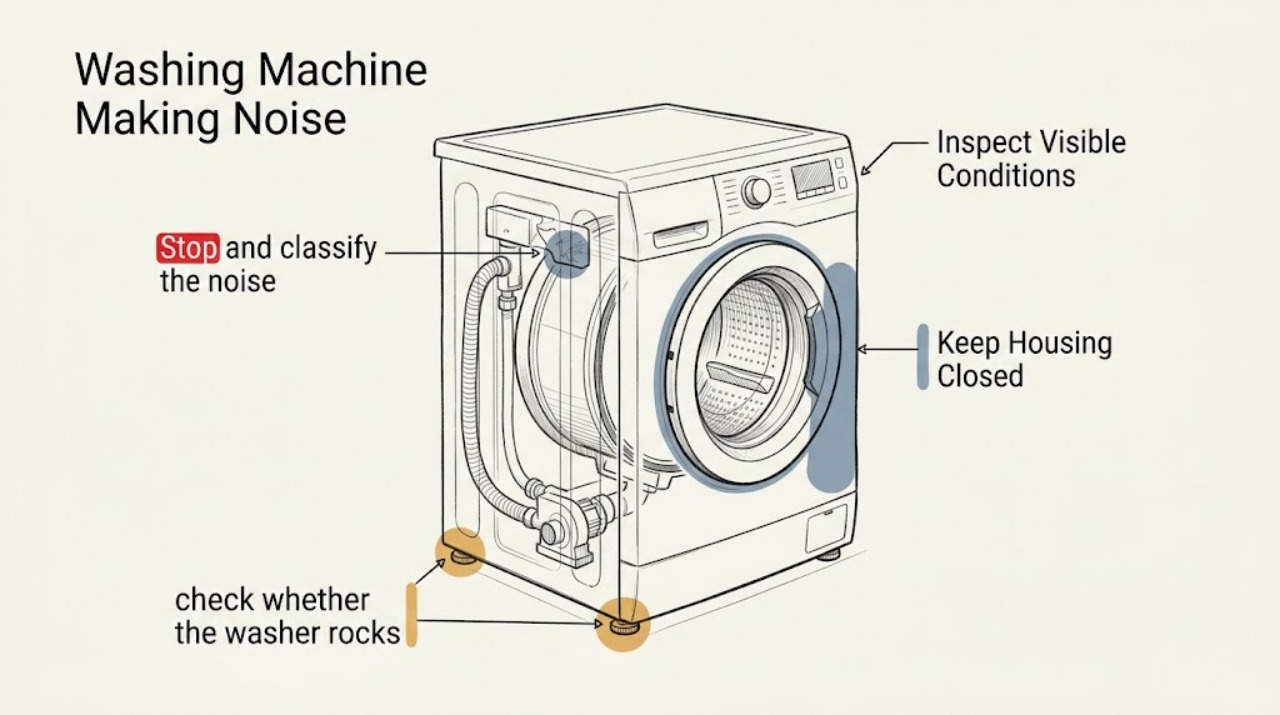
Work through in order
Diagnostic checks
Use only checks that match the exact appliance or system and its official guide.
-
Check 1
Stop and classify the noise by stage and pattern: filling, tumbling, draining, spin acceleration, high-speed spin or shutdown; describe it as click, pop, hum, buzz, rattle, thump, squeal, grind or jet-like, and note whether the cabinet moves or the drum speed changes with it.
Expected result: The sound is brief and tied to a normal transition, or it is continuous, speed-related, getting louder, accompanied by movement, water or a burning smell.
Next step: Keep the washer out of use for grinding, squealing, violent movement, water, burning or electrical odor. Otherwise continue with the specific load and installation checks without repeatedly running a noisy cycle.
Why this matters
Why: A brief transition or drain hum can be normal, while persistent speed-related metal contact, violent movement or an escalating noise changes the diagnosis toward load, installation or mechanical service.
-
Check 2
Check the load only after the drum has stopped: look for one heavy or waterproof item, a tangled blanket or sheet, an overloaded drum, or a very small load gathered on one side; redistribute or reduce the load according to the exact Samsung manual.
Expected result: The noise and thumping occur only with an uneven or bulky load, or the same noise occurs with a normal balanced load.
Next step: Use the correct cycle and load size, then stop if the washer still walks, bangs or makes metal-on-metal noise. Do not keep adding or removing laundry while the drum is moving.
Why this matters
Why: One-sided weight can make a washer thump, vibrate, pause or refuse high-speed spin. Noise that remains with a reasonable balanced load is not explained by load balance alone.
-
Check 3
From a dry standing position, check whether the washer rocks at its corners and whether all visible feet contact a firm, level floor; inspect for a slippery or damaged surface and for contact with a wall, pedestal, drip pan or adjacent appliance.
Expected result: The cabinet rocks, a foot is not firmly planted, the floor is soft or slippery, or the noise occurs when the washer contacts something outside the cabinet.
Next step: If the manual permits, level the washer and secure the applicable feet or nuts; do not force a heavy appliance through a wet or confined space. If it remains unstable or the floor or pedestal is damaged, arrange installation or appliance service.
Why this matters
Why: An unstable installation can amplify normal drum movement into rattling, walking and thumping. External contact can sound like an internal fault but should be corrected only according to the installation instructions.
-
Check 4
If the model is front-load and was recently installed or moved, use the exact manual to confirm that every shipping bolt and spacer was removed; do not pull the appliance out just to inspect the rear if access is unsafe.
Expected result: The manual or installation record shows shipping hardware remains, or the drum has normal spring movement and the hardware was removed.
Next step: Keep the machine off and have the installation corrected using the model instructions. Do not remove hardware from an unstable or inaccessible washer without safe assistance.
Why this matters
Why: Shipping bolts left in a front-load machine can make it shake severely during spin. Their presence is an installation fault, not a reason to run another high-speed cycle.
-
Check 5
With the washer stopped, inspect the visible drum opening, door edge and nearby exterior for coins, zippers, bra wires, buttons, loose objects, a cord or drain hose touching the cabinet, or a door seal that shows fresh rub marks.
Expected result: The object or hose moves when the cabinet is safely still, or the seal is worn, cut or being contacted by the drum; alternatively the visible area is clear and undamaged.
Next step: Remove only a loose object that is plainly accessible without reaching into a moving or energized machine. Stop for a damaged seal, deep object, scraping or any odor and request qualified service.
Why this matters
Why: Foreign objects and external contact can cause clicking or rattling. A damaged seal rubbing the drum can produce unusual noise and an unpleasant or burning smell, which requires service rather than continued operation.
-
Check 6
For a sound that occurs during filling or draining, compare it with the water phase and inspect only the visible supply and drain route for a closed valve, hose contact, kink, displacement or a loose holder; use the exact model manual before accessing a pump filter.
Expected result: A pop or brief valve sound occurs at filling, a hum occurs during draining, a hose is touching or kinked, water is leaking, or grating persists every cycle.
Next step: Correct only a clearly visible external routing issue allowed by the manual. Keep power isolated for water or leakage, and stop for a recurring pump noise, damaged hose, leak or inaccessible filter.
Why this matters
Why: A valve-opening pop or quiet drain hum may be normal. A recurring grating sound can involve the drain pump or filter, while a loose or damaged hose can cause both noise and water damage.
-
Check 7
If the manual identifies an owner-accessible pump filter and the washer is front-load, confirm the appliance is stopped, isolated, cool enough to handle, and able to contain residual water before following that written procedure; skip it when the model lacks the feature or any condition is uncertain.
Expected result: The manual authorizes the filter procedure and the area is safe, or the filter is inaccessible, water is present, the cover is damaged, or the same noise returns after the documented cleaning.
Next step: Follow only the exact model procedure and contain water safely. Do not tilt the washer, open panels or force a cover; request service for a blocked or damaged filter area or recurring noise.
Why this matters
Why: A pump filter can collect debris and create recurring grating or drain noise, but residual water and a damaged housing can create a flood or electrical hazard. A recurring noise after a permitted clean points to service.
-
Check 8
Make a service record instead of repeating a risky cycle: capture a short recording from a dry safe position, the stage and load when it occurs, model and serial information, front-load or top-load type, visible movement, water or odor, and any displayed code.
Expected result: The noise disappears after a documented load or leveling correction, or it persists with a balanced load and stable installation or includes scraping, walking, leak or electrical signs.
Next step: Keep the washer out of use for persistent or hazardous symptoms and request Samsung or qualified appliance service. Do not open the cabinet or run repeated high-speed tests.
Why this matters
Why: A resolved load or installation pattern supports an operating correction. Persistence after those checks points to a pump, seal, motor, drum-support or other internal fault that cannot be identified from sound alone.
Use your observations
Decision map
Find the observation that best matches what you see, then follow the next safe action.
-
PATH 01Safety boundary
What you see
The sound is a brief click, short click-then-thump during a mode change, quiet drain hum or fill-valve pop and there is no movement or damage
Do this next
Treat it as a possible normal operating sound and monitor it. Escalate if it becomes continuous, louder or is accompanied by movement, leak or odor.
Why this path and its safety boundary
Safety stop: Use the load, installation, object, hose and service branches.
-
PATH 02Safety boundary
What you see
Thumping or knocking tracks high-speed spin and the load is bulky, one-sided, overloaded or very small
Do this next
Stop, redistribute or reduce the load according to the manual, and use the appropriate cycle or spin setting. Stop if the washer still walks or bangs.
Why this path and its safety boundary
Safety stop: Check floor level, feet and shipping hardware before suspecting internal mechanics.
-
PATH 03Safety boundary
What you see
The cabinet rocks, slides or contacts a wall, pedestal, drip pan or another appliance
Do this next
Keep it stopped and correct only the model-authorized leveling or clearance issue; arrange assistance if moving the appliance is required.
Why this path and its safety boundary
Safety stop: Continue with the drum, seal, hose and pump-sound checks.
-
PATH 04Safety boundary
What you see
Rattling or clicking comes from a loose object, power cord, drain hose or accessible external contact
Do this next
Remove or reposition only the plainly accessible external item with the washer stopped. Request service for a deep object, damaged seal or noise that remains.
Why this path and its safety boundary
Safety stop: Do not assume an internal fault without checking the cycle stage and drain-pump branch.
-
PATH 05Safety boundary
What you see
Grating, grinding or rattling occurs during draining or every cycle
Do this next
Use the exact manual to determine whether a front-load pump filter may be safely cleaned. If the sound persists or the filter area is inaccessible, request service.
Why this path and its safety boundary
Safety stop: A brief hum or valve sound without other symptoms may be normal; document any change.
-
PATH 06Safety boundary
What you see
The sound is metal-on-metal, jet-like, escalating, or accompanied by a damaged door seal, burning smell, water or violent movement
Do this next
Stop the cycle and keep the washer out of use. Arrange qualified appliance service and do not reproduce the symptom.
Why this path and its safety boundary
Safety stop: Complete the low-risk load and installation checks once, then monitor rather than repeatedly testing.
-
PATH 07Safety boundary
What you see
There is water near the plug, socket or controls, a hot or damaged electrical connection, arcing or repeated breaker operation
Do this next
Do not touch wet electrical parts or enter uncertain standing water. Isolate electricity only from a dry safe position and obtain qualified electrical or appliance help.
Why this path and its safety boundary
Safety stop: Use Samsung Support or the exact manual for the remaining model-specific service path.
Helpful context
Understand the symptom
Use stage and pattern to narrow the cause
Listen for when the sound begins: filling, tumbling, draining, spin acceleration, high-speed spin or shutdown. A sound that follows the drum speed is different from a click at a mode change or a hum at the drain pump. Note whether the washer rocks, moves, leaks or smells hot. These observations are more useful than describing every noise as simply loud.
The common owner checks are outside the cabinet
Samsung's support guidance puts the first checks at the load, floor, feet, shipping bolts, visible hoses and loose objects. Front-load models may have a pump filter; top-load models may not. Use the exact model manual before opening a filter cover or changing a setting, and never remove a rear hose retainer or open a panel merely to chase a sound.
A persistent mechanical noise is a service clue
If the load is balanced, the washer is stable, external items are clear and the same metal or jet-like noise returns, stop the cycle and arrange service. A door-seal rub, pump obstruction, motor, drum support or bearing problem cannot be confirmed safely by repeated high-speed cycles. A short recording made from a safe dry position can help the technician reproduce the symptom without extending the risk.
Safety boundary
Stop conditions
- Stop immediately for metal-on-metal scraping, a jet-like noise, violent movement, walking, a damaged door seal, water near electrics, burning or electrical odor, arcing, a hot outlet or repeated breaker operation.
- Do not run repeated high-speed cycles to reproduce the noise, and do not open panels, probe energized circuits or reach into a moving drum.
- Do not tilt, drag or move the washer through water; do not force a pump filter or service cover when residual water may be hot or uncontrolled.
- Keep the washer out of use when the noise persists after one documented load, leveling or external-contact check, or when the source is behind the cabinet.
- Use qualified appliance service for a recurring pump, seal, motor, bearing, drum-support or suspension symptom and qualified electrical help for supply or outlet concerns.
Only after diagnosis
Potential parts
- drain pump or pump filter housing
Consider this category only when recurring drain-stage grating or a qualified diagnosis confirms a pump or housing fault on the exact model.
Confirm the exact model and front-load or top-load configuration; do not order or open the pump path based on sound alone. - door seal
Consider this category only when the visible seal is damaged or rubbing and a qualified diagnosis confirms it is the noise source.
Match the exact model and door configuration; do not run the washer with a torn or rubbing seal. - suspension, drum support or bearing component
Consider this category only after persistent speed-related noise, drum movement or walking remains with a balanced load and stable installation and a qualified technician confirms the fault.
Confirm exact model fitment and professional diagnosis; these are not owner-level sound-based replacements.
When checks do not resolve it
Need a professional?
Use Samsung Support and the exact model manual for the applicable front-load or top-load procedure, shipping-bolt information, pump-filter access and service route. Request qualified appliance service for persistent noise with a balanced load and stable installation, recurring pump noise, a damaged door seal, suspected drum or bearing movement, a jet-like sound, walking or any leak. Use qualified electrical help for a wet or damaged outlet, arcing, a hot plug or repeated breaker operation.
Safety scope: Owner checks are limited to stopped-machine observations, load arrangement, dry visible external contact, model-authorized leveling and the exact manual's safe filter procedure. Do not open panels, test energized circuits, reach into a moving drum, tilt the washer, force a filter or continue with water or electrical damage.
Common questions
FAQ
Why does my Samsung washing machine thump during spin?
Check for a one-sided, bulky or overloaded load, then check that the washer is level and stable. Front-load models also need their shipping bolts removed. Stop if it still walks or bangs with a balanced load.
Is a clicking sound from a Samsung washer normal?
A brief click at a cycle transition or a click followed by a short fading thump can be normal. Clicking throughout the cycle should prompt checks for external contact and loose objects, followed by service if it remains.
What causes grinding or grating during drain?
A drain pump can make an intermittent grating sound, but recurring noise may involve debris or a pump fault. Use the exact model manual before opening a front-load filter, and request service if the sound persists.
Should I run another cycle to diagnose a loud noise?
Do not repeatedly run a noisy or violent cycle. Record the stage, load and sound from a safe dry position, and stop for grinding, walking, water, burning odor or electrical symptoms.
Can a damaged door seal cause Samsung washer noise?
Yes. A seal that rubs the drum can make an unusual sound and may be accompanied by an unpleasant or burning smell. Keep the washer off and arrange service for a worn, torn or rubbing seal.
What information should I give Samsung Support?
Provide the exact model, front-load or top-load type, recording, cycle stage, load, whether the washer rocks or walks, shipping-bolt status, visible hose or seal condition, and any water, odor, code or breaker symptoms.
Read the exact guide
Official sources
- Samsung Washer FAQSamsung · General Samsung washer FAQ; features and sounds vary by model.
- What to do if your washing machine is noisy or vibratingSamsung UK · Samsung UK guidance used for sound categories and service boundaries; exact model and region control the procedure.
- Samsung washing machine is too noisySamsung · Samsung US washing-machine noise guidance; exact model instructions control filter access and other procedures.
- Samsung washing machine is shakingSamsung · Samsung washer vibration guidance; front-load shipping-bolt instructions are model-specific.
- Install a Samsung washing machine in your homeSamsung · Samsung US installation guidance; dimensions and procedures vary by model.
- Samsung washing machine is leakingSamsung · Samsung US leak guidance; access and drain requirements vary by model.
- Washers and Dryers SupportSamsung · Samsung support entry point; model lookup is required for the applicable manual and service route.
Community feedback
Share a repair observation
Share a plain-text repair observation. Accepted observations are published automatically; this page may take a moment to update.