
On this page
Start here
Quick answer
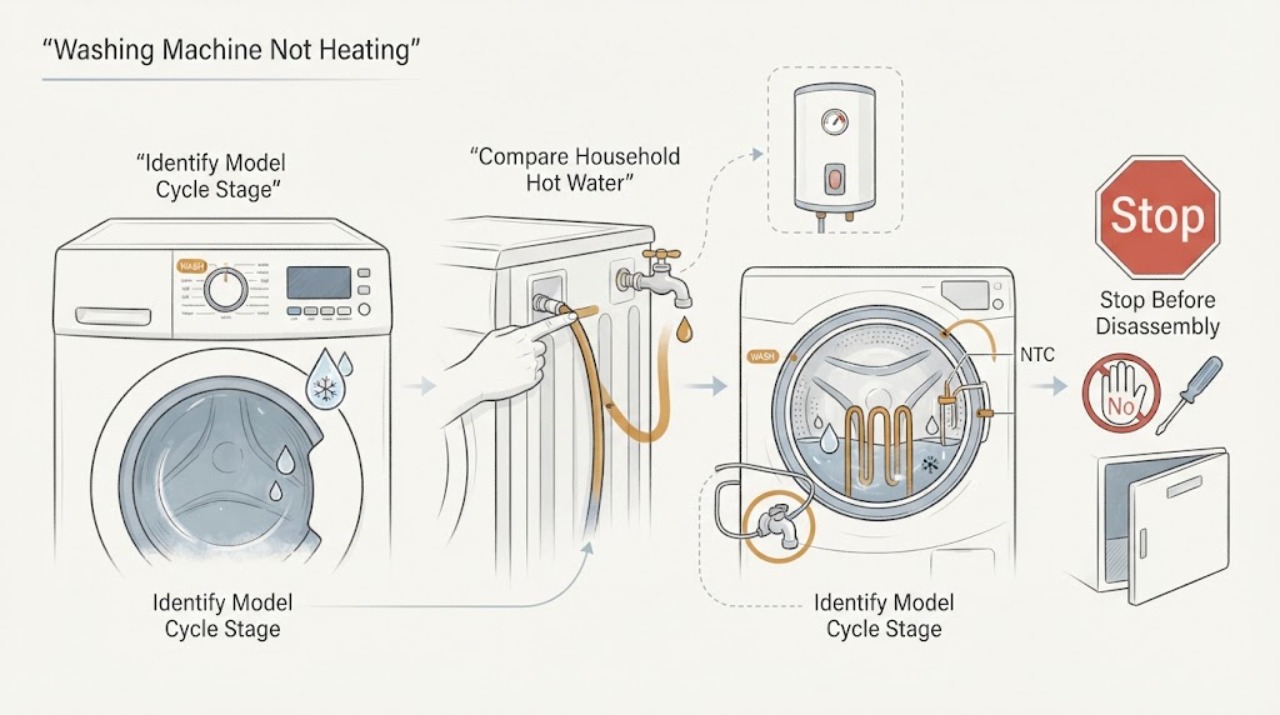
A Samsung washer that seems not to heat may be working normally: many cycles use cold water for part of the program, Samsung washers mix hot and cold with Auto Temperature Control, and the final rinse may be the only warm part of a Warm cycle. First record the exact model, cycle, temperature setting, and stage, then compare the water only during a stage that should use hot water. Confirm the hot and cold valves are open and the hoses are connected to the matching inlets, and check whether the household water heater has hot water available. Do not assume every Samsung washer has an internal heater or Steam feature; those are model-specific. If an exact fill, temperature, heater, or system code appears, use the matching manual rather than guessing. Stop for a leak near electricity, hot water that could scald, smoke, burning odor, a hot cord, sparks, or a repeated breaker trip. After correcting an obvious external supply condition and performing one safe, model-authorized power cycle, persistent cold water or a recurring code needs qualified appliance service.
Work through in order
Diagnostic checks
Use only checks that match the exact appliance or system and its official guide.
-
Check 1
From a dry, stable position, inspect the washer, floor, hoses, plug, receptacle, and cabinet before touching a hose or starting another cycle.
Expected result: Record a leak, water near electricity, very hot water, smoke, burning or melting odor, sparks, a hot or discolored cord or outlet, severe movement, or a breaker that trips again.
Next step: If a hazard is present, stop the cycle if safe, isolate power or water only from a dry safe position, and arrange qualified appliance, electrical, or plumbing service as appropriate. Otherwise continue without moving or opening the washer.
Stop if: Do not touch a wet plug or outlet, reach under the cabinet, move a leaking washer, operate a smoking machine, or reset a tripping breaker repeatedly.
Why this matters
Why: These are safety conditions, not evidence for a routine temperature check. A clean, dry exterior permits only external observations and does not make internal heater or wiring access safe.
-
Check 2
Read the full Samsung model number and record front-load or top-load configuration, selected cycle, temperature setting, options such as Steam if present, and the exact stage at which the water seems cold.
Expected result: Record whether the concern occurs during initial fill, wash, rinse, final rinse, a sanitize or steam option, or after the cycle; note the display, flashing lights, and whether the machine completes normally.
Next step: Use the matching Samsung manual and cycle guide to identify the expected water behavior before testing a hot stage; preserve the exact display text.
Stop if: Do not infer a failed heater from a cool door, a cold rinse, low water level, or a cycle name without checking the model documentation.
Why this matters
Why: A cold stage that is designed to use cold water is normal. A temperature concern only during a model-specific hot or steam stage needs a different path from a fill error or a cycle that completes without an apparent heat demand.
-
Check 3
From a safe position, determine whether another nearby fixture supplies hot water and whether the washer's hot-water concern began while a shower, dishwasher, or other hot-water use was active; do not change the water-heater setting.
Expected result: Record hot water normal elsewhere, hot water temporarily depleted, hot water consistently unavailable, or a plumbing/heater concern that affects the home.
Next step: Allow the household supply to recover and recheck only the documented hot stage. If other fixtures remain cold, arrange qualified plumbing or water-heater service before diagnosing the washer.
Stop if: Do not raise the water-heater temperature as a washer fix, touch scalding water, open plumbing covers, or continue with a leak or water near electricity.
Why this matters
Why: Samsung notes that the household water heater's temperature, capacity, and recovery can affect washer hot-water availability. A home-wide hot-water problem is not an internal washer heater diagnosis.
-
Check 4
With the washer off and the connections dry, visually check that both water valves are open, the hot hose goes to the hot inlet, the cold hose goes to the cold inlet, and neither visible hose is bent or pinched; do not loosen a pressurized connection.
Expected result: Record a closed valve, crossed hoses, kink, damaged hose, normal routing, or an external leak at a connection.
Next step: Correct only an obvious external valve or routing condition using the exact installation instructions, then check for leaks from a safe position. If the issue remains, arrange service.
Stop if: Do not disconnect a pressurized hose, overtighten a fitting, use a damaged hose, or continue if water reaches the plug or controls.
Why this matters
Why: Samsung says crossed or restricted lines can cause wrong-temperature water or a water-supply error. A hose-routing issue can mimic a heating failure, while a leak needs immediate water and electrical caution.
-
Check 5
Select the exact model's documented hot-capable cycle and temperature setting, disable a coldest or cold-only option, and compare behavior only during the stage the cycle guide identifies as using hot water.
Expected result: Record a normal warm/hot stage, cold water throughout, only a cold rinse, a setting that does not allow hot water, or an error when the washer attempts to fill.
Next step: Use the matching manual to confirm the expected phase and options, then continue to the supply or code branch rather than repeating cycles with random settings.
Stop if: Do not use a high-temperature cycle to force a test, touch hot water, or change settings while the washer is running or locked.
Why this matters
Why: Samsung says temperature labels and cycle phases do not all demand hot water; for example, some Warm cycles use cold water until the final rinse. A correct hot-capable setting with persistently cold water shifts the concern to supply or model-specific service.
-
Check 6
If the washer shows a water-supply or temperature-related code or flashing-light pattern, photograph or transcribe it exactly with the model, stage, hose routing, and household hot-water result.
Expected result: Record a fill/water-supply code such as 4C/4E/nF or a model-specific temperature, heater, or sensor code, or no code at all; note whether the same code returns.
Next step: Follow only the matching manual's safe external correction, then stop after one recurrence and arrange qualified service with the code preserved.
Stop if: Do not enter service mode, erase the code through repeated resets, open the console, or order a heater or sensor by code text alone.
Why this matters
Why: Samsung lists fill, temperature-sensor, and heater errors but warns that codes vary by model. A fill code may reflect hose routing or supply; a recurring heater or sensor code needs model-specific diagnosis rather than a guessed element.
-
Check 7
If the complaint concerns Steam, Sanitize, or another special high-temperature function, verify that the option exists for the exact model and that the cycle has reached its intended phase; do not assume every Samsung washer has an internal heater.
Expected result: Record the option is unavailable, the option is accepted but no hot behavior occurs, the cycle completes with a documented delay, or an exact heater/temperature code appears.
Next step: Use the exact manual's cycle description and error path. If the feature is applicable but remains ineffective, leave the washer off after a safe check and arrange appliance service.
Stop if: Do not add hot water manually, bypass a sensor, remove panels, or run repeated sanitize/steam tests after an error, leak, odor, or abnormal heat.
Why this matters
Why: Special heating features and their components are model-specific. An unavailable option is not a fault; an accepted option with a recurring code or no expected result needs the model manual and service diagnosis.
-
Check 8
Record whether the washer completes the cycle, stops with water, or ends with wet clothes; if water remains, inspect only the visible drain hose and use the exact model's drain procedure, allowing recently used hot-cycle water to cool first.
Expected result: Record normal completion with a cold final rinse, standing water, a drain code, slow discharge, or a locked door with water inside.
Next step: Treat standing water or a drain code as a drain branch, not a heater diagnosis. Follow the model manual only when safe; arrange service when water remains or the door stays locked.
Stop if: Do not open a hot filter, reach into a pump, force a locked door, tilt the washer, or work with water near electricity.
Why this matters
Why: A cold final rinse can be normal, while incomplete drainage can prevent later stages and make a temperature complaint misleading. Samsung cautions that water after a hot cycle may be very hot before drain work.
-
Check 9
After correcting an obvious safe external supply or setting issue and documenting any code, perform one model-authorized power cycle only while the washer is dry, stable, and free of abnormal heat, odor, noise, or leak.
Expected result: Record whether the washer resumes expected temperature behavior, the same code returns, hot water remains absent, or the washer becomes unresponsive.
Next step: Run one ordinary model-approved cycle only if no hazard exists. If the symptom returns, stop and arrange qualified service with the original observations.
Stop if: Do not reset after a leak, scald risk, smoke, burning smell, spark, hot connection, severe movement, or repeated breaker trip, and do not keep power-cycling.
Why this matters
Why: Samsung says a power cycle can clear a temporary issue but does not fix the underlying condition; a recurring code or persistent cold result needs diagnosis.
-
Check 10
After the safe external checks, classify the concern as normal cycle temperature, household hot-water supply, hose/valve routing, drain or completion, or model-specific heater/sensor/control fault and prepare a service handoff.
Expected result: Choose the strongest evidence: cold-only setting or rinse; home-wide hot water unavailable; crossed or kinked hose; standing water; recurring fill/heater/temperature code; or a correct hot stage that remains cold with normal supply.
Next step: Provide the model, cycle, temperature option, stage, household hot-water result, hose routing, exact code, completion/drain result, reset result, and all safety observations. Keep the washer disconnected if a hazard occurred.
Stop if: Do not remove panels, test live components, open a heater circuit, or replace an inlet valve, heater, sensor, or control based only on cold water.
Why this matters
Why: The classification tells a technician whether to begin with plumbing and water supply, drain and lock, or the washer's model-specific sensing/heating/control path. It does not identify a replacement part by itself.
Use your observations
Decision map
Find the observation that best matches what you see, then follow the next safe action.
-
PATH 01Safety boundary
What you see
There is a leak near electricity, scalding water, smoke, burning odor, sparks, a hot or damaged connection, severe movement, or a repeated breaker trip.
Do this next
Stop, isolate power or water only from a dry safe position when possible, and arrange qualified appliance, electrical, or plumbing service.
Why this path and its safety boundary
Why it matters: The washer must not be tested as a temperature problem.
Safety stop: Do not touch wet electrical parts, move the machine, run another cycle, or repeatedly reset protection.
-
PATH 02Safety boundary
What you see
The concern occurs during a cold-only setting, a cold rinse, or a cycle phase that Samsung documents as using cold water.
Do this next
Use the exact cycle guide and compare only at the documented hot-capable phase; do not add heat or change internal parts.
Why this path and its safety boundary
Why it matters: The observed water may be normal for that model and phase rather than evidence of a failed heater.
Safety stop: Do not run repeated hot cycles or touch water to prove a normal cold phase.
-
PATH 03Safety boundary
What you see
Other fixtures are also cold or the hot-water supply has been depleted by simultaneous use.
Do this next
Allow recovery and arrange qualified plumbing or water-heater service if hot water remains unavailable; recheck the washer only after supply is normal.
Why this path and its safety boundary
Why it matters: The home water heater, capacity, or recovery is the leading boundary, not an internal washer heater.
Safety stop: Do not alter water-heater settings as a washer repair or touch scalding water.
-
PATH 04Safety boundary
What you see
The hot and cold hoses are crossed, a valve is closed, a hose is kinked, or an external connection leaks.
Do this next
Correct only an obvious safe external valve or routing issue according to the installation instructions; arrange service for damage, leaks, or persistent error.
Why this path and its safety boundary
Why it matters: Water supply routing can cause wrong temperature or fill errors and can also create an electrical hazard if leaking.
Safety stop: Do not loosen pressurized fittings, use damaged hoses, or continue with water near electricity.
-
PATH 05Safety boundary
What you see
The washer stops with water, cannot complete draining, ends wet, or shows a drain/overflow code.
Do this next
Follow the exact model's safe external drain guidance and allow hot-cycle water to cool; arrange service if water remains, a filter is inaccessible, or the code returns.
Why this path and its safety boundary
Why it matters: The later cycle stage may be blocked by drainage rather than heating; hot water may also be unsafe to handle.
Safety stop: Do not open a hot filter, reach into a pump, force the door, or tilt the washer.
-
PATH 06Safety boundary
What you see
The concern is limited to Steam, Sanitize, or another special heating feature that exists only on some models.
Do this next
Confirm the feature and expected phase in the exact manual, then arrange service for a persistent applicable failure or code.
Why this path and its safety boundary
Why it matters: Feature availability and heating hardware are model-specific; an unavailable option is not a failure.
Safety stop: Do not manually add hot water, bypass a sensor, or open the cabinet to inspect a heater.
-
PATH 07Safety boundary
What you see
A heater, temperature-sensor, or system code returns after the documented external checks and one authorized reset.
Do this next
Leave the code and timeline intact and arrange qualified Samsung appliance service with the exact model.
Why this path and its safety boundary
Why it matters: The washer needs model-specific diagnosis; a code is not a universal part number.
Safety stop: Do not repeatedly reset, enter service mode, or replace a heater or sensor by code alone.
-
PATH 08Safety boundary
What you see
A hot-capable phase is confirmed, the home supply and hose routing are normal, the washer completes or accepts the cycle, but water remains unexpectedly cold.
Do this next
Stop internal troubleshooting and arrange qualified appliance service with the model, cycle phase, water-supply result, and code history.
Why this path and its safety boundary
Why it matters: A model-specific temperature-sensing, heating, valve, wiring, or control fault is possible and cannot be identified safely from outside.
Safety stop: Do not remove panels, test live voltage, reach into the heater path, or order an internal part from the symptom alone.
Helpful context
Understand the symptom
Confirm that the cycle should be hot before diagnosing heat
A cool door, small water volume, or cold rinse does not prove a Samsung washer cannot heat. Samsung says Auto Temperature Control mixes hot and cold water and that different portions of a cycle can use either or both. Some Warm cycles use cold water until the final rinse, while the coldest setting uses cold water only on applicable models. Use the exact cycle guide and compare temperature only at the stage where that model calls for hot water.
The home's hot-water supply is part of the washer diagnosis
If a hot stage is genuinely cold, check whether other fixtures have hot water and whether the water heater has recovered from simultaneous use. Samsung advises checking that the hot line supplies hot water and that the hot and cold washer hoses are connected to the matching valves. Do not change a water-heater setting or disconnect a hose as a quick test; use the appliance manual and qualified service for installation or plumbing work.
Do not assume an internal heater or Steam feature
Samsung washers vary by model, load configuration, and cycle features. A washer may rely on household hot-water supply, while some models have additional heating or Steam functions. A temperature-sensor or heater code can also mean different things across models. Record the code and model, then use the matching manual; do not open the cabinet or order an internal heater from a generic symptom.
Water and electrical safety set the stopping point
Hot water can burn, and a leak can put water near an electrical connection. Turn off the washer and isolate power only from a dry safe position for a leak, hot electrical connection, smoke, burning odor, sparks, or a repeated breaker trip. Samsung advises allowing recently used hot-cycle water to cool before a drain procedure. Internal heater, sensor, wiring, and control work belongs with qualified appliance service.
Safety boundary
Stop conditions
- Stop for a leak near the plug, outlet, controls, or a wet floor around electricity; isolate power or water only from a dry safe position and do not touch wet electrical parts.
- Stop for scalding water, smoke, burning or melting odor, sparks, a hot or discolored connection, severe movement, or a repeated breaker/GFCI trip.
- Do not open a hot or pressurized filter, reach into a pump, force a locked door, tilt the washer, or disconnect a full hose without a safe drain plan.
- Do not remove panels, test live heater or sensor circuits, bypass locks, manually add hot water, or assume every model has an internal heater or Steam feature.
- Do not repeatedly reset or run cycles after a recurring code, leak, abnormal heat, odor, noise, violent vibration, or persistent cold result.
Only after diagnosis
Potential parts
- water inlet valve
Consider only when a powered washer has a verified fill or hot/cold routing problem and qualified diagnosis identifies the valve after faucet, hose, and supply checks.
Confirm the complete Samsung model and inlet configuration before selecting any part; do not disconnect a pressurized hose as a first test. - temperature sensor
Consider only when the exact model displays a recurring temperature-sensor code or qualified testing links the cold hot-capable phase to that sensor.
Sensor identity and fit are model-specific; verify the manual and professional diagnosis before ordering. - washer heater or Steam heating assembly
Consider only for a model that actually has the applicable heating feature and after qualified diagnosis confirms the heating assembly fault.
Not every Samsung washer has an internal heater or Steam system; confirm exact model, feature, and diagnosis. - washer control assembly
Consider only after qualified diagnosis connects a recurring temperature, valve, heater, or cycle-control symptom to the model's control assembly.
A cold-water complaint does not identify a control board; confirm model, revision, and diagnostic evidence.
When checks do not resolve it
Need a professional?
Arrange qualified appliance service when a confirmed hot-capable phase remains cold after the household hot-water supply and hose routing are normal, a heater or temperature code returns, Steam or Sanitize fails on an applicable model, or the washer cannot complete because of a persistent drain, lock, sensor, or control symptom. Use qualified plumbing or water-heater service for home-wide hot-water failure and electrical service for a failed or repeatedly tripping circuit. Treat leaks near electricity, scalding water, smoke, burning odor, sparks, severe movement, and repeated trips as immediate stop conditions.
Common questions
FAQ
Why is my Samsung washer cold even on Warm?
Samsung says temperature behavior is cycle-dependent and Auto Temperature Control mixes hot and cold water. Some Warm cycles use cold water for part of the cycle, especially before the final rinse. Check the exact model's cycle guide and compare only during a documented hot-capable phase.
Why does my Samsung washer show a water-supply error when I select Cold?
Some Samsung models may still use the hot line when water is very cold, and crossed or missing hot/cold hoses can cause a water-supply error. Check the exact model, both valves, and matching hose routing without disconnecting a pressurized connection.
Does every Samsung washer have an internal heater or Steam feature?
No. Samsung washer features vary by model. Confirm Steam, Sanitize, or any internal heating function in the exact manual; an unavailable option is not a failed heater. A persistent applicable failure or heater code needs qualified service.
Can a drain problem look like a Samsung washer heating problem?
Yes. A washer that stops with water or cannot drain may never reach the next stage, and a cold final rinse can be normal. Record the stage and water level, follow only the model's safe drain guidance, and allow hot-cycle water to cool before any drain procedure.
Should I keep resetting my Samsung washer after a heater code?
No. Samsung says a power cycle may clear a temporary condition but does not fix the underlying error, and a returning code should not be repeatedly cleared. Preserve the exact code and arrange model-specific service.
Read the exact guide
Official sources
- Install a Samsung washing machine in your homeSamsung · Samsung washers when visible hose routing or leaks are part of a temperature diagnosis
- Cycles, settings, and features on your Samsung washing machineSamsung · Samsung washers when deciding whether a selected cycle or rinse should use hot, warm, or cold water; exact model manual controls
- Samsung washing machine will not drainSamsung · Samsung washers that stop with water or cannot complete a cycle at drain/spin
- Samsung washing machine information and error codesSamsung · Samsung washers when an exact code or flashing pattern accompanies a temperature or incomplete-cycle concern
- How to reset your Samsung washing machineSamsung · Samsung washers after troubleshooting, only when the machine and connection are safe
- Samsung SupportSamsung · Samsung washers when the exact model manual or support route is needed
- Water fill issues with Samsung washing machinesSamsung · Samsung front-load and top-load washers when water seems too cold, fill timing is unusual, or a water-supply code appears
Community feedback
Share a repair observation
Share a plain-text repair observation. Accepted observations are published automatically; this page may take a moment to update.