
On this page
Start here
Quick answer
For a GE GRF600AV1SS that stopped heating after an outage, turn every range control to Off and first record whether the display is blank and whether the oven and all surface elements are affected. With the appliance cool and without moving it or opening a panel, check the range's two-pole breaker or fuses and confirm the accessible power connection is firm. Do not perform a live voltage test or keep resetting a breaker that trips again. If power returns but the range still will not heat, or if there is a hot plug, burning odor, smoke, spark, visible element damage, or a crack, leave the range off and arrange qualified appliance or electrical service. Apply these GE 600 Series instructions only when the rating label and owner manual match the assigned GRF600AV1SS; the opened GE Owner Center page is labeled GRF600AVSS.
Before you begin
Safety first
- Do not open panels, probe live terminals, move the range to reach wiring, bridge a fuse, upsize a breaker, or replace an element based only on the outage timing. Disconnect power before any maintenance expressly allowed by the matching manual.
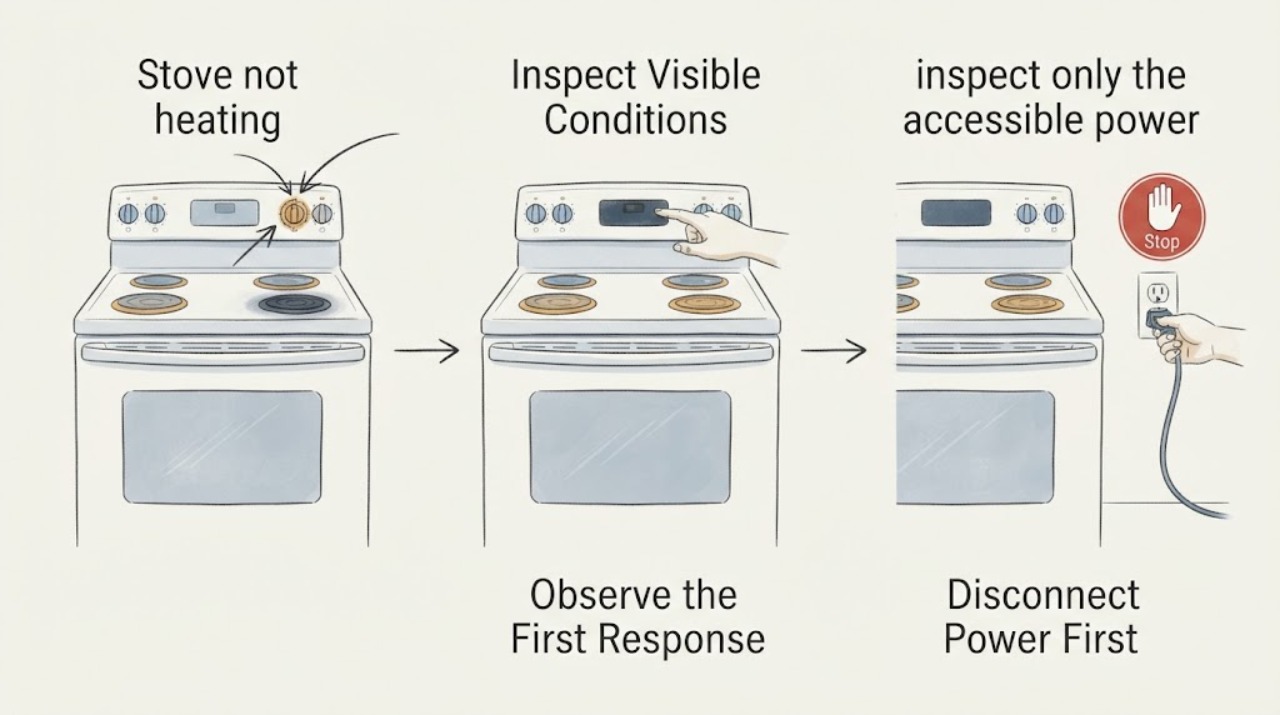
Work through in order
Diagnostic checks
Use only checks that match the exact appliance or system and its official guide.
-
Check 1
Turn all surface and oven controls to Off. Without starting another heating cycle, observe whether the display or clock is blank, whether any control responds, and whether the oven and every surface element are affected.
Expected result: The display is blank and no controls respond; the display works but the oven and all elements are cold; or only one element is cold.
Next step: For a blank display or whole-range symptom, continue only with the external power check. For one cold element, record its position and do not open the range; use the matching manual or service path.
Why this matters
Why: A blank display or whole-range loss of heat is a range-level power or control symptom. One cold element with the display and other heat zones working is a narrower symptom. Neither observation proves a failed element or control.
-
Check 2
From a safe standing position, check the range circuit at the electrical panel. For this electric range, look for either part of the two-pole breaker being tripped or a blown fuse; if there is no smoke, heat, odor, or visible damage and local rules allow it, one deliberate Off-then-On reset is the only reset to try. Do not remove the range or perform a voltage test.
Expected result: Both breaker poles or fuses appear normal; the breaker will not stay on; it trips again immediately; or the panel, plug, or accessible cord shows heat, scorching, or damage.
Next step: Leave the range off. Use an electrician for a repeatedly tripping household circuit and qualified appliance service when the range itself is implicated; do not upsize, bridge, or repeatedly reset a protective device.
Why this matters
Why: A breaker that will not hold or trips again is an unresolved electrical fault, not evidence that a heating element should be replaced. Heat, scorching, or odor raises the fire and shock risk.
-
Check 3
If the controls are still dead, inspect only the accessible power connection without pulling the range or removing the storage drawer farther than the manufacturer permits. If the range has power but heat does not return, wait until the surfaces are cool and look from above for a cracked glass surface, a split or visibly damaged heating element, scorching, or a melted-looking connection; do not touch, lift, or probe the element.
Expected result: The accessible connection is loose or damaged; a heating element or glass surface is visibly damaged; or the range looks intact but remains cold after power is confirmed.
Next step: Stop using the range when damage is visible or the cause remains unresolved. Give service the model and serial label, which zones are cold, breaker state, and any outage, spark, smoke, or odor history.
Why this matters
Why: A loose or damaged connection needs qualified electrical or appliance service. GE warns that broken cooktop glass can create shock and cut risk, and a damaged heating element can present burn, fire, or shock hazards. A clean appearance does not identify the hidden fault.
-
Check 4
Record what changed when power returned: whether the clock needed resetting, whether the display came back, whether any control produced a response, and whether the problem affects the oven, every surface element, or one position. Take a photo of the rating label and visible damage only after the appliance is cool and safe.
Expected result: The range recovered after power was restored; the display works but heat is absent; or the range remains completely dead.
Next step: If any heating function remains unavailable, leave the range off and arrange service with the complete model and serial information. Do not repeat heating cycles solely to see whether it starts.
Why this matters
Why: The outage timeline and scope help the technician distinguish a supply event from an appliance-side failure without asking the owner to diagnose internal wiring or controls.
Use your observations
Decision map
Find the observation that best matches what you see, then follow the next safe action.
-
PATH 01Next step
What you see
The display is blank, no controls respond, and one or both range breaker poles or fuses are not normal after the outage.
Do this next
After one safe reset only when there is no damage or odor, leave the range off if power does not hold and arrange electrical or appliance service.
Why this path and its safety boundary
Why it matters: This is the official GE no-power path and does not establish that a surface element or oven element failed.
-
PATH 02Next step
What you see
The display works, but the oven and every surface element remain cold after the household supply is restored.
Do this next
Stop using the range and provide the technician the outage timeline, breaker state, display behavior, model suffix, and serial label.
Why this path and its safety boundary
Why it matters: A whole-range symptom needs supply, installation, or range-level diagnosis; the evidence does not justify naming a particular internal part.
-
PATH 03Next step
What you see
The display and other heat zones work, but one surface element or the oven remains cold, with no visible crack, scorching, smoke, or odor.
Do this next
Keep the affected function off and use the exact manual/service path for the complete GRF600AV1SS identity; do not move wires or open the control area.
Why this path and its safety boundary
Why it matters: The scope is narrower, but an element, control, or connection cannot be distinguished safely from an external observation alone.
-
PATH 04Next step
What you see
The breaker trips again, the plug or cord is hot or scorched, smoke or a burning odor appears, or the glass or heating element is visibly damaged.
Do this next
Do not re-energize or test the range. Leave the area safe, disconnect power only if it can be done without exposure, and arrange qualified service or local emergency help as appropriate.
Why this path and its safety boundary
Why it matters: This is a stop-use electrical, fire, shock, or burn hazard condition.
Helpful context
Understand the symptom
Separate a continuing outage from a range fault
A power interruption can leave an electric range with no heat simply because the burners and oven cannot operate without supply power. GE also says the oven does not restore the previous cooking settings when power returns. A blank display, a tripped two-pole breaker, or a range that has no working heating zone is a different starting point from one isolated surface element that stays cold while the clock and other functions work.
Keep the inspection outside the electrical enclosure
The GE 600 Series manual says that service not specifically recommended in the manual belongs to a qualified appliance installer or service technician and requires power to be disconnected before service. That boundary matters after an outage because a loss of heat does not identify whether the cause is the supply, a connection, a control, or a heating element. Do not remove covers, probe terminals, bridge a fuse, or substitute a larger breaker.
Treat the model suffix as a matching check
The opened GE Owner Center identifies the closely related GRF600AVSS and links a 600 Series electric range manual, while the assigned identity is GRF600AV1SS. Use the steps here only after the rating label and the manual supplied for the appliance agree. If the label has another suffix or a different gas or induction configuration, stop and use that model's documentation instead of transferring element, breaker, or control instructions.
When checks do not resolve it
Need a professional?
Call a qualified appliance technician or electrician if the range remains without heat after external power is restored, the display stays blank, the breaker or fuse trips again, the cord or plug is hot or damaged, or any element, glass, smoke, or odor warning appears.
Safety scope: Do not open panels, probe live terminals, move the range to reach wiring, bridge a fuse, upsize a breaker, or replace an element based only on the outage timing. Disconnect power before any maintenance expressly allowed by the matching manual.
Have this ready
- Provide the complete rating-label model and serial, whether the display is blank, which heating zones are cold, breaker or fuse state, whether power returned, and any spark, smoke, hot-plug, burning-odor, or visible-damage history.
Common questions
FAQ
Can a power outage make the GE GRF600AV1SS stop heating without a failed element?
Yes. GE states that electric burners and ovens do not operate during an outage, and the oven does not restore the previous cooking settings when power returns. First determine whether the range has power and whether the problem affects the whole appliance before treating one heating zone as a component fault.
Should I reset the range breaker after the outage?
GE support says to check the range breaker or fuses, including both breakers where fitted, and its no-power article describes an Off-then-On check. Do not keep resetting it: if it will not hold or trips again, leave the range off and arrange electrical or appliance service.
Can I replace the heating element myself after an outage?
Do not assume the element failed from the outage alone. GE's 600 Series manual requires power to be disconnected before service and sends repairs not specifically recommended in the manual to a qualified technician. A visible crack or damaged element is a reason to stop using the range and arrange service, not to perform a live test.
Why does the assigned model need a manual match?
The opened GE Owner Center page identifies GRF600AVSS and links a 600 Series manual, while this task uses GRF600AV1SS. Confirm the exact rating-label suffix and matching manual before applying any model-level instruction; if they differ, stop and use the documentation for that exact range.
Read the exact guide
Official sources
- Range - No Power; Not Coming OnGE Appliances · External checks only: firm cord connection, breaker, and visible cord condition; no internal electrical diagnosis.
- User Manual & Care for GRF600AVSSGE Appliances · Family and documentation-path evidence only; do not silently substitute GRF600AVSS for the assigned GRF600AV1SS.
- GE Ranges Electric 600 Series / 700 Series Owner's Manual, 49-2001192 Rev. 4GE Appliances · Opened manufacturer-linked manual used for external safety and service boundaries; no model-specific internal diagnosis is transferred when the suffix or manual differs.
- Range & Wall Oven - No PowerGE Appliances · External plug, two-breaker, and fuse checks only; persistent no-power condition goes to service.
- GE Appliance - Circuit Breaker TripsGE Appliances · Visible external checks and escalation only; no live testing or internal component diagnosis.
- FAQs | Ranges & OvensGE Appliances · General GE guidance for breaker, cord, scope, and visible element checks; exact model instructions remain controlling.
- Range, Cooktop & Wall Oven - Power Outage Tips and OperationGE Appliances · General GE electric-range outage behavior; exact model controls and recovery settings remain manual-specific.
Community feedback
Share a repair observation
Share a plain-text repair observation. Accepted observations are published automatically; this page may take a moment to update.