
On this page
Start here
Quick answer
When a Summit refrigerator is not cooling, first confirm that it has power and is actually turned on, then check the thermostat setting, door seal, internal airflow, frost on the rear wall, condenser clearance, and room temperature. Summit's official FAQ says a newly installed unit may need up to 24 hours to cool, while blocked vents, a poorly closed door, excessive frost, a dirty rear condenser, unsuitable room temperature, or an incorrect control setting can reduce cooling. If these checks do not restore cooling, or the refrigerator has damaged wiring, a refrigerant concern, or another unsafe condition, protect the food and arrange an authorized Summit technician rather than opening the cooling system.
Work through in order
Diagnostic checks
Use only checks that match the exact appliance or system and its official guide.
-
Check 1
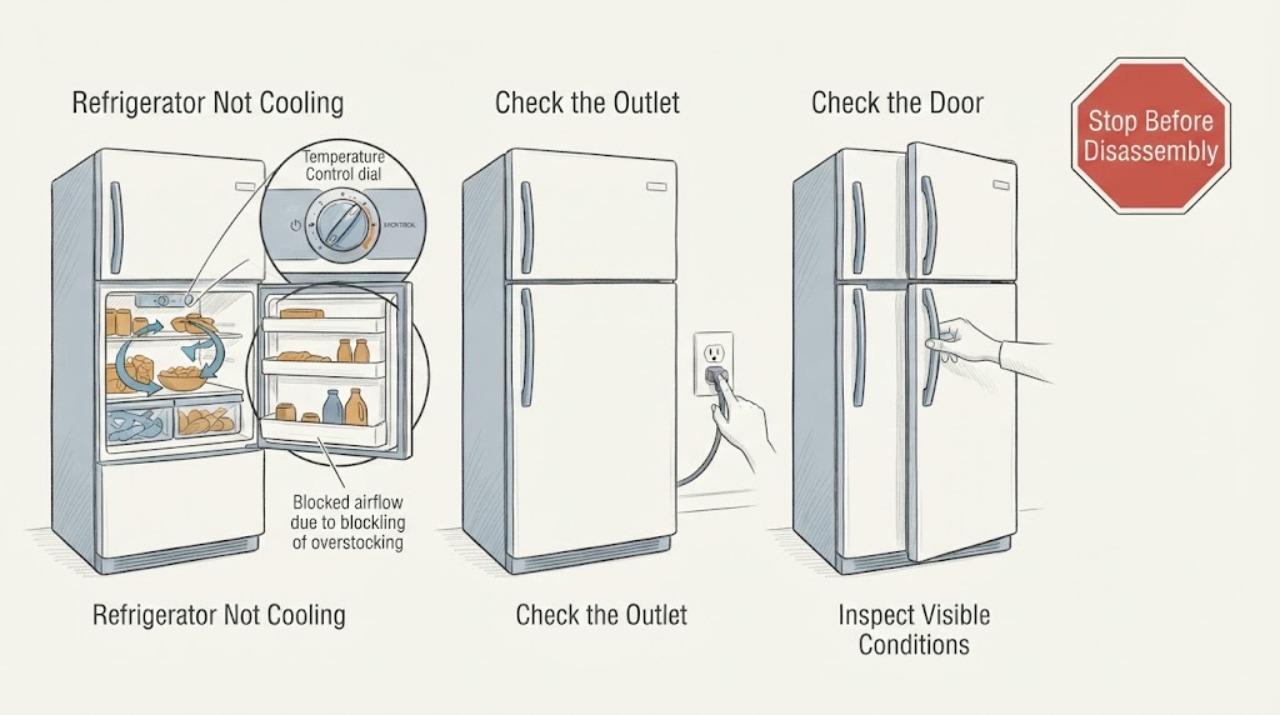
Confirm that the refrigerator is securely plugged into its intended outlet and that the outlet has power. Check that a digital unit is set to On or that a mechanical thermostat is not at Off; do not use an extension cord or open the cabinet.
Expected result: The outlet is dead, the plug is loose, the control is Off, or the unit has power and an operating setting but remains warm.
Next step: Restore only a safe, accessible plug connection or control setting. Have an electrician check a dead outlet or damaged connection; if the refrigerator still does not cool, continue with the door, airflow, frost, and environment checks.
Why this matters
Why: A missing supply or Off control can fully explain a warm cabinet. If power and the operating setting are present, continue with cooling-specific checks instead of assuming the thermostat or compressor has failed.
-
Check 2
Check whether the refrigerator was just installed, recently unplugged, or loaded with warm food. Keep the doors closed as much as practical and allow a new installation the time specified by Summit before judging cold-storage performance.
Expected result: The unit is newly installed or recently restarted; it contains hot food or a large new load; or it has been operating long enough under a normal load and is still warm.
Next step: For a new or recently restarted unit, monitor it without repeatedly opening the door and follow the exact model guide. If it remains warm after the stabilization period, continue diagnosis and arrange service if the remaining checks do not help.
Why this matters
Why: Summit's FAQ says a newly installed refrigerator will not get cold immediately and recommends allowing 24 hours before cold storage. Warm food and a heavy load can also extend recovery, but they do not explain persistent poor cooling after stabilization.
-
Check 3
Inspect the doors and gaskets from the outside. Close each door slowly and look for a large item holding it open, a dirty or damaged gasket, or a door that does not make a continuous seal; do not force a misaligned door or remove the gasket.
Expected result: A door remains partly open, the gasket has a visible gap or damage, or the doors seal normally.
Next step: Reposition only the accessible item blocking closure and clean the gasket according to the model manual. If the gasket or alignment is damaged, arrange service rather than bending or replacing parts without model confirmation.
Why this matters
Why: A poor seal allows warm air in and can make the refrigerator run without reaching its setting. A normal seal makes the door a less likely primary explanation, so check airflow and frost instead.
-
Check 4
Look inside without dismantling the refrigerator for large items blocking vents or tightly packing the cabinet. Check the rear interior wall for a thick or spreading frost buildup; do not chip ice with a sharp or metallic tool.
Expected result: Airflow is obstructed, the cabinet is tightly packed, frost covers the rear wall, or the vents and rear wall are clear.
Next step: Rearrange items to leave the vents clear. If the model uses manual defrost, follow its manual exactly; if frost returns quickly or the defrost method is unclear, stop short of dismantling and arrange service.
Why this matters
Why: Summit says blocked internal airflow can create temperature inconsistency and that frost buildup may indicate a need to defrost on applicable units. Clear placement is a useful result, but it does not rule out a sealed-system or control fault.
-
Check 5
Check the refrigerator's external environment without moving an inaccessible or built-in unit: note whether the room is unusually hot or cold, whether direct sunlight or another heat source is nearby, whether the required side/top/rear clearance is present, and whether a rear condenser is visibly dusty where the model exposes one.
Expected result: The room is outside Summit's stated range, the unit is near heat or sunlight, clearance is restricted, or a rear condenser is dusty; or the environment appears suitable.
Next step: Improve only accessible surroundings and clean an exposed condenser as the model manual directs. Do not pull out a built-in refrigerator or open the sealed system; arrange an authorized technician if cooling remains poor.
Why this matters
Why: Summit's FAQ links unsuitable room temperature, heat exposure, insufficient clearance, and dirt on rear condensers to reduced refrigeration performance. A suitable environment shifts attention back to the model's controls, defrost system, fan, or sealed system, which cannot be identified safely from the symptom alone.
-
Check 6
Record the model and serial information, current control setting, approximate refrigerator/freezer temperatures, frost pattern, door-seal result, recent installation or power event, and whether the compressor or fan runs. Retrieve the matching Summit manual before changing a setting beyond the normal user controls.
Expected result: The model identifies a matching manual and the checks point to a door, airflow, frost, or environment issue; the model is unknown; or those checks are normal but the unit remains warm.
Next step: Use Summit's service resources or an authorized technician, giving the recorded observations. Keep food at a safe temperature by moving it as needed and do not attempt refrigerant, compressor, wiring, or control-board repair.
Why this matters
Why: A matching manual can resolve model-specific defrost, control, and clearance instructions. Normal user-level checks with persistent poor cooling leave a fault requiring diagnosis; an unknown model limits part and procedure conclusions but does not make continued warm operation acceptable.
Use your observations
Decision map
Find the observation that best matches what you see, then follow the next safe action.
-
PATH 01Next step
What you see
The refrigerator was newly installed or recently restarted, contains a large load of warm food, and has not yet had the stabilization time specified by Summit.
Do this next
Keep the doors closed as much as practical and monitor after the model's stabilization period. If it remains warm afterward, follow the remaining checks and arrange service.
Why this path and its safety boundary
Why it matters: The reported warmth may be recovery rather than a confirmed refrigeration fault; Summit's FAQ recommends allowing 24 hours for a newly installed unit before cold storage.
-
PATH 02Next step
What you see
Power is present and the control is on, but a door does not seal, a large item blocks closure, or internal airflow is obstructed.
Do this next
Correct only the accessible obstruction or closure issue, then allow the refrigerator time to recover with minimal door opening. Call service if the gasket or alignment is damaged or the temperature stays high.
Why this path and its safety boundary
Why it matters: Warm air entry or restricted circulation is more likely than a confirmed compressor failure, although persistent poor cooling after correction needs further diagnosis.
-
PATH 03Next step
What you see
Frost is building on the rear wall, or the refrigerator uses a manual-defrost design and cooling has fallen as ice accumulates.
Do this next
Use the exact Summit manual for a safe defrost procedure. Never use a sharp tool or an unapproved heater; arrange service if frost returns quickly or the manual does not match the appliance.
Why this path and its safety boundary
Why it matters: Frost can restrict cooling performance on applicable units, but the correct defrost method and timing are model-specific.
-
PATH 04Next step
What you see
The room is outside Summit's stated operating range, the refrigerator is near a heat source or sunlight, clearance is restricted, or an exposed rear condenser is dirty.
Do this next
Correct accessible environmental and clearance issues and clean an exposed condenser only as the model guide permits. If cooling does not recover, use an authorized technician.
Why this path and its safety boundary
Why it matters: The environment or heat rejection path can reduce cooling performance without proving that an internal part has failed.
-
PATH 05Next step
What you see
Power, controls, door sealing, airflow, frost, clearance, and room conditions are normal, but the refrigerator remains warm after adequate recovery time.
Do this next
Protect perishable food, stop dismantling or refrigerant work, and arrange Summit-authorized service with the model, temperatures, observations, and timing.
Why this path and its safety boundary
Why it matters: The remaining possibilities include a model-specific control, fan, defrost, compressor, or sealed-system problem that cannot be separated safely from this symptom alone.
Helpful context
Understand the symptom
A warm Summit refrigerator can have a simple operating or airflow cause, but the symptom alone does not prove a failed thermostat, compressor, fan, or refrigerant system. Separate a recent installation or heavy loading from a unit that has gradually lost cooling: note the refrigerator and freezer temperatures, whether the compressor or fan can be heard, whether the door closes tightly, and whether the rear wall has frost.
Summit sells multiple refrigerator designs, so exact settings, defrost behavior, ventilation, and service instructions depend on the model. Use the model number to retrieve the matching use-and-care guide. Keep the inspection to user-accessible controls, doors, vents, and external clearances; Summit's manual warns against self-repair and against work on the refrigerant system.
When checks do not resolve it
Need a professional?
Arrange an authorized Summit technician when the refrigerator remains warm after the power, control, door, airflow, frost, environmental, and recovery-time checks; when a gasket or door alignment is damaged; when frost returns quickly; or when the model manual does not match the appliance. Provide the model and serial information, temperature observations, control setting, frost pattern, door-seal result, recent installation or power event, and whether a fan or compressor runs. Do not open the sealed cooling system, change wiring, or order a compressor, fan, thermostat, or control board from the symptom alone.
Common questions
FAQ
How long should a newly installed Summit refrigerator take to get cold?
Summit's official troubleshooting FAQ recommends allowing a newly installed refrigerator to run for 24 hours before using it for cold storage. Keep the doors closed as much as practical during recovery; if it remains warm afterward, continue the checks and arrange service if needed.
Can blocked airflow or a door that does not seal make a Summit refrigerator warm?
Yes. Summit lists blocked internal airflow, a door held open by large items, and a compromised door seal as causes of poor cooling or temperature inconsistency. Correct only accessible placement or closure issues and call service for a damaged gasket or persistent warmth.
Should I add refrigerant or replace the compressor when a Summit refrigerator is not cooling?
No. The symptom does not identify a sealed-system or compressor fault, and Summit's support material directs unresolved problems to an authorized technician. Use the model number to obtain the correct manual and provide the technician with the temperature, frost, airflow, and operating observations.
Read the exact guide
Official sources
- Instruction ManualSummit Appliance · Opened Summit refrigerator instruction manual showing user-level poor-cooling checks, electrical safety, ventilation, defrost boundaries, and authorized-service guidance; exact applicability must be confirmed by model.
- Product Troubleshooting FAQSummit Appliance · Summit's official troubleshooting entry for a refrigerator that is not getting cold, including power, controls, recovery time, door seal, frost, airflow, condenser, temperature, clearance, and defrost checks.
- Manuals & LiteratureSummit Appliance · Summit's official model-number lookup for use-and-care guides and related appliance literature.
- Product Troubleshooting FAQSummit Appliance · Summit's official defrost guidance for refrigerator and freezer models that use manual defrost, including the instruction to follow the specific product manual.
- Service & SupportSummit Appliance · Summit's official support hub for troubleshooting, manuals, parts information, and scheduling service through authorized technicians.
Community feedback
Share a repair observation
Share a plain-text repair observation. Accepted observations are published automatically; this page may take a moment to update.