
On this page
Start here
Quick answer
Treat a Thermador oven error display as model-specific until you have recorded the complete code, the oven model, the fuel type, and what the oven was doing when the message appeared. Thermador's oven support page describes an E-number display with beeping as a fault: stop the beeping with a control key, follow the exact owner's manual for any reset, and turn the oven off and arrange Thermador service if the code returns or is not listed. Do not guess what an unfamiliar code means, repeatedly reset it, open the control panel, or continue cooking when there is gas odor, smoke, arcing, uncontrolled heat, or a tripped circuit.
Before you begin
Safety first
- This article supports documentation, ordinary control use, and one explicitly authorized model-specific reset only. It does not authorize opening panels, testing live wiring, bypassing interlocks, working on gas components, or replacing parts.
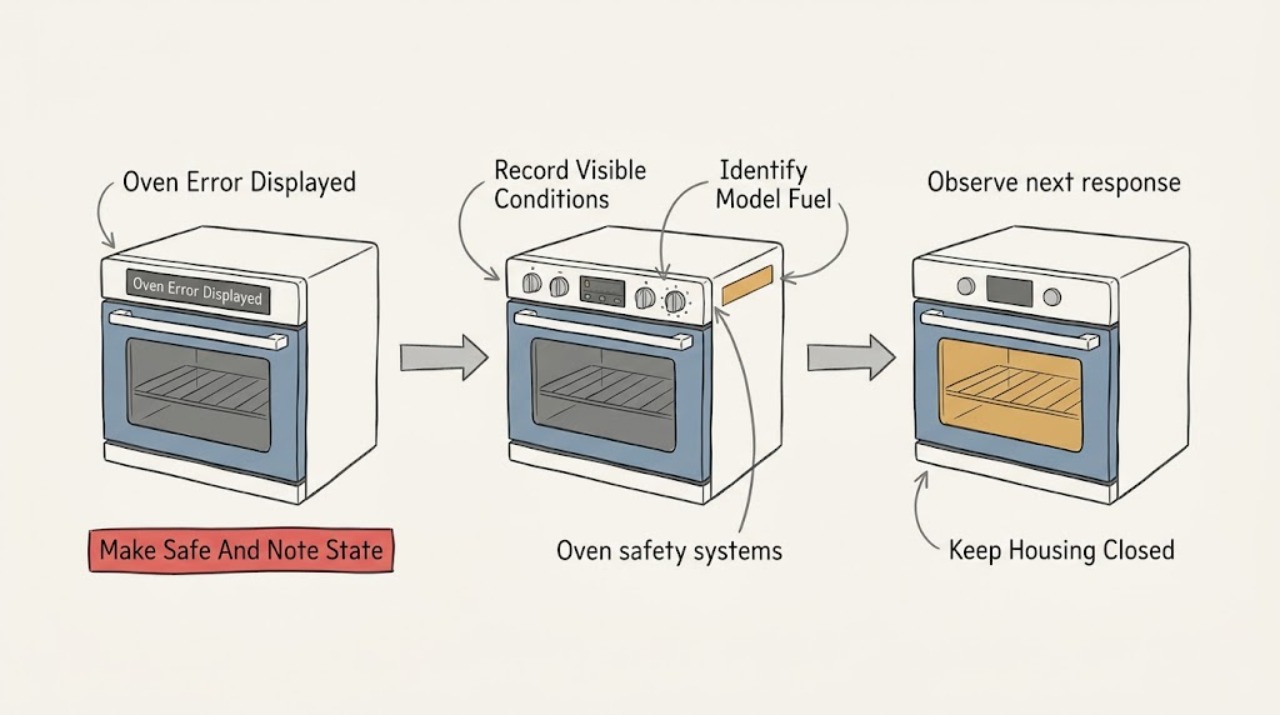
Work through in order
Diagnostic checks
Use only checks that match the exact appliance or system and its official guide.
-
Check 1
Without reaching into the oven or touching exposed wiring, stop using the appliance and note whether there is gas odor, smoke, a flame problem, arcing, uncontrolled heat, a hot or damaged receptacle, water near electrical parts, or a tripped breaker; if it is safe to do so from a normal control position, stop the beeping or cancel the active cycle as the manual permits.
Expected result: Classify the situation as a quiet display fault with no hazard signs, a display fault accompanied by smoke/odor/heat/electrical symptoms, or a gas or fire emergency.
Next step: For a hazard, stop and follow the matching stop condition below. Otherwise photograph the display from a safe position and continue by recording the exact message and appliance identity.
Stop if: Do not operate controls or switches in a suspected gas leak, do not relight or repeatedly start a gas oven, and do not touch the appliance if water, smoke, flame, arcing, a hot outlet, or uncontrolled heat is present.
Why this matters
Why: A quiet display fault can be documented before a controlled model-specific check. Any smoke, gas odor, arcing, uncontrolled heating, water at electrical parts, or repeated trip means the error is not an ordinary reset problem.
-
Check 2
From outside the hot cavity, record the complete display exactly as shown, including every E-number, letter, digit, dash, alternating message, indicator, and beep pattern; take a clear photo before a reset erases it.
Expected result: Record whether the message is an E plus a number, a Home Connect update message, a temperature or door message, a flashing control state, or an unfamiliar pattern, and note whether it appeared at startup, during preheat, while cooking, during cleaning, or after the cycle ended.
Next step: Keep the photo and written code with the model number and continue to identify the exact oven before interpreting or resetting it.
Stop if: Do not infer a code from a similar Thermador product, range, steam oven, or another brand, and do not erase a recurring code before recording it.
Why this matters
Why: The exact display and timing are the evidence needed to select the correct model-specific manual path. A partial number or a guessed translation cannot establish which sensor, door system, heating path, or software function is involved.
-
Check 3
Read the model or E-Nr from the rating label or documentation without removing panels, and record whether the appliance is an electric oven, gas oven, dual-fuel range oven, steam oven, or another Thermador category; record the selected mode and whether Home Connect was involved.
Expected result: The model, fuel type, appliance category, control layout, and active mode are known; or one or more of them cannot be confirmed without moving, opening, or disassembling the appliance.
Next step: Use Thermador's owner-manual lookup with the recorded model, or give that identity to Thermador support together with the exact code and operating stage. If the identity cannot be confirmed safely, stop at documentation and service.
Stop if: Do not remove a rear cover, control panel, trim, wiring, burner component, or rating label, and do not reach behind the appliance to obtain a model number.
Why this matters
Why: Thermador provides owner manuals by model number, and the same-looking display can serve different oven families. A confirmed identity supports the correct manual and error-code list; an unknown identity makes code interpretation unsafe.
-
Check 4
Compare the complete recorded code with the error-code section for the exact Thermador oven model and category; if the display is an E-number with beeping, use the oven support instruction to stop the tone with a control key rather than repeatedly cycling power.
Expected result: The code is explicitly listed for the exact model/category, it is identified as a Home Connect update message, or it is absent/ambiguous in the model-specific documentation.
Next step: Follow only the listed, low-risk instruction for the exact model. If the code is absent, ambiguous, or linked to an update that did not finish, preserve the evidence and arrange Thermador support.
Stop if: Do not substitute an error-code explanation from another Thermador category, perform undocumented firmware work, or continue using the oven to see whether the message returns.
Why this matters
Why: A listed code provides a documented next step. Thermador identifies E0211, E1601, and E0510 as Home Connect software-update errors on its oven page, but that does not make every E-number a software issue. An absent or ambiguous code needs support rather than a guessed repair.
-
Check 5
Only if the exact owner's manual or Thermador's oven error page authorizes it for the recorded code, carry out one normal reset using the documented user control sequence; do not open the appliance or disturb gas or electrical connections.
Expected result: The display clears and the oven remains normal, the code returns immediately, a different code appears, or the reset cannot be completed as documented.
Next step: Record the before-and-after display and operating stage. If the code returns or the oven remains abnormal, turn the oven off and arrange Thermador service with the evidence.
Stop if: Do not repeat resets, bypass a door or control lock, bridge a switch, disconnect wiring, or use a breaker cycle as an improvised repair.
Why this matters
Why: A cleared display with normal controls suggests a transient state but does not validate unobserved heating or safety functions. A returning or changing code is evidence for service, not permission for more resets.
-
Check 6
After a permitted single reset, observe the display and control response without putting food in the oven or initiating a long heat cycle; note whether controls respond, the door remains normally latched, the cooling fan behaves as described by the manual, and the error stays cleared.
Expected result: The oven is idle and normal, the code returns at startup or mode selection, the door/control response is abnormal, or the oven begins heating unexpectedly.
Next step: Leave the oven off and contact qualified Thermador service for any recurring or abnormal result; provide the exact code, model, fuel type, mode, and reset result.
Stop if: Stop immediately for unexpected heat, a door that will not remain safely closed, smoke, burning odor, gas odor, arcing, or any breaker trip.
Why this matters
Why: A stable idle display is only a limited observation. A recurring code, abnormal lock, unresponsive controls, or unexpected heating points to a control, sensor, door, or safety-system fault that needs model-specific diagnosis.
-
Check 7
From a dry, safe position, record whether the display is fully blank, intermittently resets, or remains powered while showing the error; note any recent power outage or breaker trip without repeatedly toggling the circuit.
Expected result: The oven has no display, a stable display with a code, a display that reboots, or a breaker that trips again when the oven is used.
Next step: Document the timing and leave a blank, rebooting, or repeatedly tripping appliance off for qualified electrical or Thermador service; do not remove the electrical cover.
Stop if: Do not test live terminals, replace fuses with a larger rating, hold a breaker on, or continue after a trip, hot outlet, burning smell, or visible electrical damage.
Why this matters
Why: A blank or rebooting display broadens the issue to the supply or control system, while a stable code supports model-specific error handling. A repeated breaker trip is an electrical fault boundary and is not a reset invitation.
-
Check 8
Prepare a service note containing the exact code, model/E-Nr, appliance category and fuel type, operating stage, selected mode and temperature, recent outage or cleaning event, reset attempted, and every safety symptom observed; do not include a guessed failed part.
Expected result: The service note contains a clear photo or transcription, identity, timeline, and the result after the one authorized reset, or important fields remain unknown.
Next step: Use Thermador's support and manual resources to route the request, or state which fields could not be confirmed and ask an authorized technician to identify them safely.
Stop if: Do not order a control board, sensor, igniter, valve, heating element, or other part from the code alone; do not open the appliance to confirm a suspected part.
Why this matters
Why: A complete timeline helps Thermador select the correct documentation and decide whether the fault needs an authorized service visit. Missing identity or code evidence is itself a reason not to guess.
Use your observations
Decision map
Find the observation that best matches what you see, then follow the next safe action.
-
PATH 01Safety boundary
What you see
There is gas odor, smoke, flame abnormality, an electrical arc, uncontrolled heating, water at electrical parts, a hot/damaged outlet, or a repeated breaker trip.
Do this next
Stop using the oven. If gas odor or fire danger is present, leave the area and contact local emergency or gas services from a safe location; for electrical or heating danger, keep the appliance isolated and arrange qualified service.
Why this path and its safety boundary
Why it matters: This is a safety or energy-control problem, not an ordinary display-reset situation.
Safety stop: Do not operate switches or flames in a suspected gas leak, do not touch wet electrical equipment, and do not re-energize the appliance to reproduce the error.
-
PATH 02Safety boundary
What you see
The complete code, model/E-Nr, appliance category, fuel type, and operating stage are confirmed.
Do this next
Compare the code with the exact model's manual and Thermador oven error page, then perform at most one explicitly authorized user reset.
Why this path and its safety boundary
Why it matters: The exact Thermador documentation can be used without borrowing explanations from another product.
Safety stop: Stop if the code is absent from the exact documentation, returns after the authorized reset, or is accompanied by any hazard symptom.
-
PATH 03Safety boundary
What you see
The code is partial, the model is unknown, or the appliance category or fuel type cannot be confirmed safely.
Do this next
Photograph the display and rating label from safe access and ask Thermador support or an authorized technician to identify the correct manual path.
Why this path and its safety boundary
Why it matters: Code interpretation is not reliable enough to select a part, reset sequence, or internal test.
Safety stop: Do not guess from a similar range, steam oven, or another brand, and do not disassemble the appliance to obtain missing information.
-
PATH 04Safety boundary
What you see
The exact manual authorizes one reset, the display clears, and no abnormal heat, odor, lock, control, or electrical symptom remains.
Do this next
Keep the code and reset record. Resume only the normal low-risk use permitted by the exact manual, and stop if the message returns.
Why this path and its safety boundary
Why it matters: The fault may have been transient, but a cleared display is not proof that every safety function has been tested.
Safety stop: Do not repeat the reset or begin a long cooking or self-clean cycle solely to test whether the fault returns.
-
PATH 05Safety boundary
What you see
The code returns, the oven remains abnormal, or the exact model documentation does not list the code.
Do this next
Turn the oven off and arrange Thermador service with the complete code, model, stage, and reset result.
Why this path and its safety boundary
Why it matters: The fault requires model-specific support or service; continued resets can hide the timeline or leave a safety issue energized.
Safety stop: Do not continue cooking, access internal wiring, or replace a part based only on a code label.
Helpful context
Understand the symptom
Why the complete message and model matter
The assignment does not include a model or a displayed code, and Thermador's owner-manual system asks for the appliance model number to retrieve model-specific instructions. Record every character, punctuation mark, alternating message, indicator, and beep pattern before clearing the display. An E-number on one Thermador oven should not be interpreted using a code list from another model or from a different appliance category.
Use one controlled reset, not repeated cycling
A reset can clear a transient control fault, but it does not prove that the underlying problem is gone. Follow only the exact reset described for the recorded model in its owner's manual or Thermador's oven error guidance. If the code returns, the oven behaves abnormally, or the code is not listed, leave the appliance off and provide the code and model to Thermador service.
Separate ordinary display faults from an immediate hazard
A beeping display with no heat, odor, smoke, or visible damage can usually be documented from a safe position before service is arranged. Gas odor, delayed ignition or a boom, smoke, an electrical arc, a hot or damaged outlet, uncontrolled heating, or a breaker that trips changes the decision: stop using the oven, avoid unsafe testing, and use the appropriate emergency or qualified-service route.
Safety boundary
Stop conditions
- Stop immediately for gas odor, smoke, flame abnormality, delayed ignition or a boom, electrical arcing, uncontrolled heating, water near electrical parts, a hot or damaged outlet, or a repeated circuit trip.
- Do not operate switches or flames in a suspected gas leak; leave and contact local emergency or gas services from a safe location.
- Do not touch wet electrical equipment, test live terminals, hold a breaker on, remove covers, or bypass a door, lock, switch, or control safety.
- Do not guess an unfamiliar code, borrow a code explanation from another model/category, repeatedly reset the oven, or start a long heat or cleaning cycle to reproduce the fault.
- Turn the oven off and arrange qualified Thermador service when the code returns, is unlisted, the model cannot be confirmed, or controls, door behavior, heating, or power remain abnormal.
When checks do not resolve it
Need a professional?
Arrange Thermador or qualified appliance service when the complete code returns after one model-authorized reset, is not listed for the exact oven, the model or fuel type cannot be confirmed, the display is blank or rebooting, the door or controls behave abnormally, heating is uncontrolled or absent, or the circuit trips. Use emergency or gas-service channels from a safe location for gas odor, fire, smoke, or other immediate hazards.
Safety scope: This article supports documentation, ordinary control use, and one explicitly authorized model-specific reset only. It does not authorize opening panels, testing live wiring, bypassing interlocks, working on gas components, or replacing parts.
Common questions
FAQ
What does an E-number on a Thermador oven mean?
Thermador's oven support page describes an E-number with beeping as a fault. Record the complete display and exact model, follow only the applicable manual instruction, and turn the oven off for service if the code returns or is not listed.
Should I keep resetting a Thermador oven error?
No. Use at most one reset when the exact model documentation authorizes it. If the display returns or the oven behaves abnormally, preserve the code and arrange Thermador service rather than cycling power repeatedly.
Can I use an error-code list from another Thermador appliance?
No. Thermador separates oven, range, steam-oven, and other support categories, and the owner's manual is selected by model number. Do not transfer a code explanation across categories or models.
What should I record before contacting Thermador?
Record every character and alternating display, model/E-Nr, appliance category and fuel type, operating stage, selected mode and temperature, recent power event, any Home Connect involvement, the one reset attempted, and the result.
When is a Thermador oven error an emergency?
Gas odor, smoke, flame abnormality, delayed ignition or a boom, electrical arcing, uncontrolled heat, water at electrical parts, a hot or damaged outlet, or repeated breaker trips require immediate stop and the appropriate emergency, gas, electrical, or qualified-service response. Do not reproduce the fault.
Read the exact guide
Official sources
- Error Codes | Ovens Support | ThermadorThermador · Thermador US oven support page; exact model documentation controls model-specific interpretation.
- Find Owner ManualsThermador · Thermador US owner-manual support; users must select the exact appliance model and category.
- Customer Support, Service, Repair & Parts | ThermadorThermador · Thermador US owner-support hub for ovens and related service pathways.
Community feedback
Share a repair observation
Share a plain-text repair observation. Accepted observations are published automatically; this page may take a moment to update.