
On this page
Start here
Quick answer
First identify the Thermador appliance and the cleaning mode: conventional oven self-clean, a range steam-clean program, or a steam oven's cleaning or descaling mode. Check the exact model manual, remove accessories that the manual excludes, clear loose spill residue only after the cavity is cool, and confirm the door can close and lock normally. Do not block vents, use abrasive or unapproved chemicals, force a latch, or add water to a mode that does not call for it. If the cycle will not start, stops with an error, the door remains locked after full cooling, or residue returns, record the model and message and arrange service. Stop immediately for smoke beyond normal residue burn-off, flames, a gas odor, sparking, a hot control, damaged glass, or an electrical trip.
Before you begin
Safety first
- This article covers cool, external observation and only model-documented owner cleaning steps. Do not force a latch, open panels, handle hot steam or gas, touch wet electricity, or perform live tests.
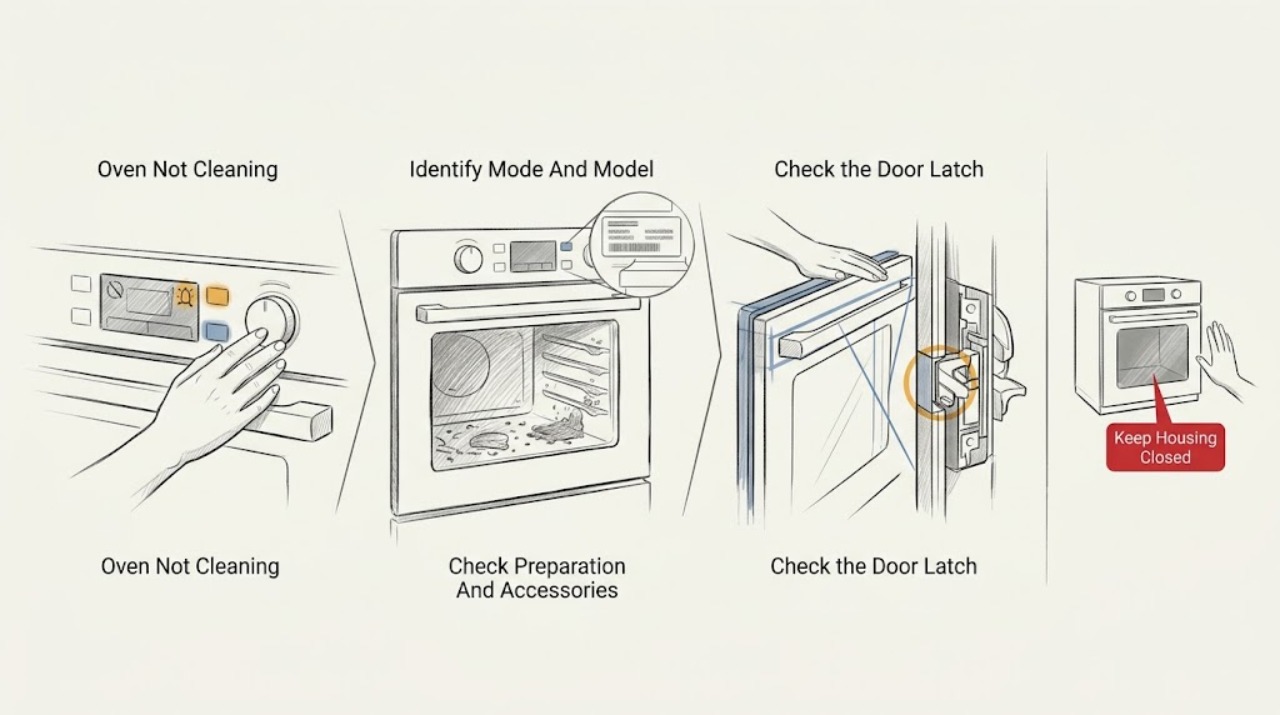
Work through in order
Diagnostic checks
Use only checks that match the exact appliance or system and its official guide.
-
Check 1
From a cool, safe oven, record the model number, whether it is a wall oven or range, whether it has steam functions, the exact cleaning option selected, and the stage at which it stops. Record every display message or light pattern instead of guessing a code.
Expected result: The oven offers Self Clean, Steam Clean, Descale, or no cleaning programme; the programme will not start, stops during heating or steam, ends with residue, or shows an exact error.
Next step: Use the Thermador owner-manual lookup with the model number and follow only the matching cleaning section. Continue with external checks only when the oven is cool and free of hazards.
Stop if: Stop for flames, smoke that does not clear when the appliance is safely off, gas odor, sparks, damaged glass, a hot control, exposed wiring, or an electrical trip.
Why this matters
Why: The available mode determines whether heat, water, descaling, accessory removal, and a locked door are expected. A generic cleaning recipe cannot diagnose a model-specific programme or error.
-
Check 2
With the oven fully cool, remove loose food pieces and inspect the cavity, door glass, gasket, vents, racks, trays, probe, and other accessories. Compare each item with the exact cleaning-mode instructions; do not scrape the gasket or apply abrasive cleaner to an interior surface.
Expected result: A rack or accessory is present in a mode that excludes it, loose residue blocks an area, the gasket or glass is damaged, vents are obstructed, or the cavity is prepared as the manual specifies.
Next step: Remove only an item that the manual identifies as removable and wipe loose residue with a suitable soft cloth. Keep the oven off and request service for damaged glass, gasket, latch, vent, or fixed components.
Stop if: Do not use abrasive pads, caustic mixtures, sharp tools near the gasket or glass, or a cleaning cycle with an excluded accessory or blocked vent.
Why this matters
Why: An excluded accessory can be damaged by a high-heat mode, while residue, an obstructed vent, or a damaged seal can make cleaning incomplete or unsafe. A clean-looking cavity does not make a damaged gasket or glass safe to use.
-
Check 3
For a self-clean model, close the empty, cool oven door normally and observe whether the latch engages when the manual's cleaning sequence is selected. If the latch remains extended or the door will not close, use only the Thermador reset path documented for the exact model; never push or hold the latch by hand.
Expected result: The latch engages and the cycle starts, the cycle starts but the door stays unlocked, the latch will not retract after an interrupted cycle, or the door remains locked after the oven has cooled.
Next step: Allow the oven to complete its safe cool-down. If the manual permits a one-time breaker reset or short self-clean entry-and-exit sequence, perform it only with accessories removed and the oven cool. If the latch fault persists, arrange service.
Stop if: Do not force, pry, tape, or bypass the latch; do not open a hot or locked door or run a self-clean cycle to chase a latch fault.
Why this matters
Why: Thermador requires a locked door for self-clean operation and says a latch can remain engaged until the oven cools. Failure to lock or release can involve a control, latch, temperature-sensing, or safety condition.
-
Check 4
For a steam oven or range steam-oven compartment, identify whether the complaint is no steam, a cleaning programme that will not start, mineral scale, or residue that remains after Steam Clean. Check the water reservoir, drain area, and descaling requirement only as the exact manual directs; do not pour cleaner or water into an unconfirmed cavity.
Expected result: The reservoir is empty or not seated, a water or drain message appears, mineral scale is visible, the Steam Clean option is absent, or the documented water path appears normal.
Next step: Use the matching Thermador manual for reservoir filling, drain, Steam Clean, or Descale. If the reservoir, pump, drain, heating, or control needs internal access, stop and request qualified service.
Stop if: Do not handle hot water or steam, add unapproved descaler, run a dry water system, remove panels, or reach into the steam path.
Why this matters
Why: Steam cleaning and descaling are model-specific programmes. Water delivery, drainage, scale, a door state, or an unavailable mode can prevent the expected result; absence of steam is not proof that a heating component should be replaced.
-
Check 5
After a documented cleaning programme has ended and the cavity is fully cool, classify the result as loose ash, softened residue, mineral scale, a greasy area, or unchanged baked-on material. Wipe only with the mild method allowed by the Thermador guidance and do not immediately repeat a high-heat cycle.
Expected result: Ash is present after self-clean, residue is softened but remains, scale is present in a steam cavity, a gasket or door edge remains dirty, or the programme ended early or produced an error.
Next step: Use the exact manual's cool-down and wipe instructions. If the result remains poor after the documented care path, record the mode and outcome and arrange service; do not use household oven cleaner or abrasive tools as a substitute.
Stop if: Do not touch hot ash, use caustic or mixed chemicals, scrape heating elements or seals, or repeat a failed cycle while smoke, odor, or abnormal heat is present.
Why this matters
Why: Some post-cycle wiping is expected, while unchanged residue or mineral scale may require a mode-specific care step. An early end, error, absent heat, or abnormal odour points to an appliance or programme fault rather than a tougher cleaner.
-
Check 6
Record the model, cleaning mode, accessory setup, door-latch state, water or scale observations, display message, stage, odour or smoke, and result after one safe model-documented check. Compare the result only with the matching Thermador manual.
Expected result: The correct mode completes and the expected post-clean wipe resolves the residue, or the oven will not start, stops early, repeats an error, will not unlock after cooling, or leaves the same residue.
Next step: Keep the oven out of use for a recurring or unsafe symptom and use Thermador's servicer route. Provide the full record and do not open panels or perform energized tests.
Stop if: Do not bypass a latch, operate with damaged glass or seal, remove panels, test live wiring, handle gas components, or replace an internal part as a trial.
Why this matters
Why: A repeatable mode-specific failure can involve the latch, temperature sensing, heating, fan, water or drain system, control, or another model-specific component. A recurring fault needs diagnosis, not a guessed cleaner or replacement part.
Use your observations
Decision map
Find the observation that best matches what you see, then follow the next safe action.
-
PATH 01Safety boundary
What you see
There are flames, persistent or heavy smoke, gas odor, sparks, a hot control, damaged glass, exposed wiring, water near electricity, or an electrical trip.
Do this next
Stop the appliance, keep clear, and isolate gas or power only from a safe position if possible. Use local emergency procedures for fire or gas and request qualified service.
Why this path and its safety boundary
Why it matters: Treat the event as an immediate fire, gas, burn, or electrical hazard rather than a cleaning fault.
Safety stop: Do not open the hot door, operate controls near a gas odor, reset protection repeatedly, or run another cleaning cycle.
-
PATH 02Safety boundary
What you see
The oven has no Self Clean or Steam Clean option, the selected option belongs to a different appliance type, or the model manual does not list the attempted mode.
Do this next
Find the exact model manual and use only its listed cleaning and care method. Hand-clean cool, accessible surfaces with the approved mild method when the manual permits.
Why this path and its safety boundary
Why it matters: The appliance may not support that cleaning method, or the wrong control path is being used.
Safety stop: Do not add water, descaler, or oven cleaner to an unconfirmed mode or cavity.
-
PATH 03Safety boundary
What you see
Self Clean will not start because the door will not latch, or the latch will not release after the oven is fully cool.
Do this next
Allow full cooling and use only the exact Thermador reset or latch guidance once. If the condition returns, keep the oven off and arrange service.
Why this path and its safety boundary
Why it matters: A door-latch, temperature, or control condition is preventing a safe cleaning state.
Safety stop: Do not force, pry, tape, or bypass the latch or open the door against a lock.
-
PATH 04Safety boundary
What you see
A steam-clean or Descale programme has no steam, reports a water or drain issue, or leaves visible mineral scale.
Do this next
Follow the manual's reservoir, drain, Steam Clean, or Descale procedure and product dilution instructions where applicable. Request service for internal water, steam, pump, or heating work.
Why this path and its safety boundary
Why it matters: The water reservoir, drain, scale, heating, or model-specific programme path needs attention.
Safety stop: Do not handle hot steam, add unapproved chemicals, run with an empty required reservoir, or open the steam system.
-
PATH 05Safety boundary
What you see
The cycle completes normally but leaves ash, softened residue, grease, or scale.
Do this next
Wait until fully cool and use the manual-approved soft cleaning method. Arrange service if residue is unchanged after the documented care path or if the programme result changes suddenly.
Why this path and its safety boundary
Why it matters: The expected post-cycle wipe or a mode-specific care step may still be required; this is different from an early programme failure.
Safety stop: Do not use abrasive tools, caustic mixtures, or repeated high-heat cycles to remove a stubborn mark.
-
PATH 06Safety boundary
What you see
The correct mode, preparation, door state, water path, and one safe model check are appropriate, but the programme still fails or the same residue and error return.
Do this next
Keep the oven out of use and request qualified Thermador service with the model, mode, stage, error, and safety observations.
Why this path and its safety boundary
Why it matters: A latch, sensor, heater, fan, water system, drain, control, or other model-specific fault remains possible.
Safety stop: Do not remove panels, test energized circuits, bypass a safety device, or replace a component from a generic symptom.
Helpful context
Understand the symptom
Cleaning mode matters more than the word clean
A Thermador wall oven or range may have a high-heat self-clean mode, while a range steam oven can offer Steam Clean or Descale. These modes do not share the same water, rack, door, or cool-down instructions. Find the model number and use the matching manual before selecting a programme or adding anything to the cavity.
Residue after a completed cycle is not the same as a failed cycle
Self-cleaning burns suitable food residue and can leave ash that must be wiped after the oven has completely cooled. A steam-clean or descaling mode may soften residue or address mineral scale rather than remove every baked-on mark. If the mode ends early, never heats, never produces the expected steam, or leaves a new error, treat that as a programme or appliance fault.
Keep heat, fumes, and the latch within safe limits
Vent warmth and some odour during a cleaning programme can be expected, but vents must remain clear and the door must lock as designed. Never force a hot latch, open the door against a lock, use caustic mixtures, or run another cleaning cycle to test a fault. Smoke, flame, gas odour, arcing, or abnormal heat is a stop-use event.
Safety boundary
Stop conditions
- Stop immediately for flames, persistent smoke, gas odor, sparks, a hot or damaged control, damaged glass, exposed wiring, water near electricity, or an electrical trip.
- Do not force or bypass a cleaning latch, open a hot or locked door, reach into a hot cavity, or operate with a damaged gasket or glass.
- Do not block vents, use abrasive or caustic mixtures, combine cleaners, add water or descaler to an unconfirmed mode, or scrape heating elements or seals.
- Do not remove panels, perform live electrical tests, handle gas components, or open a steam or water system without qualified training and model-specific service instructions.
- Keep the oven out of use and request qualified Thermador service when the cleaning programme repeatedly fails, leaves an unchanged fault, or does not release the latch after full cooling.
Only after diagnosis
Potential parts
- oven cleaning door latch or latch actuator
Consider this category only when the exact model's latch fails to engage or release and qualified diagnosis confirms a latch or actuator fault.
Confirm the exact Thermador model and cooling or sensor conditions; never force or bypass the latch. - steam oven reservoir pump or drain component
Consider this category only when a documented Steam Clean or Descale water symptom is confirmed and qualified diagnosis identifies an internal water-path component.
Use only exact-model parts and qualified service; do not open a hot or pressurized steam system. - oven temperature sensor, heater, fan, or control assembly
Consider this category only after a recurring cleaning-mode error or missing heat or steam is diagnosed to a specific internal component.
Confirm the exact model and diagnosis before selecting a component; internal and energized work requires qualified service.
When checks do not resolve it
Need a professional?
Request qualified Thermador appliance service when the correct cleaning mode will not start or finish, a door latch will not engage or release after full cooling, a steam or water path fails, an error returns, or residue remains after the exact manual's safe care procedure. Request urgent help for gas odor, flames, persistent smoke, sparks, damaged glass, a hot control, water near electricity, or an electrical trip.
Safety scope: This article covers cool, external observation and only model-documented owner cleaning steps. Do not force a latch, open panels, handle hot steam or gas, touch wet electricity, or perform live tests.
Common questions
FAQ
Why will my Thermador self-clean cycle not start?
Confirm the exact model supports Self Clean, remove accessories that the manual excludes, clear loose residue after the cavity is cool, and check that the door closes and latches normally. A latch that will not engage or an error that returns needs qualified service.
Why is my Thermador oven door locked after cleaning?
The latch may remain engaged until the oven has fully cooled. Do not force it. If it stays locked after the documented cool-down, use only the exact model's safe reset guidance and arrange service if the latch does not release.
Can I use Steam Clean on any Thermador oven?
No. Steam Clean and Descale are model-specific features, especially on range steam ovens. Use the owner manual to confirm the mode, water path, accessory setup, and approved descaler instructions before adding water or product.
Why is residue still present after the Thermador cleaning cycle?
Self Clean can leave ash that should be wiped after full cooling, while steam programmes may soften residue or address scale rather than remove every baked-on mark. Use the manual-approved cool cleaning method and request service for an early end, error, absent heat or steam, or unchanged repeated residue.
When should I stop using a Thermador oven?
Stop for flames, persistent smoke, gas odor, sparks, damaged glass, a hot control, exposed wiring, water near electricity, or a tripped circuit. Keep clear, do not force the door or repeat the cycle, and arrange qualified help.
Read the exact guide
Official sources
- Search for Owner ManualsThermador · Official Thermador support page; the exact model manual decides available cleaning modes and safe user steps.
- Cleaning & Care | Ranges Support | ThermadorThermador · Official Thermador range support page; accessory and cleaning availability is model-specific.
- Range Steam Oven Cleaning & Care | ThermadorThermador · Official Thermador range steam-oven page; use the exact owner's manual for reservoir and programme details.
- Oven Troubleshooting for Ranges | Support | ThermadorThermador · Official Thermador range and oven support page; exact features and control sequences vary by model.
Community feedback
Share a repair observation
Share a plain-text repair observation. Accepted observations are published automatically; this page may take a moment to update.