
On this page
Start here
Quick answer
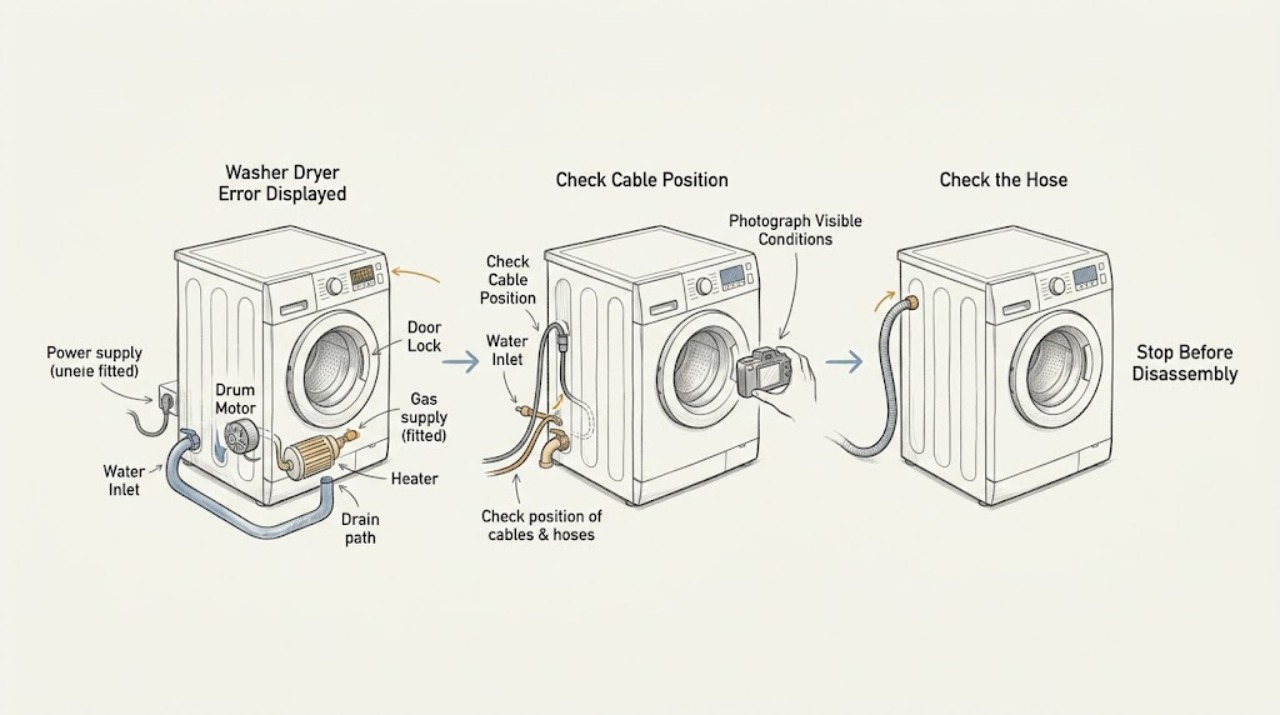
A washer-dryer error display is a clue, not a universal diagnosis. Photograph the complete code exactly as shown, record the appliance model and whether the wash or dry side was running, and note what stopped: filling, draining, locking, spinning, heating, tumbling, or drying. Do not apply another brand's code table to the appliance. First stop for leaking water, smoke, burning odor, sparks, a hot cable, gas odor, severe vibration, or a breaker that trips again. If the display and appliance are safe, check only the accessible door closure, water taps and hoses, drain hose, lint filter or external exhaust path, load condition, and control-lock state described by the owner's manual. A single model-approved reset can clear a temporary fault; a returning code, a code tied to electrical, motor, heater, gas, overfill, or sensor behavior, or a machine that remains unsafe needs qualified service. Manufacturer examples show why the exact model matters: one washer code may mean a door lock issue, while a similar-looking dryer message can concern airflow, gas, or a thermistor.
Work through in order
Diagnostic checks
Use only checks that match the exact appliance or system and its official guide.
-
Check 1
Pause the cycle and check from a safe, dry position for leaking water, smoke, burning odor, sparks or arcing, a hot or damaged cable, gas odor, a hot cabinet, severe vibration, or a breaker that trips again.
Expected result: A water, fire, gas, mechanical, or electrical hazard is present, or the appliance is stopped and free of an immediate hazard.
Next step: For a hazard, stop using the appliance, close the water taps or gas valve only when safe and appropriate, isolate power only when safe, move away from smoke or gas odor, and arrange qualified service or local emergency help. If safe, continue only with identification and an external inspection.
Stop if: Do not touch wet electrical parts, open a hot dryer, relight gas, reach into a moving drum, or reproduce smoke, odor, sparks, heat, or vibration.
Why this matters
Why: A hazard overrides code interpretation. Continuing a cycle can worsen a leak, heat buildup, gas event, mechanical failure, or electrical fault.
-
Check 2
Photograph the full display and record the exact model number, appliance configuration, date of the event, and whether the wash or dry side was filling, washing, draining, spinning, heating, tumbling, or cooling when the code appeared.
Expected result: The code is complete and readable, only part of it was captured, the model is unknown, or the affected stage is unclear.
Next step: Find the model label and owner's manual before choosing a code-specific action. If the code cannot be read or the appliance identity is uncertain, provide the photo and label information to service rather than guessing.
Stop if: Do not substitute a similar-looking code from another brand, forum, or model family, and do not erase the display before recording it.
Why this matters
Why: Error meanings are model-specific, and the same appliance may use different code families for water, door, motor, heater, temperature, gas, or airflow faults. Without the model and stage, a code lookup can mislead.
-
Check 3
If the code occurred on the wash side, identify whether the machine failed to fill, drain, lock, balance, rotate, or control water level. With power off and the drum still, inspect only the accessible taps, inlet hoses, drain hose, door area, and obvious load imbalance described by the manual.
Expected result: A tap is closed, an inlet or drain hose is kinked, the door is obstructed, the load is severely bunched, water remains in the tub, or the accessible wash path appears normal.
Next step: Correct only a visible, cool, external obstruction or load condition allowed by the manual and make one documented start attempt. If water remains, the door will not lock, the code returns, or the drum or motor makes abnormal noise, arrange service.
Stop if: Stop for water near electrics, an overflowing tub, a damaged door lock, trapped objects that need tools inside the drum, metal grinding, or any need to open the pump or motor area.
Why this matters
Why: Wash-stage codes often change the next check: inlet problems point to supply, drain problems point to the outlet path, door codes point to closure and lock conditions, and rotation or balance codes point to load and movement. These are categories, not universal meanings for the displayed code.
-
Check 4
If the code occurred on the dry side, identify whether the dryer failed to start, close or lock the door, tumble, heat, exhaust moisture, drain a condenser, or complete its cycle. With the dryer off and cool, check only the lint filter, visible external exhaust outlet, door area, load size, and an accessible gas valve if the model manual allows it.
Expected result: The door is obstructed, the lint filter is missing or blocked, external exhaust flow is weak, the load is too large, a water container is full, the gas supply is unavailable on a gas model, or these external checks appear normal.
Next step: Correct only an obvious cool external filter, door, load, container, or airflow condition from the exact manual. If the cabinet is hot, exhaust is blocked, gas odor is present, a code returns, or the dryer remains cold or stops, arrange qualified service.
Stop if: Stop for smoke, burning odor, gas odor, a hot cabinet, sparks, little or no external exhaust, a damaged drum, or any need to open the heater, motor, wiring, or gas path.
Why this matters
Why: Dryer code categories can involve door, airflow, drain, gas, heater, temperature sensor, motor, or power. The LG pages are manufacturer examples showing these distinctions; their code letters must not be applied to another brand.
-
Check 5
Using only the exact owner's manual, check whether the control lock, door state, or a documented temporary power fault is involved. If the manual permits a reset and there is no hazard, switch the appliance off, remove power through the accessible plug or labeled breaker, and perform one restart exactly as documented.
Expected result: The panel was locked, the door state was corrected, the display clears after one reset, the same code returns, or a new code appears after power is restored.
Next step: If the documented reset clears the code and the appliance completes one supervised cycle, retain the record. If the code returns, the panel stays locked, or the machine remains stopped, stop resetting and arrange service.
Stop if: Do not repeatedly cycle power, bypass a door or lid lock, remove a terminal cover, test energized circuits, or continue after a trip, smoke, heat, or odor.
Why this matters
Why: A lock or transient control condition can stop a cycle, but a returning code is evidence that the underlying condition remains. A new code after reset may identify a different or broader fault and must be read from the exact manual.
-
Check 6
For a dryer code associated with long drying, high heat, or restricted airflow, clean the user-accessible lint screen as directed and observe the outside vent only during a safe, supervised cycle if the manual permits. Do not run the dryer with a disconnected exhaust or with volatile residues on clothing.
Expected result: The lint screen is blocked, little air exits outside, the duct is crushed or kinked, clothes remain damp, the cabinet is unusually hot, or airflow and temperature appear normal.
Next step: Stop the dryer if airflow is weak, the cabinet is hot, smoke or odor appears, or the code returns. Arrange qualified vent or appliance service; do not reach inside the chassis or continue cycles to test it.
Stop if: Stop for smoke, burning odor, hot cabinet, sparks, no external exhaust, lint behind the appliance, or any need to disconnect ducting or open the dryer chassis without a qualified procedure.
Why this matters
Why: The CPSC warns that lint and a blocked exhaust path can restrict airflow and build excessive heat. Normal airflow does not clear a recurring heater, sensor, motor, or gas code, and abnormal heat is a stop condition.
-
Check 7
Prepare the model, complete display code, wash or dry stage, load, water and drain observations, door and lock result, lint and airflow result, gas or electric configuration, one-reset result, and any leak, heat, odor, spark, vibration, or breaker event.
Expected result: The appliance recovered after a documented safe external correction, or the code returns, the appliance stops again, or a component or safety path is implicated.
Next step: For a returning or safety-related code, leave the appliance off as appropriate and arrange qualified appliance service. Use the exact model manual and do not order a lock, pump, valve, motor, heater, sensor, or control from the code alone.
Stop if: Do not open panels, test energized circuits, access gas or heater parts, bypass a lock or safety, or continue operating with leaking water, overheating, sparks, or smoke.
Why this matters
Why: A complete record prevents a generic code lookup from sending the diagnosis down the wrong path and helps service distinguish washer controls, dryer airflow, water, drain, motor, heater, gas, or electrical faults.
Use your observations
Decision map
Find the observation that best matches what you see, then follow the next safe action.
-
PATH 01Next step
What you see
Leaking water, smoke, burning odor, sparks, gas odor, hot cabinet, severe vibration, a hot cable, or a repeat breaker trip is present.
Do this next
Arrange qualified service and follow the exact model guidance.
Why this path and its safety boundary
Why it matters: Stop the appliance, close water or gas only when safe, isolate power only when safe, leave the area for smoke or gas odor, and arrange qualified or emergency help. Do not reset or reproduce the event.
-
PATH 02Next step
What you see
The full code, model, appliance configuration, or affected wash or dry stage is missing or unclear.
Do this next
Arrange qualified service and follow the exact model guidance.
Why this path and its safety boundary
Why it matters: Photograph the display, find the model label and manual, and record the cycle stage before interpreting the message. Do not use another brand's code table.
-
PATH 03Next step
What you see
The wash code appears during filling, draining, locking, or spinning and an accessible tap, hose, drain, door, or load condition is abnormal.
Do this next
Arrange qualified service and follow the exact model guidance.
Why this path and its safety boundary
Why it matters: Correct only the visible external condition allowed by the exact manual and make one documented start attempt. Persistent water, door, motor, or balance faults need service.
-
PATH 04Next step
What you see
The dry code appears during heating or drying and the lint filter, exhaust flow, gas supply, drain container, door, load, or cabinet temperature is abnormal.
Do this next
Arrange qualified service and follow the exact model guidance.
Why this path and its safety boundary
Why it matters: Stop for heat, odor, gas, smoke, or weak airflow. Otherwise correct only a visible external condition from the exact manual and request vent or appliance service if the code returns.
-
PATH 05Next step
What you see
The manual documents a temporary power or control reset and no hazard is present.
Do this next
Arrange qualified service and follow the exact model guidance.
Why this path and its safety boundary
Why it matters: Perform one documented reset, record the result, and stop if the code returns or a new code appears. Do not repeatedly cycle power or bypass a safety.
-
PATH 06Next step
What you see
The same code returns, the machine stops again, a code implicates a motor, heater, sensor, gas, voltage, pump, or control, or external checks are normal.
Do this next
Arrange qualified service and follow the exact model guidance.
Why this path and its safety boundary
Why it matters: Leave the appliance off as appropriate and arrange qualified service with the complete code and stage record. Do not infer a part from the code alone.
-
PATH 07Next step
What you see
A visible, low-risk external correction or one permitted reset restores a supervised cycle and no safety symptom returns.
Do this next
Arrange qualified service and follow the exact model guidance.
Why this path and its safety boundary
Why it matters: Monitor one cycle, retain the model-specific record, and request service if the code, leak, heat, odor, vibration, or stoppage returns.
Helpful context
Understand the symptom
Do not treat error codes as universal
The same letters can mean different things on different brands, model families, and washer-dryer layouts. Record the complete display, capitalization, punctuation, symbols, and any flashing pattern. Save a photo before switching the appliance off, then find the owner's manual by the model label. A manufacturer page used as an example can show a reasoning pattern, but it cannot define another appliance's code.
Separate the wash side from the dry side
Write down whether the error appeared while filling, washing, draining, spinning, heating wash water, drying, tumbling, cooling, or using a steam feature. For a stacked or combo appliance, note whether the door, drum, pump, heater, fan, or controls belong to the washer side or dryer side. A code after a drain attempt is not investigated like a code after a dryer's heat cycle.
Use low-risk external checks
With the appliance stopped, check a closed door, visible gasket, accessible water taps, inlet hoses, drain hose, lint filter, and external dryer exhaust outlet only as the model manual allows. Do not pull out a built-in unit, remove a terminal cover, reach into a drum, or dismantle a pump, heater, gas path, or door lock.
Reset once, not indefinitely
Some manufacturers allow a brief power-off and restart for a temporary display or power event. That is an observation step, not proof that a fault is repaired. Write down the code before the reset and the new code after power returns. If the same code comes back, the machine stops again, or a safety symptom is present, stop and arrange service.
Dryer airflow is a fire-safety branch
The CPSC warns that lint in a dryer or exhaust duct can block airflow and cause excessive heat. If a dryer code accompanies a hot cabinet, smoke, burning odor, very long drying, or little air at the outside vent, stop the dryer and arrange safe vent and appliance service. Do not keep running cycles to see whether the code clears.
Know when the code needs a technician
A recurring code involving motor rotation, door locking, water level, drain, heater, temperature sensor, gas supply, voltage, or control communication needs model-specific diagnosis. Give service the code, stage, load, recent installation or move, visible checks, and whether a single documented reset changed anything.
Only after diagnosis
Potential parts
- door lock, latch, or door-sensing component
Consider only after qualified service confirms that the exact model has a door or lock component fault after a clear gasket and obstruction check.
Washer and dryer door hardware varies by model; do not bypass a lock or order a part from a code alone. - inlet valve, drain pump, hose, or water-level component
Consider only when qualified service links a persistent fill, drain, or water-level code to a named model component after external hose checks.
Water work can cause leaks; keep taps closed when appropriate and confirm the exact model before any part decision. - dryer heater, thermistor, motor, or airflow component
Consider only after qualified service identifies a heater, temperature, motor, or airflow fault for the exact dryer side and configuration.
Gas, electric, vented, and condenser designs differ; never open a heater or gas path as a user troubleshooting step. - control board or wiring component
Consider only when qualified service confirms a control or wiring fault after code identity, supply, and external checks are documented.
Do not test energized circuits or infer a control part from a generic display message.
When checks do not resolve it
Need a professional?
Water leaks, the tub overfills, smoke, burning odor, sparks, gas odor, a hot cabinet, severe vibration, a hot cable, or a repeat breaker trip appears., The full code cannot be identified, the model is unknown, or the next step would require interpreting another brand's code table., The wash side has persistent fill, drain, door-lock, water-level, motor, or balance symptoms after safe external checks., The dry side has restricted airflow, overheating, gas or heater symptoms, a recurring sensor or motor code, or a cabinet that becomes unusually hot., The same code returns after the exact manual's one permitted reset, a new code appears, or the appliance stops again., The next step would require opening panels, testing energized circuits, reaching into the drum or pump, accessing gas or heater parts, or bypassing a door or thermal safety.
Common questions
FAQ
Is a washer-dryer error code universal across brands?
No. Error meanings vary by manufacturer and model. Record the full display and model, identify whether the wash or dry side was active, and use the exact owner's manual. Manufacturer support pages can illustrate categories but do not define another appliance's code.
What should I record before resetting a washer-dryer?
Photograph the complete code, model label, cycle, stage, load, door state, water and drain conditions, dryer airflow or gas/electric configuration, and any noise, leak, heat, odor, or vibration. Then follow only the model manual's reset instruction once.
Which checks are safe for a displayed washer error?
With power off and the drum still, check only the accessible door area, water taps and hoses, drain hose, visible load balance, and the model's external instructions. Do not open the pump, lock, motor, or control area. Persistent fill, drain, door, or motor codes need service.
What should I do if a dryer code mentions airflow or heat?
Stop for smoke, burning odor, a hot cabinet, or very weak exhaust. Otherwise check the user-accessible lint screen and outside exhaust only as the exact manual permits. The CPSC warns that lint and blocked ducts can restrict airflow and create excessive heat; recurring codes need qualified vent or appliance service.
Can I keep resetting a washer-dryer until the code disappears?
No. A single model-approved reset may help identify a temporary fault, but a returning code means the underlying condition remains. Repeated resets can hide a leak, overheating, motor, heater, gas, or electrical issue. Stop and arrange service if the code returns.
When should I stop troubleshooting a washer-dryer error?
Stop for leaking or overfilling water, smoke, burning odor, gas odor, sparks, arcing, severe vibration, overheating, a hot cable, or a repeat breaker trip. Also stop before opening panels, testing live circuits, accessing gas or heater parts, or bypassing a door or thermal safety.
Read the exact guide
Official sources
- Kitchen And Laundry Appliance Manuals | WhirlpoolWhirlpool · Opened official Whirlpool manual portal as a clearly labeled example of model-specific documentation; it does not define codes for another brand.
- LG Front Load Washer - Error Code List(New)LG Electronics · Opened official LG support page as a clearly labeled example only; do not apply its code meanings to an unidentified appliance.
- LG Dryer - Error Code ListLG Electronics · Opened official LG dryer support page as a clearly labeled example only; code letters, gas and electric behavior, and procedures vary by model.
- Overheated Clothes Dryers Can Cause FiresU.S. Consumer Product Safety Commission · Opened official CPSC safety alert; it provides general dryer fire-safety guidance, not brand-specific error meanings.
- [LG Top Load Washer] Error Code ListLG Electronics · Opened official LG support page as a clearly labeled example only; its codes and procedures do not define another brand or model.
Community feedback
Share a repair observation
Share a plain-text repair observation. Accepted observations are published automatically; this page may take a moment to update.